Login with ChatGPT: an SDK for account sign-in, with a button and a proxy handler
A simple SDK that lets your users log in with their ChatGPT account.
At a glance
- What is it?
- login-with-chatgpt is a four-package TypeScript SDK that lets each user of an app sign in with their own ChatGPT subscription while the token stays on your server. The catch is that the credential and proxy setup lives in the docs, not the README.
- Who is it for?
- Adopt login-with-chatgpt when your product needs every user to sign in with their own ChatGPT subscription and you are willing to own token refresh and session cookies on your server. Skip it when one server-side key for all users is enough, since an OpenAI project key covers that without per-user identity.
- Can I use it commercially?
- Yes. MIT is a permissive licence: you can use, modify and sell software built on it, as long as you keep its copyright and licence notices.
- Is it still maintained?
- Yes. The repository last received commits 21 days ago.
- What is it written in?
- Mainly TypeScript, according to GitHub's language statistics.
Answers come from the project's GitHub data, last synced on November 13, 2026, and from our analysis. They are not legal advice.
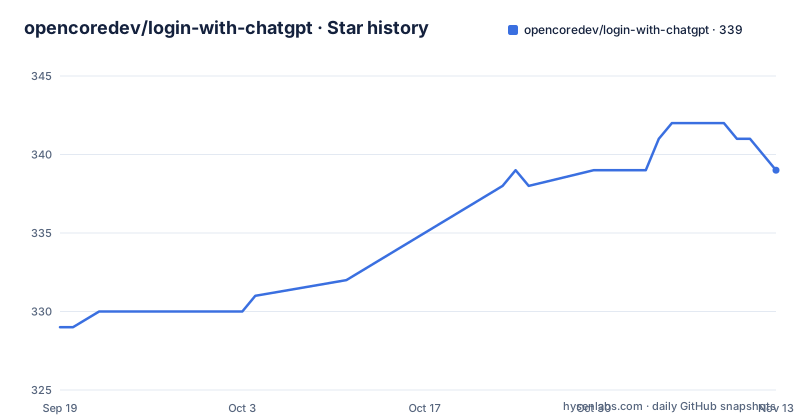
Star history
- opencoredev/login-with-chatgpt339 ★ · +10
| Repository | 2026-09-19 | 2026-11-13 |
|---|---|---|
| opencoredev/login-with-chatgpt | 329 | 339 |
10 Stars in the last 55 days, measured from the daily GitHub snapshot. Compare with other projects
Editorial analysis
Users bring the subscription, the handler keeps the token
The premise is narrow. Users bring their own ChatGPT subscription, and your app never holds a shared API key on their behalf. What the SDK adds is the plumbing that turns a person's ChatGPT identity into something a frontend can call.
The handler in `@opencoredev/loginwithchatgpt-server` keeps tokens behind the proxy path by default. The browser receives a session cookie, asks your backend which models the account has, and streams from there. Nothing in that path hands a ChatGPT token to page code: tokens never touch the browser, and the one cookie involved is HttpOnly.
That is the whole design in three sentences, and it is a boundary rather than a slogan. Whoever writes the frontend cannot read the credential, because the frontend never receives it. Model access is decided server side from the account, which is also why a component cannot hardcode a model name and expect it to hold.
Four packages, four jobs, and two of them are boundaries
Installing this SDK pulls four packages at once, and they are not interchangeable layers you can pick and choose from.
`@opencoredev/loginwithchatgpt-core` carries OAuth, token refresh, model discovery, the private voice transport, and the app-server browser client. `@opencoredev/loginwithchatgpt-server` is the backend handler: login, models, responses, direct voice signaling, and native tool handoffs. `@opencoredev/loginwithchatgpt-react` is the `<LoginWithChatGPT />` button and its hook. `@opencoredev/loginwithchatgpt-ai` holds the Vercel AI SDK providers.
The split matters because core and server both run on your server, while react and ai are the two your browser bundle touches. Everything ships as ESM with types for Node 18+, and the README says npm and pnpm work as well as bun. There is no bundler-specific build step, no plugin, and no framework wrapper in that list.
Installing all four with one bun add line
This is the entire install instruction:
bun add @opencoredev/loginwithchatgpt-core @opencoredev/loginwithchatgpt-server @opencoredev/loginwithchatgpt-react @opencoredev/loginwithchatgpt-aiThere is no second step. No init command, no key to paste, no config file to author. Each package lands in your dependency list, and npm or pnpm can do the same work.
To watch it run, work from a checkout of the monorepo rather than from your own app. The root package.json is a private workspace over `packages/*` and `examples/*`, and it carries the scripts you want for a first look:
bun --cwd examples/demo run dev
PORT=${PORT:-3001} bun run --cwd docs dev
bun test packages
tsc --build --pretty
The first line starts the demo in `examples/demo`. The second starts the documentation site, falling back to port 3001 when `PORT` is unset. The third runs the test suite across `packages`, and the fourth is the typecheck across the build graph.
What the root README will not give you is the handler's own configuration. The quickstart at `docs/content/docs/quickstart.mdx` is where the wiring is described, next to a security model page and a production checklist. Read the README as a map of the packages rather than as a setup guide.
The demo container runs from source and never calls the build script
The repository ships a Dockerfile whose only job is to run `examples/demo`, and the image never runs the monorepo build:
FROM oven/bun:1
WORKDIR /app
RUN bun install --frozen-lockfile
ENV NODE_ENV=production
EXPOSE 3000
WORKDIR /app/examples/demo
CMD ["bun", "run", "src/server.ts"]
The comment at the top of that file explains the arrangement. The image is built from the repository root so the demo's `workspace:*` dependencies resolve, and Bun runs those dependencies from `src` through the `bun` export condition, so no package build step is needed.
So there are two build paths here and they produce different artifacts. `bun run build` compiles each package with its own tsconfig, in the order core, server, react, ai, and the release script depends on it. The container path skips compilation entirely and hands the running process a TypeScript source file.
The install step is pinned, at `bun install --frozen-lockfile` against a committed `bun.lock`, with only the package.json files copied in before it runs. The image exposes port 3000, sets `NODE_ENV` to production and starts one process. Nothing in it carries the credentials the OAuth side will ask you for, so those come from your deployment.
Model discovery, and why an OpenAI project key is not the same product
Model discovery matters more than the OAuth dance. The browser asks your backend which models the account has, and the backend answers from the account rather than from your configuration. The agent skill bundled in this repository exists for the same reason: it is written to stop an agent from assuming one model slug works for every account, and from inventing API keys it was never handed.
The real alternative is the route most teams already have, an OpenAI project API key held in server environment variables and used through the OpenAI provider. The difference is not a preference between two libraries. With a project key, every user of your app shares one credential and one billing relationship, and your handler has no idea which person is calling. With this SDK, each user authenticates their own ChatGPT account, that identity survives into your handler, and refresh is handled for you. The price of that difference is that you now own token refresh, session cookies, and the allowlist decisions that come with per-user accounts.
`ai` at `^7` and `@ai-sdk/openai` at `^4` sit in the monorepo devDependencies, which pins the generation of the Vercel AI SDK this targets. The README's line about `streamText()` running straight from the client is the payoff: the browser calls the provider, and the request still resolves to a proxy on your server.
Image generation and editing ride the same proxy path
The feature list includes generating and editing images with size, quality, format, masks, and streaming previews. Five knobs and one streaming behaviour, stated in a single README bullet, and every one of them travels the same route as text: the caller's ChatGPT subscription, the handler on your server, the token the browser never receives.
The masks and the streaming previews carry the architectural weight. A mask means an edit request rather than a fresh generation from a prompt alone, and a streaming preview makes the response progressive instead of one blob at the end, which puts the same demands on your proxy that streaming text does.
What you cannot learn from the README is the shape of the request. It does not document an image endpoint, the parameter names behind size, quality or format, or how a mask is encoded. The package that would own that surface is `@opencoredev/loginwithchatgpt-ai`, and the parameter level detail has to come from the source or the quickstart rather than from the landing page.
The WebRTC voice path and the allowlisted handoffs are labelled experimental
Two headline features carry the word experimental, and they are the two most exposed to change.
The first is GPT Live WebRTC audio with native interruption, so a user can cut the model off mid sentence the way they would cut a person off in a call. The second is a desktop-style app-server handoff for arbitrary allowlisted tools, where the model asks to run something and the flow runs through explicit confirmations. The package table splits the work: core carries the private voice transport and the app-server browser client, server handles direct voice signaling and the native tool handoffs.
An allowlist is a policy surface, and the README does not say where that list lives or what syntax it takes. The confirmation lifecycle and the transport limitations are pushed out to `docs/content/docs/guides/realtime-voice.mdx`, which is the page to read before you let a browser session drive tool calls. The README also documents no degraded mode for a failed peer connection, so plan for that failure yourself.
One more consequence of the shape of this work: the allowlist is yours to configure, and the README gives no sample entries to start from. Nobody is shipping a default set of tools you can inherit by accident.
No GitHub releases, so npm carries the history
The repository is MIT licensed and not archived, and the last push to main is dated 2026-08-01. It has no GitHub releases, so the version history of the four packages lives on npm rather than on a releases page, and there is no changelog at the top level to read before upgrading.
The release script in the root package.json shows how the four move together. It runs the monorepo build, then publishes core, server, react and ai in that order, one `npm publish` per package directory. Each package has its own `tsconfig.build.json` and its own publish step, and nothing in the repository pins the four to a shared version number, so a partial upgrade is something you can do by accident. The `clean` script removes `dist` and tsbuildinfo files, which tidies a build tree and does nothing for a rollback.
MIT covers the code. It does not settle what a ChatGPT subscription entitles you to, and the repository does not claim to. Users bring their own subscription, which keeps the account relationship between the user and OpenAI rather than between you and OpenAI, and the subscription terms themselves are the document to read before you ship that arrangement to anyone.
Editorial conclusion
Adopt login-with-chatgpt when your product needs every user to sign in with their own ChatGPT subscription and you are willing to own token refresh and session cookies on your server. Skip it when one server-side key for all users is enough, since an OpenAI project key covers that without per-user identity. Before shipping, read docs/content/docs/quickstart.mdx and the security model page next to it: the README is a package map, the last push to main is dated 2026-08-01, and there are no release notes to diff an upgrade against.
Frequently asked questions
How does login-with-chatgpt keep the ChatGPT token out of the browser?
The handler in @opencoredev/loginwithchatgpt-server keeps tokens behind the proxy path by default. The browser gets a session cookie and asks your backend which models the account has, while the token itself is only ever handed over as an HttpOnly cookie, so page scripts never read it.
Which login-with-chatgpt package does model discovery, and why does that matter?
@opencoredev/loginwithchatgpt-core handles OAuth, token refresh and model discovery. The browser asks your backend which models the account has before streaming, so the model name comes from the account rather than from your config, which is why the bundled agent skill warns against assuming one model slug works for every account.
Does login-with-chatgpt need an OpenAI API key of its own?
The README sets out no API key step, and the install line adds four @opencoredev packages and nothing else. Users authenticate with their own ChatGPT account, and the agent skill in this repository is written to stop an agent from inventing keys it was never given.
How do I run the login-with-chatgpt demo locally?
The monorepo root is a private workspace with a demo script that runs examples/demo and a docs script that serves the documentation site on port 3001 unless PORT is set. From a container, the repository root holds a Dockerfile that ends at a command running src/server.ts inside examples/demo on port 3000.
What is still experimental in login-with-chatgpt?
GPT Live WebRTC audio with native interruption, and the desktop-style app-server handoffs for arbitrary allowlisted tools with explicit confirmations. Core carries the private voice transport, server does the direct voice signaling, and the transport limitations are described in docs/content/docs/guides/realtime-voice.mdx.
Official sources
Add this badge to your README
If you maintain this project, the badge below links readers to this analysis and shows its maintenance status from the daily GitHub snapshot. Paste the markdown into your README; add ?metric=license or ?metric=stars to the image URL for a different field.

[](https://hysenlabs.com/projects/opencoredev-login-with-chatgpt)Star history chart for your README
[](https://hysenlabs.com/projects/opencoredev-login-with-chatgpt)Was this useful?