OmniDocBench: what the v1.6 score actually measures
[CVPR 2025] A Comprehensive Benchmark for Document Parsing and Evaluation
At a glance
- What is it?
- OmniDocBench scores document parsers against 1651 annotated PDF pages, combining text edit distance, table TEDS and formula CDM into one Overall number. Its Python rewrite of the matching layer made the harness far cheaper to run, but the score bundles three failure modes into one figure.
- Who is it for?
- OmniDocBench earns the setup cost for teams shipping a document parser who need a defensible comparison against MinerU, dots.ocr or a proprietary model, and for anyone scoring Chinese and English pages side by side. It is the wrong tool for a quick smoke test, because Ghostscript, ImageMagick and TeX Live with CJK resources sit outside pip, and the Overall formula hides which of text, table or formula scoring failed.
- Can I use it commercially?
- Yes. Apache-2.0 is a permissive licence: you can use, modify and sell software built on it, as long as you keep its copyright and licence notices.
- Is it still maintained?
- Yes. The repository last received commits 2 days ago.
- What is it written in?
- Mainly Python, according to GitHub's language statistics.
Answers come from the project's GitHub data, last synced on November 7, 2026, and from our analysis. They are not legal advice.
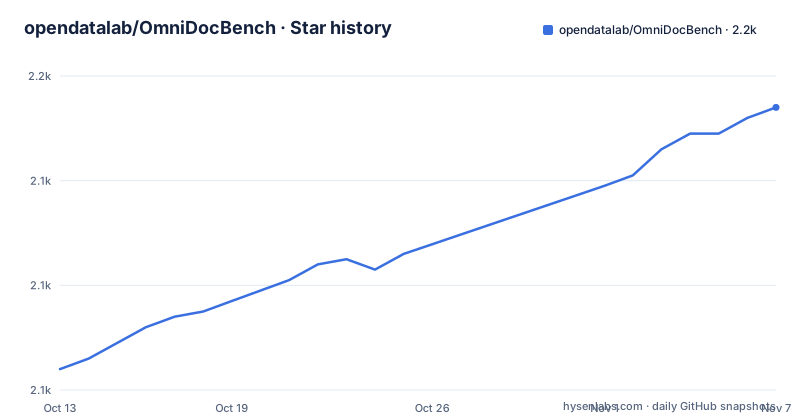
Star history
- opendatalab/OmniDocBench2,154 ★ · +50
| Repository | 2026-10-13 | 2026-11-07 |
|---|---|---|
| opendatalab/OmniDocBench | 2.1k | 2.2k |
50 Stars in the last 25 days, measured from the daily GitHub snapshot. Compare with other projects
Editorial analysis
A scoring harness for 1651 pages, not a parser of its own
OmniDocBench ships no parser. It ships a dataset of 1651 PDF pages and a scoring harness that takes whatever your parser emits and compares it against hand-checked annotations. The page pool covers 10 document types, 5 layout types and 5 language types, drawn from academic papers, financial reports, newspapers, textbooks and handwritten notes. The mix matters: a tool tuned on clean academic PDFs meets handwritten notes and dense financial tables in the same run.
Annotation granularity is the part most competitors skip. There are 28 block-level element categories, such as text paragraphs, headings and tables, and 4 span-level categories, such as text lines, inline formulas and subscripts. Every element region carries its own recognition result, so text gets a text annotation, formulas get LaTeX, and tables get both LaTeX and an HTML form. Reading order between components is annotated too, which is what lets the harness catch a parser that reads every block correctly and assembles them in the wrong sequence.
Attribute tags sit above the text: 5 page-level tags, 3 text-level tags and 6 table-level tags. Those are what distinguish a genuinely hard page from a parser mistake.
The evaluated systems listed in the update log cover a wide spread, from MinerU2.5 and PaddleOCR-VL-1.5 to GPT-4o, Gemini-3 Pro, Kimi 2.5 and Mathpix. That range tells you the target audience. If you are choosing between a hosted frontier model and a self-hosted OCR stack, this is the yardstick both get measured on. The evaluation toolkit is published under Apache-2.0, which matters if you plan to embed the scorer inside your own regression suite.
The Overall number averages three different kinds of failure
Since v1.5 the leaderboard no longer splits Chinese and English into separate groups, and it averages across all pages. The headline figure is computed as `((1 - text Edit distance) * 100 + table TEDS + formula CDM) / 3`.
Read that formula carefully before quoting it. Text edit distance is a character-level distance, inverted and scaled by 100. Table TEDS is a tree edit similarity over table structure. Formula CDM is a similarity score from a separate LaTeX rendering pipeline. They are different units, given equal weight by a plain division by three. A parser with perfect OCR and destroyed table structure still loses a full third of its score, and the Overall value alone will not tell you which third failed.
Underneath Overall sit the raw metrics: Normalized Edit Distance, BLEU, METEOR, TEDS and COCODet, reported as mAP and mAR for layout detection. The supported evaluation axes are end-to-end, layout detection, table recognition, formula recognition, text OCR, and formula detection. Treat Overall as a summary for ranking, and read the per-axis numbers when you are debugging.
MGAM adjusts granularity on the prediction side only
Matching a prediction to ground truth is where a benchmark quietly advantages one architecture over another. The v1.6 evaluation code introduces Multi-Granularity Adaptive Matching, and the design constraint is stated plainly: keep the ground truth unchanged and search for the optimal segmentation granularity on the prediction side only.
That matters because parsers disagree about block boundaries. One returns a whole page as a single paragraph, another splits it into six blocks, and a naive matcher penalises whichever convention the annotations do not use. MGAM lets the prediction side be re-segmented to find the best match, so a grouping difference stops registering as a content error.
An earlier fix is still visible in the metric design. The v1.5 update allowed formulas and text to be matched with each other, which the update log attributes to score errors caused by models that emit formulas as unicode characters. Before that change, a parser emitting a readable unicode formula was simply unmatched against a LaTeX ground truth and took the full penalty.
The same v1.6 cycle also rewrote the Node.js and KaTeX dependencies of the CDM stage in Python, which the update log puts at roughly a 3x speed improvement. Cost per evaluation run dropped for everyone, which is why re-running the whole suite became practical rather than a once-a-quarter event.
A CDM score needs four system packages that pip never installs
Formula CDM is the metric with an operating system tax. The project metadata lists what has to be present when CDM is enabled:
required = [
  "A Linux environment with working Ghostscript when CDM is enabled",
  "A working ImageMagick installation with PDF read/write enabled when CDM is enabled",
  "A working TeX Live installation providing pdflatex and kpsewhich when CDM is enabled",
  "TeX Live CJK resources providing CJK.sty and c70gkai.fd for Chinese formula CDM",
]
None of these appear in the pip dependency list, which is entirely Python wheels: apted, beautifulsoup4, evaluate, func-timeout, Levenshtein, loguru, lxml, matplotlib, nltk, numpy, pandas, Pillow, pylatexenc, PyYAML, scipy, tabulate and tqdm, every one of them pinned to an exact version. Installing the package on macOS or Windows gets you text and table metrics and no CDM, because Ghostscript, ImageMagick and TeX Live are named as Linux requirements. The CJK line is the detail most people miss: without `CJK.sty` and `c70gkai.fd`, Chinese formula pages fail even on a correct Linux install.
One optional dependency also sits outside pip. `latexmlc` is required when LaTeX tables must be converted to HTML before TEDS and edit distance, so a missing `latexmlc` shows up as degraded table scores rather than as an error message.
Running pdf_validation.py against the end2end config file
The package installs as `omnidocbench-eval`, with a console script pointing at `src.cli:main`, and the runtime metadata names the real entrypoint and its default configuration:
entrypoint = "python pdf_validation.py --config <config_path>"
default_config = "configs/end2end.yaml"
Two other runtime keys decide whether the run works at all on a locked-down machine:
needs_writable_hf_cache = true
hf_cache_env = ["HF_HOME", "XDG_CACHE_HOME", "HUGGINGFACE_HUB_CACHE"]
The metric layer calls into `evaluate` modules that download on first use, and the project preloads `bleu` and `meteor`. A read-only home directory, or a container where none of those three environment variables point at a writable volume, produces a failure at the download step rather than at your parser.
The Python range is narrow and worth checking before anything else:
requires-python = ">=3.10,<3.12"Python 3.12 is outside the supported window. The repository also ships a Docker runtime, added in November 2025, that covers both the evaluation environment and the CDM environment; on a machine where you cannot install TeX Live, that image is the practical route to a CDM number rather than a workaround.
end2end and md2md score different failure layers
Two end-to-end modes exist. The `end2end` method scores the parsed document against the full annotation set. The `md2md` method works from markdown representations. They are not redundant, because a parser can lose points in end-to-end scoring for reasons that have nothing to do with the quality of its markdown output, and markdown-only comparison hides them.
Single-module evaluation covers the other axis of the problem: layout detection, table recognition, formula recognition, text OCR and formula detection each have their own path. If you are building one component rather than a whole pipeline, module-level scoring tells you which component to fix. End-to-end scoring tells you what your users experience.
There is also a second path around the bundled runner. An update dated 2026/07/27 documents a community-maintained EvalScope integration for running OmniDocBench against OpenAI-compatible model endpoints, with standardised predictions, metrics and reports. The difference in approach is ownership: the bundled code is pinned and versioned with the dataset, while the integration lets you point at any OpenAI-compatible endpoint and keep the reporting outside this repository. Use the bundled runner when your scores have to be defensible against a fixed dataset version, and the integration when the endpoint is the thing you are iterating on.
Added pages target harder cases, so older numbers do not compare
The page population changes between versions, and the additions are deliberately adversarial. v1.6 added 296 pages covering complex nested tables, dense mathematical formula layouts and unconventional layout structures. v1.5 added 374 pages, balanced the Chinese and English split and raised the proportion of pages containing formulas. The same v1.5 cycle also raised image resolution for newspaper and note types from 72 DPI to 200 DPI.
Both updates fixed typos in text and table annotations, which means a parser that got a page wrong before may have been partly right against a bad annotation. Combined with the changed Overall formula and the removal of the Chinese/English grouping, a v1.0 score and a v1.6 score are not two measurements of the same thing. The project handles this by keeping the current code and datasets on the main branch and requiring a checkout of a specific branch for v1.0 or v1.5, so reproducing an older published number means reproducing an older branch.
If you are tracking your own parser over time, pin the branch in the same commit as your reported score.
Packaged metadata still reads 1.6.0 after the v1.7 note
The package metadata and the update log have drifted apart. The project file declares:
version = "1.6.0"
description = "OmniDocBench evaluation toolkit"
while the 2026/04/30 entry records an update from v1.6 to v1.7 with the Qianfan-OCR leaderboard and skills-based evaluation, and the 2026/04/10 entry is the v1.6 change itself. The version string was never bumped to match. Anything that reads the version from pip metadata will report 1.6.0 against a v1.7 dataset and a v1.6 evaluation code path, which is the kind of mismatch that quietly invalidates a comparison.
Two smaller signals sit alongside it. The top-level tree contains `skills/`, matching the skills-based evaluation the update log mentions, plus `signatures/`, `metrics/`, `configs/`, `src/`, `tools/`, `demo_data/` and `result/`. And the v1.5 paragraph in the README ends mid-sentence at `Version **v1.`, so the branch guidance for that cycle is truncated in the English README.
The practical consequence is small but real: check the branch name and the dataset version on OpenDataLab or Hugging Face before trusting whatever the installed package metadata reports.
Editorial conclusion
OmniDocBench earns the setup cost for teams shipping a document parser who need a defensible comparison against MinerU, dots.ocr or a proprietary model, and for anyone scoring Chinese and English pages side by side. It is the wrong tool for a quick smoke test, because Ghostscript, ImageMagick and TeX Live with CJK resources sit outside pip, and the Overall formula hides which of text, table or formula scoring failed. Before trusting a leaderboard number, confirm which branch produced it, since the packaged version still reads 1.6.0 while the dataset moved to v1.7.
Frequently asked questions
How do I install OmniDocBench and run my first evaluation?
The Python package is `omnidocbench-eval`, installable from the repository, and it requires Python `>=3.10,<3.12`. Evaluation runs through `python pdf_validation.py --config <config_path>`, with `configs/end2end.yaml` as the default configuration.
What extra system packages does OmniDocBench need for formula CDM scores?
With CDM enabled the project requires a Linux environment with working Ghostscript, a working ImageMagick with PDF read and write, and a TeX Live installation providing pdflatex and kpsewhich. Chinese formula CDM also needs CJK resources, specifically CJK.sty and c70gkai.fd.
Can I reproduce OmniDocBench v1.0 or v1.5 scores with the current code?
No. The main branch of the evaluation code and the datasets on HuggingFace and OpenDataLab are at v1.6, so evaluating against v1.0 or v1.5 means checking out the specific branch for that version.
What is Multi-Granularity Adaptive Matching in OmniDocBench v1.6?
It removes matching bias by adjusting segmentation granularity on the prediction side while leaving the ground truth unchanged, searching only for the prediction segmentation that best fits the annotation. The same update rewrote the CDM stage's Node.js and KaTeX dependencies in Python for roughly a 3x speed improvement.
Why does OmniDocBench evaluation need a writable Hugging Face cache?
The runtime metadata sets `needs_writable_hf_cache = true` and points at `HF_HOME`, `XDG_CACHE_HOME` and `HUGGINGFACE_HUB_CACHE`, because the metric layer preloads the bleu and meteor modules. If none of those locations is writable, the run fails while downloading metrics rather than at your parser output.
Official sources
Add this badge to your README
If you maintain this project, the badge below links readers to this analysis and shows its maintenance status from the daily GitHub snapshot. Paste the markdown into your README; add ?metric=license or ?metric=stars to the image URL for a different field.

[](https://hysenlabs.com/projects/opendatalab-omnidocbench)Star history chart for your README
[](https://hysenlabs.com/projects/opendatalab-omnidocbench)Was this useful?