Kaiden: Podman Desktop's shell with model providers, MCP and RAG attached
kaiden
At a glance
- What is it?
- Kaiden is an Electron and TypeScript desktop application that reuses Podman Desktop's main, renderer, preload and extension architecture, then adds registries for model providers, MCP servers and a Docling-into-Milvus RAG path. Its own documentation and manifest disagree about the version number.
- Who is it for?
- Use Kaiden if you want one desktop application that holds model providers, MCP servers and the container or Kubernetes environment your work runs in, and you are willing to treat its extension surface as unstable. Do not adopt it as a stable product release, because the status text calls the version a prerelease, warns that APIs and configuration formats may change between releases, and even disagrees with the manifest about which prerelease it is.
- Can I use it commercially?
- Yes. Apache-2.0 is a permissive licence: you can use, modify and sell software built on it, as long as you keep its copyright and licence notices.
- Is it still maintained?
- Yes. The repository last received commits 19 days ago.
- What is it written in?
- Mainly TypeScript, according to GitHub's language statistics.
Answers come from the project's GitHub data, last synced on October 4, 2026, and from our analysis. They are not legal advice.
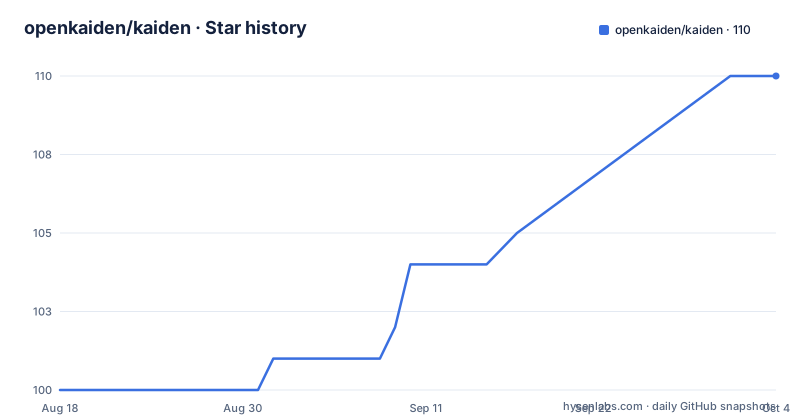
Star history
- openkaiden/kaiden110 ★ · +10
| Repository | 2026-08-18 | 2026-10-04 |
|---|---|---|
| openkaiden/kaiden | 100 | 110 |
10 Stars in the last 47 days, measured from the daily GitHub snapshot. Compare with other projects
Editorial analysis
A Podman Desktop base with the AI registries layered on top
The relationship to Podman Desktop is stated rather than hinted at. Kaiden reuses that project's main, renderer and preload architecture along with its extension system, and the container and Kubernetes features come from the base unchanged, while AI providers, MCP and ACP sessions are added on top of it. The application itself is an Electron program written in TypeScript with a Svelte renderer, and the codebase is a pnpm monorepo rather than a single package. That inheritance explains both the reach and the weight: you inherit a working container and cluster surface instead of building one, and you inherit an extension host that was designed for container tooling rather than for model providers. AGENTS.md is where the plugin system, the IPC patterns and the extension lifecycle are walked through in more depth.
packages/main holds the registries, extensions/ holds the features
The monorepo is split along the process boundary rather than by feature. `packages/main` is the Node.js main process and carries the plugin system together with four named pieces of machinery: `ProviderRegistry`, `ContainerProviderRegistry`, `KubernetesClient` and `MCPManager`. `packages/renderer` is the Svelte user interface, `packages/preload` and `packages/preload-webview` are the IPC bridges between main and renderer, and `packages/extension-api` is the TypeScript API surface that extensions program against. Everything a user sees as a feature is an extension in `extensions/`, and the built-in set named in the documentation is claude, gemini, mistral, openai-compatible, openshift-ai, ollama, ramalama, goose, mcp-registries, milvus, docling, container and kdn.
The status section says 0.1.0-next and the manifest says 0.4.0-next
The version numbers in this repository do not agree, and the difference is large. The status section states that Kaiden is at version `0.1.0-next` and warns that APIs, configuration formats and the extension surface may change between releases. The manifest at the root declares `0.4.0-next` under a product name of Kaiden. The published tags sit between the two, with v0.3.3, v0.3.2 and v0.3.1 all released in July 2026. Pre-built binaries for Windows, macOS and Linux are not attached to this repository at all: they live in a separate prereleases repository, and the text says those are development snapshots built from the main branch and published automatically on each merge, so what you download is whatever the branch produced last.
The prerequisites ask for Node 22 while the manifest demands Node 24
Development is supported on Windows, macOS and Linux, and the listed requirements start with Node.js 22 or newer, pnpm v10.x enabled through `corepack enable pnpm`, a Gemini API token, and Goose, which can be installed through the CLI panel. The manifest contradicts the first of those: its engines field requires Node `>=24.0.0` and npm `>=10.2.3`. Whichever you believe, the path from a clean machine is three commands:
git clone https://github.com/openkaiden/kaiden && cd kaidenpnpm installpnpm watchThe last one starts the application in watch mode, which is the development loop rather than a packaged build.
The build chain compiles twenty extensions and the list names thirteen
Compare the two inventories and a gap appears. The build script is a chain of twenty extension builds, covering claude, codex, container, copilot, cursor, docling, gemini, goose, mcp-registries, mistral, milvus, ollama, openshell, openshell-podman-gateway, openai-compatible, openclaw, opencode, openshift-ai, ramalama and vertex-ai. The architecture section names thirteen built-in extensions, and the two lists do not match in either direction: codex, copilot, cursor, openshell, openshell-podman-gateway, openclaw, opencode and vertex-ai are built but unlisted, while kdn is listed but has no step in the chain. If you are adding an extension, that difference decides whether your work is wired into the build. The rest of the root is conventional tooling: biome, eslint, prettier and two markdownlint configs, a vitest config with a tests directory and a mocks directory, an electron-builder config, a flatpak manifest, husky hooks, a commitlint config, a patches directory and a telemetry.json.
Containers and Kubernetes arrive from the base, RAG is Docling into Milvus
The container surface is Podman Desktop's, and the scope is broad: containers, images, pods, volumes and networks can be listed, started, stopped, built and inspected against either Podman or Docker engines. The Kubernetes surface covers switching contexts, viewing and editing deployments, services, ingresses and cron jobs, port-forwarding and exec-ing into pods. On top of that, the RAG path is exactly two extensions rather than a framework: documents are chunked with Docling and the embeddings are stored in Milvus. Model access is broader still, covering Anthropic Claude, Google Gemini, Mistral, any OpenAI-compatible endpoint, OpenShift AI, and local models served through Ollama or RamaLama, with provider API keys and tokens kept in a local secret vault rather than in a hosted account.
The first run is a Gemini key, then a GitHub MCP server
Two flows are documented in detail, and both end the same way, with a new entry appearing in the Chat window. For Gemini you open Settings, then Resources, where the Gemini provider is listed, click `Grab a key` if you have none, or type an existing key and press `Create`; the Chat window then shows the Gemini models. For MCP you click the MCP icon in the left toolbar, stay on the Install tab where the GitHub MCP server is listed, click `Install Remote Server`, supply a GitHub Personal Access Token or follow the link to create one, and press `Create`. The pattern is the point: providers and servers are added through a panel and a Create button rather than by editing a configuration file, which is why the two credential flows are described as UI steps at all.
Positioned against chat front-ends, not as a replacement for them
The comparison section names three neighbours and concedes something to each. Podman Desktop is the base whose architecture and extension system are reused, with the container and Kubernetes features inherited from it. LM Studio, Open WebUI and other chat front-ends are described as focusing on local model inference and chat, where Kaiden includes ACP sessions but also covers MCP and container or Kubernetes operations. Goose is called an agent provider, and the arrangement is that Kaiden embeds it as one provider and adds a UI for managing model providers and MCP servers around it. The stated audience is developers and platform engineers building AI-assisted tooling who want model access, agent execution and the environment the work runs in covered by one application, including the case of evaluating several inference providers, local ones included, side by side.
Editorial conclusion
Use Kaiden if you want one desktop application that holds model providers, MCP servers and the container or Kubernetes environment your work runs in, and you are willing to treat its extension surface as unstable. Do not adopt it as a stable product release, because the status text calls the version a prerelease, warns that APIs and configuration formats may change between releases, and even disagrees with the manifest about which prerelease it is. Before you build on it, read package.json for the real engine requirement, since the prerequisites name Node 22 while the manifest demands Node 24, check whether the extension you need is in the build chain or only in the documentation list, and treat the automatic prerelease snapshots from the main branch as development builds.
Frequently asked questions
What is Kaiden and what is it built on?
Kaiden is a desktop application for working with AI model providers, MCP servers and container or Kubernetes environments from one workspace. It is an Electron application in TypeScript with a Svelte renderer, built on Podman Desktop's main, renderer, preload and extension architecture, and its codebase is a pnpm monorepo.
Which model providers can Kaiden talk to?
Anthropic Claude, Google Gemini, Mistral, any OpenAI-compatible endpoint, OpenShift AI, and local models served through Ollama or RamaLama. Provider API keys and tokens are kept in a local secret vault rather than sent to a hosted service.
How do I run Kaiden from source?
Clone it with git clone https://github.com/openkaiden/kaiden && cd kaiden, run pnpm install, then pnpm watch to start the application in watch mode. The prerequisites name Node.js 22 or newer, pnpm v10.x through corepack, a Gemini API token and Goose, which can be installed through the CLI panel.
How do I add the GitHub MCP server in Kaiden?
Click the MCP icon in the left toolbar, keep the Install tab selected where the GitHub MCP server is listed, click Install Remote Server, then enter a GitHub Personal Access Token or create one, and click Create. The server is then listed in the Chat window.
Which version of Kaiden should I install?
The status section says 0.1.0-next and warns that APIs, configuration formats and the extension surface may change between releases, while package.json declares 0.4.0-next and the published tags are v0.3.3, v0.3.2 and v0.3.1 from July 2026. Binaries come from a separate prereleases repository as snapshots built from the main branch on each merge.
Official sources
Add this badge to your README
If you maintain this project, the badge below links readers to this analysis and shows its maintenance status from the daily GitHub snapshot. Paste the markdown into your README; add ?metric=license or ?metric=stars to the image URL for a different field.

[](https://hysenlabs.com/projects/openkaiden-kaiden)Star history chart for your README
[](https://hysenlabs.com/projects/openkaiden-kaiden)