OpenAnalytics picks its version from the checkout, because migrations do not go down
Open-source, privacy-first and cookieless web analytics with revenue attribution and an MCP server.
At a glance
- What is it?
- A cookieless analytics stack that self-hosts as ten container images, with architecture rules enforced in CI rather than by convention. Its installer reads the git tag out of the tree it stands in, and its environment template is generated and explicitly not meant to be edited.
- Who is it for?
- Use it if you want analytics you can host on your own hardware with no cookies and no cross-site profiles, and if you are willing to accept a one-way database. Two things to plan for before the first boot.
- Can I use it commercially?
- Yes, with strict conditions. AGPL-3.0 is a network copyleft licence: if people use a modified version over a network, for example as a hosted service, you must offer them its source code under the same licence.
- Is it still maintained?
- Yes. The repository last received commits 24 days ago.
- What is it written in?
- Mainly TypeScript, according to GitHub's language statistics.
Answers come from the project's GitHub data, last synced on November 15, 2026, and from our analysis. They are not legal advice.
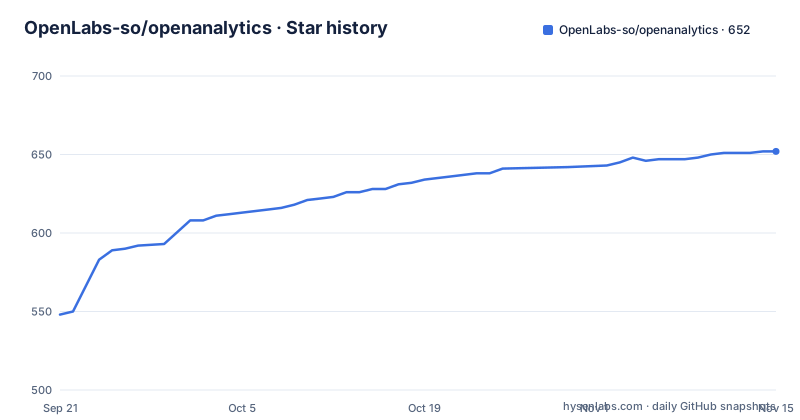
Star history
- OpenLabs-so/openanalytics652 ★ · +104
| Repository | 2026-09-21 | 2026-11-15 |
|---|---|---|
| OpenLabs-so/openanalytics | 548 | 652 |
104 Stars in the last 55 days, measured from the daily GitHub snapshot. Compare with other projects
Editorial analysis
The version is chosen by the checkout, once
The self-hosting instructions open by telling you not to run the default branch. The clone step checks out the newest release tag rather than `main`:
git clone https://github.com/OpenLabs-so/openanalytics
cd openanalytics
git checkout "$(git tag -l 'v*' --sort=-v:refname | sed '/-/d' | head -1)"   # newest release, not main
cd infra/selfhost
./generate-secrets.sh --domain example.com --email [email protected] --with-geoip
docker compose pull && docker compose up -d
# then open https://app.example.com and create the first account
The sed removes prerelease tags by dropping anything containing a dash, so `v0.8.0-rc` is skipped in favour of `v0.8.0`.
The reason for the ceremony is stated plainly. The generator reads the tag back out of the tree it is standing in and points the environment file at that release's images, printing which one it picked and why. Stand on a branch, on `main`, or with no git at all, and it writes the build defaults instead. That is not a convenience: the compose file, the environment templates and the migrations ship with the images, so pairing one release's images with another tree produces a configuration nobody has tested.
Installing is then a pull rather than a build. A release publishes ten images to a registry, so a fresh host needs no toolchain. The catch is architecture: the published images are amd64 only, and on arm64 or to run a branch you build the ten yourself, same compose file, one flag, about ten minutes on a four gigabyte machine.
Migrations do not go down, so rollback is a restore
The upgrade path is described with the honesty that the version pinning implies. An upgrade script moves between releases and takes the snapshot that the rollback script needs, because migrations are one-way. The way back is a restore, and a restore discards everything that arrived after the upgrade.
The script says so before it starts, rather than at rollback time when the choice has already been made for you. That is a design decision with a cost attached, stated rather than hidden: an upgrade is cheap and reversible in the sense that you can get back to a working state, and irreversible in the sense that anything written between the two points is gone.
So the operational shape is: snapshot, upgrade, and accept that going back means throwing away recent writes. A project with per-site retention and deletion requests has to decide what that window is, because the restore is indiscriminate.
There is a separate document explaining what a version number in this repository means, and the self-hosting guide has its own section for running from source. That path has an ordering constraint the page flags explicitly: the migration runners are compiled output, so the build command has to come before the Postgres migration command. One obvious ordering does not work.
Four names, and a certificate failure half an hour later
Four DNS records have to exist before anything starts, and the page names them by role prefix: an app subdomain, an api subdomain, a bare `c` subdomain and an `rt` subdomain, all under the domain you pass to the generator.
The failure mode is what makes this worth reading. Certificates are issued on the first boot, and issuance fails without those names. The consequence, in the page's words, is a half hour later and nowhere near the cause, because by the time the logs show a certificate problem, the operator has already worked through the generator, the images and the environment.
Beyond DNS, the stated requirements are modest and concrete: a Linux host with Docker, four DNS records, about four gigabytes of memory and twenty-five gigabytes of free disk. Twenty-five gigabytes is the figure that reflects the two databases in the stack rather than the application code, since events and rollups live in ClickHouse and the control plane lives in Postgres.
Postgres is the one component that can move off the host. The stack bundles a Postgres container, and the sponsored managed provider is the recommended option: four environment variables and one line in the environment file, after which backups and point-in-time restore become the provider's problem. The documentation also covers moving an existing installation across, which is the case that actually needs it.
The environment template is generated and is not a starting point
The template at the repository root carries a header that pre-empts the most likely mistake. It says, in capitals, generated file, do not edit by hand, gives the command that regenerates it, and names the check that fails when it has gone stale.
Its inventory comes from a single source in the domain package, the file every service validates against at startup. That is why nothing in it can be missing and nothing in it can describe a variable the code does not read: the list is derived from the code rather than maintained beside it.
Then the header contradicts the obvious use of the file by saying it is a reference, not a starting point. Real configuration is written by the generator, one file per service, split the way the next section requires and with every secret generated. The root template exists so you can find out what a variable is for and what stops working without it.
Two mechanical warnings are worth copying verbatim into your own notes. Quote every value, because several may contain an ampersand or a question mark that a plain source of the file would treat as shell syntax and silently truncate. And delete the lines you are not setting rather than leaving them empty, because a bare assignment is the empty string rather than an absent variable, and the schema rejects it, so a service handed that file does not start.
Each service refuses secrets it has no business holding
The header explains what optional means here, and it is not what optional usually means. A missing required variable stops the process. A missing optional one leaves the surface it powers unmounted. That is why nearly everything in the file is optional, and why a half-configured deployment fails at startup rather than at a customer's request.
Then comes the line that explains the whole file structure. It is not one file per deployment. Each service refuses to start when it is handed a secret it has no business holding, and the comment says why: that boundary is the reason a leaked collector cannot reach ClickHouse.
That is the security model stated as a startup check rather than as a convention. The collector validates, sanitizes, rate-limits and enqueues incoming events, and it has no business holding database credentials, so the deployment is arranged such that handing them to it is a failure rather than a silent capability. The query gateway exists for the same reason from the other side: it is the only process allowed to read ClickHouse, and it verifies Ed25519-signed query envelopes minted by the API before it will run one.
So the boundary is enforced twice, once by which secrets a process starts with and once by which process will accept a query.
A trail lasts as long as a visit and never as long as a person
The privacy claims are stated as mechanisms rather than as promises, which is what makes them checkable.
Presence, meaning who is on the site right now, comes from a cache rather than a table scan. The names behind those presences are generated per visitor and mean nothing outside the day they were minted.
The trail is the part with a stated lifetime. The identity behind it is a salted hash that rotates every night, so the trail is as long as a visit and never as long as a person. That is a concrete difference from cookie-based analytics: there is no identifier that survives the day, so joining yesterday's sessions to today's is not something the data supports.
Location is city level and only when a site opts in, and the lookup runs against a database on your own disk that never leaves the host. So a reader running the stack can do the resolution themselves, which is also why the self-hosting generator has a geoip flag.
The rest of the feature list is conventional for the category: page views, custom and attribute-driven events, sessions, web vitals, funnels, per-site retention, embeddable widgets, public share links, revenue analytics from your own Stripe account, import and export, an MCP server and a command line client called `oa` that handles site setup, statistics and a device-flow login.
Two stores back the queue: one durable event queue and one losable realtime cache, both on the same Redis-compatible engine.
Four architecture rules are CI-enforced rather than conventions
The page draws a line between architecture rules and conventions, and lists the four that a continuous integration job will fail on.
The dashboard may import only the contracts package, because the OpenAPI document is the single seam between frontend and backend. ClickHouse is reachable only through the query gateway, which verifies signed envelopes. The tracker has a hard byte budget, and a change that exceeds it fails the build. And the Postgres schema this repository creates contains no billing tables, asserted against a real database rather than a list of files.
The manifest shows the machinery behind those claims. A boundaries script, a schema assertion script against a product schema, a tracker build script, a generated-environment check, a contracts check that fails when the OpenAPI document has drifted from the code, and a lint pass over that document with its own configuration file. The tracker build exists because the size budget needs a measurement, and the contracts check exists because the seam only holds if both sides agree.
The last rule is the one worth pausing on. Asserting the absence of billing tables against a live database rather than a file list is a different kind of test: it does not check that a file says the right thing, it checks that the schema that actually gets created is the schema you meant.
The test runner is a single command over four named projects, unit, contract, tracker and web, so the boundary tests are part of the ordinary test run rather than a separate pipeline.
Editorial conclusion
Use it if you want analytics you can host on your own hardware with no cookies and no cross-site profiles, and if you are willing to accept a one-way database. Two things to plan for before the first boot. Point four DNS names at the host, because certificate issuance fails half an hour in and far from the cause. And pick a release tag rather than a branch, since the compose file, env templates and migrations ship with the images and mixing a release's images with another tree is a configuration nobody has tested.
Frequently asked questions
What is OpenAnalytics and how is it licensed?
A privacy-first, cookieless web analytics stack with revenue attribution and an MCP server, published as a pnpm monorepo of applications and packages. The repository metadata says AGPL-3.0 and the manifest says AGPL-3.0-only, so it is source-available and self-hostable.
How do I self-host OpenAnalytics?
Clone the repository, check out the newest release tag rather than main, run the secret generator with your domain and email, then `docker compose pull && docker compose up -d`. You need a Linux host with Docker, four DNS records, about 4 GB of RAM and 25 GB of free disk. A release publishes ten images, so installing is a pull rather than a build.
Why does OpenAnalytics tell me to check out a tag instead of main?
Because the compose file, environment templates and migrations ship with the images, so one release's images against another tree is a configuration nobody has tested. The secret generator reads the tag back out of the tree it stands in and points the environment file at that release's images, printing which it picked.
Can I roll back an OpenAnalytics upgrade?
Not by reversing migrations, because they do not go down. The upgrade script takes the snapshot the rollback script needs, and the way back is a restore, which discards anything written after the upgrade. The script warns you before it starts rather than at rollback time.
How does OpenAnalytics identify visitors?
The identity behind a session trail is a salted hash that rotates every night, so a trail is as long as a visit and never as long as a person. Presence names are generated per visitor and mean nothing outside the day they were minted, and city-level location runs against a database on your own disk.
Does OpenAnalytics support arm64 hosts?
Not from the published images, which are amd64 only. On arm64, or to run a branch rather than a release, you build the ten images yourself using the same compose file and one flag, which takes about ten minutes on a 4 GB machine.
Official sources
Add this badge to your README
If you maintain this project, the badge below links readers to this analysis and shows its maintenance status from the daily GitHub snapshot. Paste the markdown into your README; add ?metric=license or ?metric=stars to the image URL for a different field.

[](https://hysenlabs.com/projects/openlabs-so-openanalytics)Star history chart for your README
[](https://hysenlabs.com/projects/openlabs-so-openanalytics)Was this useful?