SenseNova-Skills: office skills as directories of SKILL.md files
Modular SenseNova skills for building AI-powered office assistants and productivity workflows
At a glance
- What is it?
- SenseNova-Skills is a directory of agent skills for SenseNova models, covering image generation, decks, spreadsheets, deep research and project tracking. The integration surface is deliberately narrow, a skills/ folder you copy into a dot directory, but the credential surface is wide: the root .env.example already lists 34 keys, including cookies for three Chinese social platforms.
- Who is it for?
- Use this repository when you already run OpenClaw or hermes-agent and want image generation, deck building and research skills wired to SenseNova without writing them yourself. Skip it if you need a self-contained library, since there is no manifest, no runtime and no published release to pin.
- Can I use it commercially?
- Yes. MIT is a permissive licence: you can use, modify and sell software built on it, as long as you keep its copyright and licence notices.
- Is it still maintained?
- Yes. The repository last received commits 2 days ago.
- What is it written in?
- Mainly JavaScript, according to GitHub's language statistics.
Answers come from the project's GitHub data, last synced on November 13, 2026, and from our analysis. They are not legal advice.
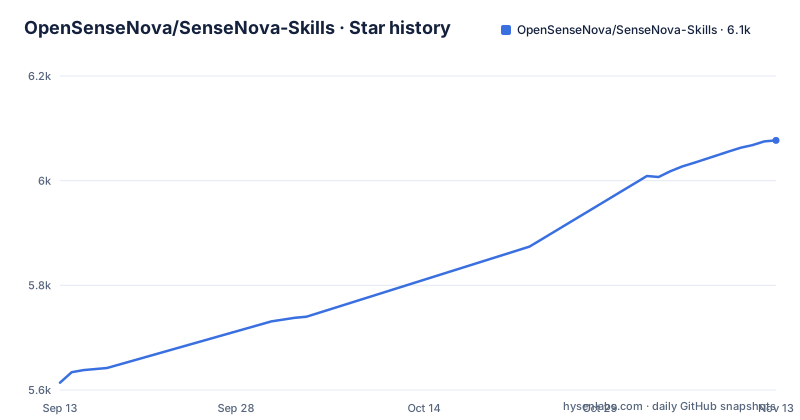
Star history
- OpenSenseNova/SenseNova-Skills6,077 ★ · +463
| Repository | 2026-09-13 | 2026-11-13 |
|---|---|---|
| OpenSenseNova/SenseNova-Skills | 5.6k | 6.1k |
463 Stars in the last 61 days, measured from the daily GitHub snapshot. Compare with other projects
Editorial analysis
Every skill is a directory with a SKILL.md contract
Nothing here is a library you import. Each capability is its own directory under skills/, and the file that matters is SKILL.md, where the skill declares its triggers, its capabilities and its execution flow. The convention is Agent Skills, documented at agentskills.io, which is what lets an existing agent runtime pick the directory up without custom glue code. The image group shows the layering. sn-image-base is the Tier 0 layer: text to image (sn-image-generate), image editing (sn-image-edit), image recognition (sn-image-recognize) and text optimization (sn-text-optimize), all reached through one entry point, sn_agent_runner.py, which is written to be called by skills above it. sn-infographic, sn-image-imitate and sn-image-resume sit at Tier 1 and build on that base. sn-image-doctor closes the loop: it checks that sn-image-base is installed, that the Python dependencies resolve, and that the environment variables exist, then interactively writes the missing values into .env.
Mixing regions is the failure mode the docs warn about
SenseNova serves two regions with different endpoints, and the docs ask for one explicit discipline: the docs page, the API key, the base URL and the model name must all come from the same region. Outside mainland China the base URL is https://token.sensenova.ai/v1 with documentation at platform.sensenova.ai/docs. Inside mainland China the base URL is https://token.sensenova.cn/v1 and the docs live behind platform.sensenova.cn/token-plan. That rule matters because the model keys in the configuration are per capability, not one shared key: SN_IMAGE_GEN_API_KEY, SN_CHAT_API_KEY, SN_TEXT_API_KEY and SN_VISION_API_KEY are four separate credentials, each with its own base URL and model name. A config that mixes a token-plan key with the .ai host produces requests that carry a valid key to the wrong region.
Installing means copying skills/* into a dot directory
The manual route is three commands, and the depth flag keeps the history thin:
git clone https://github.com/OpenSenseNova/SenseNova-Skills.git --depth=1
mkdir -p ~/.openclaw/skills
cp -r SenseNova-Skills/skills/* ~/.openclaw/skills/
OpenClaw reads skills from ~/.openclaw/skills/ and hermes-agent reads them from ~/.hermes/skills/; for Hermes the README says to swap the target to ~/.hermes/skills/. The docs also suggest handing the repository URL to the agent and letting it do the copying, for example with this request:
Please install SenseNova-Skills from https://github.com/OpenSenseNova/SenseNova-Skills into your skills directory.Either way there is a step no script performs for you: the agent service may need to be restarted by hand before the new directories are picked up. Per-category Python dependencies, keys and invocation samples live in the guide for each group, docs/sn-image-generate_en.md for images and docs/sn-ppt-generate.md for decks, with the full walkthrough in INSTALL.md.
The root .env.example already asks for 34 values
A single file at the repository root sets out the credential surface, grouped by comment. Web and image search wants SERPER_API_KEY, SERPER_BASE_URL and SERPER_TIMEOUT_SECONDS. Academic search wants DEEPXIV_TOKEN, OPENALEX_API_KEY, OPENALEX_MAILTO, CROSSREF_MAILTO and CLAWDBOT_EMAIL. Code and developer search wants GITHUB_TOKEN, HF_TOKEN and SO_API_KEY. Three entries are full session cookies rather than API keys: ZHIHU_COOKIE, DOUYIN_COOKIE and BILIBILI_COOKIE, alongside TIKHUB_TOKEN and YOUTUBE_API_KEY for international platforms. Three more are polite user agent strings for public data sources: WIKIMEDIA_USER_AGENT, YEAR_REPORT_USER_AGENT and SEC_USER_AGENT. The last group is the multimodal adapter set: SN_API_KEY and SN_BASE_URL, then per capability keys, base URLs and model names for image generation, chat, text and vision, with SN_IMAGE_GEN_MODEL_TYPE as an extra switch. Reading that list tells you what a skill may reach before you install it.
sn-infographic scores its own prompt before it renders
The image generation skill worth reading closely is sn-infographic, because it describes a loop rather than a single call. It scores the prompt quality on its own, then picks from 87 layouts and 66 styles, then generates across several rounds, reviewing the results with a vision model and ranking them before returning one. The output target is a finished infographic, not a draft, and the skill runs on SenseNova U1.5 Lite with native 4K output. The reference set for that loop sits in docs/sn-infographic-examples.md, a gallery of close to a hundred generation cases kept mainly for their prompt designs, which is the part you would reuse. The neighbouring skills are simpler by comparison: sn-image-imitate takes one reference image plus a content prompt, and sn-image-resume turns resume information into a resume image.
The skills table stops at Presentations, so four groups are unnamed
The overview promises image generation and visualization, slide deck generation, Excel data analysis, deep research, code-driven video creation, HTML experiences, team collaboration and proactive project tracking. The image group is the one covered in detail above; the Presentations section points at docs/sn-ppt-generate.md for prerequisites, quick start, API config and invocation samples, and per-category Python dependencies, API keys and invocation examples are documented in each section's full guide. There is also no package manifest at the top level and no runtime of its own: the repository ships directories and markdown, and it expects OpenClaw or hermes-agent to supply the agent loop.
No releases means an upgrade is a directory overwrite
The repository publishes no GitHub releases and its package identity carries no version to pin, so there is no upgrade channel and no changelog to read before copying newer files over ~/.openclaw/skills/. The last push to main was on 2026-11-02. What you can lean on instead is the pair of documentation trees: README.md with README_CN.md, INSTALL.md with INSTALL_CN.md, and a docs/ folder with one guide per group. Licensing is MIT. Two practical consequences follow from the install shape: copying a fresh clone over the target with cp -r overwrites local edits to a copied skill without warning, and because .env holds credentials the doctor writes interactively, the .env.example at the root is the only template you get. If you care about reproducibility, snapshot the skills directory after each copy and diff it before the next upgrade.
Editorial conclusion
Use this repository when you already run OpenClaw or hermes-agent and want image generation, deck building and research skills wired to SenseNova without writing them yourself. Skip it if you need a self-contained library, since there is no manifest, no runtime and no published release to pin. Before copying anything, read INSTALL.md, then fill .env from the region you actually pay for and keep the key, the base URL and the model name from the same region.
Frequently asked questions
Where do SenseNova-Skills get installed for OpenClaw and hermes-agent?
OpenClaw reads them from ~/.openclaw/skills/ and hermes-agent reads them from ~/.hermes/skills/. You clone the repository and copy the subdirectories under skills/ into that target, then you may need to restart the agent service by hand so the new directories are picked up.
Which SenseNova base URL should I use?
Outside mainland China the base URL is https://token.sensenova.ai/v1 with docs at platform.sensenova.ai/docs, and inside mainland China it is https://token.sensenova.cn/v1. The docs page, API key, base URL and model name must all come from the same region.
What does sn-image-doctor check before the image skills run?
It verifies that the sn-image-base skill is installed, that the Python dependencies are present, and that the required environment variables exist, then interactively fills the missing values into .env.
Official sources
Add this badge to your README
If you maintain this project, the badge below links readers to this analysis and shows its maintenance status from the daily GitHub snapshot. Paste the markdown into your README; add ?metric=license or ?metric=stars to the image URL for a different field.

[](https://hysenlabs.com/projects/opensensenova-sensenova-skills)Star history chart for your README
[](https://hysenlabs.com/projects/opensensenova-sensenova-skills)Was this useful?