OpenUtau replaces the flags of UTAU with expressions, and drops the rest
Open singing synthesis platform / Open source UTAU successor
At a glance
- What is it?
- OpenUtau is a singing synthesis editor in C# that reads UTAU voice banks, and it deliberately refuses to be a clone. What it gives up, and what it changes, decides whether your existing project survives the move.
- Who is it for?
- Adopt OpenUtau if you own UTAU voice banks already and you want real-time phonetic editing, curve tuning through the built-in WORLDLINE-R resampler, and pre-rendered previews that respond while you tune. Stay on UTAU if your workflow depends on exact reproduction of its feature set, because the project itself calls backward compatibility selective and says it does not replicate UTAU features exactly.
- Can I use it commercially?
- Yes. MIT is a permissive licence: you can use, modify and sell software built on it, as long as you keep its copyright and licence notices.
- Is it still maintained?
- Yes. The repository last received commits 5 days ago.
- What is it written in?
- Mainly C#, according to GitHub's language statistics.
Answers come from the project's GitHub data, last synced on November 14, 2026, and from our analysis. They are not legal advice.
Star history
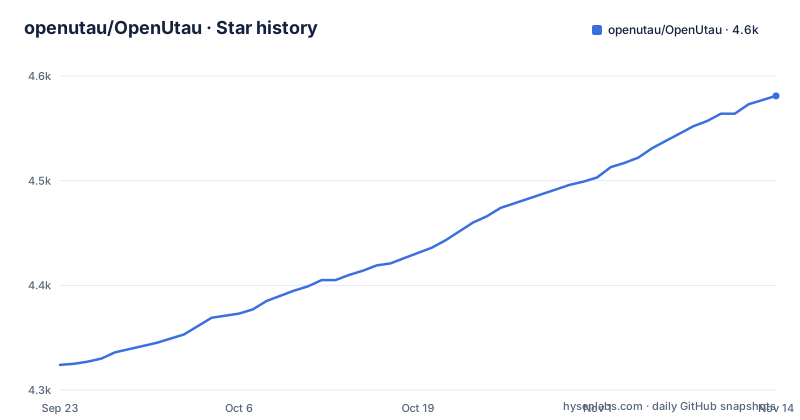
- openutau/OpenUtau4,581 ★ · +257
| Repository | 2026-09-23 | 2026-11-14 |
|---|---|---|
| openutau/OpenUtau | 4.3k | 4.6k |
257 Stars in the last 52 days, measured from the daily GitHub snapshot. Compare with other projects
Editorial analysis
The editor is the project; the voice bank is the user's problem
OpenUtau ships an editor and nothing else. It reads a UTAU voice bank that you already hold, one you built yourself from recorded samples, one a voicebank author distributed under its own terms. Nothing in the repository is a voice bank, and what the project publishes is the application itself. Every voice bank you load is one you obtained yourself, so the only licence question here concerns the editor code.
The audience is narrow and self selecting. UTAU users who hit the original tool's friction, and who want a MIDI editor, a vibrato editor and a preview path that respond the way a modern desktop app should. It runs on Windows (32 and 64 bit), macOS and Linux, and the homepage is www.openutau.com.
Repository layout says what the thing is made of. `OpenUtau.Core/` holds the engine and the editing model, `OpenUtau.Plugin.Builtin/` holds bundled plugins, `OpenUtau/` is the interface, and there are separate `OpenUtau.Test/` and `OpenUtau.UiTest/` projects. A `cpp/` directory sits beside a `runtimes/` directory. `OpenUtau.slnx` and `OpenUtau.nsi` are the solution and installer entry points, and `appcast.py` handles update feeds.
Expressions replace UTAU flags, so old tuning does not transfer cleanly
The single most consequential change is the replacement of UTAU tuning flags with expressions. UTAU encoded pitch and timing as numbers attached to notes. OpenUtau uses continuous expressions instead, and the built-in WORLDLINE-R resampler supports curve tuning, similar to many vocal synth editors. That is a real gain in feel for anyone coming from that side of the fence.
It is also the migration cost. A flag is a discrete setting. An expression is a continuous value, and the mapping between the two is not one to one. Expect to touch tuning on any project you import rather than trusting the old numbers to land where they did.
The project's own words on scope are unusually blunt. Backward compatibility with UTAU is described as selective, and the stated aim is to solve problems with fewer steps rather than to replicate UTAU features exactly. Read that as a rejection of feature parity.
Phonemizers, not audio: the plugin API is the real extension surface
Singing synthesis in UTAU is a phoneme pipeline. A note carries an alias, the alias maps to a phoneme through a phonemizer, and the resampler turns that phoneme into audio. OpenUtau keeps the pipeline and makes it pluggable. Bundled phonemizers cover VCV, CVVC and Arpasing across English, Japanese, Chinese, Korean and Russian, and the resampling engine interface is described as compatible with most UTAU resamplers.
Two API documents sit in the repository as Markdown files, `OpenUtau.Core/Editing/README.md` for the editing macros API and `OpenUtau.Core/Api/README.md` for phonemizers. That is the extension point for anyone who wants to add a phonetic system or an editor behaviour. It also means a custom phonemizer can behave differently from the bundled ones in ways the application cannot anticipate.
ENUNU AI singers are supported through a separate mechanism, documented on the project's own wiki page rather than in the README.
No package manager, just two zip files from the project page
There is no install command anywhere in the README. Two archives are linked directly, a Windows x64 zip and a Linux x64 tar.gz. Grab the archive that matches your system and unpack it:
https://github.com/stakira/OpenUtau/releases/latest/download/OpenUtau-win-x64.zip
https://github.com/stakira/OpenUtau/releases/latest/download/OpenUtau-linux-x64.tar.gz
No macOS archive sits next to them, so the macOS path is the least obvious part of the setup.
Before the first real session, read the wiki pages the README calls strongly recommended: Getting-Started, Resamplers and Wavtools, Phonemizers, and the FAQ. A Chinese walkthrough is linked too. Those pages, not the README, are where resampler configuration and phonemizer setup actually live.
Projects are authored in the MIDI editor, vibrato is shaped in the vibrato editor, and pre-rendering renders vocals before playback so that repeated listening during tuning does not re-run the engine every time. Built-in resamplers cover the quick preview case.
Pre-rendering changes the cost model of a long session
The pre-render step is the quiet architectural decision here. Instead of synthesising on every playback, OpenUtau renders ahead and then plays back what it rendered. During a long tuning session that difference is the difference between instant and laggy feedback, and it is the reason the editor can present itself as a modern tool.
It also creates a state you have to think about. Anything that invalidates a rendered section has to trigger a re-render of that section, and whether the tool does the right thing on every edit is exactly the kind of question the issue tracker and Discord are for. The README does not document a forced full re-render command, so if you hit a stale preview, expect to reach for the interface rather than a flag.
What it will not do: mixing, and Vocaloid compatibility
Two limits are stated plainly and both matter for adoption. First, mixing. OpenUtau can do minimal mixing, and the README says outright that it will not replace your digital audio workstation of choice. If your workflow ends in a full arrangement, this is a notation and vocal authoring stage that hands audio to something else.
Second, Vocaloid. OpenUtau does not aim for Vocaloid compatibility beyond some limited features, and the one concrete concession is importing VSQX tracks from Vocaloid 4. That is a way to bring an existing track in as a starting point, not an editor for Vocaloid data.
Translations are managed on Crowdin, and file system encoding support removes the need to change the system locale the way UTAU required. That last point is an underrated migration win on a non English Windows install.
Alpha builds move faster than a stable tool would
Three alpha builds went out within days of each other: 0.1.577.4 Alpha, 0.1.577.5 Alpha and 0.1.577.6 Alpha, under an MIT licence that lets you read the C# or extend the plugin APIs without a separate negotiation.
An alpha train moving at that speed means the feature level can shift under you between builds. The Editing Macros API and the Phonemizers API are documented as Markdown in the repository, so plugin authors have somewhere to track changes, but the README promises no compatibility between versions. Pin the build you validated against and upgrade deliberately instead of tracking the newest one.
Editorial conclusion
Adopt OpenUtau if you own UTAU voice banks already and you want real-time phonetic editing, curve tuning through the built-in WORLDLINE-R resampler, and pre-rendered previews that respond while you tune. Stay on UTAU if your workflow depends on exact reproduction of its feature set, because the project itself calls backward compatibility selective and says it does not replicate UTAU features exactly. Skip it entirely if you expected a Vocaloid editor or a mixing environment: VSQX import from Vocaloid 4 is the only stated concession, and minimal mixing is all that is on offer. Verify three things before committing to a migration. Open one of your existing projects and check that its resampler appears in the Resamplers and Wavtools wiki page. Re-do the tuning by hand, because expressions do not map one to one onto the old flags. Then confirm the macOS route, since the README links only the Windows and Linux archives.
Frequently asked questions
What is OpenUtau?
OpenUtau is a free, open-source singing synthesis editor made for the UTAU community, written in C#. It runs on Windows (32 and 64 bit), macOS and Linux.
Are UTAU and OpenUtau the same?
No. Backward compatibility with UTAU is selective, and OpenUtau is not designed to replicate UTAU features exactly; its stated aim is to solve problems with fewer steps. Tuning flags become expressions and pre-rendering is added.
Is OpenUtau free?
Yes. It is MIT licensed and distributed as free downloads from the project's GitHub releases page, with no paid tier described.
How do I install OpenUtau?
There is no package manager command. The project links a Windows x64 zip and a Linux x64 tar.gz for download and extraction, and the README points to the Getting-Started wiki page for the rest of the setup.
How do I use OpenUtau?
You build a song in the MIDI editor, shape vibrato in the vibrato editor, and rely on pre-rendering and built-in resamplers for fast previews. The README recommends reading the Getting-Started, Resamplers, Phonemizers and FAQ wiki pages first.
Official sources
Add this badge to your README
If you maintain this project, the badge below links readers to this analysis and shows its maintenance status from the daily GitHub snapshot. Paste the markdown into your README; add ?metric=license or ?metric=stars to the image URL for a different field.

[](https://hysenlabs.com/projects/openutau-openutau)Star history chart for your README
[](https://hysenlabs.com/projects/openutau-openutau)Was this useful?