WebGAL's editor lives in another repository, its releases cross over by shell script, and its root package is marked private
A brand new web Visual Novel engine.
At a glance
- What is it?
- OpenWebGAL/WebGAL is a browser-based visual novel engine written in TypeScript under the Mozilla public licence, with a visual editor maintained as a separate project, four translated readmes, translations committed inside the source package, and a build that produces two workspaces from a Yarn 1 workspace root.
- Who is it for?
- WebGAL fits a writer who wants a visual novel running in a browser without an engine to install, and it fits a programmer who would rather write a script than click through a node graph, since both routes are documented as first-class. Do not pick it expecting one repository to hold everything, because the editor is a separate project with its own releases and the readme points you at two different download pages depending on which one you want.
- Can I use it commercially?
- Yes, with conditions. MPL-2.0 is a weak copyleft licence: you can use it inside commercial and closed-source software, but if you distribute changes to its own files, you must publish those changes under the same licence.
- Is it still maintained?
- Yes. The repository last received commits 1 day ago.
- What is it written in?
- Mainly TypeScript, according to GitHub's language statistics.
Answers come from the project's GitHub data, last synced on November 13, 2026, and from our analysis. They are not legal advice.
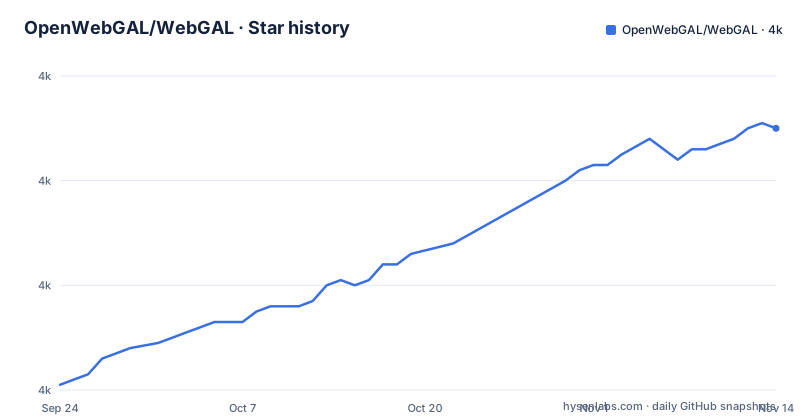
Star history
- OpenWebGAL/WebGAL4,031 ★ · +50
| Repository | 2026-09-24 | 2026-11-13 |
|---|---|---|
| OpenWebGAL/WebGAL | 4k | 4k |
50 Stars in the last 50 days, measured from the daily GitHub snapshot. Compare with other projects
Editorial analysis
The visual editor is a different project with a different release page
The most important structural fact is that the editor is not in this repository. The readme's pitch is that you should not need to know how to program to make a visual novel, and it then links to a graphical editor hosted under a separate name, with its own releases page for downloads. So there are two download destinations and they are not interchangeable: one for people who want the point-and-click tool, one for people who want the engine and its debugging tool from the releases of this repository. A third path exists for people with an editor extension installed, and a fourth for people who want to work from source. The published games page is separate again, and it lists finished titles rather than the engine, including one distributed through Steam, which is a useful signal about what the engine is expected to produce.
A release crosses into the editor project by shell script
There is a script in the root whose name says exactly what it does: it releases to the editor project. Its presence, sitting next to the readme and the manifest rather than inside a build directory, tells you that publishing is a two-repository operation and that the coupling between them is deliberate enough to automate. The same root holds a single release notes file, not a directory of them, which is convenient for readers and means the history of what changed lives in one long document rather than in tags you have to correlate. There is also a developer documentation directory separate from the public documentation site, so engine development notes are versioned in the repository while user guides are not. Nothing in the readme explains what the release script checks before it runs, so anyone forking the project should read it before relying on it.
Translations are source files on the development branch
The readme exists in four languages, with dedicated files for English, Japanese, Korean and French, and the help wanted notice points at the translation source inside the webgal package rather than at a separate localisation repository. That link goes to a branch named dev, which is the detail worth noticing: translations are merged on the development branch, not on the default one, so an internationalised change is a pull request against a moving target and a release is the moment translations are pulled in together. This is a different arrangement from projects that keep strings in one file at the root, and it has a practical consequence for contributors who write in a language other than Chinese: you are editing the same package as the engine, not a side project. Four readmes also means four places for the release notes and download links to drift out of step.
The root manifest is private and still holds the released version
Look at the package manifest and the picture is unusual in three small ways. The root package is named as a base package for the project, and it is marked private, so nothing is published from the root itself. It nevertheless carries a version number, and that number matches the newest release tag exactly, which means the root manifest is the place where the release version is written down and then propagated. The workspace layout is a glob over the packages directory, and there are two things inside it that the scripts talk to by name: a parser package and the webgal package. The parser gets its own build, its own test run, its own coverage run and its own separate continuous integration build path, which tells you it is treated as an independent component rather than a subfolder, probably because a scripting language parser has a different test story from a browser application.
Node 18 and Yarn 1 are both pinned, and both are old enough to be a choice
The runtime floor is stated as Node 18 or later, and the package manager is pinned to a specific Yarn 1 release. Yarn 1 is the classic line with a single lock file at the root and no plug-and-play mode, and pinning it exactly means every contributor and every continuous integration job resolves dependencies identically. It also means the project is not using the workspaces features of newer Yarn releases, since the workspace declaration is in the manifest rather than in a workspace-specific configuration file. For a browser engine that builds a parser and an application, that is a conservative stack rather than a modern one, and the practical effect for someone cloning it is that the install step is a single classic lock file resolution with no version negotiation between multiple Yarn releases. Contributors should not upgrade the package manager on their own without expecting the lock file to be regenerated.
The engine's own claims are learnability and Pixi.js as an escape hatch
The pitch is three sentences long and worth quoting rather than paraphrasing, because the claims are specific. Write once and run anywhere, no web development background needed, and all of the syntax learnable in three minutes. Then the feature claim: nearly everything mainstream visual novel engines have, plus the ability to add custom effects with Pixi.js. That last clause is the one that tells you how the project thinks about itself. It is not trying to be a general game engine with a scripting layer; it is trying to be a complete visual novel engine that stops being a wall exactly where a game developer is genuinely needed. If your project needs a shader, a particle system or a custom transition, you are writing Pixi.js code and the engine gets out of the way, which is a feature for some teams and a scope decision you should make consciously.
Five community projects fill the three gaps the engine leaves
The related projects list is more informative than a feature list, because each entry is something the engine deliberately does not do. One is a cross-platform studio application for authors who want an authoring environment rather than a single editor window. One is a visual editor for two specific script commands, the ones that move the camera and change a figure, which is what happens when an engine exposes a camera as script text instead of as a timeline. One is a language toolchain built on the editor-technology library the web platform uses for Vue, providing a language server, an editor extension and support for the in-browser editor, which is what makes the scripting language feel like a real language to a professional editor. One is a tool for the 2D puppet animation format the engine supports, exporting the commands the engine understands. And one is a maintained fork specialised for a particular fan project.
Sponsoring is requested on the grounds that the licence already allows commercial use
The funding section makes an unusual argument and it is worth reading precisely. It states that WebGAL is open source software, that you can use it free of charge under the Mozilla public licence, and that commercial use is permitted. It then asks for sponsorship anyway, on the grounds that money gives the developers motivation. That is a more honest framing than claiming a feature is paid for, and it has a specific consequence: the licence does the work and the sponsorship is discretionary. It also means a commercial game built on this engine owes nothing to the project, which is worth knowing before you look for an official commercial licence. The readme closes with a sponsor block and a stargazers-over-time chart, which is the standard GitHub readme furniture but also a hint that the project's audience skews toward people who discover it through popularity rather than through a search for a script syntax.
Editorial conclusion
WebGAL fits a writer who wants a visual novel running in a browser without an engine to install, and it fits a programmer who would rather write a script than click through a node graph, since both routes are documented as first-class. Do not pick it expecting one repository to hold everything, because the editor is a separate project with its own releases and the readme points you at two different download pages depending on which one you want. Two things to check before you commit a project to it. Which language you will work in, because the readme is published in four languages and the translation files live inside the source package on the development branch, so an internationalised release is a coordinated effort rather than a folder of strings. And what you will use for custom effects, because the engine's own answer is that you drop down to Pixi.js, which means the parts of your game that need effects need a JavaScript developer.
Frequently asked questions
What is WebGAL?
It is a visual novel engine that runs in the browser, written in TypeScript and released under the Mozilla Public License 2.0. It ships as a script-based engine with a visual editor maintained as a separate project, supports almost everything mainstream visual novel engines do, and lets you add custom effects with Pixi.js. It requires Node 18 or later to build and uses Yarn 1 workspaces.
Do I need web development experience to make a visual novel in WebGAL?
That is the project's central claim: you can create a visual novel without knowing how to program, using either the visual editor or the scripting language, and the readme says all of the syntax can be learned in three minutes. For anything beyond the engine's built-in features, the stated route is writing custom effects with Pixi.js, which does require JavaScript.
Is WebGAL free for commercial games?
Yes, and the readme says so explicitly: it is open source under the Mozilla Public License 2.0 and may be used free of charge, including commercially. Sponsoring is invited but framed as motivation for the developers rather than as a condition of use.
What is the WebGAL visual editor and where do I get it?
It is a graphical editor maintained as its own project rather than inside the engine repository, and it has its own releases page for downloads. The engine's own debugging tool is a separate download from the engine repository's releases, and an editor extension for Visual Studio Code is published in the marketplace for syntax highlighting when you write the script directly.
Official sources
Add this badge to your README
If you maintain this project, the badge below links readers to this analysis and shows its maintenance status from the daily GitHub snapshot. Paste the markdown into your README; add ?metric=license or ?metric=stars to the image URL for a different field.

[](https://hysenlabs.com/projects/openwebgal-webgal)Star history chart for your README
[](https://hysenlabs.com/projects/openwebgal-webgal)Was this useful?