go-ldap-admin: an OpenLDAP console that syncs DingTalk, WeCom and Lark
An OpenLDAP back-end admin project built with Go and Vue.
At a glance
- What is it?
- A Go backend plus a separate Vue repository give OpenLDAP a web console with scheduled org sync from DingTalk, WeCom and Lark. The container path is welded to two service names, and the web stack is pinned lower than the toolchain it declares.
- Who is it for?
- go-ldap-admin earns its place in an environment that already runs OpenLDAP and keeps staff records inside DingTalk, WeCom or Lark, because the directory client and all three messaging clients ship in one module behind a web console. It is the wrong choice for a team without a directory server, for Active Directory estates, and for anyone unwilling to read Go when a scheduled sync misbehaves.
- Can I use it commercially?
- Yes. Apache-2.0 is a permissive licence: you can use, modify and sell software built on it, as long as you keep its copyright and licence notices.
- Is it still maintained?
- Yes. The repository last received commits 82 days ago.
- What is it written in?
- Mainly Go, according to GitHub's language statistics.
Answers come from the project's GitHub data, last synced on October 23, 2026, and from our analysis. They are not legal advice.
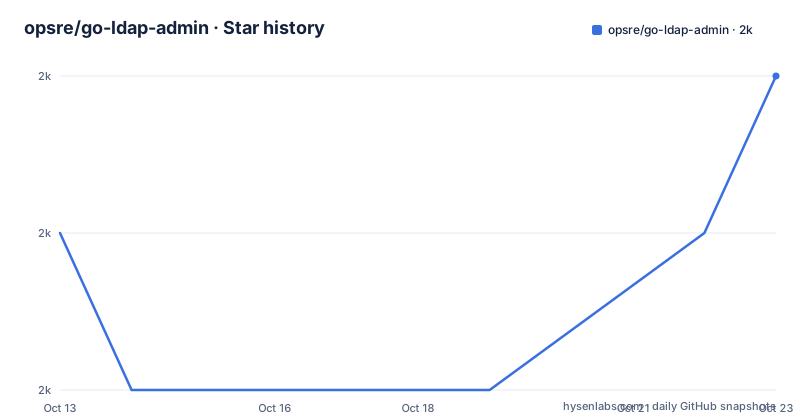
Star history
- opsre/go-ldap-admin2,029 ★ · +1
| Repository | 2026-10-13 | 2026-10-23 |
|---|---|---|
| opsre/go-ldap-admin | 2k | 2k |
1 Stars in the last 10 days, measured from the daily GitHub snapshot. Compare with other projects
Editorial analysis
The OpenLDAP console problem this project addresses
Running an OpenLDAP tree by hand means composing LDIF or filters for every hire, department move and account removal, which is why directory work collects on a handful of administrators. go-ldap-admin puts a web console in front of that directory and adds a bridge to three workplace messaging platforms: DingTalk, WeCom and Lark, the last also known as Feishu. Organization structures and employee records can be synced by hand or on a schedule, so the console becomes a way to push identity data that already lives inside those IM products into the tree.
The audience is narrower than that feature list makes it sound. The README says deployment and use assume you already understand OpenLDAP, and that configuring IM sync may need some Go experience to debug when something misbehaves. A team with no directory server gets nothing from it, and a team whose employee records sit in an HR product has no connector here.
Gin, Gorm and SQLite behind the console
The backend is one Go module, github.com/eryajf/go-ldap-admin, declared for go 1.25 and split into the usual service layers, with controller, logic, model, service, routes, middleware, public, config and locales directories at the repository root. Two core libraries sit far below that toolchain, gin v1.6.3 and gorm v1.24.5, and that pairing is inherited rather than chosen fresh, since the project was refactored from gnimli/go-web-mini and kept that scaffold's web stack.
module github.com/eryajf/go-ldap-admin

go 1.25
Persistence runs through gorm.io/gorm v1.24.5 over the two drivers listed in go.mod, glebarez/sqlite v1.7.0 and gorm.io/driver/mysql v1.4.7. Cross-compilation needs no C toolchain because every build target sets CGO_ENABLED=0 and the SQLite driver is the Go-based one. Configuration is read by spf13/viper v1.11.0 with fsnotify v1.5.4 watching the file, .air.toml at the root drives live reload, and zap v1.19.1 writes logs through lumberjack.
Casbin roles, gin-jwt sessions and six admin screens
Authorization is Casbin v2.22.0 with casbin/gorm-adapter/v3 v3.1.0, so policies live in the same database as users instead of in a policy file that must be mounted and reloaded. Sessions come from appleboy/gin-jwt/v2 v2.6.4, and juju/ratelimit v1.0.1 covers the rate limiter, which matters for a backend whose requests block on a directory server across the network.
Six management screens cover the directory: users, groups, field relationships, menus, API interfaces and an operation log. The field relationship screen has no counterpart in a SQL admin panel, because an LDAP schema is defined by objectClasses and attributes rather than table columns, and that is where the mapping gets edited.
Generated endpoint documentation comes from swaggo/gin-swagger v1.6.0 and swag v1.16.2, a feature a contributor added in pull request 345. Translations sit in locales/ behind go-playground/universal-translator v0.18.0 and go-playground/locales v0.14.0, while gomail.v2 is linked into the binary without the README saying which flow sends it.
DingTalk, WeCom and Lark sync through cron and ldap/v3
Everything that touches the directory proper goes through go-ldap/ldap/v3 v3.4.2, the LDAP protocol client, and that one dependency is the reason a console exists here at all.
The sync side carries a client per platform: zhaoyunxing92/dingtalk/v2 for DingTalk, wenerme/go-wecom for WeCom, chyroc/lark v0.0.96 for Lark, with tidwall/gjson v1.13.0 picking fields out of their JSON replies.
github.com/chyroc/lark v0.0.96
github.com/tidwall/gjson v1.13.0
github.com/robfig/cron/v3 v3.0.0
robfig/cron/v3 v3.0.0 supplies the scheduler behind automatic mode, so a sync interval becomes a cron entry inside the process rather than an outside trigger, and the schedule stops whenever the process does. patrickmn/go-cache v2.1.0+incompatible covers repeated lookups. What is missing is any documented contract for failure: nothing states what happens when a Lark tenant returns an employee who already sits in the tree under a different department, or whether a half-finished sync rolls back.
The image patches config.yml for hosts named openldap and mysql
The Dockerfile holds this project's sharpest edge. The base is docker.cnb.cool/znb/images/alpine, not the public registry, config.yml is copied in untouched, and the timezone plus binary name are fixed at build time.
FROM docker.cnb.cool/znb/images/alpine

WORKDIR /app
ENV TZ=Asia/Shanghai
ENV BINARY_NAME=go-ldap-admin
Two substitutions then run inside the image build.
RUN chmod +x wait go-ldap-admin &&\
    sed -i 's@localhost:389@openldap:389@g' /app/config.yml \
    && sed -i 's@host: localhost@host: mysql@g' /app/config.yml
Those lines hardwire two service names. Run the directory server under any other host name and the first substitution quietly matches nothing, leaving localhost:389 inside the shipped config with nothing in the logs to say so. The same applies to the database line. No environment variable in the file overrides either address, so a deployment outside compose means editing config.yml yourself.
Startup blocks on a copied-in helper before the binary runs.
COPY --from=docker.cnb.cool/znb/images/docker-compose-wait /wait .
CMD ./wait && ./go-ldap-admin
That helper is the docker-compose-wait project, so a compose network with services named openldap and mysql is the arrangement this image was written for.
Cross-compiled binaries feed the image, never a source build
The image compiles nothing at all: config.yml goes in as written, and a binary already produced by a cross-compilation step is copied in under a name built from two arguments.
COPY LICENSE .
COPY config.yml .
COPY bin/${BINARY_NAME}_${TARGETOS}_${TARGETARCH} ${BINARY_NAME}
Cross-compilation therefore has to happen first, and the Makefile stamps version data into the binary through linker flags.
LDFLAGS := -X 'github.com/eryajf/go-ldap-admin/public/version.Version=$(VERSION)' \
           -X 'github.com/eryajf/go-ldap-admin/public/version.GitCommit=$(GIT_COMMIT)' \
           -X 'github.com/eryajf/go-ldap-admin/public/version.BuildTime=$(BUILD_TIME)' \
           -X 'github.com/eryajf/go-ldap-admin/public/version.GoVersion=$(GO_VERSION)'
VERSION comes from the git tag pointing at HEAD, so an untagged build reports itself as dev. build-linux does the same job for linux on amd64 with CGO_ENABLED=0, and lint runs golangci-lint with --fix across the tree.
go run main.goCGO_ENABLED=0 gox -osarch="linux/amd64 linux/arm64" -ldflags "$(LDFLAGS)" -output="${OUTPUT_DIR}/${BINARY_NAME}_{{.OS}}_{{.Arch}}"The wider target list adds windows and darwin on amd64 plus linux on ppc64le, with upx -9 applied to each artifact afterwards.
The published demo hands over admin/123456 credentials
A live instance sits at https://demo-go-ldap-admin.eryajf.net/ with the login admin/123456 printed in the README itself. The same paragraph warns that the online environment can be unstable, that data may end up scrambled, and that personal sensitive information should not be entered there. Public credentials on an instance the author describes as breakable is the practical answer to how the console behaves before installation: it browses, but it is no place to rehearse a real directory.
Documentation lives at http://ldapdoc.eryajf.net, served over plain HTTP, with quick links for project background, quick start, feature overview and local development. The README points readers at those pages first and offers paid support for anything the docs do not cover, which is where the supported path ends. An English README exists at docs/README_EN.md. Two other lines of the same file show what the project wants from users: a request that companies record themselves in issue 18, and a sponsor block promoting an AI mirror site.
Where this console stops being the right choice
Three cases where it is the wrong tool. An Active Directory estate, since the directory layer is go-ldap/ldap/v3 v3.4.2 and the documentation never mentions Active Directory. A network where a permanent web console holding directory credentials is unwelcome, because automatic sync keeps LDAP bind credentials inside a long-running process. And anyone who needs current libraries, since gin v1.6.3 and gorm v1.24.5 sit beneath a module that declares go 1.25, with code refactored from gnimli/go-web-mini in between.
The alternative named by the project itself is go-web-mini, the scaffold it was refactored from, which supplies the same Gin, Gorm, Casbin and SQLite admin shell without the LDAP client or the three messaging integrations. go-ldap-admin adds go-ldap/ldap/v3, the DingTalk, WeCom and Lark clients and robfig/cron/v3, and carries the older web stack along. The other approach, treating an HR system as the source of truth and provisioning the directory from it, is absent: go.mod carries no HR connector.
One mismatch deserves attention before anyone vendors this. The repository is opsre/go-ldap-admin while the module path is github.com/eryajf/go-ldap-admin, the README badges and the swagger pull request 345 still point at eryajf, and the Gitee mirror sits under eryajf-world. A fork either keeps the eryajf import path or rewrites imports and Makefile linker flags together. Nothing marks the repository as abandoned: it is not archived, the last push was on 2026-08-02, and the newest listed version is v0.6.2 dated 2026-05-24, after v0.6.1 on 2026-02-09 and v0.6.0 on 2025-09-27. The code ships under Apache-2.0.
Editorial conclusion
go-ldap-admin earns its place in an environment that already runs OpenLDAP and keeps staff records inside DingTalk, WeCom or Lark, because the directory client and all three messaging clients ship in one module behind a web console. It is the wrong choice for a team without a directory server, for Active Directory estates, and for anyone unwilling to read Go when a scheduled sync misbehaves. Before adopting, check that your compose services are literally named openldap and mysql, since the image rewrites config.yml for exactly those two names, and confirm that the backend and the go-ldap-admin-ui repository are both on your list to deploy.
Frequently asked questions
What does go-ldap-admin need before it can be installed?
The README states that deployment and use assume a working knowledge of OpenLDAP, and the container build patches the directory address from localhost:389 to openldap:389, so a reachable directory server and a config.yml are part of the setup.
Can go-ldap-admin sync employees from DingTalk, WeCom or Lark?
Yes. Each platform has its own client dependency, and users can sync the organization structure and employee records either manually or on a schedule handled by robfig/cron/v3.
Does go-ldap-admin include the web interface?
No. The frontend lives in the separate go-ldap-admin-ui repository built on element-ui and axios, so a full deployment needs both repositories.
Which database does go-ldap-admin use?
go.mod lists glebarez/sqlite v1.7.0 and gorm.io/driver/mysql v1.4.7, and the container build rewrites `host: localhost` into `host: mysql`, so the image assumes a MySQL service named mysql.
Is there a demo I can try before installing go-ldap-admin?
Yes, at https://demo-go-ldap-admin.eryajf.net/ with admin/123456. The README warns that the instance can be unstable and asks visitors not to enter personal sensitive information.
How do I upgrade to a newer go-ldap-admin version?
The newest listed version is v0.6.2 dated 2026-05-24, and the README does not document an upgrade procedure or a rollback for a running installation.
Official sources
Add this badge to your README
If you maintain this project, the badge below links readers to this analysis and shows its maintenance status from the daily GitHub snapshot. Paste the markdown into your README; add ?metric=license or ?metric=stars to the image URL for a different field.

[](https://hysenlabs.com/projects/opsre-go-ldap-admin)Star history chart for your README
[](https://hysenlabs.com/projects/opsre-go-ldap-admin)Was this useful?