daktilo: a Rust program that turns every keypress into a typewriter sound
Turn your keyboard into a typewriter! 📇
At a glance
- What is it?
- daktilo is a small Rust command line program that plays a typewriter sound on every keypress, with six built-in presets including a music box and a drum kit, per-key custom sounds, and tempo and volume variation for a more realistic feel. It runs on Linux with X11, on Windows, and on macOS, and it can output through PipeWire.
- Who is it for?
- daktilo fits someone who wants a typing feel on a keyboard that has none, who is willing to hear a sound on every keystroke including in a terminal, and who wants to supply their own samples. It is the wrong tool for a shared office, a call, or a stream, and it is the wrong tool on a Wayland desktop where the key event capture it relies on is not available.
- Can I use it commercially?
- Yes. Apache-2.0 is a permissive licence: you can use, modify and sell software built on it, as long as you keep its copyright and licence notices.
- Is it still maintained?
- Yes. The repository last received commits 2 days ago.
- What is it written in?
- Mainly Rust, according to GitHub's language statistics.
Answers come from the project's GitHub data, last synced on November 7, 2026, and from our analysis. They are not legal advice.
Star history
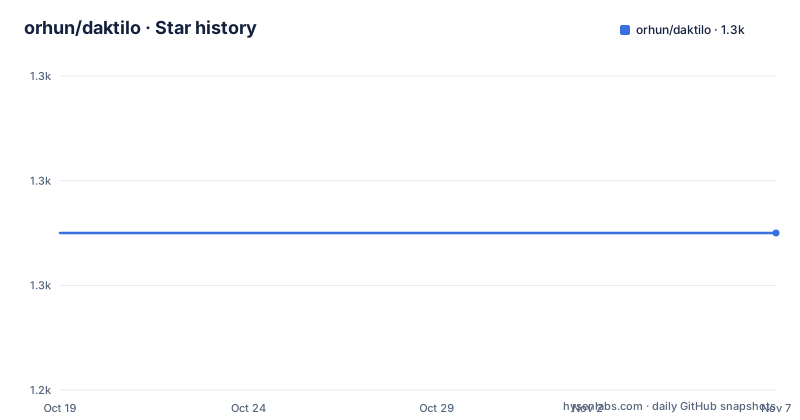
- orhun/daktilo1,255 ★ · +0
| Repository | 2026-10-19 | 2026-11-07 |
|---|---|---|
| orhun/daktilo | 1.3k | 1.3k |
0 Stars in the last 19 days, measured from the daily GitHub snapshot. Compare with other projects
Editorial analysis
The mechanism is a global key listener
daktilo is a small command-line program that plays typewriter sounds every time you press a key. It also offers the flexibility to customize keypress sounds to your liking, and you can use the built-in sound presets to create an enjoyable typing experience, whether you are crafting emails or up to some prank on your boss.
The mechanism implied by all of that is a global keyboard hook. The program is not an editor plugin and it is not an application that knows about its own text input. It sits outside your typing entirely, listens for key events system wide, and plays a sound for each one. That is what makes it work in a terminal, in a browser, in a chat client, and in a code editor without any of them knowing.
The platform list makes the same point from the other direction. The supported platforms are Linux with X11 ticked, Windows ticked, and MacOS ticked, and Wayland is listed but explicitly unticked, with a link to an issue in the `rdev` repository. The key event capture that a global listener needs is provided by the `rdev` crate, and on Wayland that is not available in the same way, so the Linux support is X11 only.
The name gives the project its character. It is daktilo, typewriter in Turkish, pronounced duck-til-oh, and it is derived from the Ancient Greek word δάκτυλος for finger. The homepage is daktilo.cli.rs, and the project is Apache-2.0 or MIT licensed, the dual licensing Rust projects use so that a downstream company can pick one.
The inspiration is stated as a video, Taking notes in class with my typewriter, and the line after it is the pitch in one sentence: now you can recreate this moment without the actual need for a physical typewriter.
Six presets, and they can be stacked into an orchestra
The preset table is short and each entry is one line of behaviour:
| Preset Name | Description | | ----------- | ----------------------------------------------- | | `default` | the classic typewriter effect | | `basic` | an alternative and more basic typewriter effect | | `musicbox` | plays random notes like a music box | | `ducktilo` | quack quack | | `drumkit` | dum, tss, cha! | | `spark` | high voltage high current typing experience |
So there are two typewriter presets, one of them described as an alternative and more basic effect, and four that are not typewriters at all. The music box plays random notes, the drum kit is a percussion pattern, the duck preset quacks, and spark is described as a high voltage high current typing experience.
The commands are simple. To list the presets:
daktilo --list-presetsTo use one:
daktilo --preset musicboxAnd the part that makes this more than a preset picker is that multiple presets can be used at the same time:
# orchestra
daktilo -p default -p musicbox -p drumkit
The comment names the effect. Layering the classic typewriter sound with the music box and the drum kit turns a typing session into a small performance, and the fact that the option is a repeatable flag rather than a single value is what makes that possible.
The sound device is also selectable, so the program is not tied to whatever the default output happens to be:
daktilo --device pipewireand `--list-devices` lists the available output devices.
The theme is that daktilo is not one sound but a small instrument, and the presets are the voices you stack.
Variation and easter eggs, both documented and both switchable
The realistic typing experience is one flag away, and it is a range rather than a single value:
daktilo --variate-tempo 0.9,0.4 --variate-volume 0.1,0.5The documentation describes this as variating the sounds to have a more realistic typewriter experience. Two numbers per flag, a range, and the effect is that the tempo and the volume of each keypress vary rather than being identical every time. A real typewriter is not perfectly uniform, and a perfectly uniform reproduction sounds synthetic. Randomising within a band keeps the character while removing the machine quality.
The other documentation item in that area is the easter eggs, and the project is upfront about them. There is a spoiler warning, and then the note that there are easter eggs which can be disabled either via the config file option `no_surprises = true` or using the command-line flag:
daktilo --no-surprisesThat is a good way to handle this. A program that plays sounds on every keystroke and also occasionally does something unexpected is a program that will, at some point, do that during a client call. Giving a documented flag and a documented config option to turn it off means the user who needs predictability has it, and the user who enjoys the surprise keeps it.
The config file is a TOML file, given the `config/` directory at the repository root and the `no_surprises = true` syntax, and the same file is where custom presets go.
The `sounds/` directory at the root holds the sample material, which is what the custom preset feature is built on.
Building it, and the Linux audio packages you need
The installation section covers six routes, and the cargo one has a dependency list that is easy to miss.
cargo install daktiloThe minimum supported Rust version is 1.70.0, and on Linux the following packages should be installed: `alsa-lib libxtst libxi` on Arch Linux, `alsa-lib-dev libxi-dev libxtst-dev` on Alpine Linux, and `libasound2-dev libxi-dev libxtst-dev` on Debian and Ubuntu. The `xtst` package is the XTest extension, which is for synthetic key events on X11, and `xi` is the XInput extension, which covers the wider range of input devices.
That is the part of the install that will actually trip people up, because the error without them is a link failure rather than a message about missing input libraries.
The distribution packages cover the rest. On Arch Linux it is in the official repositories:
pacman -S daktiloOn Alpine Linux it is available for Alpine Edge, installed via apk after enabling the testing repository:
apk add daktiloOn macOS it is available via MacPorts:
sudo port install daktiloThere are binary releases on the releases page for different targets, and building from source is a clone and a build:
git clone https://github.com/orhun/daktilo && cd daktilo/CARGO_TARGET_DIR=target cargo build --releasewith the binary located at `target/release/daktilo`.
The `CARGO_TARGET_DIR=target` in that command is redundant in the default case, and its presence suggests it is there for a CI or cross-compilation setup where the target directory is set explicitly. The release profile in Cargo.toml is tuned hard, with opt-level 3, lto set, codegen-units of 1, strip set to true, and panic set to unwind, and a separate dist profile inherits release with thin LTO for the `cargo dist` builds.
A Cargo workspace with a library crate and a binary crate
The Cargo.toml shows a workspace rather than a single package, with the members set to `crates/*` and the resolver at version 2. The release history confirms the split, with a `daktilo_lib-v0.6.0` tag published alongside the `v0.6.0` tag for the binary, and a `daktilo_lib-v0.5.0` before it.
So the project publishes a library crate and a binary crate, and they version independently. That is the sensible arrangement for a project like this, because the interesting part, the key event handling and the sound playback, is reusable, and someone who wants typewriter sounds inside their own Rust application can depend on the library rather than shelling out to the binary.
The workspace dependencies are declared once at the root and shared, which is the standard way to keep versions aligned across a workspace. They are `thiserror` for error types, `serde` with derive for configuration, `tracing` and `tracing-subscriber` with the env-filter feature for logging, `tokio` with the macros, rt-multi-thread, and sync features for the async runtime, `colored` for terminal output, and `pretty_assertions` for tests.
The tracing and tracing-subscriber pair with env-filter is worth noting because it explains the `-v, --verbose` flag and the `[env: VERBOSE=]` annotation in the options list. The program uses structured logging, and the subscriber is configured with an environment filter, so the verbosity is controlled by an environment variable in the same way the preset is controlled by `PRESET=`.
The root also holds `deny.toml` for cargo-deny, which checks dependency licences and advisories, `cliff.toml` for git-cliff, which generates the changelog from commit messages, `release-plz.toml` for the release automation, `committed.toml` and `typos.toml` for a spell checker on the source, `rustfmt.toml` for formatting, and a `RELEASE.md`.
The workspace metadata configures `cargo-dist` with the GitHub CI backend and installers for shell, powershell, and msi across four targets, and the `pr-run-mode` set to upload so that pull request builds publish artefacts rather than requiring a maintainer to run them locally.
Where daktilo is the wrong tool
The limits are obvious once you understand the mechanism, and they are worth stating plainly for anyone considering installing it on a work machine.
First, it makes a noise on every keystroke, everywhere, in every application. That includes your terminal, your browser, your editor, and any password field. There is no per-application filter documented and no way to scope it to one window. A tool that is delightful for twenty minutes on a desk at home is a tool that gets uninstalled the first time you are on a call, and the project is honest that a prank on your boss is one of the use cases.
Second, on Wayland, it does not work. The supported platforms list has Wayland unticked with a link to an issue in the `rdev` repository. Wayland is the default session on current Fedora, Ubuntu, and several other distributions, so a Linux user on a modern desktop may find the program simply cannot capture keys. The X11 session is the requirement, and on a Wayland system you would need to run an XWayland session to use it, which defeats the point for a system-wide key listener in most cases.
Third, macOS needs a permission grant, and the project has a dedicated section on macOS permissions. A global key listener on macOS is gated behind an accessibility permission, which the user has to grant in system settings, and which is a fairly heavy thing to ask for a novelty program. The permission prompt on first run is a poor first impression for something whose entire function is a party trick.
Fourth, the sound quality is bounded by the samples. The presets and the custom sounds are audio files in the `sounds/` directory, and the character of the effect comes entirely from those recordings. A custom preset made from a recording of a different keyboard will not sound like the same typewriter, and there is no synthesis.
Fifth, the release cadence is slow relative to the platform movement. The newest release is v0.6.0 from 2024-04-10, and the last push was on 2026-10-16, so the code is still being worked on while the published version is more than two years old. The Wayland gap is a good example of the cost: an upstream key event library limitation, and the project's answer is to link the issue rather than to solve it.
Editorial conclusion
daktilo fits someone who wants a typing feel on a keyboard that has none, who is willing to hear a sound on every keystroke including in a terminal, and who wants to supply their own samples. It is the wrong tool for a shared office, a call, or a stream, and it is the wrong tool on a Wayland desktop where the key event capture it relies on is not available. Check three things before you install it: that your platform is supported, since Wayland is explicitly not, that you have the audio development packages the build needs on Linux, and that the macOS permission prompt is acceptable, because the program needs accessibility permission to see your keystrokes.
Frequently asked questions
What is daktilo and how do I use it?
It is a small Rust command line program that plays typewriter sounds every time you press a key, anywhere on the system. Run `daktilo` for the classic effect, `daktilo --list-presets` to see the available ones, and `daktilo --preset musicbox` to pick a different one. Several presets can be combined with repeated `-p` flags.
Which sound presets does daktilo ship with?
Six: `default` for the classic typewriter effect, `basic` as an alternative and more basic typewriter effect, `musicbox` which plays random notes like a music box, `ducktilo` which quacks, `drumkit` with a dum, tss, cha pattern, and `spark` described as a high voltage high current typing experience.
How do I install daktilo on Linux?
With `cargo install daktilo`, which needs Rust 1.70.0 or newer. You also need system packages: `alsa-lib libxtst libxi` on Arch Linux, `alsa-lib-dev libxi-dev libxtst-dev` on Alpine, and `libasound2-dev libxi-dev libxtst-dev` on Debian and Ubuntu. Distro packages also exist via pacman, apk, and MacPorts.
Does daktilo work on Wayland?
No. The supported platforms list has Linux with X11 ticked and Wayland unticked, with a link to the issue in the rdev repository, since the key event capture the program needs is not available the same way on Wayland.
Official sources
Add this badge to your README
If you maintain this project, the badge below links readers to this analysis and shows its maintenance status from the daily GitHub snapshot. Paste the markdown into your README; add ?metric=license or ?metric=stars to the image URL for a different field.

[](https://hysenlabs.com/projects/orhun-daktilo)Star history chart for your README
[](https://hysenlabs.com/projects/orhun-daktilo)Was this useful?