ClawSuite: mission control for OpenClaw agents and the gaps between its own setup files
All-in-one command center for OpenClaw agents
At a glance
- What is it?
- ClawSuite is a TypeScript control surface for OpenClaw agents, and the most telling parts of it are the places where the setup files, the npm scripts, and the Docker image disagree with each other.
- Who is it for?
- ClawSuite fits a single operator who already runs an OpenClaw gateway and wants missions, chat, a terminal, and cost data in one browser tab. It fits badly if you were sold a hosted tier, because cross-device session sync, team shared memory, and a cloud-hosted gateway are all still marked as coming soon, and the last commit to main landed on 23 May 2026, four months after the 27 March 2026 v4.0.0 release.
- Can I use it commercially?
- Yes. MIT is a permissive licence: you can use, modify and sell software built on it, as long as you keep its copyright and licence notices.
- Is it still maintained?
- Yes. The repository last received commits 175 days ago.
- What is it written in?
- Mainly TypeScript, according to GitHub's language statistics.
Answers come from the project's GitHub data, last synced on November 14, 2026, and from our analysis. They are not legal advice.
Star history
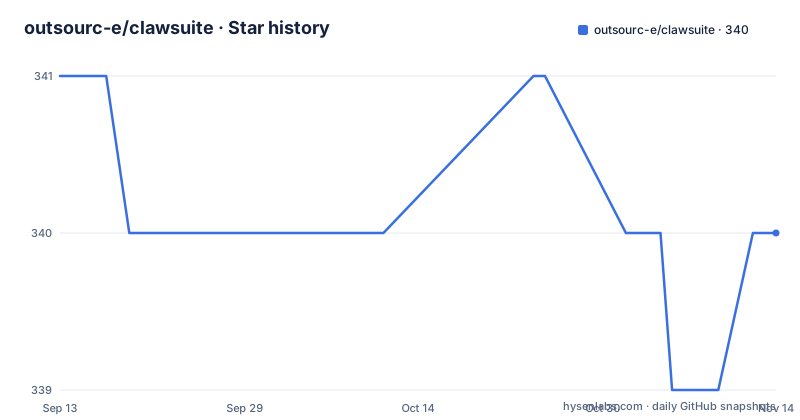
- outsourc-e/clawsuite340 ★ · -1
| Repository | 2026-09-13 | 2026-11-14 |
|---|---|---|
| outsourc-e/clawsuite | 341 | 340 |
-1 Stars in the last 62 days, measured from the daily GitHub snapshot. Compare with other projects
Editorial analysis
One WebSocket on port 18789 carries every mission lifecycle call
ClawSuite does not run the agents, it drives them. The whole product sits behind a single WebSocket connection to an OCPlatform gateway on port 18789, with a wss address offered for a remote host. Once that socket is up, the four mission verbs (spawn, pause, resume, abort) become buttons in an isometric office view, each agent gets its own SSE stream so output reaches Mission Control or chat without polling, and a finished mission produces a report with a success rate, a token count, and artifacts. Sensitive commands stop at an exec approval prompt that you approve or deny in the interface. Spend is tracked per agent with daily trend charts, month-to-date totals, a projected end-of-month figure, and provider splits for OpenAI, Anthropic, and Google. Three themes (Paper Light, Ops Dark, Premium Dark) are wired across 66 or more components, which matters most on the PWA build, since the same interface ships to iOS and Android.
Four shell commands stand between the clone and the dashboard
Prerequisites are Node.js 22 or newer and an OCPlatform gateway already running on port 18789. The install is four commands:
git clone https://github.com/outsourc-e/clawsuite.git
cd clawsuite
npm install
cp .env.example .env
After you edit `.env` with the gateway address and token, one script starts the app:
npm run dev # Starts on http://localhost:3000That script runs Vite on port 3000 with a 2048 MB heap cap forced through NODE_OPTIONS. On a first run with no gateway configuration you land on a setup wizard instead of the dashboard, and the documented symptom of a bad setup is a white screen, which points at a stopped gateway or a wrong `.env`. The longer troubleshooting notes, including agent-friendly setup steps, live in `SETUP.md`.
The gateway token is spelled differently in the two setup files
Reading `gateway.auth.token` is the first task, and the two instruction sets name different binaries for it. The quick start points at `~/.ocplatform/ocplatform.json` and gives you `ocplatform config get gateway.auth.token`, while the bundled `.env.example` points at `openclaw config get gateway.auth.token` and adds the OpenClaw settings UI as a third route. Tokens are described as clw_ prefixed strings of 64 or more characters, and `CLAWDBOT_GATEWAY_PASSWORD` sits commented out as the alternative for a gateway set up for password auth. Three names then circulate through the one project: the repository is outsourc-e/clawsuite, the runtime is OpenClaw, and the two required variables keep a CLAWDBOT prefix. The first-launch note goes further and says ControlSuite will show a setup wizard, a product name that appears nowhere else in the tree or in package.json, where the package is `clawsuite` at version 4.0.0 and marked private. The example file also states that secrets stay server-side and never reach the browser.
The container skips the browser download that the built-in browser needs
The build stage sets `PLAYWRIGHT_SKIP_BROWSER_DOWNLOAD=1` with a comment saying it is not needed for production, while the feature list advertises a headed Chromium with stealth anti-detection, agent handoff for sharing live pages with your AI, and persistent sessions whose cookies survive restarts. That skipped download is the first thing you meet if you expect the browser to work inside the image. The rest of the Dockerfile is three stages on node:22-alpine: a builder that copies the npm lockfile and `.npmrc`, runs `npm ci`, then `npm run build`; a skills stage that installs openclaw@latest globally with `--ignore-scripts` and copies that package's skills directory into /openclaw-skills; and a runner that drops to a non-root clawsuite user with port 3000 exposed. The marketplace side is separate: 2,000 or more skills from the ClawdHub registry, each scanned before install.
The package has three entrypoints and the scripts agree on none of them
Read the scripts in package.json before picking a deployment path. `dev` and `start:dev` run Vite on port 3000 under the 2048 MB heap cap, `build` is only `vite build`, which is why the Docker runner copies `dist` from the build stage. But `start` executes `node .output/server/index.mjs`, and nothing in that scripts block writes a .output directory. The image instead runs `node server-entry.js`, the file sitting in the repository root next to vite.config.ts. A third path exists for the desktop app: `main` points at `electron/main.cjs`, the build scripts hand off to electron-builder through `electron-builder.config.cjs` or its standalone variant, and platform variants pass `--mac` or `--win`. The same tree also holds a `src-tauri/` directory, a second desktop shell. The page describing the native app calls it in development and points you back to installing the PWA, and there are two beta helpers, one that runs a local state reset script and one that exports diagnostics.
Tailscale access needs a host allowlist the phone recipe never sets
Mobile reach is documented as a short Tailscale recipe: install Tailscale on the Mac and the phone, sign in to the same account, find the machine address with
tailscale ip -4
# Example output: 100.x.x.x
then open `http://100.x.x.x:3000` from the handset and add it to the home screen. What the recipe never mentions is the server side. The interface binds to 127.0.0.1 by default, and `.env.example` states that setting `CLAWSUITE_ALLOWED_HOSTS` both permits non-localhost addresses and binds the server to 0.0.0.0 instead. That variable takes a comma-separated list, with a Tailscale hostname, a LAN address, or a subnet such as 192.168.1.0/24 offered as examples. Without it, the address you just discovered over Tailscale is not the address the server answers on.
An empty CLAWSUITE_PASSWORD leaves the interface open
Access control comes down to two optional variables, and both are blank by default. `CLAWSUITE_PASSWORD` protects the web interface, and the example file calls leaving it empty the right choice for local use while saying to set it for production deployments. `CLAWSUITE_ALLOWED_HOSTS` is the second, and because it also changes the bind address the two travel together. docker-compose.yml forwards all four gateway and access variables with empty fallbacks, maps port 3000, restarts unless stopped, and maps host.docker.internal to the host gateway so the container can reach a gateway at ws://host.docker.internal:18789. An empty web-interface password means no interface authentication according to the example configuration. A gateway token serves a separate connection; it should not be treated as a substitute for protecting access to an exposed interface. Verify bind address, host allowlist and authentication in the deployment you run. Server-side work in v4.0.0 covers auth middleware on all API routes, removal of wildcard CORS, and those exec approval prompts for sensitive commands.
Developer tools and chat features
The README lists a terminal with full PTY support, a file browser with Monaco previews and editing, a memory browser, a cron manager and a debug console. It also describes streaming chat, multi-session history, file and image attachments, Markdown and message search. These are project claims; verify the features you need in the version you deploy. The repository also includes Electron and Tauri directories, while the README describes the native Electron application as in development.
Editorial conclusion
ClawSuite fits a single operator who already runs an OpenClaw gateway and wants missions, chat, a terminal, and cost data in one browser tab. It fits badly if you were sold a hosted tier, because cross-device session sync, team shared memory, and a cloud-hosted gateway are all still marked as coming soon, and the last commit to main landed on 23 May 2026, four months after the 27 March 2026 v4.0.0 release. Before you point a phone at it, confirm which token command your gateway CLI actually answers to, set CLAWSUITE_PASSWORD if anything other than localhost will reach the port, and decide whether the built-in browser matters to you given that the production image skips its browser download.
Frequently asked questions
What can OpenClaw do for me?
OpenClaw is the agent runtime, and ClawSuite is the control surface in front of it. Over a WebSocket to a gateway on port 18789 you get mission lifecycle verbs, live per-agent output streams, cost roll-ups split by provider, a PTY terminal, a file browser backed by the Monaco editor, and installable skills from the ClawdHub registry.
What is Clawdbot and how does it work?
The name survives as a prefix. ClawSuite reads `CLAWDBOT_GATEWAY_URL` and `CLAWDBOT_GATEWAY_TOKEN` from `.env`, keeps that token on the server so it never reaches the browser, and holds one WebSocket to the OpenClaw gateway to drive agents, sessions, and memory.
How does OpenClaw work?
From the dashboard side it is one socket plus one token. The gateway listens on port 18789, ClawSuite authenticates with a clw_ prefixed string of 64 or more characters, streams agent output back over SSE rather than polling, and reports success rate, token count, and artifacts when a mission ends.
How do I get started with OpenClaw as a beginner?
Run Node.js 22 and an OCPlatform Gateway, then `git clone https://github.com/outsourc-e/clawsuite.git`, `cd clawsuite`, `npm install`, `cp .env.example .env`, fill in the gateway URL and token, and start with `npm run dev` on http://localhost:3000. A setup wizard appears until the gateway is configured.
Official sources
Add this badge to your README
If you maintain this project, the badge below links readers to this analysis and shows its maintenance status from the daily GitHub snapshot. Paste the markdown into your README; add ?metric=license or ?metric=stars to the image URL for a different field.

[](https://hysenlabs.com/projects/outsourc-e-clawsuite)Star history chart for your README
[](https://hysenlabs.com/projects/outsourc-e-clawsuite)Was this useful?