pytm, a threat modeling framework you write in Python instead of in a drawing tool
A Pythonic framework for threat modeling
At a glance
- What is it?
- OWASP pytm is a Pythonic framework for threat modeling. You describe your architecture as code, and it generates a data flow diagram, a sequence diagram and the relevant threats, together with a report. The stated goal is to shift threat modeling to the left, so it happens while the design is still being written rather than after the code exists.
- Who is it for?
- Adopt pytm if your team's threat models live in version control today, or if you want the model to be reviewable as code and to be regenerated whenever the architecture changes, and skip it if your threat modeling is a one-off workshop with a diagram specialist, because the tool presumes you are comfortable writing the model in Python.
- Can I use it commercially?
- Check first. The repository uses a licence we do not classify automatically, so read its LICENSE file before any commercial use.
- Is it still maintained?
- Yes. The repository last received commits 6 days ago.
- What is it written in?
- Mainly Python, according to GitHub's language statistics.
Answers come from the project's GitHub data, last synced on November 7, 2026, and from our analysis. They are not legal advice.
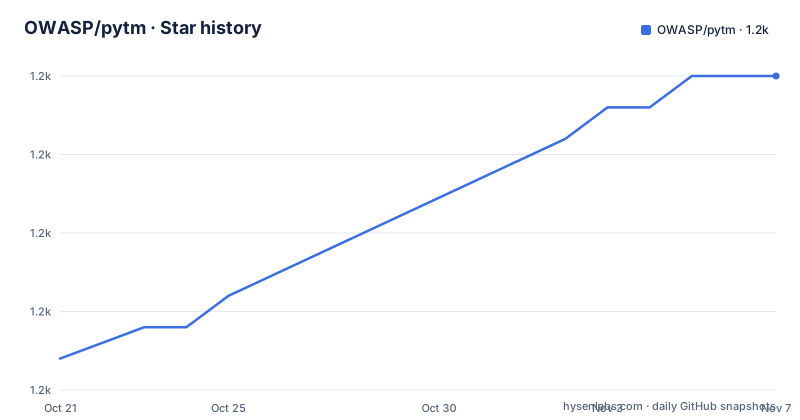
Star history
- OWASP/pytm1,190 ★ · +9
| Repository | 2026-10-21 | 2026-11-07 |
|---|---|---|
| OWASP/pytm | 1.2k | 1.2k |
9 Stars in the last 17 days, measured from the daily GitHub snapshot. Compare with other projects
Editorial analysis
Threat modeling as a build step
The argument in the project documentation is a complaint about timing. Traditional threat modeling too often comes late to the party, or sometimes not at all, and creating manual data flows and reports can be extremely time-consuming. The goal of pytm is to shift threat modeling to the left, making it more automated and developer-centric. The shift is not just about scheduling, it is about the medium. In most tools the model is a diagram, so a change to the architecture is a redraw, and a redraw is manual work nobody does. In pytm the model is a Python script, so a change to the architecture is a diff, the diagram is regenerated, and the review happens in the same pull request as the code change. Based on your input and definition of the architectural design, the tool generates a data flow diagram, a sequence diagram, and the relevant threats to your system. The project is an OWASP one and the licence identifier in the repository metadata is a custom one that GitHub cannot classify.
The element vocabulary, including LLM and Agent
The elements you can place in a model are listed, and the list tells you what the framework was built for: TM, Element, Server, ExternalEntity, Datastore, Actor, Process, Dataflow, Boundary, Lambda, LLM and Agent. The traditional set covers the classic data flow diagram shapes, and the Lambda, LLM and Agent entries are the modern addition, which matters because the OWASP threat library is where the interesting work happens. A model element is not just a shape, it carries properties, and you can list them for any element with the describe option, which prints the class attributes with their types, defaults and descriptions. The Server class alone shows assumptions about the element that optionally allow threats with the given SIDs to be excluded, security controls, a description, a findings list, whether the asset handles resources, which trust boundary the element exists in, whether it is in scope, incoming data flows, the levels at which it is drawn, and a maximum data classification it can handle.
The command line surface
The example model tm.py is runnable and the options are numerous but grouped by what they produce. The output flags are --dfd for the data flow diagram, --seq for the sequence diagram, --report with a named template file for the report, and --json for a JSON file. The introspection flags are --list to list all available threats, --list-elements to list all elements that can be part of a threat model, and --describe with an element name to show its available properties. Then there are the control flags: --exclude to specify threat IDs to be ignored, --levels to select which levels are drawn in the threat model, --colormap to color the risk in the diagram, --debug to print debug messages, and --stale_days. The report is generated from a template, with a sample template under docs/basic_template.md, which means the report wording is yours to control rather than something the tool dictates.
The stale_days check, and why a threat model goes out of date
One option deserves its own section, because it is the most interesting idea in the tool. The stale_days argument tries to determine how far apart in days the model script, which is what you are writing, is from the code that implements the system being modelled. Ideally they should be pretty close in most cases of an actively developed system, and you can run this periodically to measure the pulse of your project and the freshness of your threat model. This is the honest version of a problem every organisation has and nobody measures. A threat model that was accurate eighteen months ago describes an architecture that no longer exists, and there is no way to tell that from reading the document. Making the gap a number that a CI job can watch turns a vague intention into something with a threshold. Combined with the fact that the model is a script, it also means the freshness check can be a line in the same pipeline that builds the software.
Generating the three artefacts, and the toolchain behind them
The getting started section shows the three commands and the three tools behind them. The report is produced by piping the model output through pandoc from markdown to HTML, the data flow diagram is piped through dot from Graphviz, and the sequence diagram is piped through a headless Java invocation of plantuml. That means three external dependencies for the full output, which is why the project also ships a container and a Devbox variant. The example commands create a directory, then run the model three times, once per artefact, writing into it.
mkdir -p tm
./tm.py --report docs/basic_template.md | pandoc -f markdown -t html > tm/report.html
./tm.py --dfd | dot -Tpng -o tm/dfd.png
./tm.py --seq | java -Djava.awt.headless=true -jar $PLANTUML_PATH -tpng -pipe > tm/seq.png
The requirements are Linux or MacOS, Python 3.11 or newer, the Graphviz package, Java with OpenJDK 10 or 11, and plantuml.jar. There is also an example Makefile that wraps all of this into targets that can be shared for multiple models, and you should either have plantuml.jar in the same directory as your model or set PLANTUML_PATH.
Two ways to avoid installing the dependencies
The project offers two escape hatches from the dependency list, and the difference between them is worth understanding. The container route avoids installing dependencies like pandoc or Java by running the script inside a container. You export USE_DOCKER=true once, run make image to build it, and then run make after every change in your model. The Devbox variant is described as a lower overhead and more convenient alternative to the OCI container approach, because the host dependencies can be completely isolated using Devbox. You install it on Linux or MacOS with the install command, update it, set your GitHub access token in the nix configuration file, and then devbox shell creates a new isolated shell environment containing the tools and packages specified in the project's devbox.json. You can confirm which Python you got with the which python command, and the expected path is the one inside the .devbox profile directory.
The Makefile as the real interface
The Makefile is the layer most users will actually work with, and it shows how the project treats the model as a build artefact. The model name defaults to tm and can be overridden with the MODEL variable, and there is a safety check: if the suffix of the model is .py, the target prints that it thinks you meant the name without the extension and exits. The dependency lists are the interesting part, because a diagram is rebuilt only when the model or the threat library changes. The wildcard for the Python sources, the wildcard for the threat library JSON files and the wildcard for the images are all inputs, so changing a threat rule or adding an element re-renders the diagrams. There are also targets for the report, the sequence diagram and the data flow diagram, an image target that builds the Docker image, a docs target that generates the API documentation and the threat database listing, a format target that runs black, and a test target that runs pytest.
The threat library, and the shape of the package
The threat library lives as JSON under pytm/threatlib, and the Makefile turns it into a readable document, with a threats.md target that writes a heading and then uses jq to format each entry. The threats are identified by SIDs, which is why element properties can carry assumptions that exclude threats with given SIDs, and why the --exclude option can ignore specific threat IDs. The packaging is small and honest about its dependency: the project metadata lists pydantic at version 2.10 or newer as the only runtime dependency, with pytest, black, pdoc3 and ruff in the development group, and hatchling as the build backend. The project metadata names the licence as MIT and requires Python 3.11 or newer but below 3.15, and the classifier calls the project Production/Stable. The repository also carries a sample.png, a devbox.json, a Dockerfile and an entrypoint.sh, plus a .devcontainer directory and a SECURITY.md.
Editorial conclusion
Adopt pytm if your team's threat models live in version control today, or if you want the model to be reviewable as code and to be regenerated whenever the architecture changes, and skip it if your threat modeling is a one-off workshop with a diagram specialist, because the tool presumes you are comfortable writing the model in Python. Verify three things before you adopt it: that you can supply the dependencies, since graphviz, a Java runtime, plantuml and pandoc are all required for the diagrams and report; that the model and the code stay in step, because the --stale_days check exists to measure exactly that gap; and the licence, since the packaging metadata names MIT while the licence identifier in the repository metadata is a custom one GitHub cannot classify, so the LICENSE file is the document to read.
Frequently asked questions
What does OWASP pytm generate from a model?
Based on your input and definition of the architectural design it generates a Data Flow Diagram, a Sequence Diagram and the relevant threats to your system, and it can also output a report from a template and a JSON file.
What does the stale_days option in pytm do?
It tries to determine how far apart in days the model script is from the code that implements the system being modelled. You can run it periodically to measure the pulse of your project and the freshness of your threat model.
What dependencies does pytm need to produce diagrams?
Linux or MacOS, Python 3.11 or newer, the Graphviz package, Java with OpenJDK 10 or 11, and plantuml.jar. The documentation also shows a container route and a Devbox variant to avoid installing pandoc, Java and the rest locally.
Which elements can appear in a pytm threat model?
TM, Element, Server, ExternalEntity, Datastore, Actor, Process, Dataflow, Boundary, Lambda, LLM and Agent. The properties of any element can be listed with the --describe option.
Official sources
Add this badge to your README
If you maintain this project, the badge below links readers to this analysis and shows its maintenance status from the daily GitHub snapshot. Paste the markdown into your README; add ?metric=license or ?metric=stars to the image URL for a different field.

[](https://hysenlabs.com/projects/owasp-pytm)Star history chart for your README
[](https://hysenlabs.com/projects/owasp-pytm)Was this useful?