ocis: the README asks for Go 1.25.10 and the module wants 1.26
:atom_symbol: ownCloud Infinite Scale
At a glance
- What is it?
- ownCloud Infinite Scale ships one Go binary that can be configured from a Raspberry Pi to a Kubernetes cluster, with forty-two services you switch on individually. Its own build files disagree about the Go version, pin an image library to Alpine's edge repository, and rewrite their own name resolution config.
- Who is it for?
- ocis is a serious answer for an organisation that wants self-hosted file sync with a real identity provider and no separate database to operate, and the decision to ship one binary with selectable services is the right call for everything from a single board computer to a cluster. Three things to check before you commit.
- Can I use it commercially?
- Yes. Apache-2.0 is a permissive licence: you can use, modify and sell software built on it, as long as you keep its copyright and licence notices.
- Is it still maintained?
- Yes. The repository received new commits within the last day.
- What is it written in?
- Mainly Go, according to GitHub's language statistics.
Answers come from the project's GitHub data, last synced on November 14, 2026, and from our analysis. They are not legal advice.
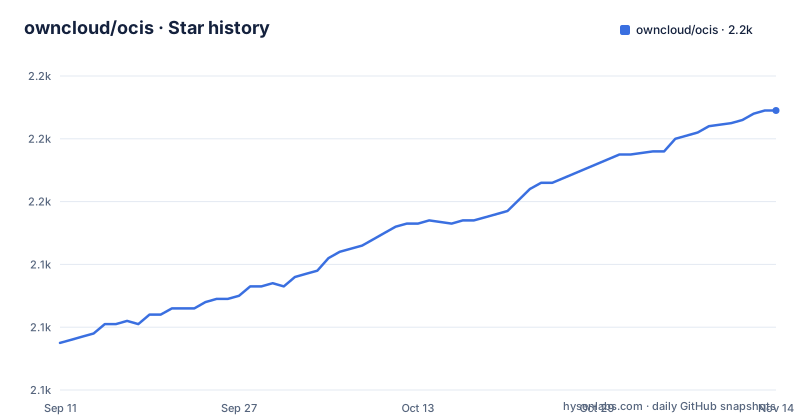
Star history
- owncloud/ocis2,189 ★ · +74
| Repository | 2026-09-11 | 2026-11-14 |
|---|---|---|
| owncloud/ocis | 2.1k | 2.2k |
74 Stars in the last 64 days, measured from the daily GitHub snapshot. Compare with other projects
Editorial analysis
One binary, forty-two services you switch on individually
The Makefile is where the architecture becomes legible, because it lists every service directory the product can start. Counting them gives forty-two services plus two top-level modules. They are not variations of one thing: five of them are authentication services, named for apps, basic credentials, bearer tokens, machine auth and service auth, which is why identity is a pluggable subsystem rather than a setting. Four more are storage services, one per access pattern: the system store, the public link store, the shares store and the per-user store. Then there is a message bus service, a gateway, a proxy, a server-sent-events service for change notifications, and separate services for search, sharing, thumbnails, groups, invitations, notifications, an activity log, a user log, an audit trail, an event history, an app registry, policies and post-processing. One binary hosts all of it; which ones actually run is a configuration decision.
make -C ocis buildThree build files, three Go versions
This is the first thing a new contributor will hit. The readme states the minimum required Go version is 1.25.10. The module file declares a different line entirely, 1.26.0. The container build uses a Go 1.25 image. A developer who trusts the prose and installs 1.25.10 gets a toolchain error from the module file, and a container build on the 1.25 image has to rely on the toolchain downloading itself. None of the three numbers is wrong on its own, but only one can be the floor, and the page that tells you the floor is the one that is out of step. The same section has a second prerequisite worth knowing: a C compile environment is required, because some dependencies, the readme names the reva project specifically, have parts that need cgo libraries and toolchains, and it gives the Debian package command for that. So the toolchain for this Go project includes build-essential.
The quickstart's second container command stops mid-variable
The quickstart is four steps and the third one is complete: it creates a config directory and a data directory under the home folder, gives both to the numeric user and group the image runs as, pulls the image, and runs an init subcommand with an insecure flag that writes a minimal configuration. The fourth step is where the page breaks off. The runtime command is given with its name, its port mapping, the same two bind mounts and one environment variable set to enable insecure mode, and then the environment variable list stops partway through the next variable's name. So the one command in the readme you actually need in order to start the server cannot be copied from the page. What follows the block tells you the rest: browse to port 9200 on localhost and sign in with the credentials printed by the init step.
docker pull owncloud/ocisThe web client moved in-tree and the old repository is archived
The client section reads like a changelog entry and contains the clearest architectural decision on the page. The web interface used to live in its own repository; it is now developed inside this one, under a directory at the root, as part of what the page calls a single-repo product combining backend and web frontend. The old repository is archived and kept only as the historical record up to its final release, and the page tells you where to file web-related issues and contributions instead. So a team with automation, review rules or issue links pointed at the previous repository has to move them. The other clients stay where they are: separate applications for Android, iOS and the desktop. All of them sync against a backend built on the reva project and speak WebDAV and the CS3 API, which is what keeps a closed-source desktop client working against an open backend.
An exact image library version, pinned from a testing repository
The container build has three stages: a Node stage that generates assets, a Go stage that compiles the binary with image processing enabled, and an Alpine runtime. Two lines in that runtime stage deserve attention. The first pins the image processing library to an exact version and pulls it from Alpine's edge community repository rather than a stable branch, which means the package exists in a moving channel and can disappear from the mirror, at which point rebuilds fail for reasons that have nothing to do with your code. The second overwrites the container's name service configuration with a two-line file that reads hosts as files then DNS, dropping whatever the base image had. For a container that has to resolve other services over a message bus, forcing resolution to file then DNS is a deliberate simplification, but it is done by writing a system file rather than by configuration.
FROM alpine:3.24.1
RUN apk add --no-cache attr ca-certificates curl mailcap tree \
    && echo 'hosts: files dns' >| /etc/nsswitch.conf
A pluggable microservice layer with two majors of one library
The module file shows the framework underneath the forty-two services, and it is a micro-service toolkit rather than a web framework alone. The dependency set includes plugins for gRPC and HTTP servers, a logger, an in-memory service registry, a store backed by NATS, a monitoring wrapper that exports to Prometheus, and a tracing wrapper for OpenTelemetry. Every one of those is swappable through configuration, which is the mechanism behind the claim that the product can reuse machinery you already run. Alongside that sit the libraries that decide what the product actually does: a full-text search engine, a text extraction tool, image processing bindings, an XML parser, a MIME sniffer, an LDAP client and an OIDC client, plus a Keycloak administration client and a ClamAV client with its ICAP companion. Two details: the module path carries a major version suffix of two while the product ships in the eight series, which is Go's convention and unrelated to the product number, and two different major versions of the same retry library are required at once.
A Go monorepo carrying PHP linting and a vulnerability ignore file
The root of the repository is a build system for four languages and two scanners. There is a Go module, a lock file, a vendored dependency directory checked in, and a tool manifest directory for pinning the Go tools themselves. There is also a Composer manifest, a PHP code sniffer configuration, a PHP style fixer configuration, and a vendor directory holding the PHP coding tools, with the root Makefile wiring up the sniffer, the beautifier, the fixer and a static analyser for PHP. Alongside both languages sit a container vulnerability scanner configuration and, next to it, an ignore file for that scanner, which is the place where accepted findings are recorded. License compliance is handled with a REUSE manifest and a licences directory, there is a notice file, and the repository carries both a generated code directory and a code generator. The result is a build that runs Go, Node and PHP tooling in one repository, which is a maintenance surface as much as a convenience.
Two releases on the same day, on two different lines
The release pattern is the last thing worth reading. The three most recent tags are not sequential: one is the 8.2 line and one is the 8.0 line, and they were published on the same calendar day about four hours apart, while the third sits six weeks earlier. So the project maintains parallel minor lines rather than shipping a single moving branch, which is what you want from infrastructure software with an eight version number, and it means a deployment has to choose a line rather than take whatever is newest. The default branch is not named for a version, and the introduction tells you to make sure you download the latest released version rather than building from source, which lines up with the source build path being marked as development-only. The last push to the default branch was on 2026-10-03, the same day the two releases went out.
Editorial conclusion
ocis is a serious answer for an organisation that wants self-hosted file sync with a real identity provider and no separate database to operate, and the decision to ship one binary with selectable services is the right call for everything from a single board computer to a cluster. Three things to check before you commit. Build from source only after resolving the Go version contradiction between the prose, the module file and the container image, because that is where a fresh contributor will lose an afternoon. Treat the insecure flags in the quickstart as a demo affordance, not a template, since the page has you initialise and run with security disabled to get a login on screen. And read the archived web client note if you have tooling pointed at the old standalone repository, because that repository is now a historical record only.
Frequently asked questions
What are the benefits of using OCIS?
It ships as a single binary or container and scales from a Raspberry Pi to a Kubernetes cluster by changing configuration and starting more services, with no external database and no external identity provider required. The web client is developed in-tree with the backend as a single repository.
how to install owncloud ocis
The quickstart creates a config and a data directory, chowns both to the image's numeric user, pulls owncloud/ocis, runs an init subcommand with an insecure flag, then starts the runtime container with port 9200 published. Browse to localhost:9200 and sign in with the credentials the init step prints. Production deployments are documented on the project site instead.
What does an ownCloud Infinite Scale source build need?
A C compile environment as well as Go, because parts of the reva dependency use cgo, with build-essential named for Debian systems. The readme gives 1.25.10 as the minimum Go version while the module file declares 1.26.0 and the container builds on a 1.25 image, so resolve that before you start.
Which authentication options does ownCloud Infinite Scale support?
Users authenticate over OpenID Connect, through an external provider such as Keycloak or the embedded LibreGraph Connect provider. The build's service list names five separate authentication services, covering apps, basic credentials, bearer tokens, machine auth and service auth.
Which office suites can ownCloud Infinite Scale integrate with?
Collabora Online, OnlyOffice Docs, and Microsoft Office Online Server, with collaborative editing handled through a WOPI application gateway. The clients for web, Android, iOS and desktop all sync through WebDAV and the CS3 API against a reva based backend.
Official sources
Where this project is recommended
Add this badge to your README
If you maintain this project, the badge below links readers to this analysis and shows its maintenance status from the daily GitHub snapshot. Paste the markdown into your README; add ?metric=license or ?metric=stars to the image URL for a different field.

[](https://hysenlabs.com/projects/owncloud-ocis)Star history chart for your README
[](https://hysenlabs.com/projects/owncloud-ocis)Was this useful?