ai-crawler-py: a repository with one README, two images, and no code
Crawl a website starting from a URL, find relevant pages, and extract data – all guided by your natural language prompt.
At a glance
- What is it?
- The published surface of a hosted crawling service that describes itself as experimental. The repository is archived, holds three files, and declares neither a licence nor a programming language, because the implementation lives in a package installed under a different name. Its single most important parameter is described three different ways in the same document.
- Who is it for?
- Read this as a vendor's documentation page rather than as an open source project, because that is what the repository contains. Three things to establish before you build on it.
- Can I use it commercially?
- Not without permission. GitHub finds no licence file in the repository, and without a licence all rights are reserved by default: you may read the code but not reuse it. Check the README, or ask the authors, before using it.
- Is it still maintained?
- No. The owners have archived the repository on GitHub, so it is read-only and no longer receives changes.
- What is it written in?
- GitHub does not report a main language for this repository.
Answers come from the project's GitHub data, last synced on November 14, 2026, and from our analysis. They are not legal advice.
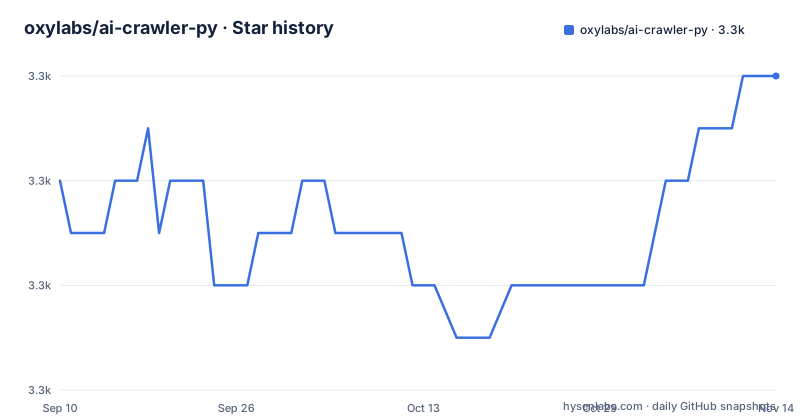
Star history
- oxylabs/ai-crawler-py3,266 ★ · +2
| Repository | 2026-09-10 | 2026-11-14 |
|---|---|---|
| oxylabs/ai-crawler-py | 3.3k | 3.3k |
2 Stars in the last 65 days, measured from the daily GitHub snapshot. Compare with other projects
Editorial analysis
The repository is three files and it is archived
The top level of this repository holds a README and two images. One image filename carries a space before its extension and the other carries two. There is no source directory, no licence file and no manifest of any kind, and the packaging metadata records neither a licence nor a programming language. The repository is also marked archived, with its last commit dated 2026-08-21. All of that adds up to a documentation page rather than a code release: what you would fork, patch or vendor from is not here. The eleven forks and single open issue on the repository are consistent with that reading, since there is nothing in it to fork usefully.
The code ships under a different name in a different place
The installation section asks for Python 3.10 or newer and a single pip install of a package whose name is not the repository name:
pip install oxylabs-ai-studioThe import path inside that package follows the same convention, with the vendor's product namespace, an apps segment and then the class. So there are three strings for one thing: the repository name, the package name you install, and the module path you import from. A JavaScript SDK exists as well and the README links to a separate repository for it. That is the shape of a vendor who ships one product across several ecosystems and keeps the code in private package indexes while publishing the documentation in public.
The schema parameter is described three different ways
This is the most consequential inconsistency in the document. In the request parameter table, the schema is described as an OpenAPI schema for structured extraction, and marked mandatory when the output format is JSON. In the feature list, you define a parsing schema in natural language. In the code example, you never write a schema at all: you call a method that generates one from a natural language prompt, and pass the result straight into the crawl call. Those are three different contracts. An OpenAPI schema is something you author precisely, a natural language description is something a model interprets, and a generated schema is something the service proposes and you may or may not accept. Which one you actually send decides whether your extraction is reproducible.
The defaults are Markdown and no script execution
The parameter table is short and its defaults matter more than the prose suggests. The output format defaults to Markdown rather than JSON, so the first call you make returns text unless you ask otherwise. The JavaScript rendering switch defaults to off, which means a page that builds its content in the browser will come back mostly empty unless you turn it on. The number of sources returned is capped at twenty-five by default, which is a quiet ceiling on how much of a site you see in one run. A separate answer in the frequently asked questions says the tool is designed to handle both static and script-rendered pages, which is true of its capability and not of its default configuration.
A free trial with a thousand credits, then twelve dollars a month
The pricing answer is the only place numbers appear, and they are specific. The free trial includes one thousand credits. Monthly plans start at twelve dollars a month, which buys three thousand credits and a rate of one request per second, and higher plans offer more credits and higher request rates. So the cost is metered twice over, by volume and by rate, and the entry plan's ceiling of one request per second is the constraint most likely to shape an architecture rather than a bill. The page also carries a link to a waiting list for an early access web API, which suggests a second interface is planned rather than documented.
Geo-targeting sends the request out of another country
One parameter takes a proxy location in a two letter country format, and the frequently asked questions note that geo-targeting can be configured. Combined with the stated ability to crawl most publicly accessible websites, that means the service can be asked to fetch a page as though from a chosen country, which is useful for content that varies by region and is a compliance question everywhere else. The same answer asks you to make sure your use case complies with the website's terms of service and with local laws, and the four listed use cases include locating terms of service pages and collecting competitor pricing, which are exactly the two that a site's terms tend to restrict. The caveat is there; it is in a frequently asked question rather than in the feature list.
The examples crawl the vendor's own sandbox, and one stops mid-argument
The code sample constructs the client with an API key, asks the service to generate a schema from a prompt asking for three fields, and then crawls a URL on the vendor's own sandbox domain, searching for a specific console game catalogue. That is a reasonable way to make a sample copyable without touching a third party's site, and it also means the example proves very little about real sites. The crawl call itself is cut off partway through its arguments in the visible text. The output sample beside it is a labelled block rather than a parseable document: a heading line, then an array of objects, and the array is itself cut off mid-value. The Markdown alternative is named in a sentence whose quotes are typographic rather than straight.
The positioning is low-code, and the README says experimental
The document opens by calling the tool an experimental data extraction app that uses advanced algorithms to crawl a domain, and the second paragraph frames it as a low-code tool meant to let developers and data scientists focus on analysis rather than on building and maintaining scrapers. The comparison with a traditional scraper is drawn in one frequently asked answer: instead of static selectors in CSS or XPath plus custom scripts, you write a prompt and the service chooses pages for you, which reduces the parsing logic you have to write and removes the selector maintenance that comes with it. The trade is the one the rest of the page implies, with a metered request budget and a hosted service between you and the site, rather than a library you can read.
Editorial conclusion
Read this as a vendor's documentation page rather than as an open source project, because that is what the repository contains. Three things to establish before you build on it. The code is a hosted service reached with a key, so your crawl budget, its rate limit and its retention are all somebody else's product decisions, and the entry plan is capped at one request per second. Geo-targeting means the request leaves from a chosen country, which is a compliance question rather than a technical one, and the README's own answer tells you to check each site's terms. And the schema parameter is defined inconsistently across the page, so agree what you are sending before you depend on the shape of the output.
Frequently asked questions
What does the Oxylabs AI-Crawler do?
It crawls a domain from a starting URL, uses a natural language prompt to decide which pages are relevant, and extracts the result as structured JSON or as Markdown. For JSON output the extraction can be shaped by a schema, which the documentation describes in three different ways on the same page.
How much does AI-Crawler cost?
There is a free trial with one thousand credits. Monthly plans start at twelve dollars a month for three thousand credits and a rate of one request per second, with higher plans offering more credits and higher request rates.
Which websites can AI-Crawler crawl?
Most publicly accessible ones, static or script-rendered, with geo-targeting available. The documentation asks you to make sure your use case complies with each website's terms of service and with local laws.
Does AI-Crawler render JavaScript by default?
No. The parameter table lists a script-rendering switch that defaults to off, and the output format defaults to Markdown. A separate answer says the tool is designed to handle script-rendered pages, which is a claim about its capability rather than about its defaults.
Where is the source code for AI-Crawler?
Not in this repository, which is archived and holds a README and two images. The Python implementation is installed from a package with a different name, and a JavaScript SDK is published in a separate repository.
Official sources
Add this badge to your README
If you maintain this project, the badge below links readers to this analysis and shows its maintenance status from the daily GitHub snapshot. Paste the markdown into your README; add ?metric=license or ?metric=stars to the image URL for a different field.

[](https://hysenlabs.com/projects/oxylabs-ai-crawler-py)Star history chart for your README
[](https://hysenlabs.com/projects/oxylabs-ai-crawler-py)Was this useful?