Project Brutality: a Doom engine total conversion developed in the open on the master branch
This is the primary repository for collaborative efforts between Doom developers on Project Brutality. This is the bleeding-edge version that is constantly being developed on, and not meant in any way shape or form to be representative of the final version of the mod.
At a glance
- What is it?
- Project Brutality is a Doom engine total conversion maintained as a rolling master branch that the README explicitly says is not representative of the final mod, and it is written in ZScript, which is why it needs GZDoom and not Zandronum. The install is a zip from the branch, and the project is unusually strict about where feedback goes and about who owns an add-on.
- Who is it for?
- Project Brutality fits a Doom player who wants the current state of a well known total conversion and is willing to run a bleeding edge branch rather than a tagged release, and a modder who wants to write add-ons against a project with an active community.
- Can I use it commercially?
- Not without permission. GitHub finds no licence file in the repository, and without a licence all rights are reserved by default: you may read the code but not reuse it. Check the README, or ask the authors, before using it.
- Is it still maintained?
- Yes. The repository last received commits 18 days ago.
- What is it written in?
- Mainly ZenScript, according to GitHub's language statistics.
Answers come from the project's GitHub data, last synced on November 7, 2026, and from our analysis. They are not legal advice.
Star history
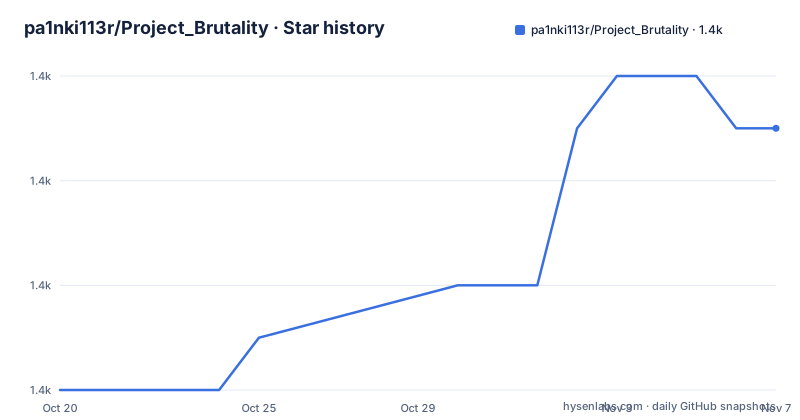
- pa1nki113r/Project_Brutality1,355 ★ · +5
| Repository | 2026-10-20 | 2026-11-07 |
|---|---|---|
| pa1nki113r/Project_Brutality | 1.4k | 1.4k |
5 Stars in the last 18 days, measured from the daily GitHub snapshot. Compare with other projects
Editorial analysis
The master branch is the product, and the README says so
Project Brutality is the primary repository for collaborative efforts between Doom developers, and the description is unusually blunt about what you are looking at. This is the bleeding-edge version that is constantly being developed on, and not meant in any way shape or form to be representative of the final version of the mod.
That single sentence should shape your whole expectation. There is no stable artefact to download and forget. What you install is a snapshot of a moving branch, and the project is telling you that the state of the tree today may not be the state next week, and that you should not treat it as a finished product.
The release history shows a versioning scheme that the project calls a new versioning method. The tags are 0.1.0A, described as the initial release using the new versioning method, on 2024-06-03; 0.2.0, tagged as Tagged Release PB 0.2.0A, on 2024-12-13; and 0.4.1, described as Project Brutality 0.4.1, on 2026-03-14.
So the tags are sparse, roughly six months apart at first and then longer, and the numbering has an A suffix on the early ones, which suggests the project was working out how to number a mod that does not release on a schedule. The gap between 0.1.0A in June 2024 and 0.4.1 in March 2026 also tells you that a tagged release is a rare event, which is consistent with a project whose main distribution channel is the branch.
The repository is not archived and the last push was on 2026-09-21, so the development is current. The primary language in the repository metadata is ZenScript, and the README's own explanation of what that means for you is the single most useful practical fact in it.
For anyone deciding whether to depend on this, the split is clear. Use the master branch if you want the newest content and accept that it moves. Use a tagged release if you need a fixed point. The project supports both and the README documents both.
Installing it: GZDoom, an IWAD or Freedoom, and the zip from the branch
The installation section is concrete and assumes you know a little about Doom.
The first requirement is the latest version of GZDoom. The footnote to that line is the important one, and it reads: PB3.0 uses ZScript, anonymous functions, and other features that zandronum does not support. So the runner is not interchangeable, and if you have a Zandronum setup you need to change it. The footnote also points at the mobile options, Delta Touch for Android and GenZD for iOS, which are the same engine with a touch interface.
The second requirement is either a copy of one of the official IWADs, which the footnotes tie to the Steam DooM classics Complete bundle and the GOG DooM II and Final Doom and Ultimate Doom offerings, or Freedoom Phase 1 and 2, which is a free alternative. That is a licence-sensitive point worth understanding: the mod itself is one thing, and the game data you run it against is another, and a total conversion needs the latter. Freedoom is the answer for anyone who does not want to buy a commercial Doom release, and Phase 1 and 2 are the phases the project expects.
The third requirement is the mod itself, and here is where the bleeding edge branch becomes concrete. To download the latest build, you scroll to the top of the repository, click the green Code button and then Download Zip. The README notes that if you are on mobile and do not see the button, you need to turn on desktop view, which is a small thing that reflects how the workflow actually works in practice.
The result is a zip of the repository contents, which is then loaded as a mod by the engine. There is no installer, no package manager and no build step, which is the right shape for a mod that is distributed as source-like data files and script.
The README also points at two getting started resources for people who are new to Doom modding rather than new to this mod: a video on how to get started with Doom mods after 27 years, and a written guide on basic installation requirements for Doom mods. And the recommendation for anything beyond the mod itself is to use a front-end launcher, with ZDL, DoomRunner and SSGL named, each described in the README by the kind of player it suits.
The repository is a Doom resource tree, not a source directory
The top level listing of this repository is unusual compared with most projects, and it is worth reading as a description of how the mod is organised rather than as a list of files.
There is no src/ directory in the usual sense and no build system, but there is a SRC/ directory among the uppercase names, and there are directories for GRAPHICS/, HIRES/, MODELS/, SOUNDS/, SPRITES/, ACS/, BMAP/ and PATCHES/. Those are the resource directories the engine reads, and the naming convention in full caps is the engine's own convention rather than a house style.
Alongside them sit the definition files that tell the engine what the resources mean. DECORATE and DECALDEF and DECALDEF.BulletHoles are three separate files, which tells you decals and their bullet hole variant are defined apart from each other. There are several SNDINFO files, one per sound category: the main SNDINFO.txt plus SNDINFO.Atmosphere_Exterior, SNDINFO.Atmosphere_Interior, SNDINFO.ChexCompatibility, SNDINFO.Footsteps, and then a set named for what they describe, SNDINFO.PBDoomguy and Marines, SNDINFO.PBGore and Nashgore, SNDINFO.PBMonsters, SNDINFO.PBWeapons, SNDINFO.PDA, SNDINFO.WeaponVolumeBalancing and SNDINFO.Whizby. The same pattern appears in the textures area, with Textures.txt alongside TEXTURES.BloodyBarrels, TEXTURES.Plasma, TEXTURES.RETICAL, TEXTURES.RLAmmo, TEXTURES.SGLDrums and TEXTURES.pickups, plus a Textures.ExecutionIndicator and a Textures.PBVP.txt.
The parallel structure across SNDINFO and TEXTURES is the interesting part. Both are category-split into a main file plus one file per subject area, and both use descriptive names rather than opaque identifiers. That is a deliberate authoring convention, and it is what makes a mod of this size navigable by people who did not write it. A contributor looking to adjust weapon sound balance has a file named for it rather than a table entry to hunt for.
The remaining files are the standard resource definitions: ANIMDEFS for animation sequences, MENUDEF.txt, SBARINFO for the status bar, MAPINFO-style content, TERRAIN, TRNSLATE for translucency, KEYCONF.txt, Fontdefs.txt, LOADACS.txt, CVARINFO, and PATCHES/ for file patches. There are also a PBTEST.wad, a DECORATE-style PDAMONST and PDAWEAP and PDAMOEPT trio, and a couple of large PNG assets, NOTCH.png, STARTUP.png and STARTUP_10th.png, which are the title screen images. DetailedCredits.txt is the one file that is plainly meant to be read by a person rather than by the engine.
A note on the primary language being ZenScript: the script in SRC/ is what gives the mod its behaviour rather than its appearance, and it is the part that requires GZDoom.
Why a front-end launcher is recommended once you add anything
The README makes a distinction that is easy to skim past and important to understand for anyone who goes beyond the base mod.
When loading more than just PB, it is highly recommended you use a front-end launcher. Three are named, and the README describes each by the player it suits, which is a small but revealing detail about how the project thinks about its audience.
ZDL is described as a rather simple, yet extremely flexible launcher. DoomRunner is described as the one you want if you want something just as flexible or newer than ZDL. And SSGL is described for the first timer, the casual player, a Doomsday Engine launcher fan, or for someone who just wants something with more personality. Those are three quite different player profiles, and the fact that the project links three launchers rather than one says it expects a mixed audience, some of whom arrived from ZDoom and some of whom came in through the Doomsday Engine ecosystem.
The reason a launcher is needed at all is that the mod is distributed as a branch snapshot. The standard way to load a Doom mod is to point the engine at an IWAD and an optional mod file, and that works fine for the base mod. But the moment you add anything, the configuration becomes a set of files in a particular order, and the ordering matters. A launcher is a tool for managing that set, for toggling add-ons on and off, and for keeping the base game and the mod separated from the extra content.
There is a related reason in the project's own rules. The add-on section says add-ons should be made for the master branch to avoid confusion, and it separates the mod from the add-ons in the bug reporting policy. That separation has a physical counterpart in how you install things, and the launcher is what enforces it. With a launcher, the base mod and each add-on are distinct entries, so you can turn one off and see whether the bug persists. Without one, you are hand-editing a load order in a text file, and when a problem appears you cannot easily bisect it.
So the launcher recommendation is not a style preference. It is the mechanism that makes the mod-plus-add-ons configuration debuggable, which is the same problem the issue tracker policy is designed around.
The community rules, which are unusually specific
The feedback and bug reporting section is where this project states its position most clearly, and the rules are worth reading carefully because they change who does what.
Issues are reserved for bug reports only. Suggestions, opinions and questions go to the Discord server, and the README says to check the rules and faq channels there, along with each channel's pins and description.
There is a filter on the bug reports themselves. You have to make sure the bug is with the mod itself and not due to any add-ons, because the team is not responsible for any addons, and the clarification is that even if an add-on is made by a member of the dev team, it is not the team's responsibility to fix it, that is up to the add-on's creator. And you have to check the issue has not already been posted.
That is a deliberate division of labour. The mod and the add-ons are separate artefacts with separate maintainers, even when the same people are involved, and the issue tracker is the mod's tracker only. A user who has three add-ons installed has a configuration that nobody but them assembled, and the project is refusing to debug other people's configurations in its tracker.
The add-on section then sets out the etiquette, and it is a code of conduct for modders rather than for players. Looking for add-ons, or a place to share a personal add-on, is handled by the Discord server and the ModDB page. The rules are: ask for permission if possible, and respect the decision if refused. If the modder is not around to ask, credit them, and if the modder is unknown but it is not yours, do not claim it as your own. If the modder asks you to remove their material from your add-on, do it. And add-ons should be made for the master branch to avoid confusion.
That last rule is a direct consequence of the bleeding edge model. An add-on written against a tagged release would be built against a different tree from the one users are running, and the mod's own versioning is not aligned with anything a third party could target reliably. Building add-ons against master is a request for contributors to accept the same churn the mod itself accepts.
There is also a note that will stop anyone filing a request: MOTION BLUR ON SPRITES IS AN ARTISTIC CHOICE, NOT LAZINESS. NO, WE WILL NOT CHANGE IT. And the repository listing shows the corresponding asset, MBlur.fp, a flatsprite patch file. A file that exists to implement a decision the maintainers have explicitly closed off.
Editorial conclusion
Project Brutality fits a Doom player who wants the current state of a well known total conversion and is willing to run a bleeding edge branch rather than a tagged release, and a modder who wants to write add-ons against a project with an active community. It is the wrong choice if you need a stable, versioned artefact, because the README is explicit that the master branch is not the final version, and the wrong choice if your runner is Zandronum, since the mod uses ZScript and anonymous functions that Zandronum does not support. Before installing, decide whether you want the master branch or the tagged 0.4.1 release, and read the feedback policy, because issues are reserved for bugs in the mod itself and everything else belongs in the Discord channels.
Frequently asked questions
What is Project Brutality and how do I install it?
It is a Doom engine total conversion in ZScript. You need the latest GZDoom, either a copy of an official IWAD or Freedoom Phase 1 and 2, and then you download the zip from the master branch using the Code then Download Zip button on the repository page. It runs as a mod loaded by the engine.
Can I use Project Brutality with Zandronum?
No. The README states that PB3.0 uses ZScript, anonymous functions and other features that zandronum does not support, so the runner has to be GZDoom, or one of its mobile equivalents such as Delta Touch on Android or GenZD on iOS.
Should I install the master branch or a tagged release of Project Brutality?
The README says the master branch is the bleeding-edge version that is constantly being developed on and is not meant in any way to be representative of the final version of the mod. So use master for the newest content and accept that it moves, and use a tagged release such as 0.4.1 if you need a fixed point.
Where should I report a bug or suggest a feature for Project Brutality?
Issues are reserved for bug reports about the mod itself, and you are asked to rule out add-ons first, because the team is not responsible for add-ons even when a dev team member wrote one. Suggestions, opinions and questions go to the Discord server, where the README asks you to check the rules and faq channels and the channel pins.
Official sources
Add this badge to your README
If you maintain this project, the badge below links readers to this analysis and shows its maintenance status from the daily GitHub snapshot. Paste the markdown into your README; add ?metric=license or ?metric=stars to the image URL for a different field.

[](https://hysenlabs.com/projects/pa1nki113r-project-brutality)Star history chart for your README
[](https://hysenlabs.com/projects/pa1nki113r-project-brutality)Was this useful?