Calendr: the macOS menu bar calendar that parses what you type
Menu bar calendar for macOS - MVVM | RxSwift | AppKit | SwiftUI
At a glance
- What is it?
- A 2,300-star menu bar calendar for macOS built on EventKit, with a natural-language parser that turns one line of text into a dated, timed, calendar-assigned event.
- Who is it for?
- Calendr wins on a narrow, specific bet: that most calendar friction comes from dialog boxes, not from missing features. Move the calendar to the menu bar, keep it readable at a glance, and then let one text field absorb the date, the time, the duration and the calendar name at once.
- Can I use it commercially?
- Yes. MIT is a permissive licence: you can use, modify and sell software built on it, as long as you keep its copyright and licence notices.
- Is it still maintained?
- Yes. The repository last received commits 2 days ago.
- What is it written in?
- Mainly Swift, according to GitHub's language statistics.
Answers come from the project's GitHub data, last synced on November 7, 2026, and from our analysis. They are not legal advice.
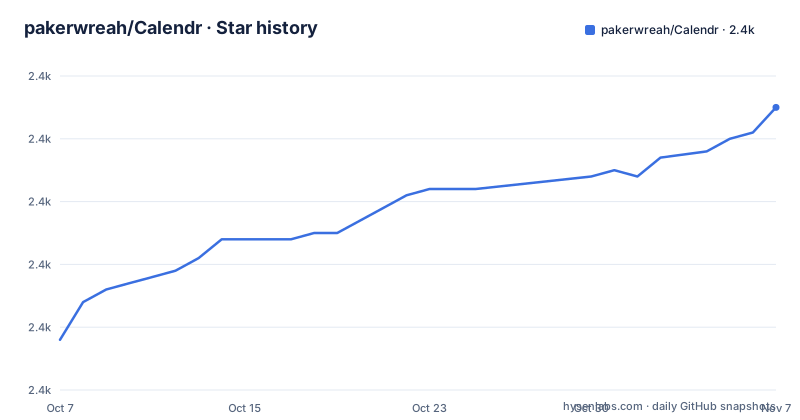
Star history
- pakerwreah/Calendr2,435 ★ · +37
| Repository | 2026-10-07 | 2026-11-07 |
|---|---|---|
| pakerwreah/Calendr | 2.4k | 2.4k |
37 Stars in the last 31 days, measured from the daily GitHub snapshot. Compare with other projects
Editorial analysis
A calendar that lives in the menu bar
Calendr is a native macOS app that replaces the calendar app you probably never open. The repository has 2,359 stars, 101 forks, an MIT license, Swift as its language, and its last push was 2026-09-28. Four issues were open at the time of writing, which is a very quiet issue tracker for a project this size.
The description line is exactly what it sounds like: a menu bar calendar. What that means in practice is that your date, your next event, and often your meeting join status are always one click away in the top right of the screen, without an app switching into the foreground and without stealing window focus.
Underneath, it is an EventKit client. Calendr reads the calendars your macOS account already has, which is why there is no account setup step and no separate sync engine. The system calendar database is the single source of truth, and Calendr is a reader of it. It also covers reminders and shows YouTube thumbnails in event details, a small feature that arrived in v1.25.3 and says more about the author than the release note suggests.
The macOS integration goes deeper than a status item. EventKit on macOS exposes a built-in menu bar calendar with a single toggle button, so Calendr exists partly to replace an Apple default with something that shows more at a glance. The v1.25.5 release fixing missing context menu icons in macOS 27 is a reminder of how much of that surface depends on system behaviour.
The natural-language parser is the actual product
Everything else in Calendr is table stakes for a calendar. The one feature that is not is natural-language event entry, and it is the feature the README spends the most space on.
You type the title together with optional instructions, and Calendr highlights what it recognized as you type, fills the event fields immediately, and strips the instructions out of the saved title. The canonical example is:
Pickleball with Tom next Friday from 10 to 12 /sportThat single line sets the title, resolves next Friday, creates a two hour block, and fuzzy-matches the calendar whose name contains sport. The supported vocabulary is listed rather than implied:
Dates include `today`, `tomorrow`, `yesterday`, `in a week`, `in 3 days`, `on Friday`, `at Friday`, `next Friday` and `August 12`. Times include `at 14`, `at 2pm`, `at noon`, `tomorrow morning`, `from 10 to 12` and `at 22 until 1`. Relative starts and durations are `in 2 hours`, `for 30 minutes`, `for 2 hours` and `for 4 days`. All-day events come from `all day` or `full day`. And a slash followed by part of a calendar name selects that calendar.
Two design decisions here are more interesting than the phrase list. First, numeric dates follow the date order configured by the active locale, so `3/4` means different days on different machines and the app does not try to override you. Second, the first word is always preserved as title text, which means the parser can never swallow the thing you most wanted to say. Those two choices are what separate a parser you can trust from one that silently mangles your input.
Localization decides whether the parser works for you
English and Czech instructions are supported, and the parser follows Calendr's own preferred localization automatically rather than your system language. That is a deliberate choice, and it cuts both ways. A Czech user running macOS in English gets the English parser, and an English user running macOS in Czech gets the Czech one.
Localizations that the parser does not support are not locked out. The README says unsupported localizations can still opt in to the English parser, which is a sensible fallback since most people write their calendar entries in whatever language their coworkers use.
The feature can be toggled in Settings and defaults to enabled for English and Czech. So if your locale is something else, the parser is there if you want it and silent if you do not.
The tree shows how seriously the non-English side of the project is taken. `MISSING_TRANSLATIONS.md` at the root is a running list of gaps, and the v1.25.3 release shipped community Japanese and Italian updates as separate credited contributions, which is what a maintained translation program looks like in practice rather than in a wiki page. For an app whose headline feature is a parser, having a public file tracking missing strings is an unusual amount of care about the unglamorous half of the problem.
Two hidden features, one honest limitation
Under a heading the README calls hidden features, there are two capabilities that are documented but not advertised on the menu.
The first is multiple timezones in the menu bar. You define a format with a three-part pattern:
HH:mm | HH:mm@GMT+2 'LT' | HH:mm@GMT-3 'BR'which renders as `15:00 | 17:00 LT | 12:00 BR`. Each segment carries its own GMT offset and a short label, so a distributed team can keep a colleague's working hours permanently visible without opening anything. This is the kind of small thing that turns a status item into something people stop replacing.
The second is a URL scheme for opening a date, tracked in issue 314. The mapping is a small table:
calendr://date/december
calendr://date/feb%2010%202025
calendr://date/2nd%20of%20September%202025
A bare month defaults to the current date and year. Spaces are percent-encoded.
And then the README admits the limitation plainly: relative dates work only for `today`, `yesterday` and `tomorrow`, and `next week` or `last month` will not resolve. The reason given is that the underlying date resolution relies on `NSDataDetector`, and the author attributes the boundary to how `NSDataDetector` behaves rather than to a design choice. This is the best kind of limitation note in a README, because it tells you the ceiling is a system framework boundary you could replace, not a decision you have to work around.
Where the README stops and the code begins
The repository description reads: `Menu bar calendar for macOS - MVVM | RxSwift | AppKit | SwiftUI`. Those four labels are the entire architectural claim, and the README does not expand on any of them. There is no architecture section, no diagram, no explanation of where SwiftUI ends and AppKit begins, and no mention of RxSwift anywhere in the prose.
The file tree gives hints but not answers. There is a `Calendr.xcodeproj`, which is where a normal AppKit app with a SwiftUI layer would live, and alongside it sit `Package.swift` and `Package.resolved`, which is the Swift Package Manager route and is where a reactive library dependency such as RxSwift would be declared. There is also a separate `CalendrLauncher` directory, implying a second target whose job is unclear from the outside, possibly a helper or CLI component. Then `Calendr/` for the app itself, `CalendrTests/` for tests, `utils/` for tooling, `resources/` for assets and images, and three build files at the root: `assemble.sh`, `assemble.env` and `assemble.entitlements`.
The honest reading is that the four labels are accurate as inventory and silent as explanation. `Package.swift` and `Package.resolved` exist, which means the project is built with the Swift toolchain's dependency resolution in play, but their contents are not part of what you can see from the outside, so whether RxSwift is a current dependency or a leftover is a question you answer by reading the package manifest rather than by trusting the topic tags. Topics on the repository do include `mvvm` and `rxswift`, which confirms the intent without confirming the implementation.
For a reader looking for a reference implementation of MVVM with RxSwift bridging into SwiftUI, that gap is the main cost of this project. For a person who wants a menu bar calendar, it costs nothing.
Installing it, and the build pipeline behind it
There are three installation paths, and the README routes you to all three through a row of badges rather than one canonical instruction.
The first is a GitHub issue, issue 217, which is the How to install link. That is unusual for a released macOS app and worth knowing about before you click it. The second is a Homebrew cask, and it does not live in this repository: the cask is maintained in a separate `pakerwreah/homebrew-calendr` repository, so `brew install` pulls from someone else's manifest for this app. The third is the releases page, which is where the version badge and the download counters both point. Releases are frequent and specific: v1.25.5 fixed read-only meeting status, wrong `(me)` attribution on subscribed calendars and missing context menu icons in macOS 27; v1.25.4 added overdue reminders in the menu bar plus crash and scroll bar fixes; v1.25.3 added YouTube thumbnails, blocked incompatible updates, and took community translations.
The badges also expose the engineering setup more directly than the prose does. There is a GitHub Actions badge for unit tests, a Bitrise badge alongside it for iOS and macOS builds, and a Sentry badge wired to the issue tracker, which means crash reports from users arrive as filed issues rather than in a dashboard nobody opens. Two CI providers running in parallel is a redundant choice, and in a solo-maintained project it usually reflects a migration rather than a preference.
The repository also carries `AGENTS.md`, `CLAUDE.md` and an `.agents/` directory at the root. Those are instructions for coding agents committed into the repository, which tells you the maintenance workflow includes delegating work to assistants. The default branch is `master`, not `main`, and it is MIT licensed with the license file at the root.
Editorial conclusion
Calendr wins on a narrow, specific bet: that most calendar friction comes from dialog boxes, not from missing features. Move the calendar to the menu bar, keep it readable at a glance, and then let one text field absorb the date, the time, the duration and the calendar name at once. The parser is documented well enough to be predictable, it follows your locale's date order, and the phrases it understands are the phrases people actually type. That combination is rare, and it is the reason the project has 2,359 stars and 101 forks on a codebase of this size. The tradeoffs are equally clear. Nothing about the architecture is explained, so adopting it as a reference for MVVM with RxSwift means reading Swift rather than reading the README. Installation is three separate paths, one of which lives in an unrelated repository. And the calendar database is read through EventKit, which means full disk access, sandbox exceptions and the fact that Calendr only ever sees the calendars you have already granted it. Try the feature on a throwaway event first, then decide whether the menu bar is where you want to live.
Frequently asked questions
How do I install Calendr on macOS?
Three routes exist. The README's How to install badge points at GitHub issue 217, a Homebrew cask is maintained in the separate pakerwreah/homebrew-calendr repository, and the releases page carries the latest build. Pick one and verify the checksum if you care about which channel you came from.
How does Calendr's natural-language event entry work?
You type the title plus optional instructions in one field. Calendr highlights what it parsed, fills the event fields as you type, and removes the instructions from the saved title. It understands dates such as `next Friday` or `in 3 days`, times such as `at 2pm` or `from 10 to 12`, durations such as `for 30 minutes`, all-day markers, and a `/name` suffix that fuzzy-matches a calendar.
Which languages does the Calendr parser support?
English and Czech instructions are supported out of the box, and the parser follows Calendr's preferred localization automatically rather than the system language. Other localizations can opt in to the English parser, and the feature can be turned off in Settings. The repository also tracks translation gaps in MISSING_TRANSLATIONS.md.
Official sources
Add this badge to your README
If you maintain this project, the badge below links readers to this analysis and shows its maintenance status from the daily GitHub snapshot. Paste the markdown into your README; add ?metric=license or ?metric=stars to the image URL for a different field.

[](https://hysenlabs.com/projects/pakerwreah-calendr)Star history chart for your README
[](https://hysenlabs.com/projects/pakerwreah-calendr)Was this useful?