Palantir's osquery baseline config, split into endpoint and server profiles
A repository for using osquery for incident detection and response
At a glance
- What is it?
- This repository is a starting osquery deployment for production fleets: a Classic tree of config and flag files for self-managed hosts, a Fleet tree of YAML for Kolide Fleet, and the packs each profile expects. It is opinionated, and it quietly assumes how much of your day an endpoint is awake.
- Who is it for?
- Use this repository when you want a working osquery baseline for macOS and Windows laptops or Linux servers and you are willing to inherit its assumptions, in particular the 28800 second interval, the disabled Windows event processing and the auditd requirement on servers. Do not use it as a finished detection engineering programme, because it ships packs rather than triage logic.
- Can I use it commercially?
- Check first. The repository uses a licence we do not classify automatically, so read its LICENSE file before any commercial use.
- Is it still maintained?
- Yes. The repository last received commits 36 days ago.
- What is it written in?
- GitHub does not report a main language for this repository.
Answers come from the project's GitHub data, last synced on November 7, 2026, and from our analysis. They are not legal advice.
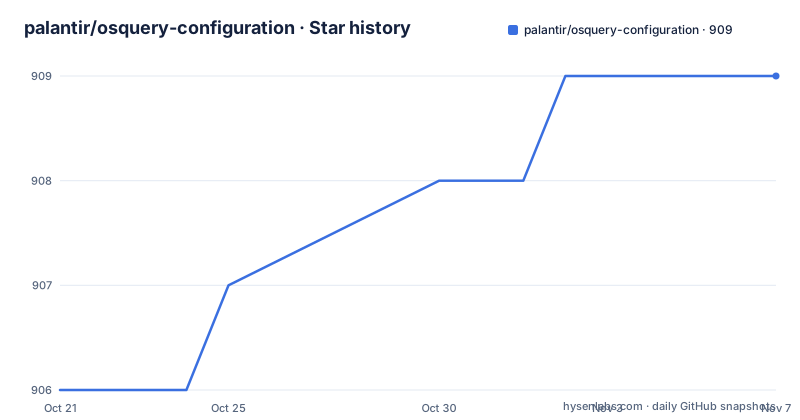
Star history
- palantir/osquery-configuration909 ★ · +3
| Repository | 2026-10-21 | 2026-11-07 |
|---|---|---|
| palantir/osquery-configuration | 906 | 909 |
3 Stars in the last 17 days, measured from the daily GitHub snapshot. Compare with other projects
Editorial analysis
A template for deploying osquery in production
The repository exists to give an organisation a head start on rolling osquery out for incident detection and response. It is described as a baseline template for any organisation considering a deployment of osquery in a production environment, and it is the companion to a Palantir blog post about running osquery across an enterprise. The philosophy behind it is stated plainly: queries likely to be useful to a large share of users should live in the upstream osquery project itself, and the ones that were broadly useful were already contributed there, as the unwanted-chrome-extensions query pack and additions to the windows-attacks pack.
What remains in this repository are the packs tuned to a specific environment, kept as a reference for other organisations. The stated caveat is worth repeating because it decides how you use the tree: osquery works best when operators have carefully considered which datasets to collect and what the data will be used for. The repository does not make that choice for you. It hands you configuration that collects a lot, and the decisions about volume, retention and what to alert on remain with the person deploying it.
The people it is for are platform and security engineers who already know what osquery is and want a defensible starting configuration rather than a blank page.
Two deployment models, Classic and Fleet
The repository splits into two top level directories that reflect two ways of running osquery at scale. The Classic directory holds configuration files for a standard osquery deployment, where each host carries its own config and flags and talks to a server you operate. The Fleet directory holds YAML files intended for import into Kolide's Fleet osquery management tool.
That split matters operationally. Classic is a set of files you copy onto machines and manage yourself, so the deployment is a file distribution problem. Fleet is a central push model, so the deployment is a fleetctl exercise and the configuration is versioned in a control plane instead of on the host. The Fleet path also has a version floor, since the quickstart asks for Fleet version 2.0.0 or higher.
Inside both trees you will find the same two subdirectories. Endpoints is tailored to macOS and Windows machines that are not expected to be online continuously. Servers is tailored to Linux servers, where the hosts are assumed to be up all the time and auditing of processes and network events is switched on, which means a much higher volume of logs coming back from the agent. Choosing the wrong profile is the most common way to get bad results from this baseline, because the query intervals and the event volumes are calibrated for a specific uptime assumption.
The 28800 second interval is a deliberate hack
The most interesting decision in the endpoint configuration is a number. Many queries in the Endpoints folder are set to an interval of 28800, and the documentation explains why. The osquery interval timer only moves forward while a host is online, and the expectation is that a laptop is online for roughly eight hours a day, which is 28800 seconds. Setting the interval to that value means a query runs roughly once per day of uptime for a device that is awake for a working day.
This is a real design idea rather than a number copied from elsewhere. A laptop that is closed for sixteen hours does not burn query slots, and the schedule stays aligned with the working day instead of drifting. It also means the query cadence on an intermittently connected endpoint is much coarser than the interval on a server, which is exactly what you want for a device that is rarely connected and for a server that never goes dark.
The trade-off is that this profile is a poor fit for a fleet of always-on workstations or for monitoring that expects continuous visibility. Changing the interval is easy in the config files, but changing it wholesale moves you back toward the volume problem the setting was chosen to avoid. Treat 28800 as a decision to evaluate for your own device uptime rather than a default to inherit without checking.
The server profile asks you to remove auditd
The Servers configuration is a Linux profile and it assumes hosts that are online at all times, with auditing mode enabled for processes and network events. Two operational constraints come with it. The repository advises disabling or removing auditd for this profile because it may conflict with osqueryd. Before changing a host, test the configuration in a lab and assess the audit events, retention and compliance requirements that auditd currently serves; osquery is not automatically a drop-in replacement for that coverage.
Second, the profile requires the ossec-rootkit.conf pack to be found at the path /etc/osquery/packs/ossec-rootkit.conf. The server layout in the documentation puts that file inside a packs directory beside osquery.conf, osquery.db and osquery.flags, and the pack must be in place before the agent starts, because the configuration files reference packs in the packs folder and may generate errors if started without them. The README warns that missing packs may produce errors, so verify the file layout and inspect the agent logs before deploying.
The subscriber for user_events is disabled in this profile, and the documentation warns that the configuration enables process and network auditing, so the README warns that log volume can be much higher than for an endpoint. Measure actual event rates and collection capacity in the target environment rather than assuming a particular growth rate or complete audit coverage.
Windows event logs are handed to another tool
The endpoint profile for Windows includes a flag file that disables events in osquery. The reason given is that the setup already uses Windows Event Forwarding and there is no need for osquery to process Windows event logs, so the same event source is read by a dedicated pipeline rather than twice. On macOS, file integrity monitoring is enabled for the specific files and directories defined in the endpoint osquery.conf.
The flags in the endpoint configuration also enable TLS client mode in osquery and assume the agent is connecting to a TLS server. Non-TLS flag files are included as well, for local testing, which matters because a lab instance on a laptop should not need a certificate authority before you can see any results. The quickstart for the Classic path is correspondingly short: install osquery, copy the osquery.conf and osquery.flags files onto the system while matching the directory layout, then start the agent. On Linux and MacOS the documented start command is sudo osqueryctl start, on Windows it is Start-Process osqueryd, and logs are written to /var/log/osquery on Linux and MacOS and to c:\ProgramData\osquery\logs on Windows.
The configuration author also recommends spinning up a lab environment before deploying any of these configurations to a production environment, and that advice is more than a formality given the auditd and event-forwarding assumptions baked in.
Applying the Fleet profile with fleetctl
The Fleet path is the part of the repository that is easiest to reproduce. You clone the repository and apply the endpoint options, the macOS configuration and the Windows configuration with fleetctl, then apply every pack in turn. The documented commands are:
git clone https://github.com/palantir/osquery-configuration.git
fleetctl apply -f osquery-configuration/Fleet/Endpoints/options.yaml
fleetctl apply -f osquery-configuration/Fleet/Endpoints/MacOS/osquery.yaml
fleetctl apply -f osquery-configuration/Fleet/Endpoints/Windows/osquery.yaml
for pack in osquery-configuration/Fleet/Endpoints/packs/*.yaml;
 do fleetctl apply -f "$pack"
done
The loop matters. Applying the three named files leaves the packs unapplied, and the configuration files reference those packs, so a Fleet server that receives the base configuration without the packs can behave oddly. Applying the packs in a loop is the intended sequence, not an optional extra.
For the self-managed path, the documented shell session starts with a clone of the same repository, copies the Linux server files into the osquery directory and starts the service:
$ git clone https://github.com/palantir/osquery-configuration.git
$ cp -R osquery-configuration/Fleet/Servers/Linux/* /etc/osquery
$ sudo osqueryctl start
The resulting directory layout is the shape the configuration expects:
/etc/osquery
├── osquery.conf
├── osquery.db
├── osquery.flags
└── packs
    └── ossec-rootkit.conf
Note that the tree lists osquery.db alongside the configuration. That file is the local state store, and it belongs to the running agent rather than to the configuration you copied, so treat the copy step as something to check after the first run rather than something to version.
Some packs live upstream and will drift from your copy
Not every pack in this repository is maintained here. The documentation points to several packs that are maintained in the official osquery project, including ossec-rootkit.conf, osx-attacks.conf, unwanted-chrome-extensions.conf and windows-attacks.conf, and asks you to view them through those links so that you receive the most up to date version of the pack. The server profile, meanwhile, expects a copy of ossec-rootkit.conf at /etc/osquery/packs/ossec-rootkit.conf on the host.
That is a genuine duplication problem, and the repository does not solve it. The upstream packs are linked as live URLs, so they change without a commit here, while a host that already has the file on disk keeps whatever version it received when the file was copied. Over time the two drift. The local packs, the ones specific to this environment, are the files that carry the interesting content: performance-metrics.conf, security-tooling-checks.conf, windows-application-security.conf, windows-compliance.conf and windows-registry-monitoring.conf.
There is no release mechanism to help. The repository has no GitHub releases, the licence field on the repository says Other with a custom licence GitHub cannot classify, and a LICENSE.md file sits in the root for you to read before you redistribute any of it. The last push was on 2026-10-02, so the tree is still being touched, but the CircleCI configuration in the root is the only sign of an automated check. Treat the local packs as a baseline you fork and own, and pull the upstream ones from their own project on a schedule you control.
Editorial conclusion
Use this repository when you want a working osquery baseline for macOS and Windows laptops or Linux servers and you are willing to inherit its assumptions, in particular the 28800 second interval, the disabled Windows event processing and the auditd requirement on servers. Do not use it as a finished detection engineering programme, because it ships packs rather than triage logic. Before you deploy, read LICENSE.md, since the licence field on the repository says Other, then confirm in a lab that the packs path in the server profile and the Windows event forwarding setup match your build.
Frequently asked questions
What is the difference between the Classic and Fleet directories in the Palantir osquery configuration?
The Classic directory holds configuration files for a standard osquery deployment that you copy onto hosts yourself, while the Fleet directory holds YAML files meant to be imported into Kolide's Fleet osquery management tool. Both contain Endpoints and Servers subdirectories.
Why do many queries in the endpoint packs use an interval of 28800?
The osquery interval timer only advances while a host is online, and the endpoint profile assumes a laptop is online for about eight hours a day, which is 28800 seconds. Setting the interval to that value makes the schedule align with the working day instead of drifting.
What must I do before starting osqueryd with the server configuration?
The server profile expects the ossec-rootkit.conf pack to exist at /etc/osquery/packs/ossec-rootkit.conf, and it asks you to disable or remove auditd because it may conflict with osqueryd. The documentation also recommends testing in a lab environment before deploying to production.
Does the endpoint configuration read Windows event logs through osquery?
No. Events are disabled on Windows through the --disable_events flag in the osquery.flags file, because the setup uses Windows Event Forwarding instead and does not need osquery to process Windows event logs.
Which Fleet version do I need to use the YAML configuration?
The quickstart asks for Fleet version 2.0.0 or higher, then has you enrol hosts, configure fleetctl and apply the endpoint options, the macOS and Windows YAML files, and each pack in the packs folder.
Official sources
Add this badge to your README
If you maintain this project, the badge below links readers to this analysis and shows its maintenance status from the daily GitHub snapshot. Paste the markdown into your README; add ?metric=license or ?metric=stars to the image URL for a different field.

[](https://hysenlabs.com/projects/palantir-osquery-configuration)Star history chart for your README
[](https://hysenlabs.com/projects/palantir-osquery-configuration)Was this useful?