parallel-ssh: an asynchronous parallel SSH client library
Asynchronous parallel SSH client library.
At a glance
- What is it?
- parallel-ssh is a Python library for running SSH commands across many hosts at once, from a handful to hundreds of thousands, with minimal load on the client. It is not built on the pure-Python SSH stack: it drives libssh2 and libssh through native bindings, which is where both its performance and its installation friction come from.
- Who is it for?
- Adopt parallel-ssh if you routinely run a command across a fleet of machines and the per-host overhead of a pure-Python SSH client is what is slowing you down, and if you can install native wheels. Do not adopt it for a single host, where the single host client is more than you need, and do not assume the exit code is there when you read the output, because it is a dynamic property that returns None until the remote command has finished.
- Can I use it commercially?
- Yes, with conditions. LGPL-2.1 is a weak copyleft licence: you can use it inside commercial and closed-source software, but if you distribute changes to its own files, you must publish those changes under the same licence.
- Is it still maintained?
- Yes. The repository last received commits 94 days ago.
- What is it written in?
- Mainly Python, according to GitHub's language statistics.
Answers come from the project's GitHub data, last synced on November 7, 2026, and from our analysis. They are not legal advice.
Star history
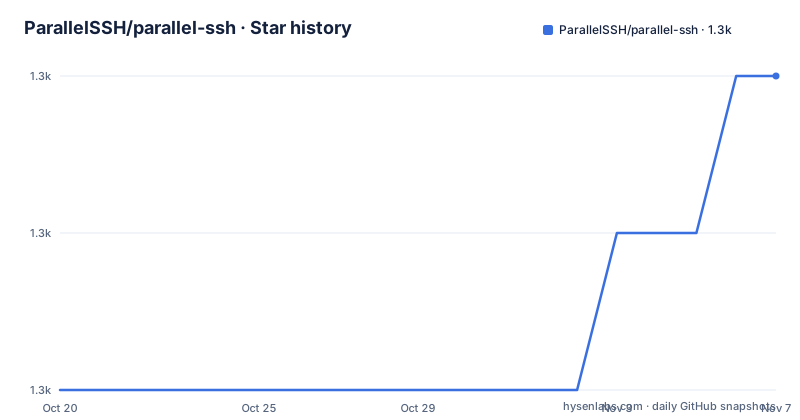
- ParallelSSH/parallel-ssh1,287 ★ · +2
| Repository | 2026-10-20 | 2026-11-07 |
|---|---|---|
| ParallelSSH/parallel-ssh | 1.3k | 1.3k |
2 Stars in the last 18 days, measured from the daily GitHub snapshot. Compare with other projects
Editorial analysis
Hundreds of hosts, one client
parallel-ssh is an asynchronous parallel SSH client library. The description of what it is for is in the second line of the README: run SSH commands over many, hundreds or hundreds of thousands, number of servers asynchronously and with minimal system load on the client host.
The scale number is the interesting one. Running a command on a thousand machines is not the same problem as running it on ten, because the cost is usually per-connection overhead rather than the work the command does. A client that creates a thread per host, or that does a lot of work per byte of protocol, falls over at a scale where the network is not the bottleneck. The claim here is that this one does not.
The implementation choice that follows from that is stated next: native code based clients with extremely high performance, making use of C libraries.
Installation is a pip install, with one caveat that is worth reading before you hit it:
pip install parallel-sshAn update to pip may be needed to be able to install binary wheels, and the README gives the two-command form for that case, pip install -U pip followed by pip install parallel-ssh. The wheels are binary because the library binds to C libraries, so a pip too old to handle them is a real installation failure rather than a theoretical one.
The licence is LGPL-2.1, the site is parallel-ssh.org, and the documentation is on Read the Docs with a separate page for SFTP and SCP.
The API is deliberately small
The usage example is short enough to hold in your head, and it shows the shape of the whole library.
from pssh.clients import ParallelSSHClient

hosts = ['localhost', 'localhost']
client = ParallelSSHClient(hosts)

output = client.run_command('uname')
for host_output in output:
    for line in host_output.stdout:
        print(line)
    exit_code = host_output.exit_code
Three calls. Build a client with a list of hosts, run a command, and iterate the output, which is an iterable of per-host objects, each with a stdout stream and an exit code. The output of the example is two lines of Linux, one per host, because the host list contains localhost twice.
There is a single host client with a similar API for the case where you do not need the parallel functionality, and it takes a host and a command string rather than a list:
from pssh.clients import SSHClient

host = 'localhost'
cmd = 'uname'
client = SSHClient(host)

host_out = client.run_command(cmd)
for line in host_out.stdout:
    print(line)
exit_code = host_out.exit_code
The parallel client is the reason the library exists, but the single host client matters for a practical reason: code that switches between the two, for instance a script that fans out to a list in production and to one machine when debugging, can keep the same shape.
The examples directory in the repository makes the same point with more complete code, with quickstart.py, parallel_commands.py, single_client.py, sftp_copy_file.py and graph.py.
Two native backends under one API
The default client in parallel-ssh is a native client based on ssh2-python, which is the libssh2 C library, and it is described as offering much greater performance and reduced overhead compared to other Python SSH libraries.
Alternative clients based on ssh-python, which is libssh, are also available under pssh.clients.ssh, and the client documentation holds a feature comparison of the available clients.
That is a genuinely useful design rather than an implementation detail. libssh2 and libssh are different C libraries with different feature sets, and a project that binds to both and exposes them behind one interface lets you choose the backend for the platform, the server implementation or the feature you need, without rewriting your application. The cost is that the intersection of what both clients can do is the portable subset, so a feature available on only one backend is a portability decision you have to make deliberately.
The README's summary of the architecture is that parallel-ssh makes use of clients and an event loop solely based on C libraries, providing native code levels of performance and stability with an easy to use Python API.
The feature list for the native code client then names four properties. Highest performance and least overhead of any Python SSH library. Thread safe, making use of native threads for CPU bound calls like authentication. Natively asynchronous, utilising C libraries implementing the SSH protocol. And significantly reduced overhead in CPU and memory usage.
The thread safety point is the one that surprises people. Authentication is CPU bound and is offloaded to native threads, so a gevent-based event loop is not blocked by the crypto work.
Exit codes are a property, not a value
The section on waiting for completion and exit codes is the part of the documentation that most directly affects how you write your script, and it comes down to one property behaving in an unusual way.
The client's join function waits for all commands in the output to finish, and after join returns the commands have finished and all the output can be read without blocking. Exit codes become available once either standard output is iterated on to completion, or client.join() is called.
The subtlety is that HostOutput.exit_code is a dynamic property. It returns None when the exit code is not ready, meaning the command has not finished, or when it is unavailable due to an error.
output = client.run_command('uname')

client.join()

for host_out in output:
    for line in host_out.stdout:
        print(line)
    print(host_out.exit_code)
which prints the two Linux lines and the two zero exit codes, and it also works if you never read the output at all:
output = client.run_command('uname')

client.join()

for host_output in output:
    print(host_output.exit_code)
The practical rule is that reading a partial output and then treating a None exit code as zero is a bug waiting to happen. Either join first, or iterate the stream to completion.
There is a related detail about interruption. Iteration ends only when the remote command has completed, though it may be interrupted and resumed at any point, and the join and output timeouts section of the documentation covers that.
The argument is about the C libraries underneath
The Why This Library section is more argumentative than most, and it is worth reading because the reasoning generalises beyond this library.
The claim is that other options are either immature, unstable, lacking in performance, or all of the above, and it points at certain self-proclaimed leading Python SSH libraries as leaving a lot to be desired from a performance and stability point of view, and as suffering from a lack of maintenance with hundreds of open issues, unresolved pull requests and inherent design flaws.
The counter-argument is about the libraries parallel-ssh uses rather than about the Python code around them. libssh2 and libssh are long standing mature C libraries that have been in production use for decades and are part of some of the most widely distributed software available today, naming Git itself, OpenSSH, Curl and many others. The claim is that these low level libraries are far better placed to provide the maturity, stability and performance needed from an SSH client for production use.
The summary is that parallel-ssh provides easy to use SSH clients that hide the complexity, while offering stability and native code levels of performance and the ability to scale to hundreds or more concurrent hosts.
The project publishes the comparisons it refers to, with a performance comparison of different Python SSH libraries on its own site and a more complete comparison of alternative SSH libraries in the documentation. That is the right way to make an argument like this, and it is also how you should decide whether to believe it.
Packaging, tooling and the release state
The packaging is a plain setuptools setup.py, and it says the important things about the project.
The version comes from versioneer, which derives it from the version control tags rather than from a number in the file, and the cmdclass comes from the same tool. The packages are found with find_packages, excluding the embedded_server package and the tests, and the install requirements are gevent, ssh2-python and ssh-python, all with minimum versions. The license field is LGPL-2.1-only, and the author is Panos Kittenis, with the source files carrying the LGPL header and the tree holding both COPYING and COPYING.LESSER.
The requirements file lists the same three dependencies, and the dev requirements add the test and lint tooling. The rest of the tree is a mature Python project: setup.cfg, MANIFEST.in, a .coveragerc and .codecov.yml for coverage, a .pre-commit-config.yaml, the CircleCI configuration in .circleci/, the Read the Docs configuration, a .devbots/ directory for bot-driven maintenance, doc/ for the documentation sources, tests/, and a Changelog.rst.
The release history is healthy and recent. Version 2.15.0 was released on 2025-10-12, 2.16.0 the same day, and 2.16.0.post1 on 2025-10-14, the post release being the usual packaging fix after a version bump. The last push was on 2026-08-05, and the repository is not archived.
The one thing to keep in mind is that the library ships binary wheels, so its install story depends on a working compiler or a matching wheel for your platform, and that is where the pip upgrade advice in the README matters.
Editorial conclusion
Adopt parallel-ssh if you routinely run a command across a fleet of machines and the per-host overhead of a pure-Python SSH client is what is slowing you down, and if you can install native wheels. Do not adopt it for a single host, where the single host client is more than you need, and do not assume the exit code is there when you read the output, because it is a dynamic property that returns None until the remote command has finished. Before you start, upgrade pip if a binary wheel fails to install, and read the clients documentation to decide between the libssh2 and libssh backends before you benchmark anything.
Frequently asked questions
What does parallel-ssh do?
It is a Python library for running SSH commands over many hosts, hundreds or hundreds of thousands, asynchronously and with minimal system load on the client host. It provides a parallel client and a single host client with a similar API, and the licence is LGPL-2.1.
How do I install parallel-ssh?
With pip install parallel-ssh. The README notes that an update to pip may be needed to be able to install binary wheels, so the fallback is pip install -U pip followed by pip install parallel-ssh, because the library binds to native C libraries.
Which SSH backend does parallel-ssh use?
The default client is native, based on ssh2-python and the libssh2 C library, and alternative clients based on ssh-python and libssh are available under pssh.clients.ssh. The client documentation carries a feature comparison of the available clients, and both backends are driven through C libraries for native performance.
Why is exit_code sometimes None in parallel-ssh?
HostOutput.exit_code is a dynamic property that returns None when the exit code is not ready, meaning the remote command has not finished or it is unavailable due to an error. Exit codes become available once the standard output is iterated to completion or once client.join() is called.
How active is the parallel-ssh project?
The repository is not archived and the last push was on 2026-08-05, with 2.15.0 and 2.16.0 both released on 2025-10-12 and 2.16.0.post1 on 2025-10-14. The project publishes its own performance comparison of Python SSH libraries and a comparison of alternatives in its documentation.
Official sources
Add this badge to your README
If you maintain this project, the badge below links readers to this analysis and shows its maintenance status from the daily GitHub snapshot. Paste the markdown into your README; add ?metric=license or ?metric=stars to the image URL for a different field.

[](https://hysenlabs.com/projects/parallelssh-parallel-ssh)Star history chart for your README
[](https://hysenlabs.com/projects/parallelssh-parallel-ssh)Was this useful?