lightningcss parses property values into types, not token soup
An extremely fast CSS parser, transformer, bundler, and minifier written in Rust.
At a glance
- What is it?
- A Rust CSS parser, transformer and minifier that Mozilla's own cssparser and selectors crates sit under, shipped as a library, a CLI and an npm package. Its distinguishing claim is type safety on property values, and its distinguishing rule is that output must behave exactly like input.
- Who is it for?
- Choose lightningcss when minified size and predictable output both matter, when you have browser targets you can state, and when you would rather not hand-write prefixes. Be careful with it if your pipeline depends on the sloppy optimisations some other minifiers perform, since this one refuses to change behaviour for size.
- Can I use it commercially?
- Yes, with conditions. MPL-2.0 is a weak copyleft licence: you can use it inside commercial and closed-source software, but if you distribute changes to its own files, you must publish those changes under the same licence.
- Is it still maintained?
- Yes. The repository last received commits 10 days ago.
- What is it written in?
- Mainly Rust, according to GitHub's language statistics.
Answers come from the project's GitHub data, last synced on November 14, 2026, and from our analysis. They are not legal advice.
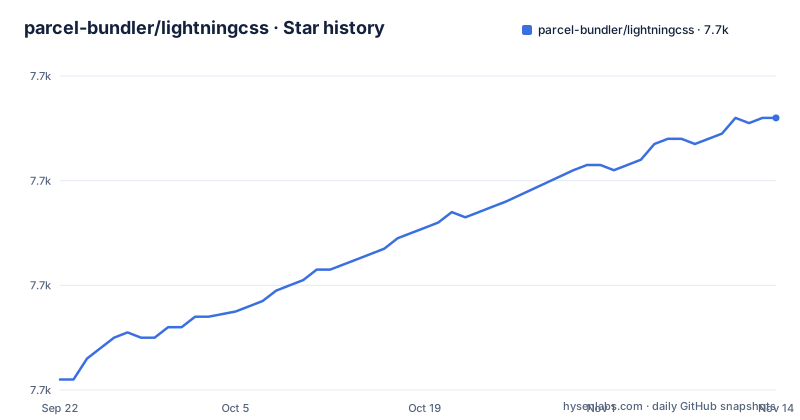
Star history
- parcel-bundler/lightningcss7,732 ★ · +50
| Repository | 2026-09-22 | 2026-11-14 |
|---|---|---|
| parcel-bundler/lightningcss | 7.7k | 7.7k |
50 Stars in the last 53 days, measured from the daily GitHub snapshot. Compare with other projects
Editorial analysis
Property values are parsed into types, not token sequences
The design decision worth understanding is at the parser level. Many other CSS parsers treat property values as an untyped series of tokens, which means every transformer that wants to do something with a value has to interpret that value itself. The result is duplicated work across transformers and, more seriously, inconsistencies when two of them read the same value differently.
Lightning CSS parses all values using the grammar from the CSS specification and exposes a specific value type for each property. A transform that touches a transform list, a colour or a grid template is therefore working against a defined type rather than re-deriving meaning from raw tokens. This is the reason the minification passes listed in the readme can be written as decisions about types: combining transforms into a single matrix when that is smaller, or splitting one apart, is only safe if the parser already knows what it is looking at.
The foundation is the parser Firefox itself uses
The general purpose parsing layer is not written from scratch. Lightning CSS is built on the cssparser and selectors crates created by Mozilla and used by Firefox and Servo. Those two crates are the general CSS parsing foundation, and Lightning CSS implements support for the specific CSS rules and properties on top of them.
That inheritance has a practical consequence for a project that cares about correctness: the general CSS-parsing foundation is shared with code used by Firefox and Servo. The Cargo manifest pins cssparser at 0.37.0 and carries a local parcel_selectors crate at 0.28.3 with its path set to the selectors directory in this repository, so the selectors side is vendored and versioned alongside the parser.
The benchmark caveat is more important than the numbers
The readme prints three runs on bootstrap-4.css, animate.css and tailwind.css against cssnano and esbuild. On tailwind.css, cssnano takes 2.198s for 1925626 bytes, esbuild 107.668ms for 1961642 bytes, and lightningcss 43.368ms for 1824130 bytes:
$ node bench.js tailwind.css
cssnano: 2.198s
esbuild: 107.668ms
lightningcss: 43.368ms
The bootstrap run shows 544.809ms for cssnano against 4.16ms for lightningcss, and animate.css shows 283.105ms against 1.973ms.
What makes those comparisons fair is stated immediately after them. Some of the tools shown perform unsafe optimisations that may change the behaviour of the original CSS in favour of a smaller file. Lightning CSS does not do this, and the output CSS should always behave identically to the input. So when you compare byte counts across tools, you are comparing outputs with different correctness properties, and the readme asks you to keep that in mind rather than quoting the smallest number.
Browser targets drive prefixes, lowering and shorthand removal
One input shapes three separate behaviours. Give Lightning CSS a list of browser targets and it adds the vendor prefixes that list needs, removes the ones it does not and generates more compatible output where modern syntax is not safe for those targets.
The lowering list is long and specific: CSS nesting, custom media queries from a draft specification, logical properties, color-mix() and relative color syntax from Color Level 5, lab(), lch(), oklab(), oklch() and color() with spaces such as display-p3 from Color Level 4, :not and :lang with multiple arguments, :dir, :is, double position gradient stops, the clamp(), round(), rem() and mod() math functions, media query range syntax, and multi-value display values such as inline flex. Targets can also be resolved from an existing browserslist setup through opt-in discovery.
CSS modules support is a subset, and two parts of it are opt-in
CSS modules compilation is supported for a subset of the specification. Locally scoped class and id selectors are the core. On top of that, custom identifiers can be scoped too: @keyframes names, grid line and area names, and @counter-style names. One further behaviour is opt-in rather than default, which is the detail that bites people porting an existing setup.
That opt-in is support for locally scoped CSS variables and other dashed identifiers. :local() and :global() selectors are also supported. The composes property is also part of the supported subset. If your build depends on dashed-identifier scoping and you do not switch it on, names will leak into the global namespace, and the failure shows up as a style collision rather than an error.
One Cargo workspace produces eight language surfaces
The bindings are not add-ons bolted on afterwards; they are workspace members. The Cargo workspace lists node, napi, selectors, c, derive, static-self and static-self-derive, and the tree carries corresponding cli/ and wasm/ directories alongside src/ and examples/. The npm package is published from the node side: its main is node/index.js, its types are node/index.d.ts, and the files it ships are limited to node/*.js, node/*.mjs, node/*.d.ts and node/*.flow.
Two things there are worth checking before you integrate. The npm manifest declares engines.node as 24.0.0 or newer, and it depends on detect-libc, which is how the native binary picks the right build for a platform. The funding field points at the Parcel open collective, which is the clearest signal about who this project answers to.
Cargo features decide what a given build can actually do
The feature list explains the differences between installations. Default is bundler, nodejs and sourcemap, so a plain build gets the bundler entry point with dashmap, sourcemap support and rayon for parallelism:
default = ["bundler", "nodejs", "sourcemap"]
cli = ["clap", "serde_json", "browserslist", "jemallocator"]
The cli feature is separate and pulls in clap, serde_json, browserslist resolution and jemallocator, and the binary target in src/main.rs declares required-features = cli, which means the CLI is not compiled into a default build at all.
The remaining features cut across use cases: browserslist pulls in browserslist-rs, jsonschema adds schemars and serde plus the selector crate's own schema support, visitor opens the transform extension point, into_owned handles owned variants of the borrowed types, and substitute_variables is defined as visitor plus into_owned. Notice what is not here: no feature gate for the behaviour guarantee. Output fidelity is the default behaviour, not something you opt into.
The two registries do not share a version line
The npm package is at version 1.33.0, matching the v1.33.0 release published on 20 July 2026, with v1.32.0 in March and v1.31.0 in January. The Cargo package declares a different number entirely: version 1.0.0-alpha.72, with edition 2021 and the same MPL-2.0 licence. Two registries, two numbering schemes, one project.
That matters when you pin. A crates.io dependency written as 1.33 will not resolve, and a loose constraint on the npm side and a loose one on the Rust side do not track the same releases. The Rust crate is also published with all features enabled for docs.rs, so the documentation you read online covers feature combinations that your build may not use. The last push to master is dated 31 October 2026, later than the newest tag.
Editorial conclusion
Choose lightningcss when minified size and predictable output both matter, when you have browser targets you can state, and when you would rather not hand-write prefixes. Be careful with it if your pipeline depends on the sloppy optimisations some other minifiers perform, since this one refuses to change behaviour for size. Before adopting, decide which Cargo features you need, decide whether to opt in to browserslist configuration discovery, and check which binding you want, because the Rust crate version and the npm version do not follow the same numbering.
Frequently asked questions
What is Lightning CSS?
It is a CSS parser, transformer, bundler and minifier written in Rust, used by Parcel and also usable as a standalone library from JavaScript or Rust, through a CLI, or wrapped as a plugin inside another tool. It is licensed MPL-2.0 and published to npm as lightningcss.
How does Lightning CSS compare with PostCSS?
The readme draws no comparison, but PostCSS appears in the project's own dev dependencies at version 8.3.11, alongside cssnano and esbuild. Lightning CSS itself is a Rust parser that types property values from the CSS grammar rather than a JavaScript plugin pipeline.
Is Lightning CSS a Sass replacement?
The readme names no comparison with Sass, and the scope does not overlap: Lightning CSS is a CSS parser, transformer and minifier, so its input is CSS rather than a preprocessor language. It lowers modern CSS syntax based on browser targets instead of adding a new syntax layer.
Does Lightning CSS work with Tailwind CSS?
The readme benchmark runs node bench.js over tailwind.css, reporting 43.368ms and 1824130 bytes against cssnano at 2.198s and 1925626 bytes.
What is an alternative to lightningcss?
The readme names no alternative and makes no comparison beyond its own benchmark runs against cssnano and esbuild. Its own distinguishing claims are typed property values, a parser foundation from Mozilla used by Firefox and Servo, and an output guarantee that the CSS behaves identically to the input.
Official sources
Add this badge to your README
If you maintain this project, the badge below links readers to this analysis and shows its maintenance status from the daily GitHub snapshot. Paste the markdown into your README; add ?metric=license or ?metric=stars to the image URL for a different field.

[](https://hysenlabs.com/projects/parcel-bundler-lightningcss)Star history chart for your README
[](https://hysenlabs.com/projects/parcel-bundler-lightningcss)Was this useful?