GenieX: two runtimes, five interfaces, Snapdragon only
Run frontier LLMs and VLMs locally on Qualcomm devices across NPU, GPU, and CPU with a few lines of code
At a glance
- What is it?
- Qualcomm's community inference runtime puts one C SDK behind a CLI, Python, Kotlin, Docker and a local OpenAI-compatible server, and routes GGUF models to llama.cpp while AI Hub bundles go to the NPU.
- Who is it for?
- GenieX fits teams that already own Snapdragon hardware and want one runtime across CLI, Python, an Android app and an OpenAI-compatible endpoint, and it is the only sensible choice when the device is the target. Walk away if the deployment target is x86, a CUDA workstation or a Raspberry Pi class board, because the runtime is Snapdragon only.
- Can I use it commercially?
- Yes. BSD-3-Clause is a permissive licence: you can use, modify and sell software built on it, as long as you keep its copyright and licence notices.
- Is it still maintained?
- Yes. The repository last received commits 1 day ago.
- What is it written in?
- Mainly Rust, according to GitHub's language statistics.
Answers come from the project's GitHub data, last synced on November 14, 2026, and from our analysis. They are not legal advice.
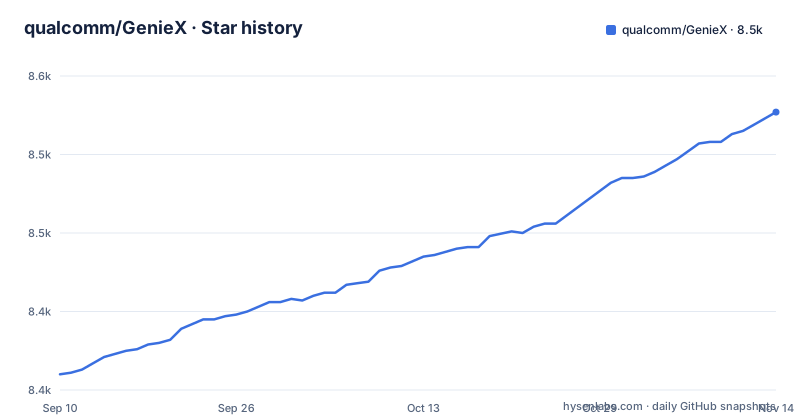
Star history
- qualcomm/GenieX8,527 ★ · +167
| Repository | 2026-09-10 | 2026-11-14 |
|---|---|---|
| qualcomm/GenieX | 8.4k | 8.5k |
167 Stars in the last 65 days, measured from the daily GitHub snapshot. Compare with other projects
Editorial analysis
One C header carries all five interfaces
GenieX exposes one C SDK and wraps it five ways. The single header sdk/include/geniex.h is what you link against for C and C++, and the CLI, Python, Kotlin/Java, Docker and OpenAI-compatible server are described as thin wrappers over it. The tree separates the layers: sdk/ holds the SDK, cli/ the command line front end, bindings/ the language bindings, with examples/python/ and examples/sdk/ as the two example directories. Underneath sits a Rust and C++ codebase assembled by Bazel, visible in BUILD.bazel, MODULE.bazel, MODULE.bazel.lock and a pinned .bazelversion, with .gitmodules and third-party/ carrying vendored dependencies. The consequence is worth stating plainly: a chipset mismatch or a defect in that one header arrives in all five interfaces at the same time, and no wrapper will filter it out for you.
Two runtimes decide where the weights land
The model reference you pass picks one of two runtimes, and they do not cover the same hardware. GGUF files from Hugging Face, ModelScope or Docker Hub go through llama.cpp, named llama_cpp, and the CLI comments that describe that path read NPU / GPU / CPU. Pre-compiled bundles from Qualcomm AI Hub go through Qualcomm AI Engine Direct, named qairt, and that path is marked NPU. The formats differ as well: GGUF on one side, a per-chipset bundle on the other. The README frames the pair as broad model coverage and peak Snapdragon performance in one stack, and both runtimes handle LLMs and VLMs. The cost of that split is concrete. GGUF buys you the choice of compute unit, while the qairt path only exists for models Qualcomm has already compiled for a specific chipset.
geniex infer reads the reference and picks the runtime
Four reference shapes in one command, and the shape is what selects the backend. A bare hub identifier resolves through llama.cpp, a ModelScope URL does the same, and the ai-hub-models and docker.io forms each name their own source:
# GGUF from Hugging Face → llama.cpp (NPU / GPU / CPU)
geniex infer google/gemma-4-E4B-it-qat-q4_0-gguf

# GGUF from ModelScope → llama.cpp (NPU / GPU / CPU)
geniex infer https://modelscope.cn/models/Qwen/Qwen3-0.6B-GGUF

# Pre-compiled bundle from Qualcomm AI Hub → Qualcomm AI Engine Direct (NPU)
geniex infer ai-hub-models/Qwen2.5-VL-7B-Instruct

# GGUF from Docker Hub (https://hub.docker.com/u/ai) → llama.cpp (NPU / GPU / CPU)
geniex infer docker.io/ai/gemma3
Those four lines are the reference forms the CLI quickstart shows.
Four install routes with four different costs
Linux ARM64 gets a single line that the README calls one line, no sudo:
curl -fsSL https://qaihub-public-assets.s3.us-west-2.amazonaws.com/qai-hub-geniex/install.sh | shThat pipes a shell script from an S3 bucket straight into sh. Windows ARM64 takes the other path: download the installer from the releases page, run it, then open a new terminal, which tells you the install does not reach the shell that launched it. Python and Docker are conventional:
pip install geniexdocker pull docker.io/qualcomm/geniex:latestThe container wraps the CLI, so geniex infer behaves as it does on the host. Two channels move fast here: releases v0.10.0 on 2026-10-28, v0.10.1-rc.1 on 2026-10-29 and v0.9.5-alpha.1 on 2026-11-02, with the last push on 2026-11-02, and the repository is not archived. Pin one of those versions rather than tracking the branch. The licence is BSD-3-Clause, with LICENSE and NOTICE at the repository root.
The Python surface mirrors transformers, close() included
The Python path is deliberately shaped like Hugging Face transformers, from from_pretrained() through tokenizer.apply_chat_template() to generate():
# GGUF from Hugging Face → llama.cpp
from geniex import AutoModelForCausalLM

model = AutoModelForCausalLM.from_pretrained("unsloth/Qwen3.5-2B-GGUF", precision="Q4_0")

messages = [{"role": "user", "content": "What is 2+2?"}]
prompt = model.tokenizer.apply_chat_template(messages, add_generation_prompt=True)

for chunk in model.generate(prompt, max_new_tokens=256, stream=True):
    print(chunk, end="", flush=True)

model.close()
Two details carry weight. precision="Q4_0" is passed at load time, and switching runtimes means changing the reference to ai-hub-models/Qwen3-4B and dropping precision, as the second README example does. And the loop consumes a stream, so the caller prints chunks rather than receiving a finished string, while model.close() at the end is the only teardown the README shows, with no explanation of what it releases or what happens if you skip it in a long-lived process.
The local server binds loopback on port 18181
The OpenAI-compatible server ships with the CLI, so there is nothing extra to install. Pull a model, serve it, and the documented address is local:
geniex pull ai-hub-models/Qwen3-4B-Instruct-2507
geniex serve   # serves http://127.0.0.1:18181/v1
Any OpenAI client pointed at that URL needs no code changes, and the call is a plain POST:
curl http://127.0.0.1:18181/v1/chat/completions \
  -H "Content-Type: application/json" \
  -d '{
    "model": "ai-hub-models/Qwen3-4B-Instruct-2507",
    "messages": [{"role": "user", "content": "Hello!"}]
  }'
Two boundaries are visible in those lines. The address is 127.0.0.1, so a client on another machine cannot reach it, and the request carries no Authorization header or key, which leaves access control to whatever you put in front of it. The quickstart shows no flag for changing the bind address and no authentication option, so exposing it beyond the loopback interface means adding your own proxy.
The Android artifact is pinned at 0.4.0
Android support arrives as a Gradle dependency, and its version matches the latest stable release:
dependencies {
    implementation("com.qualcomm.qti:geniex-android:0.10.0")
}
The latest stable release, v0.10.0, came out on 2026-10-28, the same version as the coordinate in the quickstart. The sample app is not in this repository either. It lives in qualcomm/ai-hub-apps under apps/geniex_chat_android, which means Android work involves cloning a second tree, opening the project in Android Studio, and hitting Run, with the chat UI, a model picker for GGUF and AI Hub bundles, and VLM support already wired in. Hardware coverage is one row: Snapdragon 8 Elite and 8 Elite Gen 5. Windows ARM64 covers Snapdragon X and X Elite, and Linux ARM64 IoT covers Dragonwing QCS9075.
Snapdragon only, with the device cloud as the way in
GenieX runs only on Qualcomm Snapdragon. There is no x86 build and no CUDA path in the project, so the runtime cannot be compared on a desktop GPU where llama.cpp benchmarks usually live. The platform table is short by design: Windows ARM64 for compute, Android for mobile, Linux ARM64 for IoT. For evaluation without hardware, the README's answer is a remote session on Qualcomm Device Cloud at qdc.qualcomm.com. That makes the cloud the only route to a first measurement, which is worth settling before you commit to the SDK. This is also the community version of Qualcomm GENIE.
Editorial conclusion
GenieX fits teams that already own Snapdragon hardware and want one runtime across CLI, Python, an Android app and an OpenAI-compatible endpoint, and it is the only sensible choice when the device is the target. Walk away if the deployment target is x86, a CUDA workstation or a Raspberry Pi class board, because the runtime is Snapdragon only. Verify two things first: that your model has a form the reference resolver accepts, since a bare hub id, a ModelScope URL, an ai-hub-models prefix and a docker.io prefix each route to a different runtime, and that the row for your exact chipset in the platform table is not a planned or untested one.
Frequently asked questions
What is GenieX used for?
Running frontier LLMs and VLMs locally on Qualcomm devices. GenieX brings GGUF models from Hugging Face, ModelScope or Docker Hub, or a pre-compiled bundle from Qualcomm AI Hub, onto the Hexagon NPU, Adreno GPU, or CPU through a CLI, Python, Kotlin/Java, Docker, or an OpenAI-compatible server.
How do I use GenieX?
Install one interface and hand it a model reference. The CLI takes the reference with geniex infer, the Python surface loads it through AutoModelForCausalLM.from_pretrained, and the server takes it after geniex pull followed by geniex serve.
What is GenieX?
It is an on-device Gen AI inference runtime for Qualcomm devices, and the community version of Qualcomm GENIE. One C SDK underneath is exposed through a CLI, Python, Kotlin/Java, Docker and an OpenAI-compatible server.
Official sources
Add this badge to your README
If you maintain this project, the badge below links readers to this analysis and shows its maintenance status from the daily GitHub snapshot. Paste the markdown into your README; add ?metric=license or ?metric=stars to the image URL for a different field.

[](https://hysenlabs.com/projects/qualcomm-geniex)Star history chart for your README
[](https://hysenlabs.com/projects/qualcomm-geniex)Was this useful?