PasarGuard: a root shell from a pipe, host networking, and three database drivers you did not pick
PasarGuard | Unified GUI Censorship Resistant Solution
At a glance
- What is it?
- A self-hosted panel for managing Xray and WireGuard users, subscriptions and quotas, with a web dashboard and a command line interface. The installation is one line that pipes a moving script into a root shell, and the container it builds runs as root on the host network.
- Who is it for?
- Judgment: this is a serious piece of work for people running their own proxy infrastructure, and several of its choices are better than the norm for this category. Bootstrap is a one-time key you generate on the server rather than a default administrator password.
- Can I use it commercially?
- Yes, with strict conditions. AGPL-3.0 is a network copyleft licence: if people use a modified version over a network, for example as a hosted service, you must offer them its source code under the same licence.
- Is it still maintained?
- Yes. The repository last received commits 1 day ago.
- What is it written in?
- Mainly TypeScript, according to GitHub's language statistics.
Answers come from the project's GitHub data, last synced on November 25, 2026, and from our analysis. They are not legal advice.
Star history
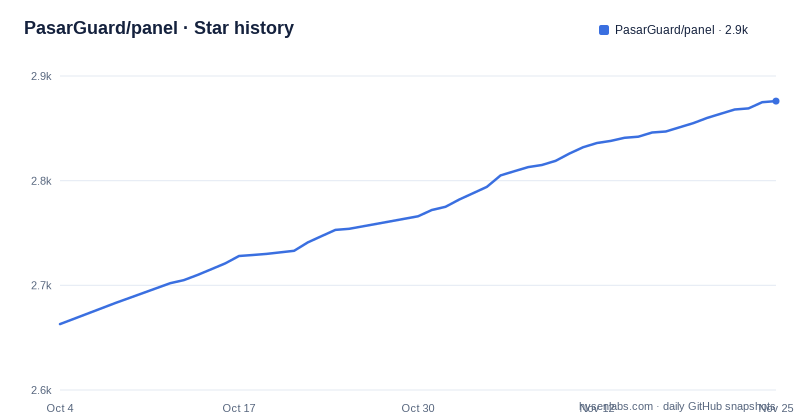
- PasarGuard/panel2,876 ★ · +213
| Repository | 2026-10-04 | 2026-11-25 |
|---|---|---|
| PasarGuard/panel | 2.7k | 2.9k |
213 Stars in the last 52 days, measured from the daily GitHub snapshot. Compare with other projects
Editorial analysis
Every install command pipes an unpinned remote script into a root shell
There are five install commands and they differ by one flag:
sudo bash -c "$(curl -fsSL https://github.com/PasarGuard/scripts/raw/main/pasarguard.sh)" @ install --database timescaledbThe others are the same line with no flag for SQLite, and with the flag set to mysql, mariadb, or postgresql. TimescaleDB is the one marked recommended.
Two things about that command are worth being precise about. The script is fetched from a branch rather than a tag or a commit, so what you execute is whatever that branch held at the moment you ran the line, and it will differ next month. And it is executed by a root shell, so the script is not sandboxed by anything, including the possibility of being wrong.
The installer also does not live in this repository. It is fetched from a separate one, which means the panel's own release tag has no relationship to the code that installs it.
On the database choice: TimescaleDB is a time-series extension for PostgreSQL, and plain PostgreSQL is offered as a separate flag with no explanation of the difference. So the recommended option is the Postgres one plus an extension, and the file does not say what you give up by choosing the plainer flag.
None of this makes the approach wrong. It makes it a decision to make with your eyes open rather than by pasting the first line you find.
The image runs as root, and the compose file shares the host network
Two lines in the deployment files together define the security posture, and neither is hidden.
The Dockerfile contains no user directive. The runtime stage installs packages, copies three wrapper scripts and a health check script into the binary directory, marks them executable, sets the virtual environment on the path, and stops at an entrypoint. Everything runs as root, because nothing says otherwise.
The compose file then asks for the host network namespace:
services:
  pasarguard:
    image: pasarguard/panel:latest
    restart: always
    env_file: .env
    network_mode: host
    volumes:
      - /var/lib/pasarguard:/var/lib/pasarguard
Host networking is not a mistake here in the way it usually is. This panel manages proxy inbounds, advertises multi-inbound support on a single port with fallbacks, and publishes subscriptions, so it plausibly needs to own listeners on ports chosen at runtime that a published container port mapping could not express. The environment template even offers a Unix domain socket option for the case where you are behind a local proxy, which is the narrower alternative.
The cost is equally clear. No port mapping means no network isolation, and root in the host namespace means a compromise of the dashboard, or of anything serving the dashboard, is not contained by the container boundary at all. That is the argument for running it on a host that has one job.
Compose pulls a published image and mounts a different path from the installer
The compose file has no build instruction. It references a published image on a registry with a floating latest tag, so deploying with compose means pulling someone else's build rather than building the repository you just cloned.
The repository does contain a Dockerfile, and it is a good one. Two stage build, a dependency layer resolved from the committed lockfile with the frozen flag, the lockfile and manifest bind-mounted so the dependency layer is cached, then the source added and synced again. The result is a runtime image with a virtual environment already resolved, so two builds of the same commit get the same dependency tree.
None of that runs unless you ask for it. Compose as written ignores the file.
The volume list is where the two deployment paths disagree. The compose service mounts one directory, the data directory. The installation documentation says files live under a program directory and, explicitly, that the configuration file is inside it. That path is not mounted by compose, so a container deployment gets a data volume and a configuration source from somewhere else, and the file that documents where the configuration lives is describing the script install, not the compose install.
One more: the image installs a health check script and the repository keeps one, and the compose service declares no health check at all.
The node and scheduler roles are deprecated for removal in 7.0.0 and still sit in the root
Two processes at the repository root are on their way out, and the environment template says when.
The comment beside the process role setting reads: prefer all-in-one, and the separate backend, node and scheduler roles are deprecated, with removal named for version 7.0.0. The setting itself is commented out, with all-in-one as the implied default.
Still, the worker scripts for those two roles are in the root of the tree, next to the main entry point and the config module, rather than marked as transitional or moved aside.
That matters because the feature list advertises multi-node support for infrastructure distribution, and a separate published package appears among the dependencies whose name describes exactly the bridge to those nodes. So the architecture has a multi-node mode, the environment file is telling you the process model behind it is going away in two major versions, and the scripts implementing it are still the first thing you see in a directory listing.
The access-control story is also split across files in a way worth knowing: the role and permission definitions live in their own module at the root, and the dependency helpers the linter treats as safe are the two authentication functions that enforce permission and scope.
None of this is a defect on its own. It is a deprecation you have to read about in a comment in a sample configuration file rather than in a migration guide.
You pick one database and install all three drivers
The dependency list is long and mostly uses floors. Five entries are pinned to exact versions instead, and the choices are worth reading because they say which parts are deliberate.
The web server is pinned exactly. So are the password hashing library, the TLS library, the deprecation-warning helper, and a comment-tolerant JSON parser.
That last one is the interesting entry. A parser that tolerates comments in JSON is there because something in this system is JSON with comments in it, and the feature list includes customisable configuration for the proxy core, whose own configuration format is exactly that. So the pin is doing quiet work in a place the documentation never explains.
The three database drivers are the other thing. There is an asynchronous driver for SQLite, one for PostgreSQL, and one for MySQL, all three as unconditional dependencies. The install command asks you to choose a database, and the choice changes the connection string, not what gets installed.
That is a defensible trade for a single-file distribution, since vendoring all three keeps the installer from failing on an unlisted platform. It does mean the attack surface of your install is the union of three database clients when you will use one.
Two more dependencies say something about the audience. A Jalali calendar library is a hard requirement rather than an extra, and the first translated readme in the repository is the Persian one. An asynchronous locking library sits alongside the natural interface event loop, both restricted to non-Windows platforms.
The linter is configured not to complain about swallowed exceptions
The lint configuration is worth reading closely, because it is unusually honest about what it tolerates.
Two rules are switched off for the whole codebase, under a comment explaining that they are intentional resilience and no-op catch patterns. Both are the rules that catch a bare exception clause and a swallowed failure. In other words, catching everything and doing nothing is permitted everywhere in this project, on purpose, and the reason is written down rather than left as a pragma someone added in a hurry.
Two more suppressions are more specific and more interesting. FastAPI's dependency injection helpers are registered as calls that are safe to treat as immutable, and so are two functions from the project's own authentication module, the ones that require a permission and the ones that require a scope. So the linter is configured to trust the two functions that decide access, which is a deliberate carve-out and arguably the one place you would want it.
The rest of the configuration is modern and sensible. Formatting is enforced with double quotes, the linter fixes what it can automatically, it respects the ignore file rather than duplicating exclusions, and database migrations are excluded by path.
And the build honours the committed lockfile with a frozen sync, twice, so the dependency set is reproducible for both the builder and the image.
Bootstrap is a one-time key, but the documented test path is plain http
The account setup is better than most panels in this category manage, and it is two commands:
# Generate a one-time setup key for owner account setup
pasarguard cli generate-temp-key

# Use the key on the dashboard login page to create the owner account
You mint a key on the server and paste it into a login page to create the first owner. There is no default administrator, no default password, and no credentials printed in the installation output. For software that people run on their own machines and expose to the internet, that is the right default and it is rarer than it should be.
The dashboard itself is required to be served over TLS, with a guide linked for getting a certificate and a dashboard path under a domain on port 8000.
The test path is where it loosens. There is a port-forwarding instruction so you can reach the dashboard on your own machine without a domain, and it tells you to browse it over plain http on localhost. That is a reasonable instruction with a real mitigation, because an SSH tunnel keeps the dashboard off the network entirely, and the file says as much by marking it testing only and warning that you lose access when you close the terminal.
Worth being clear about the difference, though: the production path is encrypted and the test path is not, and the only thing standing between them is that you did not open a port.
Two protocol lists that disagree, and four documentation locales
The overview and the feature list describe the same product with different numbers, which is the sort of thing that sends someone looking for a protocol they were not told about.
The overview sentence says it supports two implementations, naming a specific proxy core and WireGuard. The feature list, further down the same page, names six protocols across five groups and adds transport-level options including TLS and one named obfuscation scheme, plus the ability to give a single user more than one protocol.
The two lists are not reconcilable from the page. Either the overview is describing the two core implementations the panel drives while the feature list describes the protocol families a user can be served, or the overview is simply out of date. Nothing in the file says which.
The rest of the feature list is where the engineering shows. Users can share a single inbound and multiple inbounds can share one port through fallbacks. Traffic and expiry limits sit alongside periodic limits, and there is a separate hardware-identifier limit for access control bound to a device. Subscriptions are compatible with three client families and there is a share-link and QR generator. There is a bot integration, a command line interface, four languages, and multiple administrators with role-based access and scoped permissions.
Documentation is in four locales and the repository carries four readmes, with the documentation source itself in a third repository. The licence is the Affero General Public License, which for a panel that people expose over a network is the choice with the most reach, and neither the readme nor the metadata comments on it.
Editorial conclusion
Judgment: this is a serious piece of work for people running their own proxy infrastructure, and several of its choices are better than the norm for this category. Bootstrap is a one-time key you generate on the server rather than a default administrator password. Trust store handling is explicit rather than implicit. The dependency layer is locked to a committed lockfile. And the lint configuration states its exemptions and justifies them in a comment instead of hiding them. Two things to weigh before you run it. The install command fetches a script from a branch and pipes it into a root shell, so pin the installer or read it first, because that is the moment you grant the code whatever the shell can do. And the image runs as root with the host network namespace, which means a compromise of the dashboard is not contained by a container. If you want a narrower blast radius, run it on a dedicated host, keep the TLS requirement on rather than using the SSH tunnel, and read the cross-origin setting before you enable it.
Frequently asked questions
What is PasarGuard?
PasarGuard is a self-hosted proxy management panel for handling large numbers of proxy users, with a web dashboard, a REST API, a command line interface and a Telegram bot. It manages Xray-core and WireGuard, supports user traffic and expiry limits, periodic limits, hardware-bound access control, subscription links compatible with several client families, and multiple administrators with role-based permissions. It is licensed under the AGPL-3.0.
How do I install PasarGuard?
With one command that installs a script from a separate repository as root, and a database argument: SQLite by default, or timescaledb, mysql, mariadb or postgresql. After installation the files are under an application directory with the configuration file inside it and data under a data directory, and you generate a one-time setup key with `pasarguard cli generate-temp-key` and use it on the dashboard login page to create the owner account. A compose file is also provided.
What does the PasarGuard dashboard let you do?
Manage users and their limits, configure inbounds and fallbacks, generate subscription links, share links and QR codes, monitor the system and view traffic statistics, run system commands through the interface, and administer other operators through scoped role-based permissions. Subscriptions are compatible with V2ray, Clash and ClashMeta clients, and the dashboard requires an SSL certificate unless you reach it through an SSH tunnel.
Official sources
Add this badge to your README
If you maintain this project, the badge below links readers to this analysis and shows its maintenance status from the daily GitHub snapshot. Paste the markdown into your README; add ?metric=license or ?metric=stars to the image URL for a different field.

[](https://hysenlabs.com/projects/pasarguard-panel)Star history chart for your README
[](https://hysenlabs.com/projects/pasarguard-panel)Was this useful?