Chokidar 6 replaces fs.watch's ambiguous rename events with verified add, change and unlink, and now requires Node 22.22
Minimal and efficient cross-platform file watching library
At a glance
- What is it?
- paulmillr/chokidar is the MIT-licensed Node.js file watching library that normalizes fs.watch across platforms. Version 6.0.0 adds a selectable backend option, keeps polling for network filesystems, and drops glob strings from ignored; this piece covers how each mechanism behaves and where it still misses changes.
- Who is it for?
- Chokidar is the right choice for a Node.js build tool, dev server or upload processor that needs reliable add, change and unlink events on macOS, Windows and Linux, including on network mounts through polling. It is the wrong choice if you are stuck on a Node release older than 22.22, or if you depend on glob strings in ignored and cannot rewrite them yet.
- Can I use it commercially?
- Yes. MIT is a permissive licence: you can use, modify and sell software built on it, as long as you keep its copyright and licence notices.
- Is it still maintained?
- Yes. The repository last received commits 8 days ago.
- What is it written in?
- Mainly TypeScript, according to GitHub's language statistics.
Answers come from the project's GitHub data, last synced on November 14, 2026, and from our analysis. They are not legal advice.
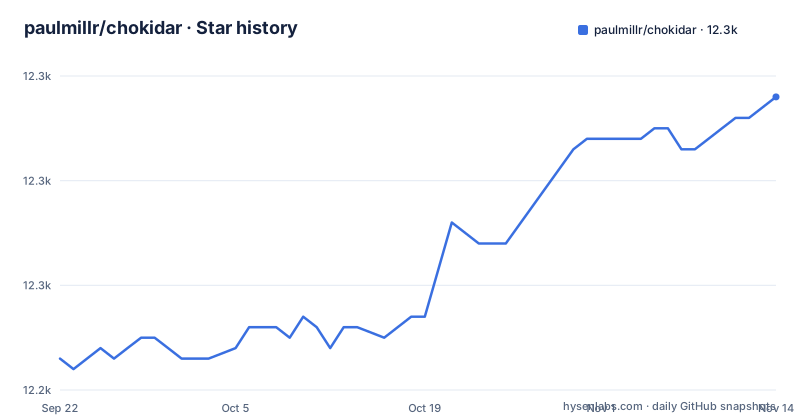
Star history
- paulmillr/chokidar12,268 ★ · +25
| Repository | 2026-09-22 | 2026-11-14 |
|---|---|---|
| paulmillr/chokidar | 12.2k | 12.3k |
25 Stars in the last 53 days, measured from the daily GitHub snapshot. Compare with other projects
Editorial analysis
fs.watch reports a rename where Chokidar reports add, change or unlink
The reason Chokidar exists is that raw fs.watch is hard to use directly. It reports many changes as an opaque rename, can fire twice for one change, and recursive watching differs between platforms. Chokidar turns that into a fixed event vocabulary: add, change and unlink for files, addDir and unlinkDir for directories, each verified, deduplicated and carrying a path on every platform, plus a ready event once the initial scan finishes. The shortest working program is one line:
chokidar.watch('src').on('all', (event, path) => console.log(event, path));chokidar.watch(paths, [options]) returns an FSWatcher. paths is a string or an array of strings; files are watched individually and directories are watched recursively. The library was written for the Brunch build tool in 2012, and the README cites use in more than 30 million projects on npm.
backend: 'auto' uses recursive native watching only on macOS and Windows
Version 6 makes the observation strategy an explicit option with four values. The default, auto, uses native recursive watching on macOS and Windows and native per-directory watching everywhere else. native opens one fs.watch subscription per directory. native-recursive prefers fs.watch({ recursive: true }) and falls back to per-directory watching where recursive watching is unavailable; if you also set a finite depth, it uses per-directory watching so nothing beyond the requested tree gets subscribed. polling switches to Chokidar's own stat-based scheduler. The practical effect is that the same code behaves differently by platform under auto: on Linux you pay one subscription per directory, so a very large tree costs more there than on a Mac. If you need predictable behavior across a mixed team, pin backend instead of leaving it at auto.
Polling compares four file properties and misses writes that change none of them
For network shares and other unusual filesystems where fs.watch is unreliable, the polling backend is the fallback:
chokidar.watch('/mnt/nfs/data', { backend: 'polling', pollingInterval: 500 });pollingInterval defaults to 100 ms and pollingBinaryInterval to 300 ms for recognized binary extensions. Each poll compares size, modification time, existence and, except on Windows, the inode. An in-place write that changes none of those four is not detected at all, so a tool that rewrites a file with identical length inside the same timestamp resolution will slip past. Polling also costs more CPU than the native backends. Two environment variables override code: CHOKIDAR_USEPOLLING forces polling when truthy and disables it when falsy, even if backend: 'polling' is set in code, and CHOKIDAR_INTERVAL replaces pollingInterval. A stray CHOKIDAR_USEPOLLING=false in a container image can therefore silently turn off the polling you asked for.
atomic and awaitWriteFinish collapse editor saves and chunked writes into one event
Many editors save by writing a temp file and renaming it over the original, which shows up as unlink followed by add. With atomic, which defaults to true on native backends and false with polling, Chokidar merges that pair into a single change if it happens inside the window, 100 ms by default or a number of milliseconds you supply. It also ignores common editor temp files: .swp and .swx, ~ backups, and Sublime .subl*.tmp files. Large uploads are the opposite problem: add or change fires as soon as a file appears, which can be before the write is complete. awaitWriteFinish waits for the size to settle:
chokidar.watch('uploads', {
  awaitWriteFinish: { stabilityThreshold: 2000, pollInterval: 100 }, // wait for size to settle
  atomic: 100, // unlink + add within 100 ms becomes one change
});
The cost is latency: with a 2000 ms threshold, every new file waits at least that long before your handler sees it.
ignored tests the whole path, and plain strings are no longer globs
The ignored option takes one matcher or an array of them, and it is tested against the whole path as passed to watch(), joined with cwd if set, not just the basename. A string is an exact path; globs are not supported, and the README points to its upgrading section for the replacement pattern. A RegExp is tested against the whole path with forward slashes, Windows included, so /(^|\/)\../ matches dotfiles and /\/node_modules\// matches node_modules. A function receives (path, stats?) and may be called twice per path, first without stats and then with an fs.Stats object, which is why the README example guards with stats?.isFile(). An object form, { path, recursive?: boolean }, ignores an exact path and optionally its subtree. Two consequences matter. Code that passed glob strings in older versions now matches nothing. And directories above a watched path are never ignored, so a missing path is still watched through its parent.
Chokidar watches everything under the paths you give it
There is no implicit filtering of large directories. Chokidar watches everything below each path, so the README tells you to scope paths and use ignored and depth rather than watching more than you need. depth defaults to undefined, meaning unlimited, and Infinity means the same; any finite number caps how many subdirectory levels are traversed. cwd sets the base directory that paths resolve against, and emitted paths become relative to it. followSymlinks defaults to true; set it to false and symlinks are watched as themselves, with a retarget emitting change. ignoreInitial defaults to false, so the initial scan emits add and addDir for every existing file before ready; set it to true if your handler should only react to new activity. alwaysStat defaults to false. Pointing a default watcher at a project root that contains node_modules is the most common way to burn CPU and file handles with this library.
Version 6.0.0 requires Node 22.22 and ships as an ES module with one dependency
Install it from npm:
npm install chokidarThe 6.0.0 package.json declares engines node >= 22.22 and type module. You can import the default export, import { watch }, or use require('chokidar'). The published files are small: index, backend, policy, reconcile, runtime and tree, each as .js with a .d.ts beside it, and the only runtime dependency is readdirp ^5.1.1. sideEffects is false. The test scripts include a run under Bun through bun index.test.js and a VM test script, and there is a benchmark/ directory. Majors have come roughly yearly: 4.0.3 in December 2024, 5.0.0 in November 2025 and 6.0.0 on October 19, 2026, with the last push on October 27, 2026. A project on an older Node release cannot take 6.0.0 at all and has to stay on an earlier major until its runtime moves.
Editorial conclusion
Chokidar is the right choice for a Node.js build tool, dev server or upload processor that needs reliable add, change and unlink events on macOS, Windows and Linux, including on network mounts through polling. It is the wrong choice if you are stuck on a Node release older than 22.22, or if you depend on glob strings in ignored and cannot rewrite them yet. Before upgrading to 6.0.0, check your Node version, convert any glob patterns to RegExp or function matchers, and check whether CHOKIDAR_USEPOLLING is set anywhere in your environment.
Frequently asked questions
What is Chokidar used for?
Chokidar is a cross-platform file watching library for Node.js. It turns fs.watch output into verified add, change, unlink, addDir and unlinkDir events, and was originally built for the Brunch build tool in 2012.
How do I install Chokidar?
Run npm install chokidar. Version 6.0.0 requires Node 22.22 or newer.
What is CHOKIDAR_USEPOLLING?
CHOKIDAR_USEPOLLING is an environment variable that forces Chokidar's polling backend when truthy and disables polling when falsy, even if backend: 'polling' is set in code. CHOKIDAR_INTERVAL overrides pollingInterval.
How does Chokidar compare with fs.watch?
Raw fs.watch reports many changes as an opaque rename, can fire twice for one change, and handles recursive watching differently per platform. Chokidar uses native fs.watch underneath by default but emits deduplicated add, change and unlink events with paths on every platform.
What is the chokidar npm package?
chokidar on npm is Paul Miller's MIT-licensed file watching library. Version 6.0.0 is an ES module whose only runtime dependency is readdirp.
Official sources
Add this badge to your README
If you maintain this project, the badge below links readers to this analysis and shows its maintenance status from the daily GitHub snapshot. Paste the markdown into your README; add ?metric=license or ?metric=stars to the image URL for a different field.

[](https://hysenlabs.com/projects/paulmillr-chokidar)Star history chart for your README
[](https://hysenlabs.com/projects/paulmillr-chokidar)Was this useful?