tsx runs TypeScript in Node without a build step
⚡️ TypeScript Execute | The easiest way to run TypeScript in Node.js
At a glance
- What is it?
- esbuild under a Node loader hook, shipped as one CLI with a documented export map. A small package that removes the compiler from the loop for scripts, REPL work and tests.
- Who is it for?
- tsx is the right tool when the TypeScript you want to run is a script, a REPL session, a test file or a one-off tool, because there is no compile step and no dist directory to keep in sync. It is the wrong tool for a production service, where a real build with type checking and bundling is what you want anyway.
- Can I use it commercially?
- Yes. MIT is a permissive licence: you can use, modify and sell software built on it, as long as you keep its copyright and licence notices.
- Is it still maintained?
- Yes. The repository last received commits 28 days ago.
- What is it written in?
- Mainly TypeScript, according to GitHub's language statistics.
Answers come from the project's GitHub data, last synced on October 23, 2026, and from our analysis. They are not legal advice.
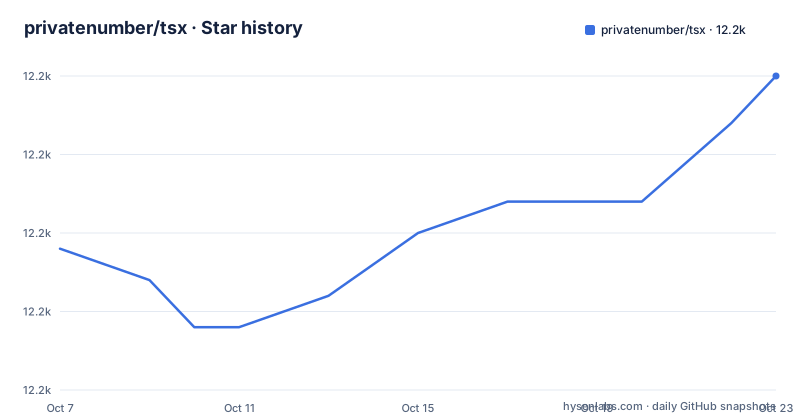
Star history
- privatenumber/tsx12,175 ★ · +11
| Repository | 2026-10-07 | 2026-10-23 |
|---|---|---|
| privatenumber/tsx | 12.2k | 12.2k |
11 Stars in the last 16 days, measured from the daily GitHub snapshot. Compare with other projects
Editorial analysis
A loader, not a compiler
The package description in `package.json` is more precise than the README: Node.js enhanced with esbuild to run TypeScript and ESM files. The keywords list cjs, commonjs, esm, runtime, cli and typescript runner, and none of them say compiler.
That distinction is the whole design. tsx registers a module loader hook so that when Node asks for a `.ts` file, the hook transforms it on the fly with esbuild and hands back JavaScript. Nothing is written to disk, there is no compiler invocation, and no type checking happens at all, because esbuild strips types rather than checking them.
The practical consequence is that tsx changes how a file is read, not what is proved about it. A type error is invisible to tsx. If your workflow depends on catching those before running, tsx is a companion to your type checker rather than a replacement for it.
The topics on the repository line up with the package.json keywords: cli, esbuild, esm, loader, node, runtime, typescript, watch. That `watch` tag is the reason people reach for it, since running a TypeScript file and re-running it on change works without a bundler watching your output directory.
The export map is the real API surface
The README is short enough to read in a minute and it hands you to a documentation site. The interesting file is `package.json`, because for a loader package the entry points are the product.
The main entry is `./dist/loader.mjs`, and the binary is `./dist/cli.mjs`. Beyond those two the map lists eleven keys in total, and grouping them tells you what the package is for:
".": "./dist/loader.mjs",
"./cjs": "./dist/cjs/index.cjs",
"./esm": "./dist/esm/index.mjs",
"./repl": "./dist/repl.mjs",
"./preflight": "./dist/preflight.cjs",
"./suppress-warnings": "./dist/suppress-warnings.cjs"
The cjs and esm paths both have matching api subpaths with conditional exports: `./cjs/api` and `./esm/api` each declare types and a default for `import` and a separate types and default for `require`, with `.d.mts`, `.mjs`, `.d.cts` and `.cjs` files. A package that ships both module systems with correct types in each is doing work a hand-rolled loader usually skips, and that dual support is what the recent bug fixes are about.
There is also an `imports` entry for `#cjs-loader`, an internal alias, and `"type": "module"`, so the package itself is ESM. `"files": ["dist"]` is the only thing published, so nothing but the build output ships to npm. `./patch-repl` and `./package.json` round out the map, and both exist for tooling rather than for application code.
What the release notes say about Node compatibility
The three most recent releases are all bug fixes, and reading them is more informative than any feature list would be.
v4.23.15, published 2026-09-20, excludes bare builtins from namespace inheritance, exposes `require.cache` and `require.extensions` to CommonJS modules loaded through the tsImport path, and makes namespaced `register()` overloads portable for declaration emit. Each of those is a compatibility gap between a transpiler's idea of module semantics and Node's.
v4.23.14, published the same day at 05:28, restored the CJS bridge namespace for Node 24's `require(esm)` under `tsImport()`, referencing issue 802. That is the sharpest signal in the whole file: the bridge between the two module systems is sensitive to what Node itself does, and it tracks Node releases closely.
v4.23.13, published 2026-08-30, is a memory fix that bounds the shared transform cache, referencing issue 835. A transform cache is what makes repeated runs fast, and bounding it is what stops a long-lived process, such as a test runner, from growing without limit.
So the version number tells you something: at 4.23.x with tags shipping within hours of each other, this is a project in active compatibility work, not a finished wrapper. Two tags landed on 2026-09-20 and the last push to the repository carries the same date, which is recent enough that the release history reads as a live signal about which Node versions people are actually running.
Development tooling inside a single package repo
The repository tree is short for a project at this stage: `src/`, `tests/`, `docs/`, `scripts/`, `notes/`, `.github/`, `.vscode/`, plus `tsconfig.json`, a `pnpm-lock.yaml`, a `pnpm-workspace.yaml`, `release.config.cjs` and `FUNDING.json`. The version field in `package.json` is the string `0.0.0-semantic-release`, which is the semantic-release placeholder, so the real version comes from the tag rather than from the file.
The `scripts` block shows how the package builds and checks itself, and three lines in it are the clearest statement of what the project is:
"build": "pkgroll --minify",
"type-check": "tsc",
"test": "pnpm build && node ./dist/cli.mjs tests/index.ts"
That trio settles the question raised above. Type checking exists, but it is a separate script that calls the compiler directly. The test script then runs the project's own CLI against its own test entry point. A project that tests itself with its own loader is either confident in the mechanism or has nothing else to test it with, and here it is the former. The `benchmark` script follows the same shape with `scripts/benchmark/index.ts`, which is how the author compares the loader against alternatives.
`[email protected]` is declared as the packageManager, and the lockfile plus workspace file say pnpm is the intended workflow rather than npm or yarn. Note that the README links a Development repo under a different account name for sponsor discussions, which is where the day-to-day happens. The `.nvmrc` file at the root records the intended Node version as a machine-readable value rather than in prose, so there is no version floor written anywhere in the documentation a reader is likely to skim.
tsx against ts-node and the alternatives
The questions people search for around this project are dominated by one comparison, tsx versus ts-node, and the difference is architectural rather than a feature list.
ts-node type-checks by default and runs through the TypeScript compiler's API, which means the compile step is the compiler. tsx uses esbuild, which is a transpiler, so it starts fast and does not check types. That is the whole trade: ts-node answers whether this is correct while it runs, tsx answers run this now.
A second difference is ESM. The package name, the keywords, the repository topics and the export map all centre on ESM and the CJS bridge, and the release notes show work on Node 24's `require(esm)`. For a package whose main job is being a module loader, ESM handling is the feature rather than an afterthought.
The third option people reach for is not a tool at all: Node's own type stripping. Node has shipped experimental type stripping for TypeScript files, which reduces the reason to need a loader for simple scripts. The `preflight` export in tsx's package.json reads as the code that checks whether such a runtime is available, and `./suppress-warnings` is the escape hatch for the warnings that path emits.
So the honest question is not tsx or ts-node, it is whether your task needs type checking at the point of execution at all.
Where a README this short leaves you
The README is 1,385 characters. It contains a logo, a version badge, a monthly download badge, two sponsorship banners, a Sponsors section and links to the documentation and to a getting started page. That is the entire file, and it is not an oversight so much as a decision: the documentation lives at tsx.hirok.io, and the one-line summary in the README calls tsx the easiest way to run TypeScript in Node.js.
That is a real trade for anyone evaluating the project. You learn what it is from the repository description, what it is built on from `package.json`, what is being fixed from the release notes, and nothing at all about the command line, the watch mode, the REPL or the supported Node version without leaving the repository.
The MIT licence and a `FUNDING.json` are both present, and sponsorship is prominent enough that the README links a sponsor banner twice. For an MIT package of this size that is unremarkable, though it does say the project is maintained by one person: the `package.json` author field names a single maintainer with an email address and no organisation.
If you need to evaluate tsx properly, read the getting started page, then look at the export map to see which entry point you would actually import. The README will not tell you, and the export map is the more honest document.
Editorial conclusion
tsx is the right tool when the TypeScript you want to run is a script, a REPL session, a test file or a one-off tool, because there is no compile step and no dist directory to keep in sync. It is the wrong tool for a production service, where a real build with type checking and bundling is what you want anyway. Two things decide it. Look at the export map in `package.json` and confirm the entry you need exists, since the package exposes distinct paths for the CJS loader, the ESM loader, the REPL, a preflight module and a suppress-warnings module, and the one you want may not be the main entry. Then read the getting started page at tsx.hirok.io, because this README is 1,385 characters long and links out for every instruction. If your build already runs a full compile as part of a bundle, tsx solves nothing you have.
Frequently asked questions
What does TSX do?
In this package's case it runs TypeScript and ESM files directly in Node.js using esbuild, with no build step. The description in `package.json` calls it Node.js enhanced with esbuild, and the binary is `./dist/cli.mjs`, so you run a `.ts` file through the CLI and Node runs it.
Is TSX the same as TS?
No. TypeScript is the language and its compiler; tsx is a runner for it. The package description calls it a typescript runner with cli and runtime keywords, and it uses esbuild to strip types rather than check them, so type errors are not reported at execution time.
Does tsx type check the files it runs?
Not on its own. The README here does not document the behaviour, but the package description states tsx runs TypeScript with esbuild, and esbuild transpiles rather than type checks. The repository keeps type checking as its own script calling tsc separately, which is the pattern to copy if you want both.
Official sources
Add this badge to your README
If you maintain this project, the badge below links readers to this analysis and shows its maintenance status from the daily GitHub snapshot. Paste the markdown into your README; add ?metric=license or ?metric=stars to the image URL for a different field.

[](https://hysenlabs.com/projects/privatenumber-tsx)Star history chart for your README
[](https://hysenlabs.com/projects/privatenumber-tsx)Was this useful?