TypeBox builds JSON Schema objects at runtime and infers TypeScript types from them, then adds a TypeScript-to-schema script engine
JSON Schema Type Builder with Static Type Resolution for TypeScript
At a glance
- What is it?
- sinclairzx81/typebox creates in-memory JSON Schema that TypeScript can statically check, and Type.Script turns plain TypeScript type definitions into the same schemas. The README says MIT while GitHub reports no recognised license.
- Who is it for?
- Use TypeBox when one definition has to serve as a TypeScript type and a standard JSON Schema that any compliant validator accepts, for example in REST or RPC input checking. Look elsewhere if you want validation rules that are not JSON Schema, and confirm the license yourself, because the README says MIT while GitHub reports NOASSERTION.
- Can I use it commercially?
- Check first. The repository uses a licence we do not classify automatically, so read its LICENSE file before any commercial use.
- Is it still maintained?
- Yes. The repository last received commits 10 days ago.
- What is it written in?
- Mainly TypeScript, according to GitHub's language statistics.
Answers come from the project's GitHub data, last synced on November 26, 2026, and from our analysis. They are not legal advice.
Star history
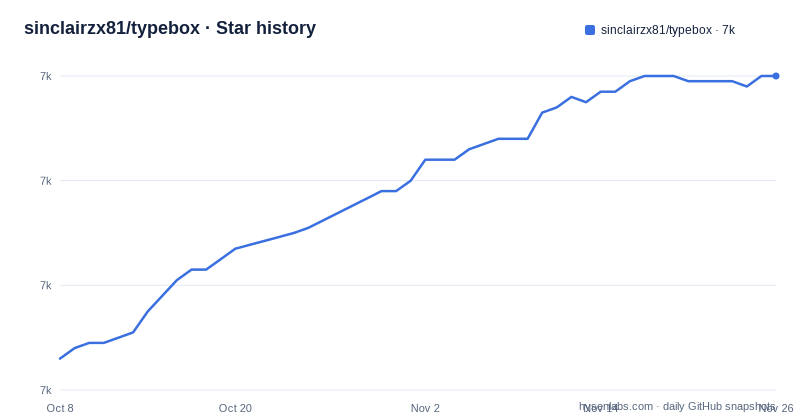
- sinclairzx81/typebox7,040 ★ · +54
| Repository | 2026-10-08 | 2026-11-26 |
|---|---|---|
| sinclairzx81/typebox | 7k | 7k |
54 Stars in the last 49 days, measured from the daily GitHub snapshot. Compare with other projects
Editorial analysis
One Type.Object call is both a JSON Schema and a TypeScript type
TypeBox is a runtime type system. It creates in-memory JSON Schema objects that infer as TypeScript types, and the schematics are designed to match the static type checking rules of the TypeScript compiler. The result is a unified type: statically checked by TypeScript and runtime checked with standard JSON Schema validation.
Install is one command from the README:
$ npm install typeboxThe default export is Type, and a schema is built by calling its constructors:
import Type from 'typebox'

const T = Type.Object({                     // const T = {
  x: Type.Number(),                         //   type: 'object',
  y: Type.Number(),                         //   required: ['x', 'y', 'z']
  z: Type.Number()                          //   properties: {
})                                          //     x: { type: 'number' },
                                            //     y: { type: 'number' },
                                            //     z: { type: 'number' }
                                            //   },
The comments show the object the call returns: type object, a required list and a properties map. The value is plain JSON Schema, so no TypeBox-specific format sits between you and a validator.
Schemas pass to any compliant validator, which keeps validation outside the library
The README says the JSON Schema schematics produced by TypeBox can be passed directly to any compliant validator. The library builds types and does not force one validation engine on you.
The stated design goal is that JSON Schema should compose the way types compose in TypeScript's type system. TypeBox types are JSON Schema fragments that compose into more complex types. A core set of types constructs JSON Schema compliant schematics, and extended types model constructs native to JavaScript and TypeScript.
Two uses are named. One is a simple tool to build up complex schematics. The other is integration into REST and RPC services to help validate data received over the wire.
The second use is where the single definition pays off. An endpoint handler gets its request body type from the schema through Static, and the same schema validates the incoming JSON. Change the schema and the type changes with it, so the two cannot drift apart. The cost is that your rules are limited to what JSON Schema can express, such as the format keyword used for an email field.
The User example attaches format: 'email' and infers with Static
The first worked example creates a User type and infers it with Static:
import Type from 'typebox'

const User = Type.Object({                       // const User = {
  id: Type.String(),                             //   type: 'object',
  name: Type.String(),                           //   required: [
  email: Type.String({ format: 'email' })        //     'id',
})                                               //     'name',
                                                 //     'email'
                                                 //   ],
                                                 //   properties: {
Three string fields are declared, and the third carries a JSON Schema format of email. The comments show every field listed in required, so fields are required unless the schema says otherwise. The README links this example to the TypeScript playground, where you can see the inferred type.
A format string is only a label to the schema. Whether an email address is actually checked depends on the validator you pass the schema to, and whether it knows that format. Test with the validator you plan to use.
Type.Script parses TypeScript type definitions with a micro engine
The Script section describes a micro TypeScript engine that can transform TypeScript definitions to JSON Schema. It is called fully type-safe, and it supports programmable constructs including Conditional, Mapped, Indexed, Generics and Distributive Generics, among others.
The example passes TypeScript source as a string. A first call defines Vector4, Vector3 and Vector2 as object types with number fields. A second call, Type.Script(Math, ...), takes the first result as a scope and defines Vertex, Geometry, Material and Mesh in terms of those vectors. The README names the scope variable Math, which shadows the global of the same name in that file.
The point is that you write the type once in TypeScript syntax and receive a schema, instead of composing constructor calls. Nested references such as Vertex[] and position: Vector4 resolve through the scope passed as the first argument.
Syntax highlighting for these template strings is available through the Visual Studio Marketplace extension named sinclairzx81.typebox-script. Without it, the definitions are plain strings with no editor support.
The repository is a development workspace with private: true and Node 24 tooling
The package.json in the repository is not what you install. It sets name typebox with private true and type module, requires node >=24 under engines, and lists a single workspace, test/common. The npm package is published separately through a publish task.
Every script routes through tasks.ts: bench, build, clean, check, format, lint, compliance, local, metrics, publish, range, start, syntax, spec, test, fast, report, challenge, turing, automata, peano and website.
The exports map points at TypeScript sources under src: the root, plus subpaths such as ./compile, ./error, ./format, ./guard and ./schema. In this development copy, node runs the .ts files directly, which is why the Node 24 floor matters for contributors.
The repository holds changelog/, design/, docs/, example/, src/, task/ and test/. The example folder has index.ts and directories named legacy, mcp, prototype, scripting and standard.
The README says MIT, but GitHub reports no recognised license
The Overview ends with License: MIT, and the npm badge row links to the MIT page on opensource.org. GitHub's own detection reports NOASSERTION, meaning it could not match the license file to a known text. The file is named license in lower case at the top level.
That mismatch does not change what the README claims, but a company with a legal review will want to read the file itself instead of relying on the badge. The check is quick, and it is the one step to do before adding the package to a product.
The repository also holds a security.md, and the README's contents list ends with Versions and Contribute sections.
No GitHub releases, and the last push was 2026-10-25
The repository has no GitHub releases. It is not archived, and the last push was 2026-11-02. Because there is no release feed, the npm page for typebox and the changelog directory are where upgrade information lives.
The README organises its documentation into Type, Script and Schema, each with a Documentation link and playground examples. The Schema section has three playground examples, and its documentation path is docs/schema/overview on the project site.
If you maintain a TypeScript service that already speaks JSON Schema, the switch cost is small because the output is the same format. If your team writes validation in another style, the schemas are an extra concept to learn.
Editorial conclusion
Use TypeBox when one definition has to serve as a TypeScript type and a standard JSON Schema that any compliant validator accepts, for example in REST or RPC input checking. Look elsewhere if you want validation rules that are not JSON Schema, and confirm the license yourself, because the README says MIT while GitHub reports NOASSERTION. Also note that package.json in this repository requires Node 24 for development.
Frequently asked questions
What is TypeBox?
TypeBox is a runtime type system that creates in-memory JSON Schema objects that infer as TypeScript types. The schemas can be checked statically by TypeScript and at runtime by any compliant JSON Schema validator.
What is the difference between TypeBox and JSON Schema?
TypeBox is a builder for JSON Schema, not a replacement. It produces standard JSON Schema fragments that compose like TypeScript types and can be passed to any compliant validator.
How do I install TypeBox?
Run npm install typebox, then import Type from 'typebox'. Schemas are built with constructors such as Type.Object, Type.Number and Type.String.
Can TypeBox turn TypeScript types into JSON Schema?
Yes. Type.Script is a micro TypeScript engine that transforms TypeScript definitions to JSON Schema and supports Conditional, Mapped, Indexed and Generic constructs.
Official sources
Add this badge to your README
If you maintain this project, the badge below links readers to this analysis and shows its maintenance status from the daily GitHub snapshot. Paste the markdown into your README; add ?metric=license or ?metric=stars to the image URL for a different field.

[](https://hysenlabs.com/projects/sinclairzx81-typebox)Star history chart for your README
[](https://hysenlabs.com/projects/sinclairzx81-typebox)Was this useful?