Shutter Encoder: an FFmpeg front end that exposes the whole command line
A professional video compression tool accessible to all, mostly based on FFmpeg.
At a glance
- What is it?
- A GPL-3.0 Java desktop application wrapping FFmpeg for transcoding, batch work, loudness normalisation and lossless operations, with installers for all three desktop platforms. Its strength is breadth, and its weight is a custom JRE and fifteen bundled binaries.
- Who is it for?
- Shutter Encoder earns its place when you want FFmpeg's reach through a window rather than a command line: batch queues, preset reuse, loudness analysis and lossless cutting are the features that save real time, and the GPL-3.0 license lets you audit what you install. It is a poor fit if you want a small download or a clean dependency tree, since the application bundles a jlink-built Java 25 runtime and roughly fifteen third-party binaries including machine-learning models.
- Can I use it commercially?
- Yes, with conditions. GPL-3.0 is a copyleft licence: if you distribute software that includes it, you must release that software's source code under the same licence. Running it internally without distributing it does not trigger that obligation.
- Is it still maintained?
- Yes. The repository received new commits within the last day.
- What is it written in?
- Mainly Java, according to GitHub's language statistics.
Answers come from the project's GitHub data, last synced on October 23, 2026, and from our analysis. They are not legal advice.
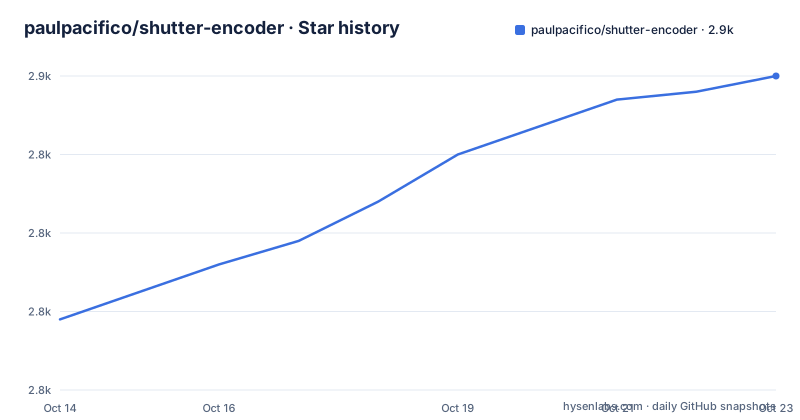
Star history
- paulpacifico/shutter-encoder2,850 ★ · +31
| Repository | 2026-10-14 | 2026-10-23 |
|---|---|---|
| paulpacifico/shutter-encoder | 2.8k | 2.9k |
31 Stars in the last 9 days, measured from the daily GitHub snapshot. Compare with other projects
Editorial analysis
What sits between you and FFmpeg
The application is a Java desktop front end over FFmpeg, which the repository description summarises as mostly based on FFmpeg and the README states more directly as built on top of FFmpeg, listing it as the core processing engine responsible for encoding, decoding, filtering, muxing and transcoding.
That framing sets expectations correctly. Shutter Encoder is not a codec or a container format. It is a way to assemble FFmpeg command lines through a form and a queue, which is why its feature list is long and its technical novelty is low. Encoding covers video, audio and images across common and professional codecs including H.264, H.265, ProRes, DNxHR, AV1 and VP9, plus container remuxing without re-encoding and image sequence generation.
The lossless operations are the part that separates it from a plain converter. The README lists lossless cut and trim, audio track replacement and removal, stream extraction and remuxing, and subtitle extraction and multiplexing. Cut and trim without re-encoding is the operation most people discover the application for, and it is the one HandBrake does not really offer.
The processing tools are broader still: subtitle embedding, burn-in and editing across srt, vtt and ass formats, loudness analysis and normalisation, black frame and media offline detection, cropping, scaling, padding and aspect-ratio control, LUT support, colour adjustment, and watermark or overlay insertion.
Batch queues, presets and rename rules
The workflow features decide whether this is a toy or a tool. A batch queue processes files in sequence, presets capture a configuration for reuse, and file renaming rules apply an output naming convention automatically. Optional FTP upload on completion and EDL export for detected cuts are the two that point at real production use rather than personal convenience.
Presets plus a queue is the combination that changes how you work. A one-off conversion is easier to do by hand, but a repeatable encode with a consistent name across a folder of source material is exactly what a queue and a preset are for. Renaming rules matter more than they sound because the alternative is a folder of `output`, `output_1`, `output_2` files that you then have to sort by hand.
Media information and metadata inspection is listed alongside these, backed by MediaInfo for technical analysis and ExifTool for reading and writing metadata. That combination is what makes the application useful for archive work rather than only delivery, since you can inspect a file's technical properties and its embedded metadata from the same window.
The application also reaches beyond transcoding in ways worth knowing about. Web video downloading goes through yt-dlp, RAW image decoding through LibRaw, and there is PDF rendering via XpdfReader for importing and converting documents. Whether a media converter should embed a web downloader is a design choice rather than a bug, but it is a choice with consequences, since the tool then has a much wider surface than its name suggests.
Fifteen bundled binaries and a custom Java runtime
The Open-Source Code Used section is the most informative part of the README, because it tells you exactly what ships inside the application. Beyond FFmpeg and yt-dlp, the list runs to Real-ESRGAN-ncnn-vulkan for AI upscaling, Whisper-Ctranslate2 for speech-to-text transcription, BackgroundRemover for image and video matting, Demucs for music source separation, DeOldify for colorization, LibRaw for camera RAW, ExifTool for metadata, tsMuxeR for transport stream muxing, MediaInfo for analysis, dvdauthor for DVD structure authoring, bmxtranswrap for broadcast MXF workflows, XpdfReader for PDF rendering, and 7-Zip for archives.
Five of those are machine-learning models rather than ordinary libraries, and three of them (Real-ESRGAN, Whisper and Demucs) carry their own model weights and their own licensing. DeOldify and BackgroundRemover are the same story. This is the honest cost of the feature list: the application can transcribe, upscale, colorize, separate stems and remove backgrounds, and it does so by carrying somebody else's models in the package.
The runtime is unusual too. Shutter Encoder ships a custom Java runtime built with jlink, based on Java 25, with fonts bundled directly into it. The configuration the README documents is a single command:
--strip-debug --no-header-files --no-man-pages --add-modules java.base,java.datatransfer,java.desktop,java.logging,java.security.sasl,java.xml,jdk.crypto.ec --output JREThe module list tells you what the application actually needs: a desktop UI, datatransfer for clipboard work, logging, XML parsing and elliptic curve crypto for TLS. Nothing about a server, no module management, no debug symbols. It is a deliberately small runtime, and bundling fonts alongside it is what keeps the application looking the same across platforms.
Building from source means populating Library by hand
The Build from Source section is two sentences long and both of them matter. Third-party dependencies must be downloaded into the Library folder by hand, and fonts are bundled inside the custom JRE. There is no dependency resolution step, no build script and no documented command for assembling a working binary from a clean checkout.
The repository layout reflects that. The tree is short: LICENSE.txt, README.md, a Languages directory for localisation, a Library directory, a fonts directory, a logo, a src directory and Shutter Encoder.jar at the root. That jar sitting in the repository root is the giveaway. A committed executable jar suggests the built application is checked in alongside its source, which is convenient for running and awkward for auditing.
The supported route is the prebuilt binary. Installers and portable versions for Windows, macOS and Linux are available from the official website at shutterencoder.com, and the changelog lives at shutterencoder.com/changelog rather than in a GitHub release feed. GitHub reports that same site as the project homepage.
So if you want to audit this application, be clear about which artefact you are auditing. Reading the source under src/ tells you about the Java application. It tells you nothing about whether the FFmpeg build, the yt-dlp build or the model files inside a downloaded installer match what this repository says they should be. That gap is not unusual for a desktop application, but it is where the interesting questions live.
Release cadence and the HandBrake comparison
Three releases appear in the project's release history: v20.1 on 2026-05-04, v20.2 on 2026-06-28 and v20.3 on 2026-08-31. The last push was on 2026-09-23 and the repository is not archived, so development is current. A version in the twenties on a Java application that started as a single-file tool is itself a signal about how long this has been maintained.
The comparison people actually search for is against HandBrake. The difference is not quality, it is scope. HandBrake is a focused video transcoder with a small, opinionated interface and a queue; its presets are curated and it does one job. Shutter Encoder is an FFmpeg control surface that covers video, audio, images, subtitles, metadata, disk structures and now AI tasks, which means you can do things in it that HandBrake cannot do at all, and you will spend longer finding them.
There is also a difference in what you can see. HandBrake shows you the encoder settings it will use and lets you adjust them within a sane range. Shutter Encoder's philosophy is closer to exposing the underlying tool, so a workflow that FFmpeg can express is a workflow you can usually reach here, including the obscure ones. For an editor who knows the command they want, that is an advantage. For someone converting their holiday video once, it is an intimidating interface with a download measured in gigabytes.
The GPL-3.0 license is worth noting alongside this. It means you can inspect and modify the application, which is unusual for a consumer-grade media tool and is why it can be recommended in environments that require auditable software.
Editorial conclusion
Shutter Encoder earns its place when you want FFmpeg's reach through a window rather than a command line: batch queues, preset reuse, loudness analysis and lossless cutting are the features that save real time, and the GPL-3.0 license lets you audit what you install. It is a poor fit if you want a small download or a clean dependency tree, since the application bundles a jlink-built Java 25 runtime and roughly fifteen third-party binaries including machine-learning models. Two things to check before installing. The homepage at shutterencoder.com is where the Windows, macOS and Linux builds and the changelog actually live, so the GitHub repository is not the distribution channel. And the bundled tools carry their own licenses, several of them permissive and some of them not, so read those terms yourself before shipping work produced with it.
Frequently asked questions
What is Shutter Encoder used for?
It is a graphical front end over FFmpeg for media transcoding, conversion and processing. The README lists video, audio and image work, lossless cut and trim, subtitle embedding and editing, loudness analysis and normalisation, batch queues, presets, LUTs and overlays, plus web video download through yt-dlp and RAW decoding through LibRaw.
Is the shutter Encoder totally free?
The project is released under the GPL-3.0 license, with a LICENSE.txt file in the repository root, and the README describes it as free and open-source. Installers and portable versions for Windows, macOS and Linux are distributed from shutterencoder.com. The application does bundle third-party components that carry their own licenses, including several machine-learning models, so those terms are worth reading separately.
How to use a shutter Encoder to replace audio?
The README lists audio track replacement and removal among the lossless operations, meaning the video is not re-encoded while the audio track is swapped. The README does not document the step-by-step procedure; that detail sits on the official site at shutterencoder.com rather than in the repository.
Is a shutter Encoder any good?
The README positions it for video editors, post-production professionals and advanced users who want reproducible workflows through a graphical interface, and it is built on FFmpeg as the core engine. Whether that suits you depends on scope: it covers far more than a dedicated transcoder such as HandBrake, and it ships a jlink-built Java 25 runtime plus roughly fifteen bundled third-party binaries, so the install is large.
Official sources
Add this badge to your README
If you maintain this project, the badge below links readers to this analysis and shows its maintenance status from the daily GitHub snapshot. Paste the markdown into your README; add ?metric=license or ?metric=stars to the image URL for a different field.

[](https://hysenlabs.com/projects/paulpacifico-shutter-encoder)Star history chart for your README
[](https://hysenlabs.com/projects/paulpacifico-shutter-encoder)Was this useful?