Pawel-N-pl/bmad-assist: the BMAD loop that was retired in favour of bmad-automator
⚠️ Deprecated & unmaintained. This tool only ever supported BMAD v6.0.0-alpha.22. Use bmad-loop instead.
At a glance
- What is it?
- A command-line tool that read a product requirements document, an architecture document and a set of epics, then implemented them story by story with one language model writing code and a panel of others validating and reviewing it. The README opens by declaring the project end-of-life, and the repository carries a final release tag, so this is documentation for a retired tool and a record of the design.
- Who is it for?
- Read this repository as a design record rather than something to install. The orchestration idea, one model writing while several validate and review, is the part worth carrying forward, and the successor project named in the README is the place to do that.
- Can I use it commercially?
- Not without permission. GitHub finds no licence file in the repository, and without a licence all rights are reserved by default: you may read the code but not reuse it. Check the README, or ask the authors, before using it.
- Is it still maintained?
- Yes. The repository last received commits 136 days ago.
- What is it written in?
- Mainly Python, according to GitHub's language statistics.
Answers come from the project's GitHub data, last synced on October 22, 2026, and from our analysis. They are not legal advice.
Star history
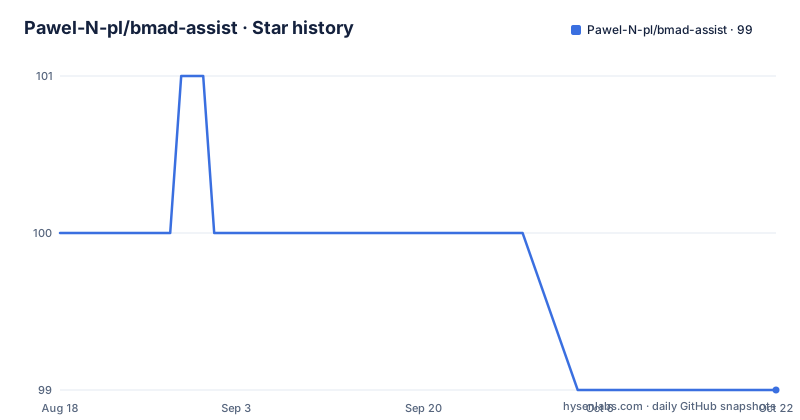
- Pawel-N-pl/bmad-assist99 ★ · -1
| Repository | 2026-08-18 | 2026-10-22 |
|---|---|---|
| Pawel-N-pl/bmad-assist | 100 | 99 |
-1 Stars in the last 65 days, measured from the daily GitHub snapshot. Compare with other projects
Editorial analysis
The README opens by declaring the project dead
The first thing on the page is a warning block stating that the project is no longer maintained and is in end-of-life status. It gives three reasons in three clauses: it was a solo project, it only ever worked with one specific early alpha release of the underlying method, version 6.0.0-alpha.22, and it will receive no further updates, fixes or support. Active development is said to have moved to a successor described as a skills-based, community-maintained tool that works with the latest versions, and the advice for anyone starting out or migrating is to use that instead. The repository is kept online for posterity and reference. The release history agrees: the newest tag is titled as the final release with project end-of-life in its name, dated 2026-03-07.
The description and the README name different successors
There is a small inconsistency worth flagging before you follow either pointer. The repository description says the tool is deprecated and unmaintained and directs you to use something called bmad-loop instead. The README's warning block instead names a different project as the spiritual successor, and links to it on the bmad-code-org organisation. So two of the three places a visitor encounters, the repository blurb and the README, point at two different replacement tools by two different names. If you are migrating, resolve that before you start, since following the wrong pointer wastes an afternoon of reading someone else's documentation.
One model writes code and the others never touch your files
The orchestration rule is stated in a single sentence and it is the core design decision. One model, referred to as the master, writes all the code. The others only validate and review, and the README is explicit that they never touch your files. Within the loop, a story is validated by several models running in parallel, on the argument that this catches issues a single model would miss, and the implementation step is followed by a code review in which the same panel acts as adversarial reviewers. Each stage ends in a synthesis phase, and the diagram the README draws shows the shape of it: create, validate, synthesize, develop, review, synthesize, then back to the next story.
The loop stops between stories so you can quit cleanly
Step five of the six described steps is not about code at all. After each story, and again at each epic boundary, the loop pauses so you can stop it, and two flags change that behaviour. The short flag skips the prompts between stories while still prompting at epic boundaries, and another flag runs the tool non-interactively, failing if configuration is missing rather than waiting for an answer. When an epic finishes its stories, the tool runs a retrospective before moving to the next epic, which means the loop has a natural place to gather what went wrong. Two of the features listed separately are marked as work in progress rather than finished: multi-method artifact verification and a parallel CWE pattern security agent that would be folded into the review phase.
Windows is unsupported for a specific and unfixable reason
The platform note is unusually precise, which is helpful. The tool supports Linux and macOS only, and the reason is not that it was never tried: the subprocess management layer depends on POSIX interfaces throughout the codebase, naming process group killing, the SIGKILL signal, process groups and a new-session option. On Windows the recommendation is to use WSL2, followed by four notes about that route. Keep your projects on the Linux filesystem rather than a Windows drive for socket permissions and inter-process communication performance; the inter-process socket directory lives under a dot directory in your home folder and is on the Linux filesystem by default; the Windows filesystem driver does not support Unix socket permissions properly and the tool warns if it detects that setup; and every WSL2 terminal you open shares the same socket.
Your project has to supply four documents
The tool does not scaffold a project's thinking for you. It reads what you write, or what another tool writes for you, and it expects a specific set of files inside a docs directory. A product requirements document, a technical decisions document that may be a single file or a directory, an epics document that may likewise be a file or a directory, and a project context file holding the rules you want the implementing agent to follow. The README recommends initialising the project, then customizing a configuration file for provider and model settings before the first run, with a full reference in the configuration document.
# Initialize project
bmad-assist init --project /path/to/your/project

# Run the development loop
bmad-assist run --project /path/to/your/project
The CLI is mostly about where to start and when to stop
The command list is short and its shape tells you what the tool thinks is important.
# Main loop
bmad-assist run -p ./project              # Run BMAD loop
bmad-assist run -e 5 -s 3                 # Start from epic 5, story 3
bmad-assist run --phase dev_story         # Override starting phase

# Useful flags
bmad-assist run -g                        # Auto-commit after create/dev/synthesis phases
bmad-assist run -n                        # Non-interactive (no prompts, fail if config missing)
bmad-assist run --skip-story-prompts      # Skip prompts between stories (still prompt at epic boundaries)
bmad-assist run -v                        # Verbose - show INFO-level log
Two flags resume rather than start: one picks an epic and story number, the other overrides the phase the loop begins with. The auto-commit flag is scoped to three named phases, so commits are created after story creation, development and review synthesis, which is a compromise between a clean history and unattended runs.
The dependency comments explain the odd pins
Two files in the repository carry comments that answer questions the docs do not. The packaging file pins a YAML library below its next major version with the reason written next to it: it is required for comment preservation when the tool rewrites the sprint status file, so a naive replacement would silently drop comments a human wrote there. The same file explains that an interactive prompt library is there for arrow-key navigation and that a path specification library is used for gitignore pattern matching when the project tree is generated. Notifications are configured through a dotenv example file that instructs you to copy it, restrict it with chmod, and never commit it, with a Telegram bot token and chat identifier and a Discord webhook as the two channels for story progress and error alerts.
Editorial conclusion
Read this repository as a design record rather than something to install. The orchestration idea, one model writing while several validate and review, is the part worth carrying forward, and the successor project named in the README is the place to do that. Two cautions if you are tempted to run this version anyway. It is tied to a single early alpha release of the underlying method and will not work with later versions, and the README directs new users to the successor instead. And it will not run on Windows at all, because the process management layer is built on POSIX calls throughout.
Frequently asked questions
What does BMAD stand for?
Breakthrough Method of Agile AI Driven Development. bmad-assist is described as a command-line tool built on that methodology, which structures AI-driven projects into documents: a product requirements document, architecture, epics and stories.
How do I use the BMAD method?
The methodology works through documents rather than code. You write a product requirements document, an architecture document, epics and a project context file, and bmad-assist reads those and runs a loop that creates a story, validates it with several models in parallel, implements it, reviews it with those models acting as adversarial reviewers, and pauses between stories.
Is bmad-assist still supported?
No. The README declares it end-of-life, states that it was a solo project that only ever supported one early alpha release of the method, and says it will receive no further updates, fixes or support. The newest tag is titled as the final release with project end-of-life in its name, dated 2026-03-07.
Can I run bmad-assist on Windows?
Not natively. Linux and macOS are the only supported platforms because the subprocess management layer uses POSIX interfaces such as process group killing, SIGKILL, process groups and new sessions throughout. The README directs Windows users to WSL2 and warns that projects should live on the Linux filesystem rather than a Windows drive for socket permissions.
How does bmad-assist split work between models?
One model, called the master, writes all the code. The others only validate stories and review code as adversarial reviewers, running in parallel, and the README states they never touch your files. Each stage ends in a synthesis phase before the loop moves to the next story.
Official sources
Add this badge to your README
If you maintain this project, the badge below links readers to this analysis and shows its maintenance status from the daily GitHub snapshot. Paste the markdown into your README; add ?metric=license or ?metric=stars to the image URL for a different field.

[](https://hysenlabs.com/projects/pawel-n-pl-bmad-assist)Star history chart for your README
[](https://hysenlabs.com/projects/pawel-n-pl-bmad-assist)