ntpd-rs: a memory-safe NTP daemon with NTS, from the people who wrote the modern one
A full-featured implementation of the Network Time Protocol, including NTS support.
At a glance
- What is it?
- ntpd-rs is a Rust implementation of the Network Time Protocol with NTS support, including both client and server modes, built under Project Pendulum as a memory-safe replacement for the classic ntpd. It ships as packaged binaries configured against the NTP pool, a systemd service, a status CLI, and a Prometheus metrics exporter, and it is now on a 2.0 alpha line while 1.9.0 remains the last stable release.
- Who is it for?
- ntpd-rs suits an operator who wants time synchronisation without running the historical C ntpd, and who cares about the security properties of a network-facing daemon, because the project was written from the start in Rust as part of an explicit memory safety programme and the 2.0 line is an ongoing rewrite rather than a frozen branch.
- Can I use it commercially?
- Check first. The repository uses a licence we do not classify automatically, so read its LICENSE file before any commercial use.
- Is it still maintained?
- Yes. The repository last received commits 1 day ago.
- What is it written in?
- Mainly Rust, according to GitHub's language statistics.
Answers come from the project's GitHub data, last synced on November 7, 2026, and from our analysis. They are not legal advice.
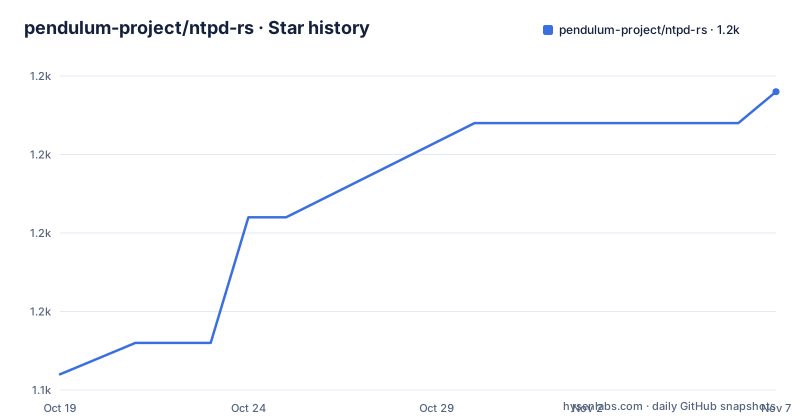
Star history
- pendulum-project/ntpd-rs1,157 ★ · +9
| Repository | 2026-10-19 | 2026-11-07 |
|---|---|---|
| pendulum-project/ntpd-rs | 1.1k | 1.2k |
9 Stars in the last 19 days, measured from the daily GitHub snapshot. Compare with other projects
Editorial analysis
What it is, and the memory safety framing
ntpd-rs is a tool for synchronizing your computer's clock, implementing the NTP and NTS protocols. It is written in Rust, with a focus on security and stability, and it includes both client and server support.
The history section is what makes the project distinctive, and it explains the design more than any feature list could.
The project originates from ISRG's project Prossimo, as part of their mission to achieve memory safety for the Internet's most critical infrastructure. Prossimo funded the initial development of the NTP client and server, and NTS support.
After completion of the initial development, ownership moved from Prossimo to Tweede golf in April 2023, and Tweede golf became the long-term maintainer as part of Project Pendulum. Pendulum is building modern, open-source implementations of the Network Time Protocol, ntpd-rs, and the Precision Time Protocol, Statime.
Then funding. In July of 2023 the Sovereign Tech Agency invested in Pendulum, securing ntpd-rs development and maintenance in 2023 and maintenance and adoption work in 2024. In 2024 the work for the Sovereign Tech Agency completed, which resulted in, among many other deliverables, a stable release for ntpd-rs. And in June of 2024, ntpd-rs was deployed in the infrastructure of Let's Encrypt.
That last item is the most informative single fact in the README. A time daemon is infrastructure, and the deployment at a certificate authority is a statement about who trusts it with uptime and accuracy.
A workspace that also contains a PTP implementation
The repository layout shows that this is two projects sharing a build.
The Cargo.toml declares a workspace with eleven members: clock-steering, ntp-proto, ntpd, statime-algo, statime-base, statime-config, statime-config-derive, statime-csptp, statime-netptp, statime-wire and timestamped-socket. statime-seccomp is excluded from the workspace.
The naming makes the split obvious. The ntp-* crates are the NTP side, with ntp-proto holding the protocol implementation and ntpd the daemon. The statime-* crates are the Precision Time Protocol side, with statime-algo for the algorithms, statime-netptp and statime-csptp for the two network transports, statime-wire for the serialisation, and statime-config with a derive macro for the configuration. timestamped-socket and clock-steering are the shared support crates, the latter presumably the mechanism for disciplining a system clock from a time source.
So Pendulum is not a single daemon with a NTP mode bolted on. It is an attempt to build both time distribution protocols, NTP over the internet and PTP over a local network, in one memory-safe stack, with the shared pieces factored out. A lab that runs both an NTP stratum server and a PTP grandmaster is the audience this workspace shape implies.
The workspace also carries some unusually strict settings. missing_docs is denied, broken intra-doc links are denied, and the clippy lint list is long and specific, with cast_possible_truncation, cast_sign_loss, checked_conversions, clone_instead_of_copy and many others set to warn. The dev profile sets panic = abort, with a comment explaining that because of the async runtime, panics really want to cause an abort, otherwise the binary can keep on running as a ghost. The release profile adds lto and debug = 2, which keeps symbols for readable crash reports.
Panic abort, because a ghost daemon is worse than a crash
That comment about panics is worth dwelling on, because it explains a design choice that affects how the daemon behaves in production.
The reasoning: because of the async runtime, we really want panics to cause an abort, otherwise the binary can keep on running as a ghost.
A panic in a thread of a multi-threaded process does not necessarily kill the process. In a synchronous server, an unhandled panic in a request handler would propagate and terminate that request. In an async runtime, a panicking task is caught by the runtime and the executor simply stops polling that future, so the process stays alive with a half-dead task. For a daemon whose entire job is to keep a clock synchronised, that is the worst outcome: the process is up, systemd thinks it is healthy, and time is silently not being disciplined.
Setting panic = abort in both the dev and release profiles means a panic terminates the process immediately, and systemd's restart policy takes over. That is the right trade for this kind of service, and it is the kind of decision that comes from having operated the thing.
The same reasoning explains the metrics exporter. A time daemon that quietly fails to discipline the clock is a problem you want to notice, and the presence of a dedicated ntp-metrics-exporter binary in the build output says the project expects to be monitored rather than trusted blindly.
The MSRV is 1.95 and the edition is 2024, both declared in the workspace package section, and the resolver is set to 3 so the compiler version is taken into account when resolving crates.
Install as a package, then check the daemon with systemctl
The README's usage path is short and assumes you are installing a packaged build rather than compiling from source.
You can install the packages from the releases page. These packages configure ntpd-rs to synchronize your computers clock to servers from the NTP pool. After installation, check the status of the ntpd-rs daemon with systemctl status ntpd-rs.
$ sudo systemctl status ntpd-rsIf ntpd-rs was not started automatically, you can do so now with systemctl start ntpd-rs.
$ sudo systemctl start ntpd-rsThe status is then checked with the ntp-ctl command.
$ ntp-ctl status
Synchronization status:
Dispersion: 0.000299s, Delay: 0.007637s
Desired poll interval: 16s
Stratum: 4

Sources:
ntpd-rs.pool.ntp.org:123/77.171.247.180:123 (1): +0.000024±0.000137(±0.016886)s
    poll interval: 16s, missing polls: 0
    root dispersion: 0.005905s, root delay:0.016190s
The README explains the output. The top part shows the overall quality of the time synchronization, and the time sources section shows which servers are used as well as offsets and uncertainties of those individual servers.
The presence of ntp-metrics-exporter in the build output, and the fact that the packages point at the NTP pool by default rather than asking you to configure servers, are the two things that shape a first installation. The pool is the right default for a client, and the metrics exporter is what turns the daemon from a black box into something a monitoring system can watch.
The container build produces three binaries and drops the toolchain
The Dockerfile is a two stage build that separates compilation from the runtime image, and the details are worth reading because the artifact list tells you what the project actually ships.
The builder stage is rust:${RUST_VERSION}-bookworm, with a shell override to bash with pipefail so the build fails on any error in a pipeline. It installs ca-certificates, copies the source to /build, and runs cargo build --locked --release with a features argument passed through the NTPDRS_BUILD_FEATURES environment variable. Three cache mounts are used, for the cargo git database, the cargo registry and the build target directory, and the comment explains that the binaries are copied out of the target directory afterwards because that directory will not be available in the next steps, being a cached directory.
The three binaries copied are ntp-daemon, ntp-ctl and ntp-metrics-exporter.
The runner stage is debian:bookworm-slim with ca-certificates installed, and the three binaries are copied into /usr/local/bin. A user and group are created with the name ntpd-rs and a UID of 10001, and the final image is a Debian slim with three small binaries in it rather than a Rust toolchain.
The --locked flag on the cargo build is the detail that matters for reproducibility. It forces Cargo to use the exact versions in Cargo.lock, so a rebuild produces the same dependency set, which is a reasonable requirement for a daemon whose job is to be trusted about time.
The feature flag passed through the build argument is how a downstream packager selects optional functionality without editing the Dockerfile, and the exclusion of statime-seccomp from the workspace suggests that crate is built separately, probably because it needs a specific target or a different toolchain.
A 1.9 stable line and a 2.0 alpha running in parallel
The release history is the thing to look at before deploying, and it needs reading carefully.
The recent tags are v2.0.0-alpha.20260715 from 2026-07-17, v1.9.0 from 2026-06-12 and v1.8.0 from 2026-05-07. The last push was on 2026-10-15, so the tree is being worked on.
The alpha tag is dated 2026-07-17 while the 1.9.0 tag is from 2026-06-12, and the 1.8.0 from 2026-05-07. The version string in the workspace package section reads 2.0.0-alpha.20260715, which matches the alpha tag, meaning the main branch is on the 2.0 line and the 1.x line is being maintained separately.
That structure, a mature 1.x line and a 2.0 line in development, is a normal pattern for infrastructure software. It also means the version you install matters a great deal. A 1.9.0 install is a stable release that the README says resulted from the Sovereign Tech Agency work, and it is a different codebase from the 2.0 alpha.
The 2.0 rewrite is where the PTP crates come into play in earnest, and the alpha tag carries a date suffix in the usual nightly-style format, which suggests it is cut frequently.
The README is explicit that if a feature you need is missing, the project asks you to open an issue. For a daemon, the feature list that matters is the protocol and configuration surface, and the roadmap is not in this repository but at Project Pendulum, which is where the plan for both ntpd-rs and Statime lives.
Configuration in TOML, and the two licence files
Two things in the repository tell you how the project expects to be operated.
The first is the configuration format. There is an ntp.toml and an ntp.server.toml at the repository root, one for the client role and one for the server role, and a config/ directory alongside them. The Cargo.toml lists the license as Apache-2.0 OR MIT, which is the Rust convention for a project that wants downstream users to be able to choose either.
The second is the pair of licence files. There is LICENSE-APACHE and LICENSE-MIT at the root, plus a COPYRIGHT file, and the overall licence is listed as a custom one GitHub cannot classify. The COPYRIGHT file is the standard Rust dual-licence mechanism: it assigns copyright to the individual contributors and makes the choice of licence explicit, rather than leaving a corporate entity as the sole holder.
The README does not document the configuration keys, and neither does the repository listing show a schema. That is where the documentation website comes in, which the README points to for guides on getting started, installation and migration, and a high-level overview of the code structure.
Migration gets its own mention, which is the right signal for anyone moving from the classic ntpd. The traditional daemon has a decades-old configuration format with its own quirks, and a Tonic shift to TOML with an explicit client and server split is exactly the kind of change that needs a documented path rather than a note in a changelog.
Other operational files are present as well: a .rust-toolchain/ directory and rust-toolchain.toml pinning the compiler, a clippy.toml for lint configuration, a deny.toml for cargo-deny and dependency policy, a fuzz/ directory for fuzzing, a Dockerfile, and a Cross.toml for cross compilation.
Editorial conclusion
ntpd-rs suits an operator who wants time synchronisation without running the historical C ntpd, and who cares about the security properties of a network-facing daemon, because the project was written from the start in Rust as part of an explicit memory safety programme and the 2.0 line is an ongoing rewrite rather than a frozen branch. It is the wrong tool if you need a stable long-term release with no churn, since the newest tag is an alpha and the last stable is 1.9.0, and it is the wrong choice if you need features the project has not implemented, since the README explicitly asks for an issue when something is missing. Before you deploy it, read the migration guide on the documentation site and check whether your existing ntpd configuration maps cleanly onto ntp.toml.
Frequently asked questions
What is ntpd-rs and who maintains it?
ntpd-rs is a Rust implementation of the NTP and NTS protocols with both client and server support, written with a focus on security and stability. It originated in ISRG's Prossimo project, moved to Tweede golf in April 2023 as part of Project Pendulum, and is maintained with Sovereign Tech Agency funding.
How do I check whether ntpd-rs is synchronising my clock?
Run ntp-ctl status. The output shows the overall synchronization quality including dispersion, delay and stratum, followed by the time sources with their offsets and uncertainties.
Which binaries does the ntpd-rs container image ship?
Three: ntp-daemon, ntp-ctl and ntp-metrics-exporter, built with cargo build --locked --release and copied into a debian:bookworm-slim runner image running as a non-root user with UID 10001.
What is the difference between ntpd-rs 1.9.0 and the 2.0 alpha line?
The 1.9.0 tag from 2026-06-12 is the stable release that came out of the Sovereign Tech Agency work, while the main branch carries version 2.0.0-alpha.20260715, a development line where the Precision Time Protocol crates are being developed in the same workspace.
Does the ntpd-rs project support both NTP and Precision Time Protocol?
The workspace contains both. The ntp-proto and ntpd crates cover NTP, while the statime-algo, statime-netptp, statime-csptp, statime-wire and statime-config crates cover the Precision Time Protocol, with statime-seccomp excluded from the workspace.
Official sources
Add this badge to your README
If you maintain this project, the badge below links readers to this analysis and shows its maintenance status from the daily GitHub snapshot. Paste the markdown into your README; add ?metric=license or ?metric=stars to the image URL for a different field.

[](https://hysenlabs.com/projects/pendulum-project-ntpd-rs)Star history chart for your README
[](https://hysenlabs.com/projects/pendulum-project-ntpd-rs)Was this useful?