petl, a general purpose Python package for tables of data
Python Extract Transform and Load Tables of Data
At a glance
- What is it?
- petl is a Python package for extracting, transforming and loading tables of data, and its design bet on a large set of small composable functions rather than a heavyweight pipeline engine, with every format and database driver shipped as an optional extra. The project is old, MIT licensed, and still releasing patch versions, and its packaging carries some fossils worth knowing about.
- Who is it for?
- petl fits a Python team doing tabular extract, transform and load work that wants a library of composable table functions rather than a pipeline framework, and it fits people who work in notebooks and want the data to stay as plain Python objects rather than being copied into a dataframe engine.
- Can I use it commercially?
- Yes. MIT is a permissive licence: you can use, modify and sell software built on it, as long as you keep its copyright and licence notices.
- Is it still maintained?
- Yes. The repository last received commits 1 day ago.
- What is it written in?
- Mainly Python, according to GitHub's language statistics.
Answers come from the project's GitHub data, last synced on November 7, 2026, and from our analysis. They are not legal advice.
Star history
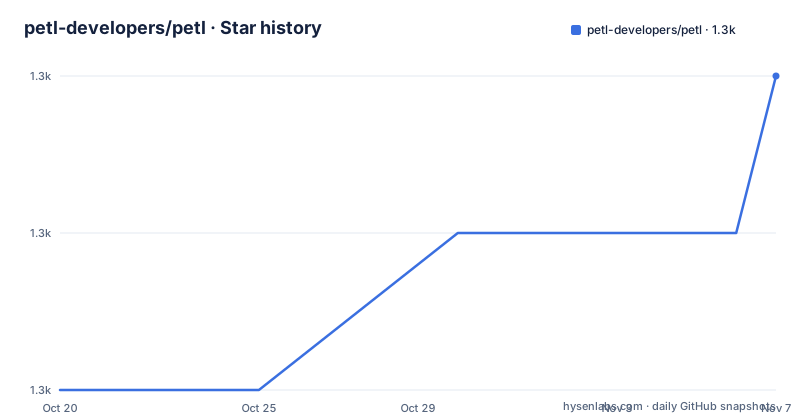
- petl-developers/petl1,325 ★ · +2
| Repository | 2026-10-20 | 2026-11-07 |
|---|---|---|
| petl-developers/petl | 1.3k | 1.3k |
2 Stars in the last 18 days, measured from the daily GitHub snapshot. Compare with other projects
Editorial analysis
Tables as the unit of work, not dataframes
petl is described as a general purpose Python package for extracting, transforming and loading tables of data, and the README points at an architecture diagram that illustrates the usage possibilities. The framing is the interesting part. A dataframe library takes a table and gives you a table back as a specialised in-memory object with vectorised operations and its own semantics. petl's position is that a table of data is a sequence of rows that can be transformed one step at a time, and that the transformations themselves are ordinary Python functions you can read, test and replace. That is the appeal for a programmer who has spent an afternoon fighting a dataframe library to do something that a comprehension would do in two lines. It is also the reason the package describes itself as general purpose rather than as an analytics tool, and the examples directory in the repository is organised the same way, with a subdirectory for io, for transform, for util and for notes, alongside intro.py and comparison.py.
Every format and database is an optional extra
The setup.py is where petl's philosophy shows most clearly, because the dependency list is almost empty and the extras are long. There are extras for Avro through fastavro, for bcolz, for databases through SQLAlchemy, for HDF5 through cython, numpy, numexpr and tables, for HTTP through aiohttp and requests, for interval trees, for numpy, for pandas, for remote files through fsspec, for SMB through smbprotocol, for the xls format through xlrd and xlwt, for xlsx through openpyxl, for XPath through lxml, and for whoosh full text search. The base install therefore pulls in almost nothing, and a project that only reads CSV installs nothing extra at all, while a project that needs to write Excel adds openpyxl and nothing else. Two of the extras are worth flagging for an evaluator. The pandas extra means the library is not a competitor to pandas but a way to feed it, and the HTTP extra means the library can pull tables from a web service as well as from a file, which is where the extract in extract, transform and load comes from.
A command line tool sits beside the library
The package installs a script, with scripts set to bin/petl in the setup metadata, and the repository carries a bin/ directory. That means the same functionality that the library exposes is reachable from a shell, which is what you want when the extraction step is a cron job or a container entry point rather than part of a larger Python program. The repository also ships a docker compose file for development, and its contents tell you what the maintainers consider the realistic backends. There are two database services, a postgres container and a mysql container, both configured with the database name, user and password petl, with the PostgreSQL image using the password authentication method, and with the MySQL image allowing an empty password. The compose file documents the three operations you will actually perform, bringing the services up in the background, testing the connections with psql and the mysql client inside the containers, and tearing everything down with the volumes and images removed.
Packaging that still remembers Python 2
The build system mixes modern and old in a way that is worth knowing before you pin a version. The pyproject declares a build backend of setuptools with setuptools-scm and wheel, and configures ruff with a line length of 88, an indent width of 4 and a short ignore list, and configures pylint with a long disable list that turns off most of the stylistic checks a linter would otherwise report. The setup.py is where the history shows. It declares python_requires as 2.7 or later with 3.0 through 3.3 excluded, the classifiers include Python 2 and 2.7 alongside Python 3, and the version is not written in the file at all but derived by setuptools-scm, with a guess next dev version scheme, a dirty tag local scheme, and the result written into petl/version.py at build time. The practical consequence is that a source install needs a git checkout with tags, and that the metadata still advertises a Python 2.7 audience that the modern releases no longer target.
The requirements files show the shape of the project
The top level of the repository is a good map of how the work is organised. There is the petl/ package itself, the docs/ directory that produces the readthedocs site, an examples/ tree, a tests/ setup with pytest.ini and tox.ini, and a set of requirements files that split the dependency surface by purpose, with requirements-database.txt, requirements-docs.txt, requirements-formats.txt, requirements-linting.txt, requirements-optional.txt, requirements-remote.txt and requirements-tests.txt. That split is the packaging story again. The core has almost no dependencies, the extras exist as named requirements groups, and the test and lint tooling is isolated so it never reaches a user. The .coveragerc and .flake8 files sit alongside a .readthedocs.yaml and a .vscode/ directory, and the presence of both README.rst and README.txt plus a MANIFEST.in is a reminder that this project has been packaging itself for a very long time, and has kept the old paths working.
A long project that still ships releases
The release history says the project is alive in the way that mature libraries are alive, with frequent patch releases and no drama. The tags are v1.7.27 on 2026-09-24, v1.7.28 on 2026-09-29 and v1.7.29 on 2026-10-11, and the last push to the default branch was on 2026-10-14. The badges in the README show the whole delivery chain, with PyPI download counts, the conda-forge channel, the test workflow, the release workflow that publishes to PyPI, the conda build status, coveralls coverage, the readthedocs build and a Zenodo publication with a DOI, which matters for an academic or government user who has to cite a version. The licence is MIT, in LICENSE.txt, with the package metadata declaring the same and the classifier confirming the OSI approved MIT licence. The project was started by Alistair Miles and is now maintained by Juarez Rudsatz, and the community discussion happens on a Google group, which is a good indicator of the audience it serves.
Editorial conclusion
petl fits a Python team doing tabular extract, transform and load work that wants a library of composable table functions rather than a pipeline framework, and it fits people who work in notebooks and want the data to stay as plain Python objects rather than being copied into a dataframe engine. It does not fit a project that needs a distributed scheduler, a DAG runtime or typed schemas, because none of that is in the package, and it does not fit a team that has standardised on pandas, since pandas is an extra you install rather than the core. Verify three things before adopting it: which extras your actual sources need, since the base install is deliberately small, that the Python version you run is one the classifiers still list, and whether the 2.7 era packaging in setup.py causes friction with your build tooling, since the version is derived by setuptools-scm at build time.
Frequently asked questions
What is petl?
It is a general purpose Python package for extracting, transforming and loading tables of data. It is distributed on PyPI and on the conda-forge channel, documented at petl.readthedocs.io, with community discussion on a Google group.
What dependencies does petl require?
Very few by default. The setup metadata lists a long set of optional extras instead, including avro through fastavro, db through SQLAlchemy, hdf5, http through aiohttp and requests, numpy, pandas, remote through fsspec, smb, xls, xlsx through openpyxl, xpath through lxml, bcolz, interval and whoosh.
Does petl come with a command line tool?
Yes. The setup metadata installs the script bin/petl alongside the library, so the same functionality is reachable from a shell for scheduled or containerised extraction work.
How is the petl version determined?
The version is not written into setup.py but derived by setuptools-scm from the git tags, using a guess next dev version scheme and a dirty tag local scheme, with the result written to petl/version.py at build time. A source install therefore needs a git checkout, and the metadata still declares python_requires of 2.7 or later with 3.0 through 3.3 excluded.
Official sources
Add this badge to your README
If you maintain this project, the badge below links readers to this analysis and shows its maintenance status from the daily GitHub snapshot. Paste the markdown into your README; add ?metric=license or ?metric=stars to the image URL for a different field.

[](https://hysenlabs.com/projects/petl-developers-petl)Star history chart for your README
[](https://hysenlabs.com/projects/petl-developers-petl)Was this useful?