pgrx: one Rust codebase against Postgres 13 through 18, and the setup that comes with it
Build Postgres Extensions with Rust!
At a glance
- What is it?
- A Rust framework for writing Postgres extensions, with a cargo subcommand that fetches and compiles each Postgres version for you, derives SQL from your types, and turns a Rust panic into a transaction abort instead of a dead backend. The rough edges sit in macOS setup, the missing 32-bit target and the absence of a minimum Rust version policy.
- Who is it for?
- Choose it if you are writing an extension in Rust and want one codebase to cover Postgres 13 to 18 without hand-maintaining six bindings. Pass on it if you need 32-bit support, a pinned minimum Rust version, or an untested Unix other than the four named targets.
- Can I use it commercially?
- Check first. The repository uses a licence we do not classify automatically, so read its LICENSE file before any commercial use.
- Is it still maintained?
- Yes. The repository received new commits within the last day.
- What is it written in?
- Mainly Rust, according to GitHub's language statistics.
Answers come from the project's GitHub data, last synced on November 25, 2026, and from our analysis. They are not legal advice.
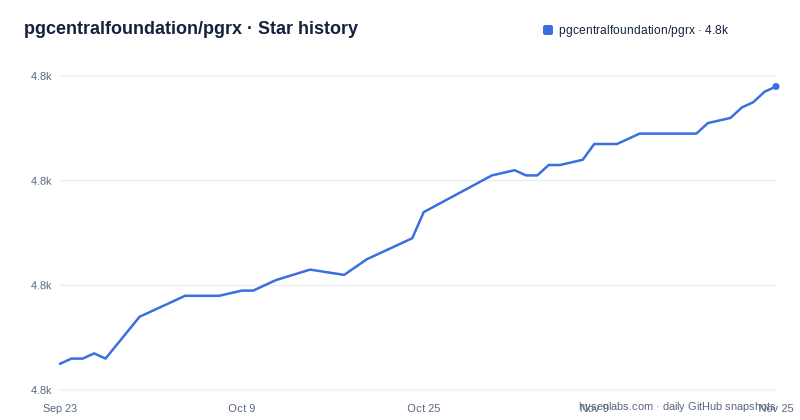
Star history
- pgcentralfoundation/pgrx4,838 ★ · +53
| Repository | 2026-09-23 | 2026-11-25 |
|---|---|---|
| pgcentralfoundation/pgrx | 4.8k | 4.8k |
53 Stars in the last 63 days, measured from the daily GitHub snapshot. Compare with other projects
Editorial analysis
cargo-pgrx owns the Postgres versions you develop against
The development environment is the point of the tool. `cargo pgrx init` installs a new PostgreSQL install or registers an existing one, and the rest of the subcommands work against that set. `cargo pgrx new` scaffolds an extension, `cargo pgrx run` runs yours and drops you into `psql` or `pgcli` to poke at it, `cargo pgrx test` unit-tests the extension across multiple PostgreSQL versions in one pass, and `cargo pgrx package` builds installation packages. The part that saves the most work is that a local PostgreSQL server installation is not required: on Linux and macOS `cargo pgrx` downloads and compiles the Postgres versions on its own, while on Windows it downloads precompiled versions from EnterpriseDB. You therefore end up with several full Postgres installs on the same machine, one per supported version, and the cost of that is disk and build time paid before your first test runs.
One codebase covers Postgres 13 to 18 plus 19beta4
Version coverage is the claim the framework rests on. Support runs from Postgres 13 through Postgres 18, with Postgres 19beta4 included, all from the same codebase rather than from forked branches. Where an API genuinely differs between versions, the answer is Rust feature gating, so a version-specific call lives behind a `cfg` rather than behind a duplicated source tree. Testing against the whole range is meant to be routine, since `cargo pgrx test` unit-tests your extension across multiple PostgreSQL versions. Two caveats belong next to that number. A beta is a beta, so the 19 support you get is whatever 19beta4 exposes at the time, and any API added in a later beta will not be there. The second is that major version transitions are visible in the tree itself: `v18.0-MIGRATION.md`, `v18-TYPE-RESOLUTION.md` and `v18-ONE-COMPILE-CHANGELOG.md` sit at the repository root, which is what a change in type resolution across a major version looks like when it reaches your crate.
A panic becomes an ERROR and the transaction dies, not the backend
The safety story is about what happens when your Rust code misbehaves inside a Postgres backend. A Rust `panic!` is translated into a Postgres `ERROR` that aborts the transaction rather than the process, so a bug in your extension costs you the statement and the transaction instead of the connection and everything else the backend was holding. Memory management follows Rust drop semantics even in the face of `panic!` and `elog(ERROR)`, and the `#[pg_guard]` procedural macro is what enforces that arrangement on functions crossing into Postgres. Datums are modelled as `Option<T> where T: FromDatum`, which makes a SQL `NULL` a `Option::<T>::None` rather than a sentinel value you have to remember to check. The rest of the surface follows the same idea: `pgrx::PgBox<T>` wraps Postgres-provided pointers the way `alloc::boxed::Box<T>` wraps Rust allocations, `pgrx::PgMemoryContexts` gives named access to the `MemoryContext` system, and executor, planner, transaction and subtransaction hooks are all exposed.
Your types pick their own storage format
Schema generation starts from your Rust types, and the macros decide the representation. `#[derive(PostgresType)]` turns a struct into a Postgres type that is CBOR-encoded in memory and on disk by default, with JSON as the human-readable form, and `#[pg_binary_protocol]` generates the send and receive functions so the binary protocol works too. Custom in-memory, on-disk and human-readable representations can be supplied instead. `#[derive(PostgresEnum)]` maps a Rust enum to a Postgres enum, and composite types come from the `pgrx::composite_type!("Sample")` macro. Functions reach Postgres through `#[pg_extern]`, `RETURNS SETOF` is expressed by returning `pgrx::iter::SetOfIterator<'a, T>`, `RETURNS TABLE (...)` by `pgrx::iter::TableIterator<'a, T>`, and trigger functions by `#[pg_trigger]`. SQL that the derives cannot write goes in by hand through `extension_sql!` and `extension_sql_file!`, and `cargo pgrx schema` generates the SQL schema manually rather than automatically. Pick the representation early, because it becomes the on-disk format that existing rows cannot change.
The bindgen step wants libclang 11 and a C compiler you may not have
Building pgrx means building a Rust crate, generated C bindings and a Postgres install, so the host needs more than cargo. A Rust toolchain with `rustc`, `cargo` and `rustfmt` comes from rustup, `git` is needed as well, and bindgen requires `libclang` 11 or greater, installed as `apt install libclang-dev` or `apt install clang` on Debian-likes and `yum install clang` on RHEL-likes, with the LLVM installers used on Windows. A C compiler is needed only when the `cshim` feature is enabled, and on Linux and macOS that means GCC or Clang, while Windows wants MSVC or Clang. Postgres build dependencies come next, and on Debian-likes that is one long line:
sudo apt-get install build-essential libreadline-dev zlib1g-dev flex bison libxml2-dev libxslt-dev libssl-dev libxml2-utils xsltproc ccache pkg-configThe RHEL-likes equivalent splits into a package install and a group install:
sudo yum install -y bison-devel readline-devel zlib-devel openssl-devel wget ccache && sudo yum groupinstall -y 'Development Tools'Postgres 17 on a Mac needs one exported variable
macOS has its own documented friction. The C compiler and related tools come bundled with Xcode from the Mac App Store, and extra C libraries are easiest through Homebrew:
brew install git icu4c pkg-configThe catch is that the config script used by Postgres 17 does not automatically detect the Homebrew install directory, while earlier Postgres versions do not have this problem. The symptom is a specific configure error:
configure: error: ICU library not foundThe fix is to export the pkg-config path before you initialize your Postgres installs:
export PKG_CONFIG_PATH=/opt/homebrew/opt/icu4c/lib/pkgconfigTwo troubleshooting cases are called out by name. Every so often Xcode updates itself and moves the directory holding the C compiler, and since the Postgres `./config` step stores the path it found, a full rebuild then fails on a directory that no longer exists; re-running `cargo pgrx init` rebuilds the installs. Separately, a build failing with `unknown type name: uint8_t` points at too old Xcode, often an Apple Clang below 15, fixed by updating Xcode and the command-line tools, possibly with an OS update if the required Xcode no longer supports your macOS release.
No minimum Rust policy, no 32-bit target, eleven workspace members
Two limitations are stated plainly. There is no MSRV policy, so the framework may require the latest stable Rust, available through rustup; the workspace manifest meanwhile carries `rust-version = "1.96"` with `edition = "2024"` and `resolver = "3"`, which is a floor for building the workspace rather than a promise about what your crate will accept. Second, 32-bit is untested: the library attempts to convert `pg_sys::Datum` to and from `int8` and `double` types, the guidance is to use it only at your own risk, and official support is not planned without considerable ongoing technical and financial contributions. Other Unix systems are expected to work with possible small changes, and those remain untested. The tested targets are x86_64 Linux, aarch64 Linux, aarch64 macOS and x86_64 Windows. The layout explains the maintenance surface: twelve workspace member entries covering the CLI, the framework, macros, bindgen, the SQL entity graph, examples and tests, plus `prepare-release.sh`, `publish.sh`, `update-versions.sh` and `upgrade-deps.sh`. Releases move fast, with v0.19.3 on 2026-09-27 after v0.19.2 and v0.19.1, and the last push landed on 2026-10-30.
Editorial conclusion
Choose it if you are writing an extension in Rust and want one codebase to cover Postgres 13 to 18 without hand-maintaining six bindings. Pass on it if you need 32-bit support, a pinned minimum Rust version, or an untested Unix other than the four named targets. Before you start, read the v18 migration notes at the repository root and decide whether the CBOR or JSON representation suits the types you plan to expose.
Frequently asked questions
Which Postgres versions does pgrx support?
Postgres 13 through Postgres 18, plus Postgres 19beta4, all from the same codebase. Rust feature gating is the mechanism for reaching version-specific APIs, and `cargo pgrx test` runs the suite across multiple versions.
Do I need PostgreSQL installed to develop a pgrx extension?
A local PostgreSQL server installation is not required. On Linux and macOS `cargo pgrx` downloads and compiles the Postgres versions on its own, while on Windows it downloads precompiled versions from EnterpriseDB.
What does pgrx do with a Rust panic inside an extension?
It translates `panic!` into a Postgres `ERROR` that aborts the transaction rather than the process, and memory management follows Rust drop semantics even in the face of `panic!` and `elog(ERROR)`. The `#[pg_guard]` procedural macro enforces this for functions passed into Postgres.
How do I set up pgrx on macOS?
Install the extra C libraries with `brew install git icu4c pkg-config`, then run `export PKG_CONFIG_PATH=/opt/homebrew/opt/icu4c/lib/pkgconfig` before `cargo pgrx init` if the build reports `configure: error: ICU library not found`, which is what the Postgres 17 config script produces when it cannot find the Homebrew directory.
What are the system requirements for pgrx?
A Rust toolchain with `rustc`, `cargo` and `rustfmt`, plus `git`, `libclang` 11 or greater for bindgen, and a C compiler when the `cshim` feature is enabled. It has been tested on x86_64 Linux, aarch64 Linux, aarch64 macOS and x86_64 Windows targets.
Official sources
Add this badge to your README
If you maintain this project, the badge below links readers to this analysis and shows its maintenance status from the daily GitHub snapshot. Paste the markdown into your README; add ?metric=license or ?metric=stars to the image URL for a different field.

[](https://hysenlabs.com/projects/pgcentralfoundation-pgrx)Star history chart for your README
[](https://hysenlabs.com/projects/pgcentralfoundation-pgrx)Was this useful?