rga is ripgrep plus a PATH lookup for pandoc, pdftotext and ffmpeg
rga: ripgrep, but also search in PDFs, E-Books, Office documents, zip, tar.gz, etc.
At a glance
- What is it?
- rga (ripgrep-all) pushes a regex into PDFs, office documents, ebooks, sqlite databases, subtitles and archives by shelling out to external tools. Knowing which formats work on your machine is the whole decision, because the binary alone does not read PDFs, office documents or media files.
- Who is it for?
- Use rga when the corpus is documents rather than source: PDFs, .docx, .epub, .sqlite3, subtitles, or archives you do not want to unpack by hand, and you are willing to install pandoc, poppler and ffmpeg alongside it. Do not point it at a tree of text files, where plain ripgrep does the same job with no external processes and no cache database.
- Can I use it commercially?
- Check first. The repository uses a licence we do not classify automatically, so read its LICENSE file before any commercial use.
- Is it still maintained?
- Yes. The repository last received commits 59 days ago.
- What is it written in?
- Mainly Rust, according to GitHub's language statistics.
Answers come from the project's GitHub data, last synced on November 15, 2026, and from our analysis. They are not legal advice.
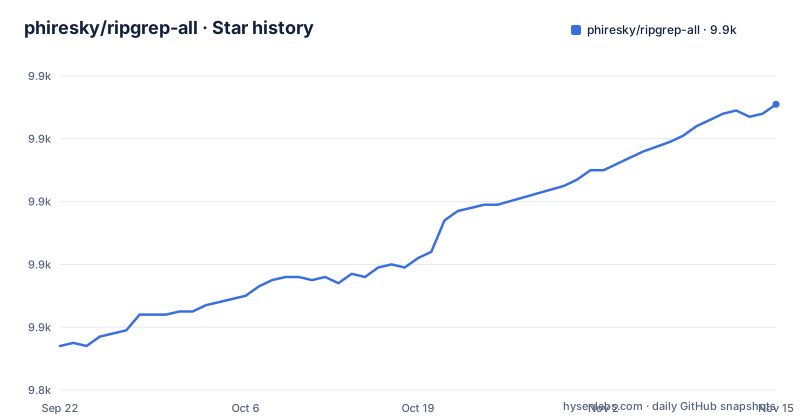
Star history
- phiresky/ripgrep-all9,931 ★ · +77
| Repository | 2026-09-22 | 2026-11-15 |
|---|---|---|
| phiresky/ripgrep-all | 9.9k | 9.9k |
77 Stars in the last 54 days, measured from the daily GitHub snapshot. Compare with other projects
Editorial analysis
rga shells out to pandoc, pdftotext and ffmpeg found on your PATH
The name is the mechanism. rga is a front end that decides, per file, which external program can turn that file into text, and then hands the result to ripgrep's matcher. Each adapter runs a real command line.
The pandoc adapter runs `pandoc --from= --to=plain --wrap=none --markdown-headings=atx` and covers .epub, .odt, .docx, .fb2, .ipynb, .html and .htm. The poppler adapter runs `pdftotext - -` for .pdf. The ffmpeg adapter covers .mkv, .mp4, .avi, .mp3, .ogg, .flac and .webm by pulling out metadata, chapters, subtitles and lyrics. Archives are handled in process rather than by a subprocess: the zip adapter reads .zip and .jar as a stream, the tar adapter does the same for .tar, and the decompress adapter feeds .gz, .bz2, .xz, .zst, .tgz and friends to a different extractor. sqlite files go through rusqlite bindings with the `vtab` and `bundled` features enabled.
`rga` looks for the binaries it calls in `$PATH` and in its own directory. Install the tool without pandoc, poppler or ffmpeg and PDFs, documents and media files will not be readable, because nothing in the binary can read a PDF on its own.
Five install paths, each with a different dependency contract
The binary and the dependencies are separate on every platform; on Windows the README gives that as the reason only chocolatey and scoop are supported. Start on macOS or Linux with Homebrew, then add the three converters separately, because they are each described as not strictly necessary but very useful.
brew install rga
brew install pandoc poppler ffmpeg
On a Debian-based system the release binary is the starting point and apt supplies the rest:
apt install ripgrep pandoc poppler-utils ffmpegArch, Gentoo, and Nix each have a single line, `pacman -S ripgrep-all`, `emerge sys-apps/ripgrep-all`, and `nix-env -iA nixpkgs.ripgrep-all`. MacPorts takes `sudo port install ripgrep-all`. Building from source needs a Rust toolchain and the same four external programs:
~$ apt install build-essential pandoc poppler-utils ffmpeg ripgrep cargo
~$ cargo install --locked ripgrep_all
~$ rga --version    # this should work now
List the adapters rga knows about:
rga --rga-list-adaptersThe invocation itself is `rga [RGA OPTIONS] [RG OPTIONS] PATTERN [PATH ...]`. Ripgrep's own flags sit between the rga options and the pattern, and `--rg-help` and `--rg-version` show help and version for ripgrep itself.
On Windows only chocolatey and scoop count as supported
The Windows section is the one place with an explicit failure report. Installing through chocolatey or scoop is the only supported download method, because a manual binary from the releases page does not bring the dependencies, and pdftotext from poppler is named as the example of what goes missing. Two commands are offered:
choco install ripgrep-allscoop install rgaNote the two different package names for the same program. chocolatey calls it `ripgrep-all`, scoop calls it `rga`.
The second documented failure is a runtime one rather than a missing dependency: a message like `VCRUNTIME140.DLL could not be found`. The answer given is to install `vc_redist.x64.exe`. So on Windows there are two separate prerequisites, the converter tools and the Visual C++ runtime, and a missing DLL surfaces as a Windows error rather than as a missing adapter. Linux, macOS, and Windows binaries are all published in the GitHub releases.
Adapter selection defaults to the file extension and gives up at 8KiB
By default rga picks an adapter from the file extension. That assumption breaks on sqlite, which ignores its extension entirely, and on files saved with no extension at all. The `--rga-accurate` flag switches to mime type detection using the magic bytes, the same idea as the `file` utility.
The flag carries its own caveat, and it is a real constraint: detection only reads the first 8KiB, because rga cannot always seek on its input inside an archive. A zip member is a stream, so a sqlite database with no extension, stored deep in a zip, gets identified from its header or it does not get identified at all.
Extension matching is also why the adapter list is not the whole story. A `.pdf` is handled by the poppler adapter, which runs `pdftotext`, so that tool has to be on your PATH, and the same holds for every extension in the pandoc row.
Extracted text is cached in a database under your user cache directory
rga caches the text it extracts, as long as the text is small enough, in a database at `${XDG_CACHE_DIR-~/.cache}/ripgrep-all` on Linux, `~/Library/Caches/ripgrep-all` on macOS, and `C:\Users\username\AppData\Local\ripgrep-all` on Windows. The next search over the same files reads from that database, which is where the speed on repeat searches comes from.
This has a consequence worth naming before you point rga at a directory. Searching a folder of contracts, payslips or unpublished manuscripts writes the extracted plain text of those documents to disk in your cache, outside the folder you searched and outside whatever permissions protect the originals. The cache is per user and not documented as encrypted. If that text is sensitive enough that copying it elsewhere is a problem, pass `--rga-no-cache` and accept that every repeat search re-runs pandoc and pdftotext.
The cache is also why disk usage grows quietly on a large corpus, since the database holds one copy of the extracted text per file small enough to qualify.
--rga-adapters takes + and - prefixes, and mail ships switched off
The adapter flag both selects and orders, because priority decides which adapter claims a file first. The syntax is positional in meaning rather than positional in syntax: `foo,bar` means use only those two, `-bar,baz` means every default adapter except bar and baz, and `+bar,baz` means every default adapter plus those two.
rga --rga-adapters=+foo,barThe mail adapter is the case that forces you to read this. It handles .mbox, .mbx and .eml with the mime types `application/mbox` and `message/rfc822`, and it is disabled by default, so mail files are not searched out of the box. Turning it on is a `+mail` on that flag.
There is also a second postprocessor worth knowing about. The postprocpagebreaks adapter takes .asciipagebreaks files and adds a page number to each line, and it is described as mainly for internal use by the poppler adapter. That is how a PDF hit gets a page reference: poppler emits text with page break markers, this adapter adds the page number to each line. Custom adapters outside the built-in set are supported and described in the wiki, along with the fzf integration instructions.
Cargo.toml declares AGPL-3.0-or-later and edition 2024
The manifest names the package `ripgrep_all`, version `0.10.10`, and licenses it `AGPL-3.0-or-later`, with a `LICENSE.md` at the repository root. That matters for a specific case: if you plan to invoke rga as part of a service you offer to other people, the copyleft terms of AGPL-3.0-or-later reach further than MIT or Apache-2.0 would, and you need to read the license text yourself before shipping. Nothing here is legal advice; the point is that the licence is stated in the manifest rather than left to guesswork.
Two build details sit next to it. The manifest sets `edition = "2024"`, while the source build instructions say rga should compile with stable Rust v1.75.0+ and suggest checking with `rustc --version`. Those two statements are not obviously consistent for an edition introduced after that floor, so verify your toolchain against the manifest rather than against the README sentence. The repository does ship a `rust-toolchain.toml`, which is the file that will settle it.
On release cadence, the newest tag is v0.10.10 from 2025-11-09, matching the version in `Cargo.toml`, with v0.10.9 and v0.10.8 both from 2025-05-11. The last push to the default branch was on 2026-09-17, so work continues on master while the newest tagged release has been v0.10.10 since November. `cargo install ripgrep_all` installs from crates.io, so it gives you the tagged version, not the branch.
Where plain ripgrep is the better tool
rga is a superset in file types and a superset in moving parts. For a repository of source code, nothing is gained and three things are added: the adapter matching pass before every search, a subprocess for every non-text file, and a cache database on disk. ripgrep matches the same regular expressions over the same tree and stops there. Reach for rga when the target is documents, and reach for ripgrep when the target is code.
The other alternative is to skip the framework and drive the converters yourself, for example running `pdftotext` over a set of PDFs and grepping the output. That gives you full control over which pages are extracted and where the intermediate text lands, at the cost of losing archive recursion and the mime and extension matching that makes one command work across a mixed corpus.
The choice turns on a single question: do you need one command to reach into file types a regex cannot read? If yes, rga saves you a conversion pipeline and costs you a dependency list. If no, it is overhead with a licence attached.
Editorial conclusion
Use rga when the corpus is documents rather than source: PDFs, .docx, .epub, .sqlite3, subtitles, or archives you do not want to unpack by hand, and you are willing to install pandoc, poppler and ffmpeg alongside it. Do not point it at a tree of text files, where plain ripgrep does the same job with no external processes and no cache database. Before you rely on it, run `rga --rga-list-adapters` to see the adapters it knows about, and check that the pandoc, pdftotext and ffmpeg binaries they call are in $PATH.
Frequently asked questions
How do I install rga (ripgrep-all) on Debian or Ubuntu?
Download the rga binary from the GitHub releases, then install the dependencies with `apt install ripgrep pandoc poppler-utils ffmpeg`. rga searches for the binaries it calls in $PATH and in its own directory.
Which file types can rga search without extra tools?
zip, tar, decompress and sqlite are handled in process, but PDFs need pdftotext from poppler, documents and ebooks need pandoc, and media files need ffmpeg.
How do I list the adapters rga knows about?
Run `rga --rga-list-adapters` to list all known adapters. The invocation form is `rga [RGA OPTIONS] [RG OPTIONS] PATTERN [PATH ...]`, so ripgrep flags go between the rga options and the pattern.
Where does rga store its cache?
Extracted text is cached in a database under `${XDG_CACHE_DIR-~/.cache}/ripgrep-all` on Linux, `~/Library/Caches/ripgrep-all` on macOS, and `C:\Users\username\AppData\Local\ripgrep-all` on Windows. Pass `--rga-no-cache` to disable it.
Why does rga skip my mail archives?
The mail adapter, which handles .mbox, .mbx and .eml, is disabled by default. Enable it with `--rga-adapters=+mail`, where a plus prefix adds adapters to the default set.
Official sources
Add this badge to your README
If you maintain this project, the badge below links readers to this analysis and shows its maintenance status from the daily GitHub snapshot. Paste the markdown into your README; add ?metric=license or ?metric=stars to the image URL for a different field.

[](https://hysenlabs.com/projects/phiresky-ripgrep-all)Star history chart for your README
[](https://hysenlabs.com/projects/phiresky-ripgrep-all)Was this useful?