uvadlc_notebooks: the description says Fall 2023, the readme says Fall 2024, and the tutorial list skips two numbers
Repository of Jupyter notebook tutorials for teaching the Deep Learning Course at the University of Amsterdam (MSc AI), Fall 2023
At a glance
- What is it?
- This repository is the notebook series for a University of Amsterdam deep learning course, published as a documentation site and also carried in the PyTorch Lightning documentation. The three ways of running the notebooks are documented better than most, including the two ways a scheduler job fails and the exact settings that stop it. The gaps are in the metadata: a course edition that disagrees with itself and a tutorial list that skips two numbers without explanation.
- Who is it for?
- Use this as a teaching reference rather than a library to depend on, and read it for the two framework implementations side by side, which is the part worth the time. Two things to check before you plan a course around it.
- Can I use it commercially?
- Yes. MIT is a permissive licence: you can use, modify and sell software built on it, as long as you keep its copyright and licence notices.
- Is it still maintained?
- Yes. The repository last received commits 177 days ago.
- What is it written in?
- Mainly Jupyter Notebook, according to GitHub's language statistics.
Answers come from the project's GitHub data, last synced on November 24, 2026, and from our analysis. They are not legal advice.
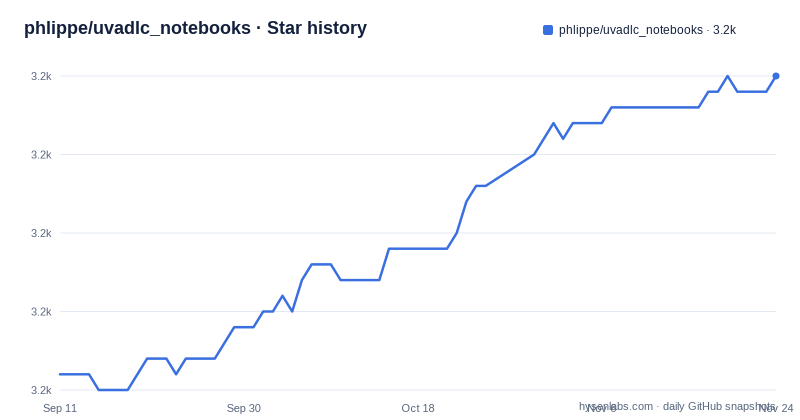
Star history
- phlippe/uvadlc_notebooks3,210 ★ · +19
| Repository | 2026-09-11 | 2026-11-24 |
|---|---|---|
| phlippe/uvadlc_notebooks | 3.2k | 3.2k |
19 Stars in the last 74 days, measured from the daily GitHub snapshot. Compare with other projects
Editorial analysis
The repository description and the readme name different course editions
The same repository describes itself as two different years of the same course.
The project description, which is what a search result and a clone header show, calls it a repository of notebook tutorials for teaching the deep learning course at the University of Amsterdam for the MSc AI programme, Fall 2023.
The readme says the course edition is Fall 2024, with dates from late October to late December, and marks that line as being kept up to date.
Neither place explains the other. What the tree does show is that both editions are represented: the root holds three environment files carrying 2023 in their names, one for CPU, one for GPU, and one for JAX on GPU, and two carrying 2024, for CPU and for GPU.
So the 2023 material is still present in the repository as environment definitions while the readme describes the 2024 course. A reader arriving from a search result is being told one thing and reading another, and the file listing is the tiebreaker.
Fifteen tutorials are listed against a claim that seven are discussed
The alignment section is where the arithmetic does not work, in two separate ways.
It opens by saying that seven of the tutorials will be discussed in the course, spread across lectures to cover something from every area. Then it lists what it calls the list of tutorials, and that list has fifteen entries.
The first entry is not even a tutorial. It is a guide, listed as Guide 1, about working with the cluster. The rest run from Tutorial 2 through Tutorial 12, covering introduction to PyTorch, activation functions, optimisation and initialisation, three architectures, transformers and multi-head attention, graph neural networks, deep energy models, autoencoders, adversarial attacks, normalising flows on image modelling, and autoregressive image modelling. The list then resumes at Tutorial 15 with vision transformers, Tutorial 16 with meta learning, and Tutorial 17 with contrastive learning.
So the numbers thirteen and fourteen are absent, with no note saying they were withdrawn, renumbered, or never issued. Nothing else in the visible text explains the gap.
The JAX translation is advertised, and the newest environments dropped it
The readme promises a second implementation, and the file listing quietly contradicts it.
The promise is specific: alongside teaching the PyTorch framework including PyTorch Lightning, the project provides one-to-one translations of the notebooks to JAX and Flax as an alternative framework.
In the root, the previous edition's environment files are three. There is a CPU one, a GPU one, and a third carrying both the year and jax_gpu in its name. The current edition's environment files are two, a CPU one and a GPU one, and there is no JAX variant among them.
The document also says the environment to use is chosen depending on the system, with a CPU version and a GPU version, which matches the two files that exist for the current year rather than the three that existed for the previous one.
So a reader who wants to run the JAX translations has to work out which environment to use from a file naming convention, because the current edition no longer ships one and the readme still describes the translations as one-to-one.
Three run routes, and each one carries a documented failure
The running instructions are the most thorough part of this repository, and each route is written with its own hazard attached.
The local route is designed around ordinary laptops. The notebooks live in the documentation tree of the same repository, they are meant to execute without a GPU, pretrained models download automatically or can be fetched from a linked drive folder, and the whole set of pretrained models and datasets needs less than a gigabyte of disk space. A conda environment is provided with CPU and GPU variants.
The browser route runs each notebook independently in a hosted notebook service, reached from a badge on every notebook page, with a reminder to switch the runtime to a GPU first. Each notebook stands alone and needs no connected drive, and the stated risk is that closing the session discards changes unless you saved them locally or copied them first.
The cluster route is for training larger models rather than working through the discussion, and the readme is candid that it is only worth it if you genuinely want to train something new.
The cluster route fails in two named ways, with two named fixes
The cluster instructions contain the kind of detail that only comes from having run them.
The first obstacle is a permission one. A student account may not be allowed to run notebooks directly on the shared GPU partition, so the documented workaround is to convert the notebook into a script before submitting it:
`jupyter nbconvert --to script ...ipynb`
Then come two warnings about what breaks once the job is running, each with a fix.
The first is progress bars. Left enabled, the progress output from the training loop can overflow the scheduler's output file and leave several megabytes of it. In PyTorch Lightning the fix is to set the trainer's progress bar refresh rate to zero.
The second is plotting. The instruction is to comment out the plotting calls, or to change the call that displays a figure into one that saves it.
Both are the kind of failure that produces an unreadable job log rather than an error, and both are here with the exact setting to change, which is why this section is the most useful thing in the file.
The notebooks are not graded, and they are also official PyTorch Lightning tutorials
Two statements sit oddly next to each other, and both affect how you should treat these notebooks.
The first is about status. The notebooks are not part of any mandatory assignment on which a student would be graded. The readme encourages getting familiar with them and extending them, and says the content is relevant for the graded assignment and the exam. So they are recommended reading that is deliberately outside the grading.
The second is about reach. The tutorials have been integrated as official tutorials of PyTorch Lightning, which means they can also be read inside that project's own documentation. The notebooks are therefore published three times over: as notebooks in this repository, as an exported documentation site, and as part of a third-party documentation set.
That third channel is the one with the longest life, since it outlives a course edition. The citations follow the documentation site rather than the repository.
A citation entry, a feedback form, and a licence file named differently
The closing sections are administrative, and two of them are worth reading for what they reveal.
The citation section offers a BibTeX entry with a key derived from the author and year, a title, the author name, the year, and the documentation site as the publication reference. It is the only citation the project supplies, and it points at the rendered site rather than the notebooks.
The feedback section is candid in a way most course repositories are not. It states that this is the first time these tutorials are presented during the course, that small bugs and issues are expected, and that feedback is welcome whether it is a spelling mistake, an implementation bug, or a suggestion for additions. Feedback goes through a web form, or by email to the author in an obfuscated form, or in person during a teaching assistant session.
The licence is a file named LICENSE.md rather than the conventional LICENSE, with the MIT licence recorded for the project. There is no contributing document and no code of conduct in the root.
Editorial conclusion
Use this as a teaching reference rather than a library to depend on, and read it for the two framework implementations side by side, which is the part worth the time. Two things to check before you plan a course around it. The course edition in the repository description and the one in the readme are different years, and the tutorial list jumps from 12 to 15 with no note about what happened to 13 and 14. And the JAX environment file present for the previous edition is gone for the current one, even though the one-to-one translations are still advertised.
Frequently asked questions
What is the best PyTorch tutorial?
This repository is one candidate and makes a specific claim about itself: the tutorials have been integrated as official tutorials of PyTorch Lightning, so they can also be read in that project's documentation. They cover activation functions, optimisation and initialisation, three classic architectures, transformers and multi-head attention, graph neural networks, energy models, autoencoders, adversarial attacks, normalising flows, autoregressive image modelling, vision transformers, meta learning, and contrastive learning, in PyTorch Lightning with translations to JAX and Flax.
What are some good notebooks for data science?
Nothing in this repository concerns data science tooling; it is a set of teaching notebooks for a deep learning course. What it does state about running them is that they are designed to execute on ordinary laptops with no GPU, that pretrained models download automatically, and that the pretrained models and datasets together need less than a gigabyte of disk space.
Is deep learning very difficult?
The repository does not answer that question. What it describes is a course format in which the notebooks are presented in the first hour of every group tutorial session, and are explicitly not part of the graded assignments, while still being stated as relevant to the assignment and the exam.
How do I run the UvA Deep Learning notebooks?
Three documented routes. Locally on CPU, from the notebooks directory in the documentation tree, using a provided conda environment with CPU or GPU variants. In a hosted notebook service, opened from a badge on each notebook page, after switching the runtime to a GPU. Or on a university cluster, where the notebook is not permitted to run directly on the shared GPU partition and must first be converted to a script with jupyter nbconvert.
What breaks when running these notebooks on a cluster?
Two documented failure modes. Progress bars can overflow the scheduler output file to several megabytes, which in PyTorch Lightning is fixed by setting the trainer's progress bar refresh rate to zero. And plotting calls have to be commented out or changed from displaying a figure to saving it, or the job spends its time drawing.
Official sources
Add this badge to your README
If you maintain this project, the badge below links readers to this analysis and shows its maintenance status from the daily GitHub snapshot. Paste the markdown into your README; add ?metric=license or ?metric=stars to the image URL for a different field.

[](https://hysenlabs.com/projects/phlippe-uvadlc-notebooks)Star history chart for your README
[](https://hysenlabs.com/projects/phlippe-uvadlc-notebooks)Was this useful?