Photonix: no release since 2021, and the port-clash fix points at the dev compose file
A modern, web-based photo management server. Run it on your home server and it will let you find the right photo from your collection on any device. Smart filtering is made possible by object recognition, face recognition, location awareness, color analysis and other ML algorithms.
At a glance
- What is it?
- Photonix is a self-hosted photo manager that indexes a library with object recognition, face recognition, location and colour analysis, served by Django and Graphene over Postgres and Redis. The last tagged release is v0.24.0 from 2021-11-18 while the last push is dated 2026-07-21, the requirements pin thirty-one exact versions, and the documented remedy for a port conflict edits the developer compose file rather than the one you downloaded.
- Who is it for?
- Run Photonix if you want to host your own photo library and you are prepared to own the operational side, because there is no release cadence to lean on, no backup procedure, and a first run that needs a command line even though the application is web-based. Three things to settle before you point it at a real collection.
- Can I use it commercially?
- Yes, with strict conditions. AGPL-3.0 is a network copyleft licence: if people use a modified version over a network, for example as a hosted service, you must offer them its source code under the same licence.
- Is it still maintained?
- Yes. The repository received new commits within the last day.
- What is it written in?
- Mainly Python, according to GitHub's language statistics.
Answers come from the project's GitHub data, last synced on November 24, 2026, and from our analysis. They are not legal advice.
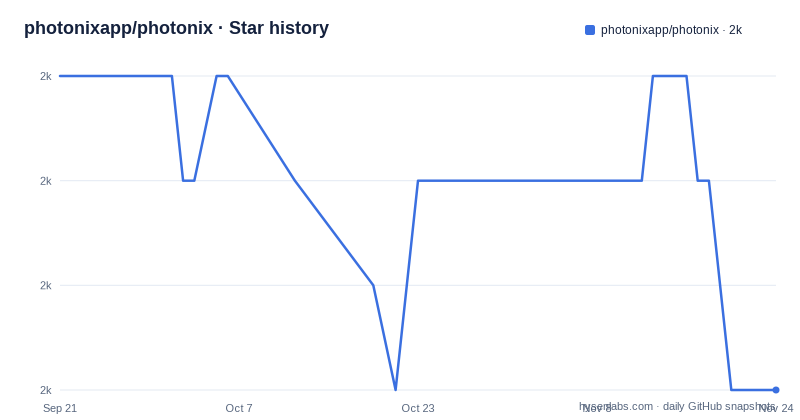
Star history
- photonixapp/photonix1,953 ★ · -3
| Repository | 2026-09-21 | 2026-11-24 |
|---|---|---|
| photonixapp/photonix | 2k | 2k |
-3 Stars in the last 64 days, measured from the daily GitHub snapshot. Compare with other projects
Editorial analysis
The newest tag is almost five years older than the newest commit
The releases recorded for this project are v0.24.0 dated 2021-11-18, v0.23.0 dated 2021-09-28 and v0.22.0 dated 2021-09-02. The last push to the repository is dated 2026-07-21.
So there are roughly four years and eight months of commits after the newest tag. Nothing on the page explains the gap. The readme does say the project is in development and not feature complete for a version 1.0 yet, which is consistent with a 0.24 version, but that sentence was written for a much earlier state of the repository and has not been revisited in front of a tag that stopped in 2021.
What this means in practice depends on which artefact you install, and the readme pushes you at the image rather than the tag. The upgrade instructions are a `docker-compose pull` followed by a `docker-compose up`, so a running installation tracks whatever the published image points at, which is not necessarily 0.24.0. The version number and the code you are executing are therefore different things, and the number is the one that stopped moving.
The same divergence shows up in the badge row, which links a Travis CI page and a Codecov page under the maintainer's personal namespace rather than the organisation's, so the badge for the default branch is not obviously tied to the tag you would install.
Thirty-one exact pins, and one of them is still at zero
`requirements.txt` pins every package with `==` and lists thirty-one of them. The machine learning group is tensorflow 2.21.0, numpy 2.5.1, scipy 1.17.1, matplotlib 3.11.1, opencv-python-headless 4.13.0.92 and annoy 1.17.3. The web group is Django 6.0.7 with django-cors-headers, django-filter, PyJWT 2.13.0 and django-graphql-jwt, plus graphene 3.4.3 and graphene-django 3.2.3 for the API layer.
Two entries in that list do the quiet structural work. `annoy` is the approximate nearest-neighbour index, which is what makes search over image embeddings tractable without a vector database, and it is why the requirements also carry TensorFlow and OpenCV rather than a hosted inference service. `asyncinotify` is the filesystem watcher behind the claim that photos dropped into the mounted directory are detected and imported immediately.
One pin stands out. `django-graphql-jwt==0.4.0` is the only dependency in the file below version 1.0, sitting in the authentication path next to PyJWT, while everything around it is at a current-looking major. That is the entry to check first if the login flow misbehaves against a Django 6 stack, because it is the one package whose version number suggests an early stage. Serving is gunicorn, storage is psycopg2 against Postgres, and caching and locking go through redis and python-redis-lock.
First run is a curl, a mkdir, and two management commands
The install is a short sequence, and two of its steps are not Docker ones. You create a directory, then fetch a compose file straight from the repository's master branch:
mkdir photonix
cd photonix
curl https://raw.githubusercontent.com/photonixapp/photonix/master/docker/docker-compose.example.yml > docker-compose.yml
After `mkdir -p data/photos` and `docker-compose up`, the application answers on port 8888. But the first user does not get created there. The readme is explicit that creating a username, password and library currently has to be done on the command line, in a new terminal window:
docker-compose run photonix python photonix/manage.py createsuperuser --username USERNAME --email [email protected]
docker-compose run photonix python photonix/manage.py create_library USERNAME "My Library"
So a web application with a login and a library picker needs two `docker-compose run` invocations against Django's management commands before it has an account. That is a reasonable choice for a container that ships no database yet, and an awkward one for an installer.
The compose filenames also drift. The curl pulls a file called `docker-compose.example.yml` and writes it to `docker-compose.yml`, while the Makefile refers to `docker/docker-compose.dev.yml` and `docker/docker-compose.prd.yml`. Three names for three purposes, none of which matches the one you end up running.
The documented port fix edits the developer compose file
The development section troubleshoots a port collision and gives an error string to match on:
Error starting userland proxy: listen tcp 0.0.0.0:5432: bind: address alerady in useThe error text is quoted with `alerady` misspelled, which matters if you are searching for it. The diagnosis is right, since 5432 is the Postgres port and Photonix needs Postgres. The prescribed fix is to edit `docker/docker-compose.dev.yml` and change `'5432:5432'` to something like `'5433:5432'`, and the readme adds that this is for Postgres but is it a similar solution for Redis or the webserver ports, which reads as a typo for but it is.
Here is the problem. Someone who followed the Installing section is running the `docker-compose.yml` they curled into their own directory. The file they are told to edit is the development one, inside the repository, which they do not have if they only downloaded a compose file and an image. So the most likely first-run error is documented with a remedy that applies to a contributor's checkout rather than to an installation.
The same paragraph says the quickest way in is `make build` and `make start`, which is contributor language, sitting a few lines above a section that a self-hosting user is more likely to be reading.
Photos are on a mount you choose, everything else is not, and backups are yours
The storage story is short and the shape of it matters. Photos live in `data/photos` and are said to be detected and imported immediately once you move some in. The readme then tells you to edit the volume in `docker-compose.yml` where it says `./data/photos` and mount wherever you usually keep photos, which is the one piece of configuration the installation genuinely asks you to get right.
Everything else is stored separately, and the readme says so: the system database, thumbnails and other cache data do not pollute the photos area. That separation is good design. It is also why the last sentence of the paragraph is the one to note, which is that you are responsible for keeping your own backups in case of error. No procedure is given, no export path, no retention note.
For this particular application the loss that would hurt is not the original image, which you still have, but the derived layer: the recognition index, the embeddings behind the Annoy lookup, the detected objects and faces, the location metadata, and the database rows tying them to files. Those live in the container-side volumes rather than on the mount you control, and re-importing a library to rebuild them is a different operation from copying your photos back. Decide what you are backing up before you import a few thousand images, not after.
Container tests and host tests are different targets, and Python has no lint target
The Makefile wraps two compose files, `docker/docker-compose.dev.yml` and `docker/docker-compose.prd.yml`, and declares six near-identical targets across them: `start`, `stop` and `build`, then `start-prd`, `stop-prd` and `build-prd`, plus a shell in each. The test entry points are:
test:
	$(DOCKER_COMPOSE_DEV) run -e PYTHONDONTWRITEBYTECODE=1 --rm photonix python test.py

test-coverage:
	$(DOCKER_COMPOSE_DEV) run -e PYTHONDONTWRITEBYTECODE=1 -e COVERAGE=1 --rm photonix python test.py
So the runner is a script called `test.py` at the repository root rather than a bare pytest invocation, and coverage is switched by an environment variable rather than a flag. The test dependencies explain the shape: pytest and pytest-django for the run, mock and factory-boy for fixtures, coverage for the toggle.
The UI suite is the odd one out. `test-ui` is declared as an alias for `e2e`, with a comment saying it is the Playwright suite and that it needs the dev stack running first, so unlike everything else it shells out to host npm and assumes you have started the stack yourself. `lint-ui` and `build-ui` also use host npm, and there is no Python lint target at all, only the UI one, despite a `Makefile` that otherwise covers the Python side thoroughly. `reset` is the target worth reading twice, since it is `down -v` and takes your volumes with it.
CI badges and the docs site still point at the author's namespace
The badge row at the top of the page links a Travis CI branch view, a Codecov project and a demo instance, and the first two are addressed to a personal account rather than to the organisation the repository now lives under. The developer documentation link points at the photonix website, and the source for those docs is a separate repository, also on the master branch. So three of the links on the front page point at places that predate the project's current home.
The repository contents match an older era too. There is a `.travis.yml` at the root rather than a GitHub Actions workflow, and alongside it a `.devcontainer/` directory for editor containers, a `CLAUDE.md`, a `SECURITY.md`, a `CODE_OF_CONDUCT.md`, and directories for the Django application, the JavaScript UI, the specs, the system configuration and the Docker files, with `manage.py` and a separate `test.py` both at the root. The `coverage` and `colorlog` entries in the requirements fit the older continuous integration setup.
None of that makes the project unusable. It does mean the front page cannot be trusted as a description of current infrastructure, so if you are deciding whether this is maintained, read the commit dates rather than the badge row, and read requirements.txt rather than the release tag.
Editorial conclusion
Run Photonix if you want to host your own photo library and you are prepared to own the operational side, because there is no release cadence to lean on, no backup procedure, and a first run that needs a command line even though the application is web-based. Three things to settle before you point it at a real collection. The version you get is whatever the Docker image tracks, not v0.24.0, and the last tag is nearly five years older than the last commit, so read the pinned versions in requirements.txt to judge what you are running rather than the tag. The data model splits your photos, which live on a bind mount you choose, from the database, thumbnails and search index, which do not, and the readme assigns backups to you without describing one, so decide what you are backing up before you import anything. And the port-clash remedy, which is the most likely thing to bite you, tells you to edit the developer compose file while the install instructions have you running a differently named one you curled from master. On licensing, AGPL-3.0 is a sensible fit for software you run on your own hardware over your own library. On the search stack, the nearest-neighbour index is Annoy rather than a vector database, so expect a rebuild when a model changes instead of an embedding migration.
Frequently asked questions
How do you install Photonix?
Create a directory, curl the example Docker Compose file from the repository's master branch into `docker-compose.yml`, make a `data/photos` directory, then run `docker-compose up` and open http://localhost:8888/. Creating the first user and library is done on the command line with `createsuperuser` and `create_library`.
What is the newest Photonix release?
v0.24.0, dated 2021-11-18. The two before it are v0.23.0 from 2021-09-28 and v0.22.0 from 2021-09-02, while the last push to the repository is dated 2026-07-21.
How do you run the Photonix tests?
With `make test`, which runs `test.py` inside the Photonix container with bytecode writing disabled. Coverage is the same command with a COVERAGE environment variable set to 1, exposed as `make test-coverage`. The UI suite is separate, as `make test-ui`, an alias for `make e2e`, which needs the dev stack already running.
What does Photonix use to search a photo library?
TensorFlow, OpenCV and Annoy for approximate nearest-neighbour lookup over image embeddings, on a Django and Graphene stack served by gunicorn with Postgres and Redis. Filtering is described as coming from object recognition, face recognition, location awareness and color analysis.
Official sources
Add this badge to your README
If you maintain this project, the badge below links readers to this analysis and shows its maintenance status from the daily GitHub snapshot. Paste the markdown into your README; add ?metric=license or ?metric=stars to the image URL for a different field.

[](https://hysenlabs.com/projects/photonixapp-photonix)Star history chart for your README
[](https://hysenlabs.com/projects/photonixapp-photonix)Was this useful?