PIE, the installer that compiles PHP extensions into your PHP installation
🥧 The PHP Installer for Extensions
At a glance
- What is it?
- PIE is the PHP installer that replaces the deprecated pecl command, shipped as a single PHAR and packaged in the shape Composer uses. It resolves a package to an extension, builds it against a chosen php-config, and drops the module into that PHP installation, while its project wide mode has no working non interactive form.
- Who is it for?
- PIE is the right tool when what you are missing is a compiled extension inside a PHP installation, and the wrong tool when the dependency belongs in your composer manifest. The design is honest about its seam, because the package name decides what gets built and the target PHP decides where it lands.
- Can I use it commercially?
- Yes. BSD-3-Clause is a permissive licence: you can use, modify and sell software built on it, as long as you keep its copyright and licence notices.
- Is it still maintained?
- Yes. The repository last received commits 1 day ago.
- What is it written in?
- Mainly PHP, according to GitHub's language statistics.
Answers come from the project's GitHub data, last synced on October 23, 2026, and from our analysis. They are not legal advice.
Star history
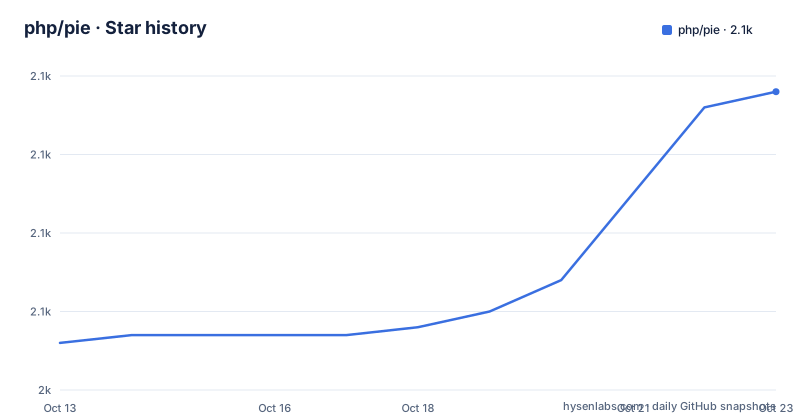
- php/pie2,078 ★ · +32
| Repository | 2026-10-13 | 2026-10-23 |
|---|---|---|
| php/pie | 2k | 2.1k |
32 Stars in the last 10 days, measured from the daily GitHub snapshot. Compare with other projects
Editorial analysis
Why PIE exists after the pecl command was deprecated
PIE exists because the command that used to install PHP extensions is being retired. The README states that PIE replaces PECL, which is now deprecated, and distributes itself as a PHAR in the same shape Composer uses. That resemblance is about packaging only. Composer pulls PHP packages into your project or library, so that code runs under whichever PHP the project happens to boot with. PIE goes the other direction and installs PHP Modules or Zend Extensions into a PHP installation itself. The sample output for a single install warns that the command may need elevated privileges and may prompt you for your password, which is the practical sign that you are modifying the PHP installation itself rather than a directory inside your project.
Two audiences share this repository. Developers are missing an extension at runtime and want it built now. Extension maintainers add PIE support to packages they already publish, and the root carries `docs/extension-maintainers.md` beside `docs/usage.md` for that second audience. A third group is told to check first: the README asks contributors to open a discussion before proposing new features, on the grounds that work is already in the pipeline.
The four build steps between a package name and a loaded module
Read the sample transcript in order and the mechanism is plain. A name such as `pie install asgrim/example-pie-extension` resolves to one concrete version, the run reports which extension that version provides, and the source is unpacked to a directory before any compiler starts. Four build lines follow: `phpize`, configure pointed at `--with-php-config=/usr/bin/php-config8.5`, a build that writes a module under `modules/`, and an install that copies the result into `/usr/lib/php/20250925/example_pie_extension.so`. Only after that copy does PIE enable the extension and report it loaded in the target interpreter.
The PHP version doing the compiling is chosen, not inherited. The same transcript names a running PHP 8.5.3 and a target installation of 8.5.3 nts on Linux/OSX/etc x86_64 taken from `/usr/bin/php8.5`, so the configure step asks that installation's php-config rather than the one executing PIE.
PIE itself needs PHP 8.1 or newer and can install an extension into any other installed PHP version. That separation is the part worth planning around, because it is what lets one machine build a module for 8.5 while an older interpreter runs the installer.
Installing pie.phar needs the GitHub CLI inside the chain
The documented path for a non-Windows system is one shell chain, and it is worth reading as a sequence rather than as a single line. First the PHAR is fetched into a temporary path, then its provenance is checked with the GitHub CLI, then it is moved into place and made executable:
curl -fL --output /tmp/pie.phar https://github.com/php/pie/releases/latest/download/pie.phar \
  && gh attestation verify --owner php /tmp/pie.phar \
  && sudo mv /tmp/pie.phar /usr/local/bin/pie \
  && sudo chmod +x /usr/local/bin/pie
The verification step is a hard link in that chain rather than advice beside it, and it needs the gh binary, which is separate from curl and sudo. A host without the GitHub CLI cannot finish the line as written. The same check works on a local copy with `gh attestation verify --owner php pie.phar`.
After installation the usage docs assume the pie command resolves on your `$PATH`, for example as `/usr/local/bin/pie` on non-Windows systems, or that you made an alias in your shell RC file. Until then the archive is invoked directly as `php pie.phar <command>`. A nightly build is published at `https://php.github.io/pie/pie-nightly.phar` if you want to run code the maintainers have not frozen yet.
A bare pie install reads a project for missing ext names
Running `pie install` with no arguments inside a project takes a different path. The output names the project and its path, then walks its extension requirements one at a time: a wildcard constraint comes back satisfied and a versioned constraint comes back missing. The sample shows `ext-curl:*` installed already and `ext-example_pie_extension:^2.0` missing, after which PIE offers a numbered list of candidate packages with None as the first entry.
$ pie install
Checking extensions for your project asgrim/demo-php-project (path: /demos/demo-php-project)
  [0] None
  [1] asgrim/example-pie-extension: Example PIE extension
Choosing an entry runs the same pipeline as an explicit install, and the transcript shows every later line prefixed with the extension name so you can tell which build belongs to which selection.
Two details here reward a close look. Candidate discovery is a guess about which package provides a missing extension name, so a wrong pick compiles the wrong code and still reports success. And the destination path differs between the two sample transcripts: one writes to `/usr/lib/php/20250925/` while the other writes under `/usr/local/lib/php/extensions/no-debug-non-zts-20250925/`. Same API number, two directory layouts, chosen by whichever PHP binary receives the build. Extensions that declare PIE support are published at `https://packagist.org/extensions`.
Two extensions in one command, unless options collide
As of PIE 1.5 a single command accepts several extension names at once:
pie install foo/great-extension bar/another-extensionThe caveat attached to that line is not about version conflicts, and it is the part a skim misses. A documented restriction says that if multiple extensions share the same configure options, this command will fail. Two libraries that want the same compiler flags, which is the ordinary case rather than an exotic one, are therefore harder to install together than either is alone.
Nothing in the documentation says which options count as shared, so you cannot predict the failure from the package list before running it. The documented fallback is to install the pair as two separate commands, and that is also why this flag is worth testing early: batch installs are the form a build script reaches for, so a collision turns into a pipeline break rather than a warning on someone's terminal. The multi extension path is young by comparison, since it arrived with PIE 1.5 while single installs have existed since the project began.
CI must name every package with its own --select pair
The interactive menu is the reason a project wide install cannot run unattended, and the README says so plainly. In a non-interactive shell, for example a CI job or a container, `--allow-non-interactive-project-install` is no longer functional and every missing package must be named on the command line:
pie install \
  --select example_pie_extension=asgrim/example-pie-extension \
  --select redis=phpredis/phpredis
Read each pair as a mapping rather than as a flag and an argument. The left side is the extension name taken from the project's requirements, the right side is the package that provides it. A pipeline therefore carries a table of substitutions that nobody writes by hand at a terminal, and it has to be maintained whenever a requirement changes.
A flag named for allowing non-interactive project installs is now documented as doing nothing, so any pipeline still passing it should be converted to the `--select` form. The documentation gives no committed config file for that table, which leaves the mapping wherever the pipeline already stores its commands. Containers hit the same limit, and the project's own image is the thinnest one available.
Windows installs a DLL while Linux and macOS compile
Two platforms diverge before a single source file is compiled. On Windows no build toolchain is required, because extensions for that platform are distributed as pre-compiled packages that already contain the extension DLL. On Linux and macOS, PIE asks whether it should install any build tools it finds missing, and that behaviour arrived in PIE 1.4.0.
So one `pie install` line means download a binary on one platform and run a compile on the other. Anything measured about that step on macOS tells you nothing about the Windows path, and the reverse holds.
The version floor applies to the interpreter running PIE rather than to the target, since PHP 8.1 or newer is enough to run the installer while the extension can be installed into any other installed PHP version. That is the useful half of the design for anyone juggling several interpreters. The sharp half is that the module lands in the API directory of the target, so a build for one PHP version does not satisfy a project that boots another.
A scratch image, and sample output that predates the branch
The container build in this repository is almost empty. The Dockerfile names a scratch base, copies the archive to /pie, and carries a TODO comment saying the octal mode should become `--chmod=+x` once a referenced buildkit change ships:
FROM scratch AS standalone-binary
COPY --chmod=0755 pie.phar /pie
There is no shell and no PHP in that image, so the only thing that can run inside it is the PHAR itself. That is a cheap way to keep the archive honest about being portable.
The rest of the root describes how the tool is assembled and checked: `box.json.dist` and `phar-stub.php` sit at the top for the archive, `behat.php` and `features/` for behaviour tests, `phpstan.neon` beside `phpstan-baseline.neon` for static analysis with recorded findings, `phpunit.xml.dist` for unit tests, and `infection.json5` for mutation testing. The repository is published under BSD-3-Clause, is not archived, and its last push landed on 2026-10-01.
One inconsistency is worth naming because it sits in the examples you are told to copy. Both sample transcripts print version 1.4.0 in the banner, while the default branch is named 1.6.x and the newest versions listed for the project are 1.5.1 and 1.5.0. The worked examples were produced by a build two branches behind, so read the banner as history rather than as the version on your disk.
Editorial conclusion
PIE is the right tool when what you are missing is a compiled extension inside a PHP installation, and the wrong tool when the dependency belongs in your composer manifest. The design is honest about its seam, because the package name decides what gets built and the target PHP decides where it lands. Verify three things from output rather than from prose: the target line naming the PHP that will load the module, the candidate menu a bare install shows, and the `--select` pairs your CI job carries.
Frequently asked questions
What is PIE and who is it for?
PIE is the installer for PHP extensions from The PHP Foundation, distributed as a PHAR and used in place of PECL, which is deprecated. It is for developers who need a PHP Module or Zend Extension built into a PHP installation, and for extension maintainers adding PIE support to their own packages.
How do I install PIE on Linux or macOS?
The documented one-liner downloads pie.phar, verifies it with `gh attestation verify --owner php /tmp/pie.phar`, moves it to /usr/local/bin/pie and makes it executable. Because the verification is part of the chain, the GitHub CLI has to be installed for that line to finish.
Do I need build tools to install an extension with PIE?
Not on Windows, where extensions are distributed as pre-compiled packages containing the extension DLL. On Linux and macOS PIE asks to install any build tools that are missing, a behaviour added in PIE 1.4.0.
Which PHP version does PIE need, and which one does it install into?
PIE needs PHP 8.1 or newer to run, and it can install an extension into any other installed PHP version. The target is selected by its php-config, shown in the output as an option such as `--with-php-config=/usr/bin/php-config8.5`.
Can PIE install a project's missing extensions automatically in CI?
No. In a non-interactive shell such as CI or a container, `--allow-non-interactive-project-install` is no longer functional. Each missing package has to be passed as its own `--select` pair, for example redis paired with the package that provides it.
How do I install several extensions at once?
As of PIE 1.5, a single `pie install` accepts several package names. The command fails if the extensions share the same configure options, so two such extensions have to be installed as separate commands.
Official sources
Add this badge to your README
If you maintain this project, the badge below links readers to this analysis and shows its maintenance status from the daily GitHub snapshot. Paste the markdown into your README; add ?metric=license or ?metric=stars to the image URL for a different field.

[](https://hysenlabs.com/projects/php-pie)Star history chart for your README
[](https://hysenlabs.com/projects/php-pie)Was this useful?