Tree Style Tab's default branch is trunk, and its readme links to master
Tree Style Tab, Show tabs like a tree.
At a glance
- What is it?
- Tree Style Tab is a Firefox extension that presents tabs as a tree, with a store build, per-commit development builds, an extension API for other add-ons and a long list of alternatives organised by how the tabs are arranged. The install instructions are the interesting part: unsigned builds, a zip around the package, and a warning not to uninstall.
- Who is it for?
- Tree Style Tab is worth installing if the idea of a tab tree appeals to you and you are on Firefox, because the model is simple and the folding behaviour is the whole point. Three things to know if you go beyond the store build.
- Can I use it commercially?
- Check first. The repository uses a licence we do not classify automatically, so read its LICENSE file before any commercial use.
- Is it still maintained?
- Yes. The repository last received commits 8 days ago.
- What is it written in?
- Mainly JavaScript, according to GitHub's language statistics.
Answers come from the project's GitHub data, last synced on November 25, 2026, and from our analysis. They are not legal advice.
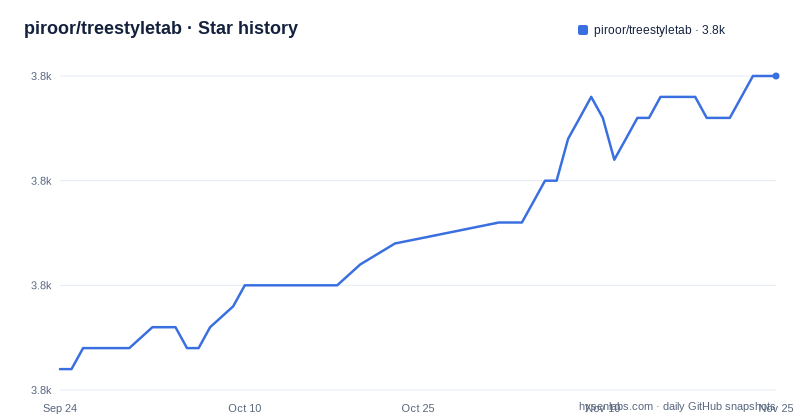
Star history
- piroor/treestyletab3,795 ★ · +14
| Repository | 2026-09-24 | 2026-11-25 |
|---|---|---|
| piroor/treestyletab | 3.8k | 3.8k |
14 Stars in the last 62 days, measured from the daily GitHub snapshot. Compare with other projects
Editorial analysis
The default branch is trunk, the links say master
The repository's default branch is named trunk, and the README's own links do not follow it. The one internal source link points at a manifest file under a master path with a line number, so it lands on whatever the branch of that name contains rather than on the code the page is describing. The clone instructions avoid the question by not naming a branch at all, and the recipe for building a specific revision is explicit about checking out a commit before building, which is the safer pattern anyway when you want a repeatable artefact. It is a small inconsistency, the kind that survives in a project with a long history and a stable internal release process, but it means one of the three links a new contributor is likely to follow is a dead end or a stale file.
Uninstalling a development build erases the configuration
The temporary add-on instructions carry a warning that is worth repeating because the obvious action is the destructive one. A development build loaded through the debugging page stays active until the browser restarts, and the README says in bold terms not to uninstall it even after testing, because uninstallation clears all of the extension's configuration. The recovery is simple and unusual: just restart the browser. The temporary build unloads itself and the version you had installed before comes back with its settings. This is the kind of behaviour that only exists because the two builds share a storage location, and it is exactly the sort of thing a reader loses an afternoon to if the README did not say it.
Development builds arrive as a zip around the package
The per-commit builds live in the artefacts of the project's continuous integration action, which has two consequences stated on the page. You need to be signed in to the forge to see them at all, so the release channel is public and the development channel is not. And the download is a zip with another zip-like archive inside it, which you have to unpack by hand to get the actual extension package; skip that step and the browser reports an error about an invalid manifest. There is also a commented-out paragraph describing an automated build hosted on the author's own site, with the note that it is open to everyone but that the automation sometimes fails to update. A dead paragraph like that is a small record of a channel that existed and stopped being reliable.
Old browser builds live in a classic add-ons archive
Distribution is handled in three tiers, and each tier exists because of a specific browser-support problem. The current signed build is on the add-on store, and the page points at the minimum-version field in the install manifest so you can check what the newest build actually supports. Older packages are on the store's versions page, and the reason they are kept is stated plainly: the project drops support for outdated Firefox versions, but an old package still runs on them. Below that, for browsers so old that even old packages fail, the page points at a separate classic add-ons archive and names two other forks of the browser as cases it may cover. It is an unusually thorough release archive for an extension, and it is mostly there because the extension has outlived several browser generations.
The root Makefile copies artefacts up and writes your git hook
The build file at the repository root is a dispatcher, not a build. One target recurses into the extension directory, runs the real make there, and then copies every built package whose name begins with the project name back up to the root, which is where the README's instructions say the artefacts will appear:
$ sudo apt install git nodejs npm jq zip
$ git clone --recursive https://github.com/piroor/treestyletab.git
$ cd treestyletab/webextensions
$ make
Four more targets recurse and pass their own name through, covering the library update, linting, formatting, an unused-export checker and a locale-error fixer. The sixth is the unusual one: it writes a shell script into the git hooks directory with a single echo command, makes it executable, and that script runs the lint target on every commit. So opting into the pre-commit hook is one make invocation, and it installs a check you have to remove by hand.
The demo folder is named after the tree's own vocabulary
The repository carries a demo directory of eight static pages whose file names read like a glossary of the extension's data model: a parent page, a child page, a sibling page, a current page, an independent page, a tree page, a tab page and a style page. That naming is a small piece of documentation in itself, because it is the vocabulary the README uses when it explains the behaviour. A tab opened from the current one becomes a child; two children of the same parent are siblings; a page that is not part of any tree is independent. Having those cases as separate files means the model can be exercised without installing the extension at all, which is also why the repository ships a recursive clone instruction and a submodule directory in the same tree.
The alternatives list is sorted by how tabs are arranged
The longest section of the README is a set of collapsible groups of other people's extensions, and the grouping is the useful part. Three of them show a vertical tab bar with a tree, three show one with grouping, five show one with neither, and five more provide a pop-up list of tabs with a search field that complements a tree rather than replacing it, with notes on which of them add a search field by default. A final group covers Chrome and Chromium. The page credits nobody for the list and opens by saying these are similar projects by other people. Read as a survey it is genuinely useful: it tells you that the tree model is one of several answers to the same problem, and it tells you which alternative to reach for when you want grouping instead.
Editorial conclusion
Tree Style Tab is worth installing if the idea of a tab tree appeals to you and you are on Firefox, because the model is simple and the folding behaviour is the whole point. Three things to know if you go beyond the store build. The per-commit builds are unsigned, so they need either a temporary load or a nightly browser with signature checks disabled. Uninstalling a development build erases your configuration, so restart the browser instead of removing it. And the project's own alternatives section is long enough to be worth reading before you commit, since it lists a dozen add-ons arranged by how they present tabs.
Frequently asked questions
what is tree style tab
A Firefox extension that presents tabs as a tree. A tab opened from the current one is automatically organized as its child, branches collapse from an arrow on the parent tab, and the tree can be restructured by dragging. The README also points at a Chrome alternative in its list of similar projects.
How to use tree style tab in Firefox?
Install the signed build from the add-on store, where the extension's manifest carries a minimum-version field telling you the oldest Firefox it supports. Then tabs opened from a tab become children of it, so a chain of search results becomes a trail you can collapse and return to by switching to the root tab.
Does Chrome have tree style tabs?
Not from this project, which is a Firefox extension. Its list of similar projects does include a group for Chrome and Chromium, naming two add-ons there that show tabs as a tree.
What are the differences between the Tree Style tab extension and Sidebery extension?
The repository publishes no comparison. It lists Sidebery among similar projects by other people, in the group of extensions offering a vertical tab bar with a tree, alongside two others.
tree style tab alternative
The readme groups alternatives by how they arrange tabs: a vertical bar with a tree, one with grouping, one with neither, and a set that adds a pop-up list with a search field to complement a tree, plus a final group for Chrome and Chromium.
Official sources
Add this badge to your README
If you maintain this project, the badge below links readers to this analysis and shows its maintenance status from the daily GitHub snapshot. Paste the markdown into your README; add ?metric=license or ?metric=stars to the image URL for a different field.

[](https://hysenlabs.com/projects/piroor-treestyletab)Star history chart for your README
[](https://hysenlabs.com/projects/piroor-treestyletab)Was this useful?