PKHUD's three package managers pin three different majors, and its docs link points at version 3.2.1
GitHub describes it as A Swift based reimplementation of the Apple HUD (Volume, Ringer, Rotation,…) for iOS 8.. The repository metadata lists Swift as its primary language. The metadata lists the MIT license. This article stays within the project description and details documented in the GitHub repository README.
At a glance
- What is it?
- An MIT-licensed Swift reimplementation of the system volume and ringer overlay for iOS, with a one-call interface and a longer one, two global behaviour switches, and a stated refusal to ever add theming. The newest release is from 2020 and the last commit from 2023, the documentation badge links a docset built from a version two majors back, the installer section leads with a Swift 2 pod line, and the third maintainer is spelled with a missing letter.
- Who is it for?
- PKHUD is worth using if you need the system overlay's look in your own app and want it in one call, because the terse interface covers the common case and the longer one exists for the cases where you need to show progress and then swap in a result. Two things to know before you adopt it.
- Can I use it commercially?
- Yes. MIT is a permissive licence: you can use, modify and sell software built on it, as long as you keep its copyright and licence notices.
- Is it still maintained?
- Probably not. The repository last received commits 44 months ago, on February 16, 2023.
- What is it written in?
- Mainly Swift, according to GitHub's language statistics.
Answers come from the project's GitHub data, last synced on October 23, 2026, and from our analysis. They are not legal advice.
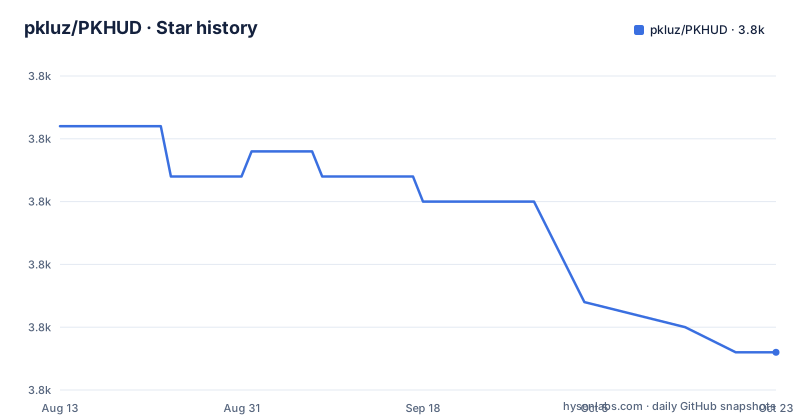
Star history
- pkluz/PKHUD3,769 ★ · -9
| Repository | 2026-08-13 | 2026-10-23 |
|---|---|---|
| pkluz/PKHUD | 3.8k | 3.8k |
-9 Stars in the last 71 days, measured from the daily GitHub snapshot. Compare with other projects
Editorial analysis
The three installers pin three different major versions
The installation section is written as if it were three separate projects. The first pod line is for Swift 2 and pins the third major of the library. The second is for Swift 3 and pins the fourth. The third is for Swift 4 and pins the fifth. Then the package-manager-agnostic manager gets its own line pinning the fourth, and the modern package manager gets the fifth point four. So the three supported routes for the same library point at three different majors, and the one described first targets a compiler generation from the middle of the last decade. That is the accumulated cost of the Swift 2 to 4 migration period being documented rather than collapsed, and the readme has not been tidied since. What it means practically is that you cannot copy any line without checking which major it is pinning.
The documentation link points at a version two majors behind
The header links an archived documentation set for the library, and the address in that link names a specific version: 3.2.1. The newest release is 5.4.0. So the documentation a reader is sent to describes an API two major versions behind the one the same readme tells them to install, and for a library whose surface is a handful of calls it will be close enough to look right until it is not. It is the kind of link that survives because the docset is generated per release and nobody regenerates the badge when a release happens. The same header also links the package manager badge twice, and the continuous integration badge points at a hosted service that has been retired, so that one renders as a broken image and tells a reader nothing about whether the build passes.
The installer for the older dependency manager is fenced with the wrong language
The dependency-file example for the decentralized dependency manager is presented in a code fence tagged with a language identifier for a configuration format that is not what the file is. The file is a dependency manifest with the same shape as a Ruby gem manifest, and it should be labelled as such, or not labelled at all. It matters less than the version drift two sections from now and a great deal more than it should, because a fence tag is what an editor uses to pick a highlighter and what a reader uses to guess the file format. If you are copying that line into a manifest, the tag is the only clue you get, and it gives you the wrong one.
And the three pod lines, which are the shape of the whole problem:
pod 'PKHUD', '~> 3.0'then one for the next compiler generation at the fourth major, and one for the next at the fifth.
Two interface styles and no list of what ships
The readme offers a short way and a long way, and it says so. The short way is one call with a style and a delay, optionally with a completion handler. The long way is described as more verbose and flexible plumbing, where you assign a content view to a shared instance, show it, and hide it after a delay with a completion handler. The long way is also how you swap views: show a progress style, do the work asynchronously, then flash a result, which is the pattern the library is actually shaped around. What is missing is any inventory. The readme says there are multiple content views and that you will find them as separate files in the project folder and as a group in the development tool, so the list of what you can show is something you discover by browsing a project rather than reading a document.
Theming is refused in advance
Two properties are offered for general behaviour: one for whether the background dims while the overlay is shown, and one for whether the views underneath still respond to touches. Beyond that you may supply your own content view, descending from any view type or from one of two base classes the library provides, one square and one wide. And then the sentence that saves everyone time: it is neither possible to customise the general look and feel nor is it planned, so you are free to provide any content view you wish but the blurring, the corner radius and the shading will stay the same. That is a design decision stated as a boundary, with the reason implied rather than given. For a library whose whole purpose is to look like a system component, it is defensible; for anyone whose design system owns those three properties, it is the constraint that decides the dependency.
Ruby tooling and a retired continuous integration badge
The repository root explains how this library is built and shipped. There is a Ruby gem file and its lock at the root, and a directory for an automated release pipeline, so publishing goes through Ruby tooling rather than through the platform's own commands. There is a lint configuration for the language, an Xcode project, a podspec, a Swift package manifest, and a demo application with its own pinned compiler version file, which is a deliberate reproducibility measure that applies to the sample rather than to the library. And there is a configuration file for a hosted continuous integration service that no longer runs for open source, plus a badge pointing at it. So the release path is Ruby, the lint path is native, the CI path is dead, and the documentation tells a reader the state of the build is unknown.
The credits spell maintainers with a missing letter
The credits section names the owner and maintainer and then says other maintainers are listed, and the word is spelled without its second vowel. It is a small thing, in a project that is otherwise unusually carefully written, and it is worth mentioning for a specific reason rather than as pedantry: the same readme is where the owner tells you where to send a bug, and that section is the one place where a contributor looking for who to ask goes first. A typo there is cheap. The rest of that section is sensible, pointing questions to a question-and-answer site under a specific tag, bugs and features to the issue tracker, and contributions to pull requests, and it points at a third-party port for a different language ecosystem as well.
The copyright year has not moved in eight years
The readme prints the entire licence text inline, in full, after naming the copyright holder and the year. The year is 2015. The last commit to the default branch is dated 2023-02-16 and the newest release is from September 2020, and neither date appears anywhere in the licence text. There is also a licence file in the repository root, so the terms are duplicated in two places, which is one more copy to keep in step. None of this affects the terms, which are permissive and unencumbered. It affects the signal a reader gets: a project whose only dated statement about itself says 2015 looks older than one whose dates are two years apart, and for a library this small, adoption decisions get made on exactly that reading.
Editorial conclusion
PKHUD is worth using if you need the system overlay's look in your own app and want it in one call, because the terse interface covers the common case and the longer one exists for the cases where you need to show progress and then swap in a result. Two things to know before you adopt it. The newest release is from September 2020 and the last commit to the default branch is dated 2023-02-16, so this is a snapshot rather than a moving line, and its stated floor is a 2015 operating system. And the readme is explicit that the general look will never be configurable: you can supply any content view you like, but the blur, the corner radius and the shading are fixed. If your design system needs to own those, this library will not get out of your way.
Frequently asked questions
What is PKHUD?
An MIT-licensed Swift reimplementation of the overlay iOS shows for volume, ringer and rotation changes. It blurs using the system's own effect view, supports rotation, works on top of presented controllers and alerts, and ships a set of content views including a checkmark, a cross and a progress indicator, with animated variants.
How do I install PKHUD?
Three dependency managers are documented and each pins a different major version: the Ruby pod route has separate lines for three compiler generations, the decentralized binary manager pins the fourth, and the Swift package manager pins the latest point release of the fifth. Copying any line without checking which major it pins will give you the wrong version.
Can I change how PKHUD looks?
You can supply your own content views, descending from any view type or from one of two base classes the library provides. You cannot change the general look: the readme states the blurring, corner radius and shading will remain the same and that this is not planned to change.
What is the difference between the two PKHUD APIs?
The short one is a single call with a style and a delay, optionally with a completion handler. The longer one is described as more flexible plumbing: assign a content view to a shared instance, show it, and hide it after a delay. The longer form is also what lets you show progress and then swap in a result view.
Is PKHUD still being worked on?
The default branch was last pushed on 2023-02-16 and the newest release is 5.4.0 from 2020-09-17, with the two before it from 2019. The repository is not marked as archived, and the stated floor is iOS 8.
Official sources
Add this badge to your README
If you maintain this project, the badge below links readers to this analysis and shows its maintenance status from the daily GitHub snapshot. Paste the markdown into your README; add ?metric=license or ?metric=stars to the image URL for a different field.

[](https://hysenlabs.com/projects/pkluz-pkhud)Star history chart for your README
[](https://hysenlabs.com/projects/pkluz-pkhud)Was this useful?