ZLS, a non-official Zig language server that tracks the compiler
A language server for Zig supporting developers with features like autocomplete and goto definition
At a glance
- What is it?
- ZLS gives editors completions, hover, rename and zig fmt formatting for Zig, but it is a separate project from the compiler, not part of it. Its default branch targets Zig master, releases lag behind, and comptime support is unfinished.
- Who is it for?
- ZLS is the server to reach for if you write Zig and want completions, rename and zig fmt formatting in your editor. Pair ZLS with a matching Zig and update it whenever you upgrade Zig.
- Can I use it commercially?
- Yes. MIT is a permissive licence: you can use, modify and sell software built on it, as long as you keep its copyright and licence notices.
- Is it still maintained?
- Yes. The repository received new commits within the last day.
- What is it written in?
- Mainly Zig, according to GitHub's language statistics.
Answers come from the project's GitHub data, last synced on November 15, 2026, and from our analysis. They are not legal advice.
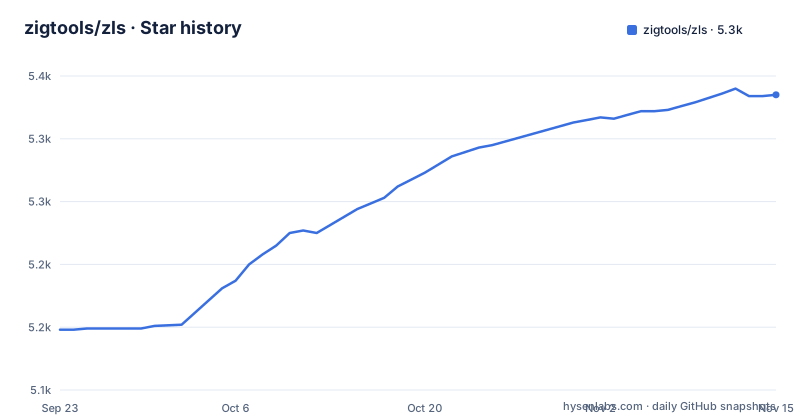
Star history
- zigtools/zls5,335 ★ · +187
| Repository | 2026-09-23 | 2026-11-15 |
|---|---|---|
| zigtools/zls | 5.1k | 5.3k |
187 Stars in the last 53 days, measured from the daily GitHub snapshot. Compare with other projects
Editorial analysis
ZLS is a separate project from the Zig compiler
ZLS is a non-official implementation of the Language Server Protocol for Zig, and it is written in Zig rather than wrapping a separate analysis tool. It lives under the zigtools organization, carries an MIT license, and its default branch is master. That branch received a push on 2026-11-01, so the code is being worked on right now. The catch is the word non-official. The Zig project does not publish or version ZLS for you, so nothing in a compiler install drops a language server into your editor. You pick the ZLS version, and you are the one who notices when it stops matching the compiler you run.
Issue 3208 is the gap between master and Zig nightly
Building ZLS is where the version story gets sharp. The default branch targets Zig master, taken from the Zig download page. The build section adds that when upgrading Zig, you should update ZLS too to keep them in sync.
Three commands turn a clone into a server binary
Here is the whole from-source path, and it fits on one screen:
git clone https://github.com/zigtools/zls
cd zls
zig build -Doptimize=ReleaseSafe
Nothing in the repository runs an install step after that. What your editor talks to is up to your LSP client. The complete installation guide lives on the Zigtools website at https://zigtools.org/zls/install/ and covers editor setup, prebuilt binaries and extra documentation, so a prebuilt download is handled there rather than by build.zig. At the repository root sit build.zig and build.zig.zon, flake.nix, flake.lock and deps.nix for Nix users, codecov.yml for coverage reporting, and src/ and tests/ for the code itself.
The LSP surface, with formatting delegated to zig fmt
The feature list covers completions, hover, diagnostics, go to definition and declaration, workspace symbols, document symbols, find references, rename symbol, semantic tokens highlighting, inlay hints and code actions. Formatting is not one of its own. It is based on `zig fmt`, so the whitespace decisions in your file come from the formatter the Zig project ships instead of a second implementation living inside the server. That consistency is worth something, and it is also a coupling: a formatting difference between compiler versions shows up as a difference in your editor, and no setting in this repository changes it.
Comptime and semantic analysis are marked work in progress
The same feature list makes a promise and a caveat in one breath. ZLS supports most language features, including simple type function support, payload capture type resolution and custom packages, then adds that support for comptime and semantic analysis is work in progress. That boundary is exactly where editor help thins out. Code that computes types at comptime, the kind found in generic containers, is code whose types a server has to evaluate rather than read. If your Zig leans on metaprogramming, expect hover text, inlay hints and diagnostics to be quietest in the files you care about most, and keep compiling for the truth.
Diagnostics only compile your build when you opt in
Diagnostics are listed next to an opt-in build-on-save feature, and the useful detail is that the two are separable. The project keeps the guide on its own site at zigtools.org/zls/guides/build-on-save/.
Release 0.16.0 is the version the project tells you to pair
Releases are named for the Zig generation they serve. The most recent releases are 0.17.0 from 2026-10-19, 0.16.1 from 2026-10-18 and 0.16.0 from 2026-04-16. The same section makes the coupling explicit: when you upgrade Zig, update ZLS too so the two stay in sync. That is a maintenance chore your editor setup inherits. Every compiler bump becomes a server bump, and a team pinning its toolchain in a container has to pin both, or the editor and the compiler will quietly disagree.
Configuration is a schema.json file, not a documented list
The README does not answer configuration questions directly. No configuration section appears in the README, and no option name, default value or settings list appears anywhere in it. What the root does carry is schema.json, sitting next to build.zig. The consequence for a reader is direct: you discover option names by opening the schema and reading it, not by following a list in the README.
Editorial conclusion
ZLS is the server to reach for if you write Zig and want completions, rename and zig fmt formatting in your editor. Pair ZLS with a matching Zig and update it whenever you upgrade Zig. Before you commit, decide whether build on save is worth a compile on every save, and open schema.json yourself, because the README has no configuration section.
Frequently asked questions
What does ZLS mean?
ZLS is a non-official implementation of the Language Server Protocol for Zig, written in Zig. It gives editors completions, hover, go to definition, find references, rename, diagnostics, inlay hints and formatting based on zig fmt.
Which ZLS version should I pair with my Zig compiler?
The README names no specific version; it says the default branch targets Zig master and that when upgrading Zig you should update ZLS too to keep them in sync. The most recent releases are 0.17.0 from 2026-10-19, 0.16.1 from 2026-10-18 and 0.16.0 from 2026-04-16.
Does ZLS understand comptime?
Not fully. Simple type function support, payload capture type resolution and custom packages are listed as supported, while support for comptime and semantic analysis is described as work in progress.
Where do I find ZLS configuration options?
The README has no configuration section and names no options or defaults. A schema.json file sits at the repository root next to build.zig, and the complete installation guide on the Zigtools website covers editor setup and prebuilt binaries.
Official sources
Add this badge to your README
If you maintain this project, the badge below links readers to this analysis and shows its maintenance status from the daily GitHub snapshot. Paste the markdown into your README; add ?metric=license or ?metric=stars to the image URL for a different field.

[](https://hysenlabs.com/projects/zigtools-zls)Star history chart for your README
[](https://hysenlabs.com/projects/zigtools-zls)Was this useful?