snk: a contributions graph replayed as a snake animation
🟩⬜ Generates a snake game from a github user contributions graph and output a screen capture as animated svg or gif
At a glance
- What is it?
- snk reads a contribution grid from GitHub, GitLab, or Forgejo, walks a snake through the cells, and renders the result as a gif or an svg. It ships as a GitHub Action, an npm library, and an npx command, and it does not accept pull requests.
- Who is it for?
- snk fits a profile README that regenerates on a schedule, and it does not try to be a general animation tool: point the action at one account, list the output files, and accept that palettes outside the three named presets mean reading the source. Two things are worth checking first.
- Can I use it commercially?
- Not without permission. GitHub finds no licence file in the repository, and without a licence all rights are reserved by default: you may read the code but not reuse it. Check the README, or ask the authors, before using it.
- Is it still maintained?
- Yes. The repository last received commits 20 days ago.
- What is it written in?
- Mainly TypeScript, according to GitHub's language statistics.
Answers come from the project's GitHub data, last synced on November 7, 2026, and from our analysis. They are not legal advice.
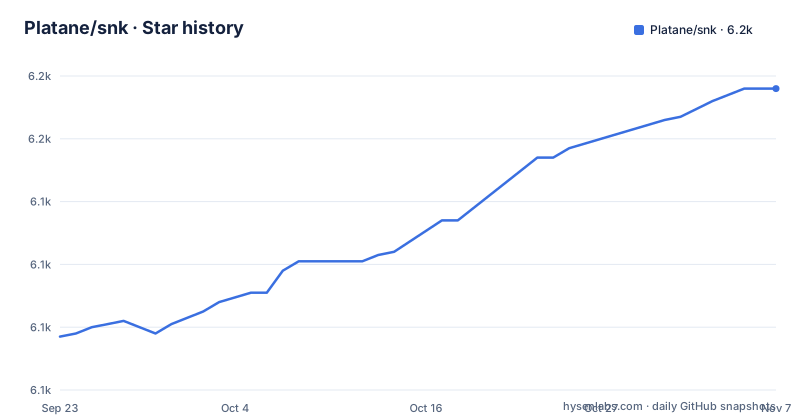
Star history
- Platane/snk6,176 ★ · +79
| Repository | 2026-09-23 | 2026-11-07 |
|---|---|---|
| Platane/snk | 6.1k | 6.2k |
79 Stars in the last 45 days, measured from the daily GitHub snapshot. Compare with other projects
Editorial analysis
The snake walks the contribution grid one cell at a time
snk pulls a user's contributions graph and treats the cells as food: a snake path is generated so the cells get eaten in an orderly fashion, and the result is rendered as a gif or an svg. The linked example renders show the colors are not fixed, with an ocean variant and a grey variant sitting next to the default ones, which is the same point the palette option makes from the other direction. The code is a TypeScript workspace, and the root package.json carries version 3.5.0 and the description 'Generates a snake game from a github user contributions grid'. A browser demo sits at platane.github.io/snk, so you can see the shape of the output before wiring anything into a workflow, and the action is also listed in the marketplace under the name generate-snake-game-from-github-contribution-grid.
One file per line, with options carried in the query string
The Action takes one required input, the account whose graph gets read, plus a list of files to generate. The sample fills the account from the action context variable, so a workflow stored in your own profile produces your own snake. Each line of the file list is one output, and every line can be tuned with a query string. Three options are named: palette, a preset limited to github, github-dark, and github-light; color_snake for the snake; and color_dots as a comma separated list for the cells it has not eaten. That is the whole documented surface, so a scheme beyond it means reading the code. Dark mode is not an option at all but a second file, with a picture element pointing at both so the reader's color scheme picks one.
- uses: Platane/snk@v3
  with:
github_user_name: ${{ github.repository_owner }}<picture>
<source media="(prefers-color-scheme: dark)" srcset="github-snake-dark.svg" />
<source media="(prefers-color-scheme: light)" srcset="github-snake.svg" />
</picture>svg-only skips the gif step and the tools it depends on
Rendering an animated gif needs more machinery than rendering an svg, and the Dockerfile shows the difference: on top of oven/bun:1.3.12-slim the runtime image installs [email protected] and [email protected] before the action bundle is copied in, and the command it runs is bun /action-release/index.js. If only the vector file matters, a second action exists for that case, documented as the faster path. The build path is pinned tightly, with bun install run under --frozen-lockfile, so the bun.lock committed in the repository decides the versions.
RUN bun add [email protected] [email protected] --no-lockfile --no-cache
CMD ["bun", "/action-release/index.js"]
The library reads three forges but names one token
The same generator is published to npm, so it runs outside a workflow. The call takes a source object and an array of outputs. The source names a platform, and the comment on the platform value says github, with gitlab and forgejo also supported and codeberg named as the forgejo instance, then a username and a token, where the example passes process.env.GITHUB_TOKEN. Each output entry declares a format, svg in the sample, and a drawOptions object. What the sample will not tell you is what belongs in drawOptions, because the field is filled with a comment reading // .. and no key names follow, so the library's option list has to come from somewhere else. The return value is one string per output, which the example writes out with fs.writeFileSync.
import { generateSnakeAnimation } from "generate-snake-animation";

const outputs = [
  {
    format: "svg",
    drawOptions: {
      // ..
    },
  },
];

const results = await generateSnakeAnimation(
  {
    platform: "github", // supports github, gitlab and forgejo (codeberg)
    username: "platane",
    githubToken: process.env.GITHUB_TOKEN,
  },
  outputs,
);

fs.writeFileSync("snake.svg", results[0]);
A codeberg palette in the npx example sits outside the preset list
There is a command line path too, which is the quickest way to look at the output without a repository at all. The flags shown are --forgejo_user, given a fully qualified codeberg.org and user value, and --output, which takes the file name and its options together in a single string. That flag holds the wrinkle: the example ends with palette=codeberg, while the Action's option comment lists the presets as github, github-dark, and github-light. Nothing in the documentation reconciles the two lists, so read the query string as an open set and expect to check the code when you want a palette outside the three that are named.
npx generate-snake-animation@3 --forgejo_user codeberg.org/JasterV --output snake.svg?palette=codebergA private root package with one published subpackage
The repository is a bun workspace: bun.lock and tsconfig.json at the top level, packages/ holding the pieces, svg-only/ holding the lighter action, and action.yml as the entry the marketplace reads. The root package.json is marked private, so it never reaches npm itself, and publishing happens from packages/generate-snake-animation/dist, which is what the publish:lib script does. The same script list shows how the parts are built, with build:action for the Action bundle, build:lib for the library, and dev:demo and build:demo for the browser demo. Tooling versions are pinned in devDependencies, typescript 5.9.3, prettier 3.6.2, @types/bun 1.3.4, and @types/node 24.12.2, and lint runs prettier in check mode over ts, js, json, md, and yml files while skipping both dist directories. There is a .nvmrc for the Node version and a Dockerfile for the container build.
bun install --no-cache --frozen-lockfile
bun run build:action
Pull requests are declined by policy, so issues are the only door
The contribution policy is explicit: this project does not accept pull requests. Reporting or fixing issues is appreciated, but a change in the API or in the implementation is supposed to be discussed in an issue first, and the docs are blunt that such a change is likely not going to be greenlighted. That has to be part of the plan before you build on top of snk. The releases give the rest of the picture: v3.5.0 arrived on 2026-04-25, after v3.4.1 in November 2025 and v3.4.0 just before that, and the last push to the default branch is dated 2026-10-18. Every example on the page references version 3, so pinning to v3 keeps the Action, the svg-only variant, and the npm package on the same line.
Editorial conclusion
snk fits a profile README that regenerates on a schedule, and it does not try to be a general animation tool: point the action at one account, list the output files, and accept that palettes outside the three named presets mean reading the source. Two things are worth checking first. The svg-only action skips the gif, so a gif needs the full action, with canvas and gifsicle in the runtime image. And the contribution policy is a dead end for patches, since the project takes issue reports but not pull requests, so plan on carrying a fork if you need an API change.
Frequently asked questions
Which account does the snk action read the graph from?
The github_user_name input is required, and the sample workflow fills it with the github.repository_owner context variable, so a workflow kept in your own profile produces your own snake.
Can snk output something other than an animated gif?
Yes. Each line of the output list names one file and can carry a query string, and a separate action documented as faster, Platane/snk/svg-only@v3, renders the svg on its own.
Does snk work outside GitHub Actions?
Yes. The npm package generate-snake-animation can be called from a script, and the platform option is said to cover github, gitlab, and forgejo, with codeberg named as the forgejo instance.
Does snk accept pull requests?
No. The contribution policy states that the project does not accept pull requests and asks that any change to the API or implementation be discussed in an issue first.
Official sources
Where developers are discussing it
Posts on Hacker News, dev.to and Lobsters that link to this repository, found by our scan of those communities. 1 in the last 30 days; newest first.
- Animated GitHub contribution snake for your profile README, your repos, and your orgsdev.to · Oct 10, 2026 · 2 points · 0 comments
Add this badge to your README
If you maintain this project, the badge below links readers to this analysis and shows its maintenance status from the daily GitHub snapshot. Paste the markdown into your README; add ?metric=license or ?metric=stars to the image URL for a different field.

[](https://hysenlabs.com/projects/platane-snk)Star history chart for your README
[](https://hysenlabs.com/projects/platane-snk)Was this useful?