Dictionariez commits its signing key pair to the repository root
📚 A customizable dictionary extension that supports double-click lookups in 20+ languages, 1000+ dictionaries, text-to-speech, translation and Anki integration.
At a glance
- What is it?
- A double-click dictionary extension with Anki export, running on AngularJS with a jQuery-era widget stack, shipped from one build to three browsers and two product variants. The engineering is a decade old and the housekeeping is not.
- Who is it for?
- Two things to settle before you install or fork this. The repository root contains a packaged extension and a private key file, which means the signing material for the published build is public to anyone who clones it.
- Can I use it commercially?
- Yes, with conditions. GPL-2.0 is a copyleft licence: if you distribute software that includes it, you must release that software's source code under the same licence. Running it internally without distributing it does not trigger that obligation.
- Is it still maintained?
- Yes. The repository last received commits 13 days ago.
- What is it written in?
- Mainly JavaScript, according to GitHub's language statistics.
Answers come from the project's GitHub data, last synced on November 15, 2026, and from our analysis. They are not legal advice.
Star history
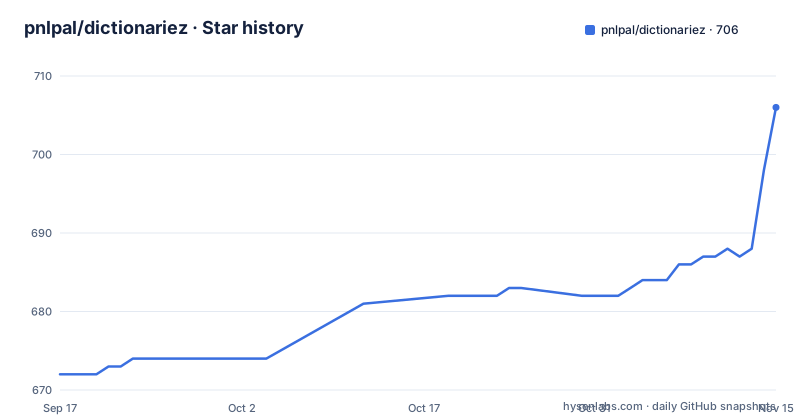
- pnlpal/dictionariez706 ★ · +34
| Repository | 2026-09-17 | 2026-11-15 |
|---|---|---|
| pnlpal/dictionariez | 672 | 706 |
34 Stars in the last 59 days, measured from the daily GitHub snapshot. Compare with other projects
Editorial analysis
The repository root holds a private key and a packaged extension
The top level of this repository contains a packed extension file and a private key file, next to the packaging script and the webpack configuration. In the Chrome extension model that key is what signs a build so the browser will accept it as an update to an already-installed extension, so a public copy of it is a public ability to produce an update. Nothing on the page mentions either file, and the build instructions never refer to them; the instructions simply say to build with one command and pack with another, which implies the key is picked up silently from the root. Two possibilities remain, and the page does not distinguish them: the key is a development key that never signed a published build, or it is the real one. Either way, the file should not be in a public repository, and anyone installing the extension has no way to tell which case they are in from the readme.
Three products are advertised and the build matrix names two
The install section offers three separate extensions. The main one, a Swedish-focused variant that prioritises Swedish over English and ships Swedish dictionaries, and a lighter one that works in the browser's side panel. The build section then documents how to target each browser with an environment variable, on the development server, on the release build and on the packaging script alike:
PRODUCT=Ordböcker BROWSER=Firefox npm run buildOnly one product variable appears anywhere in those instructions. The lighter side-panel variant is downloadable from all three stores and linked from the readme, but no documented invocation produces it, so whether it is built from this tree at all is left for a reader to work out.
The test command starts the development server with a variable set
There are four scripts in the manifest and one of them is not what its name suggests. The build script runs a build utility, the start script runs a web server, the landing page script runs a dev server for a separate site, and the test script runs the same web server as the start script with an environment variable set to a test mode. There is no test runner in the dependency list and no assertion library in the scripts, so `npm test` boots a development server in a mode the readme never describes. The readme's build section does not mention the test script or the landing page script at all, which means the two ways to check that a change works are both undocumented.
AngularJS 1.8 with current lint tooling, and one dependency set to latest
The runtime stack is from the middle of the previous decade. The framework is pinned to the 1.8 line, with two separate bootstrap adapter packages, the widget library is select2 at a release candidate, the icon font is a 4.x release, and the table plugins are a 1.x set. Alongside them sit a current formatter and a flat-config linter, and one modern dependency: a Chinese conversion library, which is the piece that makes the Chinese dictionary support work. The dependency with no upper or lower bound at all is the utility library, whose version is the word latest, meaning every fresh install resolves to whatever was newest that day. That is the reproducibility hole in a project that otherwise pins most things with care.
Two installers and one lockfile, and npm ignores the lockfile it ships
The build instructions say to use either of two package managers to install requirements, and the repository commits a lockfile for only one of them. An npm install resolves fresh from the registry ranges on every machine and never reads the other manager's lockfile, so two developers following the same sentence get different trees. Nothing on the page explains why both are offered, and nothing documents how a release build is meant to be made reproducible. The same section is otherwise careful about the variables that matter: the browser target, the product, and the distinction between a development build from the server and a release build from the build script.
Fourteen languages on the page, twenty or more in the description
The feature paragraph enumerates the languages it supports: English, Chinese, Japanese, Korean, German, Spanish, French, Italian, Portuguese, Swedish, Norwegian, Danish, Russian and Tajik. That is fourteen, and the sentence adds only that further languages can be requested on the project's community forum. The repository's own description claims support for twenty or more languages and a thousand or more dictionaries. Neither number on the page is sourced, and the gap between the two is six languages. The way to find out what is actually there is the guide at the repository root for adding a dictionary, which the readme links from a section titled as a request for more dictionaries.
Three store listings, three different URL shapes
The download links are not uniform. The main extension's Chrome link has a path segment that reads as the plural of dictionary rather than the product's name, and its Firefox link ends in the same plural slug unencoded. The Swedish variant's Firefox link percent-encodes the accented character in its slug, and the side-panel variant's link uses its own short slug. So a reader comparing three listings has three different naming conventions to reason about, and the names in the stores may not match the names on the page. The page also states its licence as GPL 2 in the manifest while the repository's licence field gives the two-clause form, and it keeps its privacy statement in a separate file rather than in the page, which for an extension that reads the text of every page you visit is the file worth reading before installing. The repository also commits a changelog, a formatter configuration with an ignore list, and a flat-config linter file, so the project's own tooling is current even where its runtime dependencies are not.
Editorial conclusion
Two things to settle before you install or fork this. The repository root contains a packaged extension and a private key file, which means the signing material for the published build is public to anyone who clones it. That is the single most important thing on this page and it is not mentioned in the readme at all. If the extension is already installed, treat the existing installation as something you may need to remove and reinstall from a store listing rather than trusting an update from that source. The second is the count: the repository description claims twenty or more languages and a thousand dictionaries, while the page itself enumerates fourteen languages. Neither number comes with a source you can check. What the project does well is its build matrix: one command set targets three browsers and two product variants through environment variables, and the packaging script honours the same variables. What it does not do is pin its dependencies consistently, since one library is set to resolve to whatever is newest at install time, one is pinned to a release candidate, and two different installers are offered with a single lockfile.
Frequently asked questions
What is Dictionariez?
A browser extension by River Yang that looks up a word by double-clicking it on any page, showing its definition, translation and pronunciation on screen, with a popup for deeper lookup across multiple dictionaries, auto-completion, word history, keyboard shortcuts and recorded human pronunciation. Looked-up words can be exported to Anki. It is published for Chrome, Firefox and Edge under GPL-2.0.
How do I build Dictionariez for Firefox?
With an environment variable on whichever command you are running. Setting the browser variable to Firefox builds a development version from the dev server, a release version from the build script, or a packaged archive from the packing script. A second variable selects the product, so the Swedish-focused variant is built by combining both variables with the release build command.
Which languages does Dictionariez support?
The page lists fourteen: English, Chinese, Japanese, Korean, German, Spanish, French, Italian, Portuguese, Swedish, Norwegian, Danish, Russian and Tajik, and says other languages can be requested on the project's community forum. The repository description claims twenty or more languages and a thousand or more dictionaries, so the two figures on the page do not agree.
How do I add a dictionary to Dictionariez?
The readme does not explain how to add one. It links a section titled as a request for more dictionaries, which points at a community forum thread, and the repository root carries a separate guide file for adding a dictionary. Neither the instructions nor the count of available dictionaries appears on the page itself.
Official sources
Add this badge to your README
If you maintain this project, the badge below links readers to this analysis and shows its maintenance status from the daily GitHub snapshot. Paste the markdown into your README; add ?metric=license or ?metric=stars to the image URL for a different field.

[](https://hysenlabs.com/projects/pnlpal-dictionariez)Star history chart for your README
[](https://hysenlabs.com/projects/pnlpal-dictionariez)Was this useful?