Pocket ID runs on Docker with one credential: a passkey
The most user-friendly OpenID Connect Certified™ and OAuth 2.0 provider that lets users sign in to your applications with passkeys.
At a glance
- What is it?
- Pocket ID is a self-hosted OpenID Connect provider built around one credential, the passkey, which removes the password database and every password reset flow with it. It ships as a Docker compose service on port 1411 and is deliberately narrow: no password fallback, no documented key rotation, and optional settings whose meanings live on an external documentation site.
- Who is it for?
- Pocket ID suits a small self-hosted setup whose users can all hold a passkey, deployed from the shipped Docker compose file with the encryption key held in a file rather than in the environment. It does not suit an organisation that needs password login, shared accounts, or a documented key rotation path, and the README names no fallback credential for someone who cannot enrol one.
- Can I use it commercially?
- Yes. BSD-2-Clause is a permissive licence: you can use, modify and sell software built on it, as long as you keep its copyright and licence notices.
- Is it still maintained?
- Yes. The repository received new commits within the last day.
- What is it written in?
- Mainly Go, according to GitHub's language statistics.
Answers come from the project's GitHub data, last synced on November 15, 2026, and from our analysis. They are not legal advice.
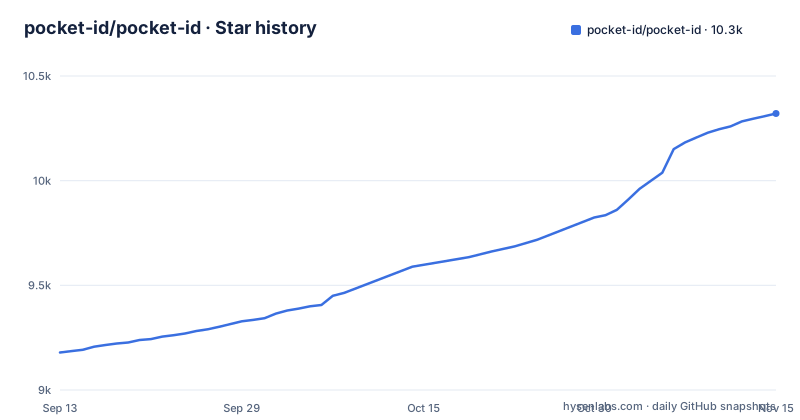
Star history
- pocket-id/pocket-id10,321 ★ · +1,142
| Repository | 2026-09-13 | 2026-11-15 |
|---|---|---|
| pocket-id/pocket-id | 9.2k | 10.3k |
1,142 Stars in the last 63 days, measured from the daily GitHub snapshot. Compare with other projects
Editorial analysis
Pocket ID has exactly one credential type, and it is a passkey
Pocket ID ships one credential type. The README states that it only supports passkey authentication, which means there is no password to set, reset, leak or phish. A passkey lives in the platform credential store on the user's device, and the payoff the project describes is signing in to every self-hosted service with a physical Yubikey.
That single choice is the product. Read the trade honestly. An operator gets an identity provider with no password database to breach and no reset flow to build, but a user holding no passkey-capable device and no hardware key cannot sign in at all, because nothing in the repository offers a second credential type. The README concedes as much, noting that some people might not like the idea at first. There is no break-glass account documented either, so every person you enrol needs a device you have thought about in advance.
A demo at https://demo.pocket-id.org lets you walk the sign-in flow before committing a deployment to it.
The compose file runs the v2 image on port 1411 with one volume
Deployment is a compose file, and the README calls Docker the easiest and recommended route. Everything the container needs comes from one image tag, one env file and one volume:
services:
  pocket-id:
    image: pocketid/pocket-id:v2 # or ghcr.io/pocket-id/pocket-id:v2
    restart: unless-stopped
    env_file: .env
    ports:
      - 1411:1411
    volumes:
      - "./data:/app/data"
Two details in those nine lines decide what you own afterwards. The tag is `v2`, a floating major tag rather than a pinned release, so the build you deploy depends on when you pulled it, and the comment offers a GitHub Container Registry mirror of the same tag as the alternative. The single `./data:/app/data` mount is the only persistence declared, so whatever the provider writes has to live under that host directory or it goes when the container is replaced. Port 1411 is published on both sides, host and container.
ENCRYPTION_KEY ships a less secure inline method and a recommended file method
Before the container starts it needs two settings, and the repository ships them as a template file rather than prose. Copy `.env.example` to `.env` and fill in the public URL and a key:
APP_URL=https://your-pocket-id-domain.com

ENCRYPTION_KEY=
The key comes in two flavours and the template labels both. Method 1 pastes a generated key straight into the variable, annotated simple but less secure, with the generator given as `openssl rand -base64 32`. Method 2 points `ENCRYPTION_KEY_FILE` at a file holding the base64 key, and the template calls that one recommended. So the file you deploy from either contains the key that protects what the provider stores, or it names another file that does.
What the template does not give you is a rotation procedure. No documented way to replace `ENCRYPTION_KEY` on a live deployment appears in the repository, so treat the first value you generate as the value you keep and store a copy outside that host.
TRUST_PROXY and MAXMIND_LICENSE_KEY are opt-in, with no explanation in the repo
Below the required pair sits a block of optional settings the template marks as recommended to review:
TRUST_PROXY=false
MAXMIND_LICENSE_KEY=
PUID=1000
PGID=1000
The file gives no explanation for any of the four. It points at https://pocket-id.org/docs/configuration/environment-variables, so the semantics live on a separate documentation site rather than in the repository, which means a fork that wants different defaults has to read someone else's page first.
`TRUST_PROXY` is the one that changes your deployment. The compose file publishes 1411 directly and declares no proxy in front of the service, so putting Pocket ID behind Traefik or another reverse proxy is a choice made outside the shipped configuration. With the flag left at `false` and the reference page not vendored into the repo, whether forwarded headers are honoured is the setting to confirm before you rely on that proxy for TLS termination and client addresses.
The healthcheck calls the binary itself, not an HTTP endpoint
The compose file wires its healthcheck to the binary, which means the probe ships inside the image:
healthcheck:
  test: [ "CMD", "/app/pocket-id", "healthcheck" ]
  interval: 1m30s
  timeout: 5s
  retries: 2
  start_period: 10s
Those four timings are the contract. Failures during the ten second start period are not counted, and each attempt gets five seconds, and checks repeat every ninety seconds until two consecutive failures mark the container unhealthy. The restart policy beside it is `unless-stopped`, which acts on the process exiting. A container that keeps running while reporting unhealthy is therefore not brought back by anything in this file. If health should drive recovery in your setup, you add that yourself rather than assume the shipped compose already does it.
The pnpm preinstall hook blocks npm, and backend/ sits outside the workspace
The repository carries two build systems and one of them refuses the other. `package.json` declares the root private, and installs a guard as the preinstall step:
"preinstall": "npx only-allow pnpm"`packageManager` is pinned to `[email protected]`, a `.node-version` file is present, and the scripts run through `vp -C frontend` and `vp -C packages/...`, so an `npm install` stops at the preinstall guard. Contributors need that pnpm major available. The Go service lives in `backend/`, and `pnpm test` runs `vp -C packages/tests run test`.
Shipping is brisk. v2.19.0 on 2026-10-21, v2.19.1 on 2026-10-22 and v2.19.2 on 2026-11-02 landed within about twelve days, and the last push was 2026-11-02. `CHANGELOG.md`, `cliff.toml` and `crowdin.yml` sit at the root, which is where release notes and translations are wired.
Keycloak and ORY Hydra are the providers Pocket ID argues with
The README positions Pocket ID against two named projects. It says other self-hosted OIDC and OAuth 2.0 providers exist, naming Keycloak and ORY Hydra, but that they are often too complex for simple use cases. That one sentence carries the whole comparison, so read it for what it is: a claim about configuration surface, not a measurement.
The difference in approach runs both ways. Keycloak and ORY Hydra are built as general identity systems. Pocket ID takes the opposite trade and removes everything except the passkey, so its own argument is that there is less to configure and fewer credential flows to reason about. If your users need a shared account, a password, or any credential other than a device-held key, that simplification is the part you do not want. The OpenID Connect Certified mark in the README speaks to the protocol implementation, not to how simple your deployment becomes.
Editorial conclusion
Pocket ID suits a small self-hosted setup whose users can all hold a passkey, deployed from the shipped Docker compose file with the encryption key held in a file rather than in the environment. It does not suit an organisation that needs password login, shared accounts, or a documented key rotation path, and the README names no fallback credential for someone who cannot enrol one. Before deploying, read https://pocket-id.org/docs/configuration/environment-variables for TRUST_PROXY and MAXMIND_LICENSE_KEY, then decide whether the floating `v2` image tag is acceptable for something you may have to rebuild.
Frequently asked questions
What is Pocket ID?
A self-hosted OpenID Connect Certified and OAuth 2.0 provider that lets users sign in to applications with passkeys. It supports only passkey authentication, so there is no password to set, reset or store.
Is Pocket ID secure?
The .env.example lists APP_URL and an encryption key as variables that must be configured. The .env.example labels a key pasted into the variable simple but less secure and recommends a file-based key instead, and users have no password that can leak.
How do I install Pocket ID?
The README calls Docker the easiest and recommended route, and the repository ships a docker-compose.yml that runs the pocketid/pocket-id:v2 image on port 1411 with .env as its env file and ./data mounted. The setup guide lives at https://docs.pocket-id.org.
How do I set up Pocket ID?
Copy .env.example to .env and set APP_URL plus an ENCRYPTION_KEY, generated with openssl rand -base64 32 or read through ENCRYPTION_KEY_FILE. TRUST_PROXY, MAXMIND_LICENSE_KEY, PUID and PGID are optional to review.
Which is better, Pocket-ID or Authentik?
The README does not discuss Authentik. It names Keycloak and ORY Hydra as the self-hosted providers it sets itself against, calling them often too complex for simple use cases, and grounds that in supporting only passkey authentication.
How does Pocket ID compare to Keycloak?
The README names Keycloak and ORY Hydra as the providers Pocket ID positions against, saying they are often too complex for simple use cases. The README presents Pocket ID as simpler and notes that it supports only passkey authentication; its shipped compose file runs a single service on port 1411.
Official sources
Add this badge to your README
If you maintain this project, the badge below links readers to this analysis and shows its maintenance status from the daily GitHub snapshot. Paste the markdown into your README; add ?metric=license or ?metric=stars to the image URL for a different field.

[](https://hysenlabs.com/projects/pocket-id-pocket-id)Star history chart for your README
[](https://hysenlabs.com/projects/pocket-id-pocket-id)Was this useful?