Poiyomi Toon Shader for Unity and VRChat: Setup, Features, and Limits
A feature rich toon shader for unity and VR Chat
At a glance
- What is it?
- Poiyomi Toon Shader is an MIT-licensed collection of ShaderLab materials for Unity's Built-In Rendering Pipeline, with a primary focus on VRChat avatars. It offers multiple shading and rendering modes, but its compatibility targets and update procedure require attention before adoption.
- Who is it for?
- Adopt Poiyomi Toon Shader for VRChat avatar work that targets Unity's Built-In Rendering Pipeline, DX11, and the documented material workflow. Do not choose it as an HDRP solution or as a universal multi-platform shader without verifying platform support.
- Can I use it commercially?
- Yes. MIT is a permissive licence: you can use, modify and sell software built on it, as long as you keep its copyright and licence notices.
- Is it still maintained?
- Yes. The repository last received commits 3 days ago.
- What is it written in?
- Mainly ShaderLab, according to GitHub's language statistics.
Answers come from the project's GitHub data, last synced on November 7, 2026, and from our analysis. They are not legal advice.
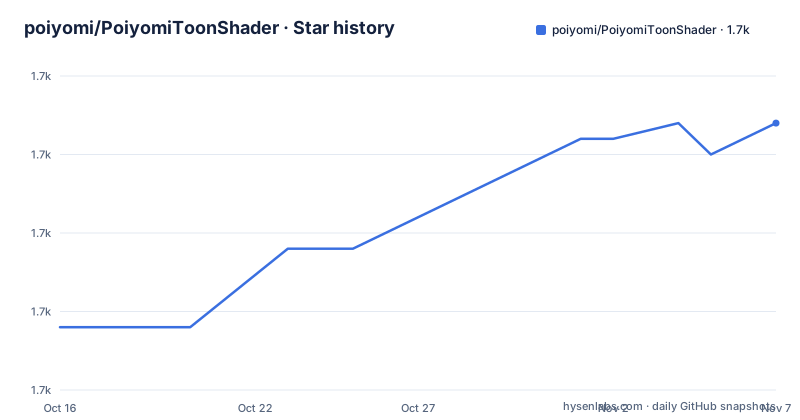
Star history
- poiyomi/PoiyomiToonShader1,682 ★ · +13
| Repository | 2026-10-16 | 2026-11-07 |
|---|---|---|
| poiyomi/PoiyomiToonShader | 1.7k | 1.7k |
13 Stars in the last 22 days, measured from the daily GitHub snapshot. Compare with other projects
Editorial analysis
Poiyomi's Unity and VRChat Rendering Scope
Poiyomi Shaders address a specific gap between Unity's standard physically based rendering and the stylized appearance commonly used by VRChat avatars. They provide shading models such as Realistic, Toon, Flat, and other configurable modes, plus rendering modes including Opaque, Cutout, and Transparent. The target audience is Unity artists and avatar creators who need more control over highlights, outlines, masks, transparency, and lighting response than a basic material offers.
The feature list also includes physically based reflections and a metallic and smoothness workflow. Stylized components include matcaps, outlines, and rim lighting. Special effects include glitter or sparkle, emission, and iridescence. For scene and asset control, the project documents global masking and options for culling, `ZWrite`, `ZTest`, and stencils. This is a broad collection of material controls rather than a single-purpose toon effect.
The package can be used in games outside VRChat, but the README warns that its materials may not be ideal there because materials cannot share a common shader. For those projects, the documentation points to ThryEditor's `Locking` functionality as the way to create optimized shaders for each material. That qualification matters for adoption. Poiyomi is aimed first at a particular Unity and VRChat environment, not at every Unity rendering workflow.
ShaderLab Architecture and Rendering Controls
The repository is primarily written in ShaderLab and is distributed as a Unity package named `com.poiyomi.toon`, displayed as `Poiyomi Toon`. Its package metadata identifies it as a shader package and records version `10.0.25`. The package depends on `com.poiyomi.thryeditor` with the version requirement `>=2.74.3`. The README explains that ThryEditor displays the inspector properly and locks the shader to support performance. It is provided as a separate VCC package and is automatically installed when Poiyomi Toon is added through VCC.
The visible package structure includes the `_PoiyomiShaders` folder, the package manifest, Unity metadata files, and supporting repository files. That layout indicates that the shader implementation is shipped as Unity project content rather than as a standalone command-line program. The package manifest also declares `legacyFolders` for `Assets\_PoiyomiShaders` and lists `com.poiyomi.pro` as a legacy package, which reflects version migration concerns for existing projects.
The documented feature groups map to different parts of a material setup. Shading models determine how light is represented, while rendering modes control transparency and depth-related behavior. Reflection and specular controls address surface response, and global masking provides a shared way to affect selected portions of an avatar or material. The available options are numerous, so the practical difficulty is selecting a coherent set rather than discovering that the package lacks controls. The README does not provide a complete property reference or a worked shader graph, so the linked documentation is needed for exact setup details.
Installing Poiyomi Through VPM and Unity Packages
The README offers two distribution paths: a VPM package through VCC and the latest Unity Package from the repository's releases page. It does not give a terminal installation command or a Unity Editor script, so there is no command to reproduce here. The documented installation action is to import the downloaded package into the Unity project.
For a VCC-based setup, obtain the Poiyomi VPM package from the linked VPM page, add Poiyomi Toon to the project, and allow the VPM dependency on ThryEditor to be installed. The package manifest gives the dependency name and minimum version, but the README does not document the exact VCC button sequence. After the package is added, open the Unity project and use the Poiyomi shader and material controls in the Inspector. The README says that ThryEditor is what makes the Inspector display properly, so a missing or unavailable `com.poiyomi.thryeditor` dependency is a reason to check before evaluating material behavior.
For a manual package setup, download the latest Unity Package from the releases page and import it into the project. After either route, the first practical check is whether Unity recognizes Poiyomi Toon and whether ThryEditor controls appear. The repository's documented target is Unity `2022.3.22f1` at the time of writing, while the package manifest declares Unity `2021.3`. That difference is worth checking against the actual VRChat Unity version and the intended project configuration.
Updating Without Duplicate Shader Assets
Updates require explicit cleanup. The README instructs users to delete the old `_PoiyomiShaders` folder from the project's `Assets` folder before importing a new package, because leaving it in place can cause interference. This is a concrete migration rule, not an optional recommendation. The package manifest reinforces the relationship by declaring `Assets\_PoiyomiShaders` as a legacy folder.
The latest listed release is `v10.0.25`, published on 2026-10-11. The repository's last push was also on 2026-10-11, and the repository is not archived. The release history includes `v10.0.24` on 2026-10-02 and `v10.0.23` on 2026-09-29. Those facts indicate recent release activity, but they do not describe compatibility for every Unity version or platform.
When distributing an avatar or asset that uses Poiyomi, the README says not to include the `_PoiyomiShaders` folder inside the distributed asset package. The intended approach is to direct users to download the correct version from the releases page, or include Poiyomi alongside the asset rather than nesting it inside that asset's package. This separation affects packaging and support responsibilities. A creator who packages the shader directory without following the documented rule can produce an asset that is harder for another user to update.
Built-In Render Pipeline, DX11, and Platform Boundaries
The primary compatibility target is Unity's Built-In Rendering Pipeline, also identified as BIRP, on DX11. The README says the project targets the Unity version currently supported by VRChat, listing `2022.3.22f1` as the version at the time of writing. It also states that higher Unity versions have been tested and are known to work, but the primary target remains the latest version supported by VRChat. This gives projects a sensible baseline without claiming unrestricted Unity compatibility.
URP compatibility is available, but the README refers users to the project's Discord for more information. HDRP and Unity's other Scriptable Rendering Pipelines are explicitly listed as not compatible. Non-DirectX 11 platforms, including OpenGL, Metal, and Vulkan, are not guaranteed to work. Vulkan is described as highly experimental. Those limits make Poiyomi unsuitable for projects whose rendering pipeline or graphics API is already fixed outside the documented target set.
There is also a performance-related design choice. ThryEditor locks shaders, and the README says locking can produce optimized shaders for each material in non-VRChat projects. Locking may increase project-specific asset management, since each material can have a specialized shader rather than sharing one common shader. The documentation does not quantify build size, frame time, or shader compilation costs, so those effects cannot be assumed from the repository description.
Free Poiyomi Versus Poiyomi Pro
Poiyomi Toon is distributed as free and open-source software under the MIT license. Poiyomi Pro is a separate paid offering described as including the free version plus additional functionality. The README lists Fur Shader support, tessellation and geometry shader effects such as Geometric Dissolve, TPS, SSAO, Contact Shadows, Squish, and early unreleased features. Pro is accessed through a Patreon account at the `$10` tier or higher and installed as the `Poiyomi Pro` VCC package, with manual installation also available through the Pro website after login.
This distinction affects evaluation. A user who needs fur, geometric dissolve, SSAO, or contact shadows should determine whether those features are required for the project rather than assuming they are present in the free package. The README says active development happens on the Pro shader in a private repository, while free releases happen periodically. It does not provide a detailed feature matrix for every version, so version-specific behavior should be checked in the release documentation.
The MIT license applies to the free project and the repository includes `LICENSE.txt`. The README does not give licensing terms for the paid Pro package. Teams should therefore treat the free repository's license and the Pro service's terms as separate matters, rather than assuming that access to one determines the rights or obligations for the other.
Editorial conclusion
Adopt Poiyomi Toon Shader for VRChat avatar work that targets Unity's Built-In Rendering Pipeline, DX11, and the documented material workflow. Do not choose it as an HDRP solution or as a universal multi-platform shader without verifying platform support. Check the current Unity version, the selected VPM dependency, the intended shader mode, and the removal of the previous `_PoiyomiShaders` folder before importing an update.
Frequently asked questions
How do I install Poiyomi Toon Shader in Unity or VRChat?
The README provides a VPM package for VCC and a downloadable Unity Package from the releases page. Add the VPM package through VCC or import the downloaded package into the Unity project. Poiyomi depends on `com.poiyomi.thryeditor` version `>=2.74.3`.
What should I do before updating Poiyomi Toon Shader?
Delete the old `_PoiyomiShaders` folder from the Unity project's `Assets` folder before importing the new package. The README warns that leaving the old folder can cause interference.
Is Poiyomi Toon Shader compatible with HDRP, Vulkan, and other Unity rendering pipelines?
The README lists HDRP and other Scriptable Rendering Pipelines as not compatible. DX11 is the primary target, URP support is available, and Vulkan support is described as highly experimental rather than guaranteed.
Does the free Poiyomi Toon package include Fur Shader, SSAO, and Contact Shadows?
The README lists Fur Shader, SSAO, Contact Shadows, tessellation, geometry effects, and related features under Poiyomi Pro. The Pro package includes the free version plus those additional features.
Official sources
Add this badge to your README
If you maintain this project, the badge below links readers to this analysis and shows its maintenance status from the daily GitHub snapshot. Paste the markdown into your README; add ?metric=license or ?metric=stars to the image URL for a different field.

[](https://hysenlabs.com/projects/poiyomi-poiyomitoonshader)Star history chart for your README
[](https://hysenlabs.com/projects/poiyomi-poiyomitoonshader)Was this useful?