Polychromatic: a Linux front end for Razer lighting, and nothing else
RGB lighting management software for GNU/Linux. Powered by OpenRazer.
At a glance
- What is it?
- Polychromatic is a PyQt6 application for managing RGB effects on OpenRazer peripherals on Linux, and it is deliberately a front end rather than a driver, so it needs OpenRazer underneath and only works on Linux. Its dependency set is small and pinned, and the interesting engineering is in packaging a desktop app across distributions.
- Who is it for?
- Polychromatic fits a Linux user with Razer keyboards, mice or keypads who wants the same lighting controls the vendor software offers on Windows, and it fits a user who wants effects that trigger on the application they are running.
- Can I use it commercially?
- Yes, with conditions. GPL-3.0 is a copyleft licence: if you distribute software that includes it, you must release that software's source code under the same licence. Running it internally without distributing it does not trigger that obligation.
- Is it still maintained?
- Yes. The repository received new commits within the last day.
- What is it written in?
- Mainly Python, according to GitHub's language statistics.
Answers come from the project's GitHub data, last synced on November 7, 2026, and from our analysis. They are not legal advice.
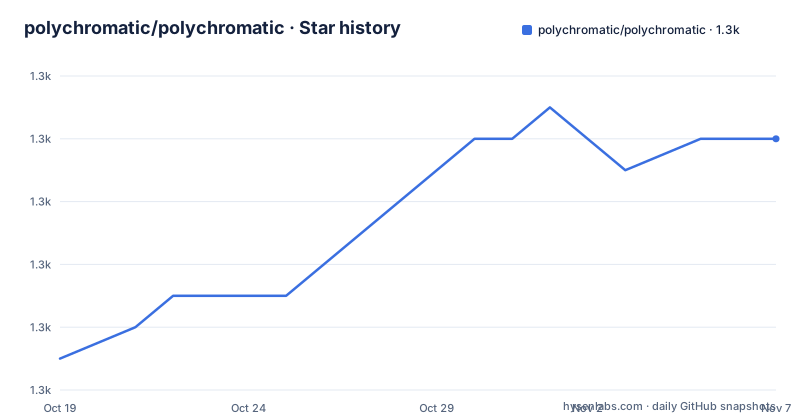
Star history
- polychromatic/polychromatic1,262 ★ · +7
| Repository | 2026-10-19 | 2026-11-07 |
|---|---|---|
| polychromatic/polychromatic | 1.3k | 1.3k |
7 Stars in the last 19 days, measured from the daily GitHub snapshot. Compare with other projects
Editorial analysis
A front end that needs a driver underneath it
Polychromatic is described as an open source RGB lighting management front-end application to customise OpenRazer peripherals on GNU/Linux.
The device support section is where the architecture becomes explicit. Polychromatic on its own is just a frontend, it currently needs OpenRazer installed to provide the actual communication with the hardware, and both projects only run on Linux distributions.
That is a two piece design with a clear division of labour. OpenRazer does the talking to the USB device, and Polychromatic does the talking to the user. The consequence for anyone evaluating it is that the quality of the experience depends on two things rather than one, and a failure can be in either layer.
The project says so plainly in its troubleshooting section. Occasionally, issues are caused by an improper OpenRazer driver installation, and Polychromatic includes a troubleshooter to identify common problems, with a link to the FAQ on OpenRazer for the case where a device is not showing up or shows an error when changing settings. Bugs specific to Polychromatic go to the GitHub issue tracker instead.
That division of the bug reports is itself informative. A support queue split between driver problems and application problems is a sign that the project has decided where its responsibility ends, and it is a reminder that the most common failure you will hit is probably in the layer below.
Razer hardware today, other brands as an ambition
The About section describes the scope plainly. Polychromatic is a front-end for managing lighting, RGB effects and device properties for Razer keyboards, mice and keypads, and the project has a long-term ambition to support peripherals from other brands too.
The word ambition is doing the honest work there. There is a commented out block in the README that spells out the longer term intent, that the software aims to make it easy to create and co-ordinate lighting effects that work across all compatible hardware, even if you switch to another brand also supported by Polychromatic, and that presets and triggers enable you to switch your lighting on the fly to match the application or game that is currently playing.
Two features are named in that block. Co-ordination across hardware, meaning one effect profile applied to several devices at once, which is the thing a vendor utility does badly and a cross device tool does well. And triggers, meaning the lighting changes based on which application has focus, which is the feature that makes the tool more than a colour picker.
The presets and triggers being in a comment rather than in the rendered README is a small editorial choice with a practical effect. It means those two features are the project's stated direction rather than a documented capability, and a reader evaluating it today should treat them as roadmap rather than as the thing they are installing.
For the current user, the picture is a Razer lighting control panel that is Linux native and written in PyQt6, with a project site at polychromatic.app listing features, screenshots and FAQs, and a documentation site at docs.polychromatic.app.
Four executables, one of them a tray applet
The repository top level lists the binaries, and the names say what the application is made of.
There is polychromatic-cli, polychromatic-controller, polychromatic-controller-dev, polychromatic-helper and polychromatic-tray-applet. The controller is the main window, and the README carries a screenshot labelled as the Polychromatic v0.7.0 Controller. The controller-dev variant is there for development, and the helper is the piece that talks to the hardware, which is what makes the tray applet possible.
The tray applet is the interesting one for daily use, because it is what lets lighting change without opening a window. The README's commented block describes the intent of switching lighting on the fly to match the running application, and a tray applet is the natural host for that.
The build system is Meson, with a meson.build at the root, and there is a debian/ directory, a man/ directory, a locale/ directory with the translations, and a data/ directory. The man pages and the locale directory together tell you this is packaged for distribution rather than run from a source checkout, and the debian directory means there is at least one first party packaging recipe.
There is also a tests/ directory, a scripts/ directory, a sources/ directory, and the main package in polychromatic/. The presence of DEVELOPMENT.md at the root, which the README points to for instructions on running the software locally, is the entry point for anyone who wants to work on it rather than install it.
The dependency set, pinned by pip-compile
The requirements file is small and the header explains exactly how it was made.
# This file is autogenerated by pip-compile with Python 3.14
# by the following command:
#
#    pip-compile --no-index
So the file is generated rather than hand maintained, from a requirements.in that lists the direct dependencies, and the resolution is done with pip-compile so the versions are pinned. The direct dependencies in the file are pyqt6 at 6.11.0, pyqt6-webengine at 6.11.0, requests at 2.34.2, colour at 0.1.5, setproctitle at 1.3.8, tomlkit at 0.15.1, pylint at 4.1.2, isort at 9.0.2 and astroid at 4.3.3, with the rest being transitive.
Two things in that list are worth noticing. The webengine variant of PyQt6 is a separate requirement from PyQt6 itself, and it exists because the hardware communication and the effects rendering need a browser engine rather than plain widgets. And the presence of a full linting stack, pylint with astroid, mccabe and isort, in the same file as the runtime dependencies tells you the project treats linting as a first class part of the build.
The Python version matters too, since the file header says it was generated with Python 3.14, and the top level listing includes requirements.in next to requirements.txt.
Compared with a typical desktop application, this is a short list. There is no numpy, no image processing library, no settings framework beyond what the standard library offers. For an application whose entire job is to send colour values to a device, that is a reasonable outcome, and it also means the application starts quickly and has few places to break.
Installing from a package repository, and why the README sends you elsewhere
There is no install command in the README, and the omission is explained. Instructions for each supported Linux distro are provided on the website, at polychromatic.app/download, and the README says why that is the right approach.
Installing packages from a software repository is recommended as this will keep the software up to date, and your package system will keep track of dependencies.
That is the whole installation story, and it is a deliberate choice rather than a gap. A Linux desktop application that ships packages per distribution inherits the distribution's dependency tracking and its update cadence, and the alternative, a pip install into a virtual environment, would put the OpenRazer integration and the system libraries outside the package manager's knowledge. For an application that talks to USB devices through a kernel driver, the system integration is not optional.
The consequence for a reader is that this repository is not where you install from. It is where you read the code, and where you go if you want to run it from source, which is what DEVELOPMENT.md covers.
One more point from the README's own guidance. The project asks that issues caused by an improper OpenRazer driver installation be identified with the included troubleshooter first, and the documentation site has a specific FAQ page for the case where a device is showing up as unrecognised. Before filing a bug, that is the path the project wants you to take, and the reason is that most of the reported problems are not in the front end at all.
Where a lighting front end is the wrong tool
Three boundaries, stated plainly.
The first is platform. Both Polychromatic and OpenRazer only run on Linux distributions, and the project says so in the device support section. If you are on Windows, the vendor utility exists and this is not for you. If you are on Linux and do not have a Razer device, the tool has nothing to control.
The second is the gap between ambition and implementation on other brands. The long term ambition is to support peripherals from other brands and to co-ordinate lighting across hardware, but the current scope is Razer keyboards, mice and keypads. A user who reads the About section and concludes that their Logitech keyboard is supported will be disappointed.
The third is that this is a lighting and device properties tool, not a macro tool or a configuration suite. The About section names lighting, RGB effects and device properties, and the screenshots in the repository are of the controller. If you are looking for per key remapping, Polychromatic is not the answer, and the fact that it is a front end over a driver rather than a driver itself means it can only expose what the layer below it exposes.
There is a real alternative in the same space and it is worth naming precisely. A different project, OpenRazer itself, is the driver layer and it also has a command line interface of its own, so the questions that Polychromatic answers can partly be answered without a GUI at all. The difference in approach is that OpenRazer talks to the hardware and offers scripting, while Polychromatic adds a graphical interface, per device profiles, and the notion of an effect applying across devices. For a script that sets one colour once, the driver plus a script is the smaller answer.
Editorial conclusion
Polychromatic fits a Linux user with Razer keyboards, mice or keypads who wants the same lighting controls the vendor software offers on Windows, and it fits a user who wants effects that trigger on the application they are running. It does not fit a Windows or macOS user, because both Polychromatic and OpenRazer only run on Linux distributions, and it does not fit someone with non Razer hardware who expects it to work today, because support for other brands is a long term ambition rather than a current feature. Check three things before you install. Check that your distribution has a package, because the download instructions are per distro and on the website rather than in the repository, and the recommendation is to install from a software repository so the package system tracks the dependencies. Check that OpenRazer is present and working, because Polychromatic on its own is just a front end and an improper driver installation is the cause of most issues, which is why a troubleshooter is included. And check what your lighting needs, since a device that does not appear in the supported list may be recognised by the driver but not expose the effects the front end expects. The last push was on 2026-10-06, the newest release listed is v0.9.8 from 2026-08-08, and the license is GPL-3.0.
Frequently asked questions
What is Polychromatic and what does it need to work?
It is an open source RGB lighting management front-end application to customise OpenRazer peripherals on GNU/Linux, and it needs OpenRazer installed to provide the actual communication with the hardware. Both projects only run on Linux distributions.
How do I install Polychromatic?
Instructions for each supported Linux distro are on the website at polychromatic.app/download. The README recommends installing from a software repository, because that keeps the software up to date and lets the package system track the dependencies.
Does Polychromatic support devices from brands other than Razer?
Not currently. The About section says it manages lighting, RGB effects and device properties for Razer keyboards, mice and keypads, and that the project has a long-term ambition to support peripherals from other brands too.
My device is not showing up in Polychromatic, what should I check?
The README says that occasionally issues are caused by an improper OpenRazer driver installation, and that Polychromatic includes a troubleshooter for common problems. There is a specific FAQ page on the documentation site for a device showing up as unrecognised.
What does Polychromatic run on top of?
The application is written in Python with PyQt6, including the pyqt6-webengine variant, and the repository is built with Meson. The executable set includes a controller, a controller for development, a helper, a command line interface and a tray applet.
What license is Polychromatic released under?
GPL-3.0, with a LICENSE file at the root of the repository. The newest listed release is v0.9.8 from 2026-08-08, and the last push was on 2026-10-06.
Official sources
Add this badge to your README
If you maintain this project, the badge below links readers to this analysis and shows its maintenance status from the daily GitHub snapshot. Paste the markdown into your README; add ?metric=license or ?metric=stars to the image URL for a different field.

[](https://hysenlabs.com/projects/polychromatic-polychromatic)Star history chart for your README
[](https://hysenlabs.com/projects/polychromatic-polychromatic)Was this useful?