Pinia Colada: server state management for Vue that reuses Pinia's store
🍹 The smart data fetching layer for Vue
At a glance
- What is it?
- A caching layer for remote data in Vue applications, built as a Pinia plugin so queries and mutations live in the same store system as the rest of your state.
- Who is it for?
- Pinia Colada makes the most sense for a Vue codebase that already settled on Pinia and wants remote data handled by the same primitives instead of a second parallel store. The caching model, the deduplicated keys and the mutation invalidation flow are all in the README and readable in `src/`, and the plugin packages mean you can adopt auto refetch or retry without forking anything.
- Can I use it commercially?
- Yes. MIT is a permissive licence: you can use, modify and sell software built on it, as long as you keep its copyright and licence notices.
- Is it still maintained?
- Yes. The repository last received commits 1 day ago.
- What is it written in?
- Mainly TypeScript, according to GitHub's language statistics.
Answers come from the project's GitHub data, last synced on November 7, 2026, and from our analysis. They are not legal advice.
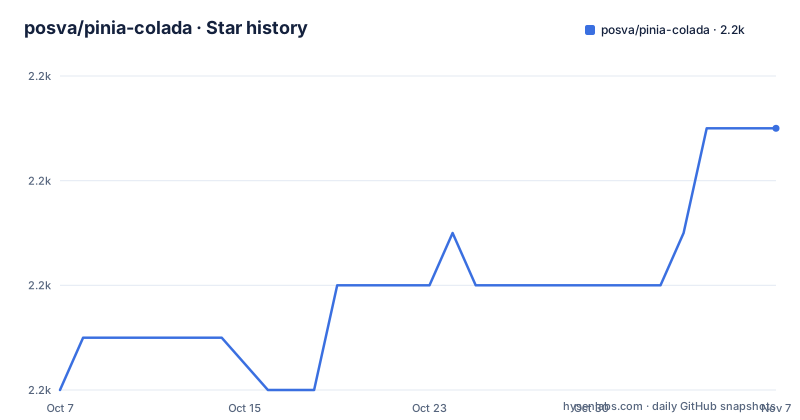
Star history
- posva/pinia-colada2,243 ★ · +5
| Repository | 2026-10-07 | 2026-11-07 |
|---|---|---|
| posva/pinia-colada | 2.2k | 2.2k |
5 Stars in the last 31 days, measured from the daily GitHub snapshot. Compare with other projects
Editorial analysis
A Pinia plugin rather than a second state library
The pitch is one sentence long: the project calls itself the data fetching layer for Vue, and it sits on top of Pinia rather than competing with it. Installation is a two step affair, and the ordering matters enough that the README comments it inline:
npm install pinia @pinia/coladaimport { createPinia } from 'pinia'
import { PiniaColada } from '@pinia/colada'
app.use(createPinia())
// install after pinia
app.use(PiniaColada, {
// optional options
})Install order is the first small thing to get right, and the comment in the sample is doing real work there. The payoff for staying inside the Pinia ecosystem is that you keep one state system, one devtools story and one set of idioms. The feature list backs this up with automatic caching and request deduplication, async state management, a plugin system, optimistic updates, server side rendering support and a stated zero dependency policy for anything other than Pinia itself. It also claims a baseline of roughly 2kb and full tree shakability, which is why `package.json` sets `"sideEffects": false` and points both `main` and `exports` at a single ESM entry, `./dist/index.mjs`.
Queries keyed by array, mutations invalidated by key
The core API is two composables, `useQuery` for reads and `useMutation` for writes, and the canonical example in the README shows how a contact page uses both. A query owns a key that identifies it in the cache, and the key is a function so it can react to a route parameter:
const { data: contact, isPending } = useQuery({
  // unique key for the query in the cache
  key: () => ['contacts', route.params.id],
  query: () => getContactById(route.params.id),
})
Writes go through `useMutation`, and the interesting part is `onSettled`, which invalidates the matching query rather than refetching by hand:
const { mutate: updateContact, isLoading } = useMutation({
  mutation: patchContact,
  async onSettled({ id }) {
    // invalidate the query to refetch the data of the query above
    await queryCache.invalidateQueries({ key: ['contacts', id], exact: true })
  },
})
That invalidation call arrives from `useQueryCache()`, and the `exact: true` flag limits the blast radius to the one key rather than every query sharing a prefix. It is a small design decision that decides whether a save button refetches one card or an entire page. The template in the example then binds `isPending` and `isLoading` to two different pieces of the UI, so a background refetch and a user initiated write look distinct on screen.
Plugins ship as separate scoped packages on their own cadence
The feature list advertises out of the box plugins for auto refetch, delaying loading states and more, and the release history shows these are genuinely separate npm packages rather than options on the core. The most recent tags are `@pinia/[email protected]` on 2026-09-28, the core at `v1.4.6` on 2026-09-23, and `@pinia/[email protected]` minutes earlier the same day. The plugin versioning makes the point clearly: the retry plugin is at 1.0.3 while auto refetch is at 0.2.7, so the extra features are at genuinely different maturity levels and a project can adopt one without taking a bet on the other.
The auto refetch release notes are also a decent window into how this project handles correctness. Alongside features like `meta` support on mutations and a new `defineMutationOptions` helper for type safe reusable options, the 0.2.7 entry includes a fix titled auto-refetch skip refetch when staleTime is not finite, and the 1.4.6 core release fixes discarding old entries when using `defineQuery` plus skipping `onError` for cancelled fetches. Both point at a library that is being careful about the interaction between cache lifetime, cancellation and error callbacks. If you rely on any of that, read the changelog entries for the version you pin rather than assuming the newest tag covers you.
Where devtools and network status actually stand
Two lines in the README feature list are commented out rather than removed, and they are worth noticing because the repository disagrees with them. The hidden lines are network status handling with offline support and integration with the Vue devtools. Yet the repository tree carries a top level `devtools/` directory, the package scripts include a filtered type check for it with `--filter './devtools'`, and the retry plugin release from 2026-09-28 credits a drag button devtools feature, a subtle rotation animation on that button, a diagnostics migration and a new dev reporter. So the devtools work is shipping while the README still carries it commented out as an unannounced or in progress item.
Rather than guessing which is ahead, treat the README feature list as a conservative summary and the changelog as the accurate record of what has landed. The same pattern applies to network status, where nothing in the visible changelog entries suggests the offline support has shipped. If devtools integration is a reason you are considering the library, check the `devtools/` directory and the recent release notes directly, because the headline feature list will not tell you it is there.
The repository is set up like a product, not a library
The top level tree is worth reading as a description of how the maintainer works. Beyond the expected `src/`, `docs/` and `playground/`, there is a `nuxt/` directory for the Nuxt integration, a `codemods/` directory paired with an `sgconfig.yml`, a `test-utils/` package, an `e2e/` suite driven by `playwright.config.ts`, and separate linting and formatting configuration in `.oxlintrc.jsonc` and `.oxfmtrc.jsonc`. `mise.toml` and `.node-version` pin the toolchain, `renovate.json` handles dependency bumps, and `CHANGELOG.md` sits at the root. Two directories stand out as a signal about the project's audience: `.claude/` and `.codex/` are committed, alongside an `.mcp.json` file.
The README also points readers to Mastering Pinia, noting that this is a feature complete version of the exercises from that course. That is a candid admission that the library and the teaching material grew together, and it explains a good deal about the API shape. The codemods directory matters for anyone on an older major version, since codemod rules ship in the published package alongside `dist`, `LICENSE` and `README.md`, which is what you want when a release changes call signatures across a large codebase. Test tooling is equally concrete: `vitest.config.ts` for units, coverage wired through `test:cov`, Playwright for hot module replacement checks, and `docs:build` gated on a typedoc run, so the API documentation is generated from types rather than maintained by hand.
Editorial conclusion
Pinia Colada makes the most sense for a Vue codebase that already settled on Pinia and wants remote data handled by the same primitives instead of a second parallel store. The caching model, the deduplicated keys and the mutation invalidation flow are all in the README and readable in `src/`, and the plugin packages mean you can adopt auto refetch or retry without forking anything. What the README does not tell you is how much of the API is v1 versus still settling, and the devtools story sits in an odd place given that the feature list has it commented out while the package ships a devtools directory. Start by installing the core, use one query key per resource, and read the plugin pages on pinia-colada.esm.dev before assuming you need the retries package.
Frequently asked questions
Is Pinia Colada a replacement for Pinia itself?
No. It is a plugin that layers remote data fetching on top of Pinia, installed after Pinia and used alongside it. Pinia still owns your application state; Pinia Colada adds caching, query keys and mutations.
How do you refetch data after a mutation?
Invalidate the affected query key through the query cache. The README example calls queryCache.invalidateQueries with the key array and exact true, so only the matching query refetches.
Which extra features are available as separate packages?
Plugins ship as their own scoped npm packages, including retry and auto refetch. Their versions move independently, retry was at 1.0.3 while auto refetch was at 0.2.7, so you can adopt one without the other.
Does Pinia Colada support server side rendering?
The feature list states server side rendering support works out of the box, and the repository includes a dedicated Nuxt directory for that integration. The README points to pinia-colada.esm.dev for the configuration details.
Official sources
Add this badge to your README
If you maintain this project, the badge below links readers to this analysis and shows its maintenance status from the daily GitHub snapshot. Paste the markdown into your README; add ?metric=license or ?metric=stars to the image URL for a different field.

[](https://hysenlabs.com/projects/posva-pinia-colada)Star history chart for your README
[](https://hysenlabs.com/projects/posva-pinia-colada)Was this useful?