PSScriptAnalyzer: a rule-based static checker for PowerShell that needs a .NET 8 SDK to build from source
Download ScriptAnalyzer from PowerShellGallery
At a glance
- What is it?
- PSScriptAnalyzer checks PowerShell modules and scripts against a set of rules and reports errors and warnings as DiagnosticResults. This covers the Install-Module route, the source build with build.ps1, the documentation that moved to learn.microsoft.com and the release dates.
- Who is it for?
- Install PSScriptAnalyzer from the PowerShell Gallery if you want rule-based linting of PowerShell modules and scripts, and build from source only when you contribute to it. It will not tell you how your code runs, because it checks quality rules and not behaviour.
- Can I use it commercially?
- Yes. MIT is a permissive licence: you can use, modify and sell software built on it, as long as you keep its copyright and licence notices.
- Is it still maintained?
- Yes. The repository last received commits 1 day ago.
- What is it written in?
- Mainly C#, according to GitHub's language statistics.
Answers come from the project's GitHub data, last synced on November 7, 2026, and from our analysis. They are not legal advice.
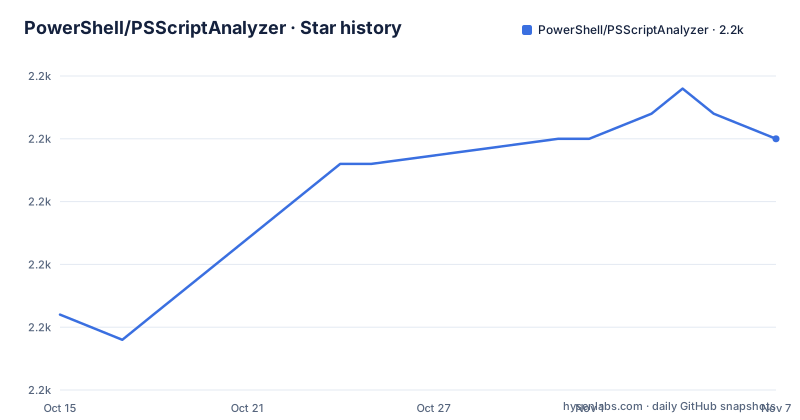
Star history
- PowerShell/PSScriptAnalyzer2,180 ★ · +7
| Repository | 2026-10-15 | 2026-11-07 |
|---|---|---|
| PowerShell/PSScriptAnalyzer | 2.2k | 2.2k |
7 Stars in the last 23 days, measured from the daily GitHub snapshot. Compare with other projects
Editorial analysis
Rules produce DiagnosticResults, and the built-in set catches things like Invoke-Expression
PSScriptAnalyzer is a static code checker for PowerShell modules and scripts. It runs a set of rules based on PowerShell best practices identified by the PowerShell Team and the community, and it generates DiagnosticResults, which are errors and warnings. Each result also suggests a possible improvement.
The README names three of the built-in checks as examples: the presence of uninitialized variables, use of the PSCredential type and use of Invoke-Expression. The list ends with and many more, so the full set is in the rules documentation.
To see what is installed on your machine, run Get-ScriptAnalyzerRule in the PowerShell console. The README gives that command as the way to confirm an installation, and it returns the built-in rules.
The tool is static. It reads the code and does not run it, so a rule can flag a risky pattern, but it cannot tell you whether the script behaves correctly at run time.
Install-Module is the whole install for most users
From the PowerShell Gallery the install is one command run in a PowerShell terminal:
Install-Module -Name PSScriptAnalyzerThe README also points to an Installing PSScriptAnalyzer section on learn.microsoft.com for the same route. The repository description reads Download ScriptAnalyzer from PowerShellGallery, which is the project's own pointer to that channel.
The latest release is 1.25.0 from 2026-03-20, followed by 1.24.0 from 2025-03-18 and 1.23.0 from 2024-10-09. Each of the three releases is about a year after the one before it, so check the gallery for the current version before you pin one.
The last push to the repository was on 2026-10-23, and it is not archived. The licence is MIT.
Building from source asks for the .NET 8.0 SDK, Pester v6 and PlatyPS
Source builds have a longer requirements list. The README names the latest .NET 8.0 SDK, and the .NET Framework 4.6.2 targeting pack if you are building for Windows PowerShell versions, which is only possible on Windows. Visual Studio 2022 or Visual Studio Code are optional but recommended for development. The Pester v6 and PlatyPS PowerShell modules are also required.
The steps start with the source. Download it from the release page, or clone the repository with git:
git clone https://github.com/PowerShell/PSScriptAnalyzerThen move into the directory and build:
cd path/to/PSScriptAnalyzerThe targeting pack can only be installed on Windows, so building for Windows PowerShell versions needs a Windows machine.
The repository contains PSScriptAnalyzer.sln, build.ps1, build.psm1, global.json and the folders Engine, Rules, Tests, Utils, PSCompatibilityCollector and docs.
build.ps1 builds for the current PowerShell by default, with flags for 5, 7, documentation and all
You can build from the Visual Studio solution or from PowerShell. The default build targets the version of PowerShell you are currently running:
.\build.ps1For Windows PowerShell version 5.0:
.\build.ps1 -PSVersion 5For PowerShell 7:
.\build.ps1 -PSVersion 7Documentation builds automatically only the first time, so rebuild it after changing help content:
.\build.ps1 -DocumentationTo build both versions and the documentation in one go, use -All:
.\build.ps1 -AllThen import the module from the out folder:
Import-Module .\out\PSScriptAnalyzer\[version]\PSScriptAnalyzer.psd1The documentation caveat is easy to miss, because a second plain build does not rebuild it.
Resource strings should be edited in Visual Studio, not by hand
A contributor adding or removing resource strings in the resx files runs into a specific trap. The README recommends Visual Studio for this, because it automatically updates the strongly typed Designer.cs files that go with each resx file.
Without Visual Studio there are two options. You can adapt the Designer.cs files manually, or use the New-StronglyTypedCsFileForResx.ps1 script, which sits in the repository root. The README discourages the script because it leads to a bad diff of the Designer.cs files, which makes pull requests harder to review.
The same paragraph mentions the free Visual Studio 2017 Community Edition, while the requirements list recommends Visual Studio 2022.
For anyone only running the analyzer, none of this applies.
Tests run through Pester 6 and build.psm1 helpers
The Pester-based tests live in the Tests folder. Pester of at least version 6.0 must be installed, and the run starts from the root of your local repository:
./build -TestThe results come from helpers in the build module. Import build.psm1 and call Get-TestResults:
Import-Module ./build.psm1
Get-TestResults
To see only failures, use Get-TestFailures after the same import:
Import-Module ./build.psm1
Get-TestFailures
The README does not state how long the suite takes or how many tests it holds.
Contributions go through issues first. The README asks you to discuss a fix or feature in an issue before submitting a pull request.
User documentation lives on learn.microsoft.com, and only the latest release is published there
A documentation notice explains a recent move. Conceptual user documentation left the source repository for a documentation repository so it can be published on learn.microsoft.com. The source repository keeps only documentation about the code base, such as building and contributing.
The notice maps the old files to new pages. Most of this README is now the PSScriptAnalyzer overview page. The cmdlet reference and the rules overview have their own pages. PowerShellBestPractices.md became PSScriptAnalyzer rules and recommendations, and ScriptRuleDocumentation.md became Creating custom rules. The Using PSScriptAnalyzer section of this README is a link to the page of the same name.
There is one exception. The rule and cmdlet documentation stays in the docs folder, so it can be build-tested and archived with each release. Only the latest release's documentation is published on learn.microsoft.com.
If you run an older release, the published pages may describe rules your version lacks, and the docs folder at that release tag is the matching source.
Editorial conclusion
Install PSScriptAnalyzer from the PowerShell Gallery if you want rule-based linting of PowerShell modules and scripts, and build from source only when you contribute to it. It will not tell you how your code runs, because it checks quality rules and not behaviour. Before building, check that you have the .NET 8.0 SDK and, for Windows PowerShell targets, the .NET Framework 4.6.2 targeting pack.
Frequently asked questions
How do I install PSScriptAnalyzer?
Open PowerShell in a terminal and run Install-Module -Name PSScriptAnalyzer. To build from source you need the .NET 8.0 SDK and the build.ps1 script.
What is PSScriptAnalyzer?
PSScriptAnalyzer is a static code checker for PowerShell modules and scripts. It runs rules based on PowerShell best practices and reports errors and warnings as DiagnosticResults.
How do I use PSScriptAnalyzer?
After installing, run Get-ScriptAnalyzerRule to list the built-in rules. The Using PSScriptAnalyzer documentation is published on learn.microsoft.com.
Official sources
Add this badge to your README
If you maintain this project, the badge below links readers to this analysis and shows its maintenance status from the daily GitHub snapshot. Paste the markdown into your README; add ?metric=license or ?metric=stars to the image URL for a different field.

[](https://hysenlabs.com/projects/powershell-psscriptanalyzer)Star history chart for your README
[](https://hysenlabs.com/projects/powershell-psscriptanalyzer)Was this useful?