ejabberd server on Docker, packages or source: how the Erlang XMPP, MQTT and SIP platform installs and what it asks of you
Robust, Ubiquitous and Massively Scalable Messaging Platform (XMPP, MQTT, SIP Server)
At a glance
- What is it?
- ejabberd is ProcessOne's Erlang/OTP realtime server, combining an XMPP server, an MQTT broker and a SIP service. This review follows its install routes, its two container images, the build system and the GPLv2 license, and flags where each route falls short.
- Who is it for?
- Choose ejabberd if you want one self-hosted Erlang/OTP service covering XMPP, MQTT and SIP and you can live with GPLv2 for the server code. It is the wrong pick if you need an MQTT-only broker with no chat stack, or if GPLv2 conflicts with how you plan to ship modified code.
- Can I use it commercially?
- Check first. The repository uses a licence we do not classify automatically, so read its LICENSE file before any commercial use.
- Is it still maintained?
- Yes. The repository last received commits 4 days ago.
- What is it written in?
- Mainly Erlang, according to GitHub's language statistics.
Answers come from the project's GitHub data, last synced on November 7, 2026, and from our analysis. They are not legal advice.
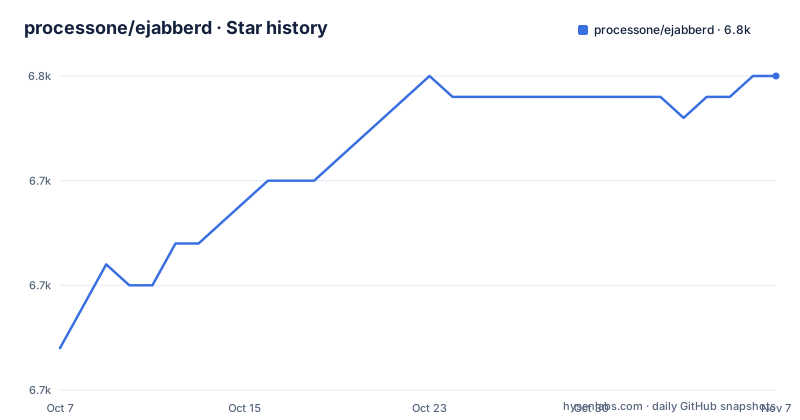
Star history
- processone/ejabberd6,750 ★ · +13
| Repository | 2026-10-07 | 2026-11-07 |
|---|---|---|
| processone/ejabberd | 6.7k | 6.8k |
13 Stars in the last 31 days, measured from the daily GitHub snapshot. Compare with other projects
Editorial analysis
One Erlang/OTP service answering XMPP, MQTT and SIP
ejabberd is a realtime platform built on Erlang/OTP that bundles three roles in one server: an XMPP server, an MQTT broker and a SIP service. That combination is the main reason to pick it over a single-protocol server. If your product needs chat between users and also telemetry from devices over MQTT, one ejabberd deployment can carry both, with one configuration file and one admin tool.
The comparison people make most often is ejabberd vs Prosody, and ejabberd vs Openfire. Prosody is an XMPP server written in Lua, and Openfire is one written in Java. The difference in approach is the runtime and the scope: ejabberd runs on the Erlang virtual machine and lists MQTT and SIP alongside XMPP in the same project. Which runtime your operations team already knows matters as much as the feature list here, because debugging a production node means debugging its runtime.
The feature list itself is kept off the README. ProcessOne points to ejabberd.im, the ejabberd Docs introduction and a supported protocols page for the details.
Five install routes, each covering a different set of architectures
ejabberd offers more ways in than most servers, and they are not interchangeable. Releases are available as installers from the ProcessOne download page and from GitHub Releases. Builds of the master branch come out of the installers workflow in GitHub Actions as run, deb and rpm packages for both x64 and arm64. Two container images exist. You can also use your operating system's package or Homebrew, and the Hex package page is linked from the README badges. Compiling from source is the last option, covered in COMPILE.md.
The practical question is which one tracks the version you need. Release installers and the GitHub Releases page follow the calendar-numbered releases: 26.04 on 2026-04-20, 26.07 on 2026-07-30 and 26.09 on 2026-09-30. Operating system packages follow your distribution's schedule, not ProcessOne's, so a distribution package can sit several releases behind GitHub. If you need a fix that landed in 26.09, check the version your package manager offers before assuming apt or Homebrew has it. The Installation section of docs.ejabberd.im/admin/install/ carries the details for each route.
ejabberd vs ecs: the ecs image stops at x64, so arm64 hosts need the other container
There are two Docker images, and the naming invites confusion. The ecs container image lives on Docker Hub as ejabberd/ecs and on GitHub Packages under processone/docker-ejabberd, with its own README in that separate repository. It is built for x64 only.
The ejabberd container image lives on GitHub Packages under processone/ejabberd, is documented in CONTAINER.md in the main repository, and covers both x64 and arm64. It is also published for the master branch as well as releases, which the ecs image is not described as doing.
The consequence is concrete. On an arm64 server, such as a Graviton instance or an Apple Silicon development machine running containers natively, pulling ejabberd/ecs gets you an image for the wrong architecture. Teams that start with the Docker Hub image because it is the familiar registry can find themselves migrating to the GitHub Packages image later. Pick the ejabberd image from the start if any host in your fleet is arm64, and follow CONTAINER.md rather than the ecs README.
Building from source runs through autotools on top of rebar3 and mix
The repository root shows a layered build. autogen.sh and configure.ac generate a configure script, Makefile.in becomes the Makefile, and underneath sit rebar, rebar3 and rebar.config for the Erlang build plus mix.exs and mix.lock for the Elixir toolchain. A configure.bat exists as well. COMPILE.md is the guide, and two commands list the options before you commit to anything:
./configure --help
make help
The first prints every configure switch, which is where you choose optional features before building. The second lists the make targets. Read both before running a build, because a configure choice made wrongly means reconfiguring and rebuilding.
One detail surprises people coming from pure Erlang projects: there is a package.json. It pulls in bootstrap at ^5.3.8, and its postinstall script deletes priv/mod_invites/static/bootstrap and copies node_modules/bootstrap/dist into that path. Those are the static assets for mod_invites. A source build that skips the npm step leaves that directory without its Bootstrap files.
ejabberd.yml and ejabberdctl are the two things to learn after installing
Once ejabberd is installed, the project points administrators to two commands:
ejabberdctl help
man ejabberd.yml
ejabberdctl is the command-line control tool, and its help output lists the administration commands available on your node. The man page for ejabberd.yml covers the main configuration file. The repository ships ejabberd.yml.example and ejabberdctl.cfg.example as starting points, along with ejabberd.service.template for systemd and ejabberd.init.template for init-script systems, and an sql/ directory for database schemas.
The README itself stays out of configuration entirely. It sends readers to docs.ejabberd.im for everything beyond those two commands, and to the developer section of the docs for module work. That split is reasonable for a server with this many options, but it means the GitHub page alone will not get you to a working XMPP domain. Budget time with the docs site and the example YAML file, not just the README.
Nightly builds from master arrive as a zip artifact, not as a release
ejabberd publishes nightly builds for the master branch and for pull requests. For installers, the route is manual: open the Installers workflow in GitHub Actions, open the most recent commit, and download the ejabberd-packages.zip artifact from the bottom of that commit page. For containers, the ejabberd image on GitHub Packages carries master builds.
That is useful for testing a fix before the next calendar release, and it is a poor fit for anything you need to reproduce. A GitHub Actions artifact is tied to a workflow run, downloading it needs a browser session on GitHub, and there is no version number like 26.09 to pin. If you deploy a nightly to production because it contains a fix you need, record the commit hash yourself, because the artifact name ejabberd-packages.zip is the same for every run.
The repository itself is busy: the last push was on 2026-11-03, and releases have arrived every two to three months through 2026. Waiting for the next tagged release is a realistic alternative to running a nightly.
GPLv2 for the server, MIT for translations, and a commercial edition alongside
GitHub shows the license as NOASSERTION, but the README is clear: ejabberd is released under the GNU General Public License v2, with the text in COPYING. The translations, kept in the separate ejabberd-po repository and editable through Weblate, are under the MIT License. GPLv2 is a copyleft license, so if you distribute a modified ejabberd you take on obligations about sharing source for that modified version. Running it as an internal service is a different situation from shipping it inside a product. Check the terms with whoever handles licensing for your organization before you fork it.
ProcessOne also sells ejabberd Business Edition and runs Fluux, described as ejabberd in the Cloud. Those are the routes for commercial support.
Security reports should go privately: SECURITY.md has the reporting guidelines, and the README also gives the contact address at process-one dot net. Bugs and feature requests go to GitHub Issues, with CONTRIBUTING.md for the process. Community help is in the [email protected] chatroom, GitHub Discussions and Stack Overflow.
Editorial conclusion
Choose ejabberd if you want one self-hosted Erlang/OTP service covering XMPP, MQTT and SIP and you can live with GPLv2 for the server code. It is the wrong pick if you need an MQTT-only broker with no chat stack, or if GPLv2 conflicts with how you plan to ship modified code. Before committing, decide between the x64-only ecs image and the ejabberd image on GitHub Packages, and read man ejabberd.yml on a test install so the configuration format holds no surprises.
Frequently asked questions
How do I install ejabberd?
ejabberd can be installed from release installers on the ProcessOne download page or GitHub Releases, from master-branch run, deb and rpm installers in GitHub Actions, from the ecs or ejabberd container images, from your operating system package, with Homebrew, or by compiling from source following COMPILE.md. The Installation part of docs.ejabberd.im covers each route.
What is ejabberd?
ejabberd is an open-source realtime platform built with Erlang/OTP that includes an XMPP server, an MQTT broker and a SIP service. It is developed by ProcessOne and released under the GNU General Public License v2.
What is an ejabberd server used for?
An ejabberd server provides realtime messaging over XMPP, acts as an MQTT broker, and offers a SIP service from one Erlang/OTP installation. It is administered with ejabberdctl and configured through ejabberd.yml.
What is the difference between the ejabberd and ecs container images?
The ecs image is on Docker Hub and GitHub Packages and is built for x64 only. The ejabberd image is on GitHub Packages, covers x64 and arm64, is published for releases and the master branch, and is documented in CONTAINER.md.
Official sources
Add this badge to your README
If you maintain this project, the badge below links readers to this analysis and shows its maintenance status from the daily GitHub snapshot. Paste the markdown into your README; add ?metric=license or ?metric=stars to the image URL for a different field.

[](https://hysenlabs.com/projects/processone-ejabberd)Star history chart for your README
[](https://hysenlabs.com/projects/processone-ejabberd)Was this useful?