Project Nessie: transactional data lake catalog setup
Nessie: Transactional Catalog for Data Lakes with Git-like semantics
At a glance
- What is it?
- Project Nessie is a transactional catalog for data lakes that applies Git-like semantics to Iceberg tables and views. The README documents a container-based start on port 19120, a Python CLI package, OpenID Connect authentication, and a defined compatibility matrix.
- Who is it for?
- Teams operating several Iceberg tables and needing branch-aware catalog transactions should evaluate Nessie against their supported Spark, Flink, Presto, or Trino versions. Projects that only require Iceberg without an additional transactional catalog should first check whether that extra service is justified.
- Can I use it commercially?
- Yes. Apache-2.0 is a permissive licence: you can use, modify and sell software built on it, as long as you keep its copyright and licence notices.
- Is it still maintained?
- Yes. The repository received new commits within the last day.
- What is it written in?
- Mainly Java, according to GitHub's language statistics.
Answers come from the project's GitHub data, last synced on November 7, 2026, and from our analysis. They are not legal advice.
Star history
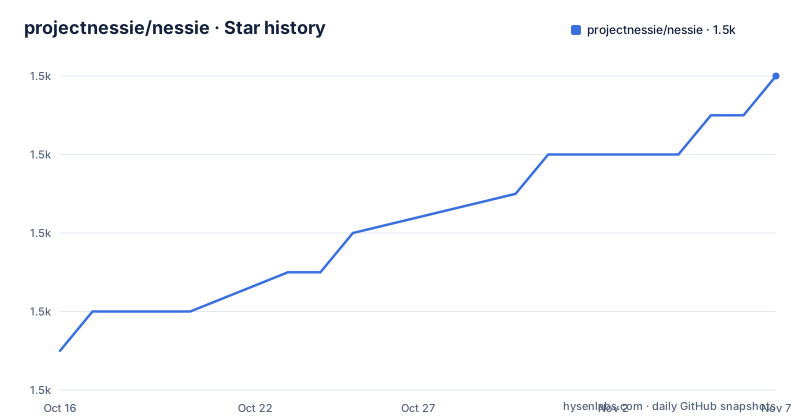
- projectnessie/nessie1,528 ★ · +7
| Repository | 2026-10-16 | 2026-11-07 |
|---|---|---|
| projectnessie/nessie | 1.5k | 1.5k |
7 Stars in the last 22 days, measured from the daily GitHub snapshot. Compare with other projects
Editorial analysis
Nessie's transactional catalog model for Iceberg
Project Nessie solves a specific coordination problem: applying Git-like operations to a data lake catalog rather than only to source files. Its intended users are data platform engineers who work with Iceberg tables or views and need catalog changes to carry transactional, version-control-style semantics. The repository also includes integrations, a CLI, server modules, Helm material, compatibility definitions, and a UI integration, which places it between the data storage layer and tools such as Spark and Hive.
The README specifically states that Nessie supports Iceberg tables and views. That scope matters. Nessie is not presented as a general-purpose query engine, file store, or replacement for Iceberg. It acts as a transactional catalog around the wider set of tools that can consume the supported Iceberg resources. The feature matrix linked by the README is the intended authority for tool-by-tool support rather than the short list of examples in the setup section.
The Git-like semantics also require a different operational mindset from an unversioned catalog. An engineer must decide which catalog version or branch should receive table operations, and the project documentation should be consulted for tool-specific configuration. The README does not document branch creation syntax, merge semantics, conflict handling, garbage collection controls, or rollback commands. Those are material adoption details, but they cannot be inferred safely from the phrase "Git-like semantics."
Repository structure behind the Nessie server
Based on the repository layout, Nessie is a substantial Java and Gradle project rather than a small client library. The top-level entries include `api/`, `catalog/`, `cli/`, `events/`, `gc/`, `integrations/`, `nessie-iceberg/`, `servers/`, and `versioned/`. This separation suggests distinct project modules for interfaces, catalog behavior, command-line access, events, garbage collection, integrations, server deployment, and version handling. The presence of `build-logic/`, `build-tools-integration-tests/`, `codestyle/`, and `testing/` also shows that compatibility and integration work are embedded in the build structure.
The executable distribution is documented under `servers/quarkus-server`. Its runtime configuration lives in `servers/quarkus-server/src/main/resources/application.properties`, and the README describes assembling the Quarkus application before launching the generated JAR. The repository includes Docker build material under `tools/dockerbuild/docker/`, while `docker/` contains configuration templates referenced by the quick-start instructions. Helm material is also present, although the README does not provide a deployment command for it.
This layout helps distinguish two kinds of use. Java clients and integrations depend on Nessie modules, while operators usually consume the packaged server, container image, or deployment files. The separate `nessie-ui` repository mentioned by the README means the server's Web UI should not be confused with the UI source tree in the main repository.
Running Nessie and installing pynessie for a first session
The shortest documented trial uses the official container image and exposes the Nessie server on port 19120. Recent releases are available from `ghcr.io` and `quay.io`, so new configurations should not continue using `docker.io` or the old unqualified image reference.
Pull and start the image with the documented commands:
docker pull ghcr.io/projectnessie/nessie
docker run -p 19120:19120 ghcr.io/projectnessie/nessie
The README states that a local Web UI is available after the server starts. It also directs users to the CLI documentation for command details. Install the Python package named in the README as follows:
pip install pynessieThe repository does not provide a first CLI invocation, server URL flag, or authentication flag in the README, so an exact command cannot be supplied without inventing a flag. A real next step should follow the linked Nessie CLI documentation, then configure one of the documented technology integrations. The README names Spark via Iceberg and Hive via Iceberg as examples and links a broader tools page. It also states that the interface is available at `http://localhost:19120` for a source-built Quarkus distribution.
This path is appropriate for a local trial because the README describes the image as small and fast. It does not, however, document persistent volume mounting, production data directories, backup procedures, or container restart policies. Those omissions matter before the container is treated as a durable deployment.
OpenID Connect authentication and the anonymous default
Nessie starts with authentication disabled, and the README says that requests are processed under the `anonymous` identity. This default simplifies the initial container trial, but it also means that a deployment must not assume every request is attributable to an authenticated user. Enabling bearer token validation changes the server setup and introduces dependencies on an OpenID Connect provider, a client identifier, and correct token issuance.
The documented Quarkus properties are:
nessie.server.authentication.enabled=true
quarkus.oidc.auth-server-url=<OpenID Server URL>
quarkus.oidc.client-id=<Client ID>
The placeholders must be replaced by the deployment's OpenID server URL and client ID. The README explains that Nessie validates bearer tokens through OpenID Connect. It does not document role mapping, authorization policies, token audiences, service-account setup, key rotation procedures, or behavior when the identity provider is unavailable.
The authentication example in the README demonstrates setting the same properties as Docker environment variables, including `--network host`. However, its image reference differs from the newer registry guidance elsewhere in the same README. That inconsistency is a reason to follow the current registry instructions and consult the `docker/` templates for configuration rather than copying the older example unchanged.
Version compatibility for Nessie 0.109.0
Nessie's usefulness depends on the catalog and query-engine versions in the surrounding data platform. The README provides a concrete compatibility row for Nessie 0.109.0. It maps that release to Iceberg 1.5.0, Spark 3.3.x through 3.5.x, Flink 1.16.x through 1.18.x, and Presto 0.277 through 0.281. The row lists Trino 419 and marks Hive as not applicable.
This matrix is more useful than a general statement that Nessie supports many tools because it exposes the upper and lower bounds. An engineer using Spark 3.5.x, for example, can compare the documented row with the actual planned versions. A team using another Spark, Flink, or Presto line cannot treat this release as covered by the table. The absence of a Hive entry for this row is also important even though the quick-start section links a Hive via Iceberg integration.
The repository includes `compatibility/`, integration test modules, and external query-engine integration workflow references. Those entries indicate that compatibility is treated as a repository concern. Still, the README does not provide the exact client configuration for each engine, nor does it explain whether version upgrades require catalog migration, client changes, or both. The compatibility table is the first concrete checkpoint for an adoption decision.
Container migration, source builds, and upgrade work
Recent Nessie releases are no longer published to `docker.io`. The README identifies `ghcr.io/projectnessie/nessie` and `quay.io/projectnessie/nessie` as the replacement references. This is an operational change even if the application behavior is otherwise unchanged: deployment manifests, CI pipelines, Helm values, developer scripts, and documentation may contain the old image name. Searching those files for `projectnessie/nessie` is a specific migration task exposed by the README.
Building from source requires JDK 21 or higher, although the README notes that some artifacts target Java 8 or 11. The clone command is documented, but detailed build instructions are delegated to `CONTRIBUTING.md`. The Quarkus distribution procedure assembles a JAR and then runs it with Java. Readers should distinguish this source workflow from the normal container trial because the former produces a local artifact and requires a matching JDK.
Maintenance activity is visible in the release sequence and repository metadata. The repository is not archived, and the last push was on 2026-10-16. Releases dated 2026-10-08, 2026-09-22, and 2026-09-09 include patch releases such as 0.109.0, 0.106.2, and 0.108.8, but the different release lines also indicate that an upgrade does not necessarily mean moving from one single line to the next.
The project is licensed under Apache-2.0. That license covers the repository's stated licensing terms, while integrations may bring their own dependency and distribution obligations. Nessie is also implemented primarily in Java, so teams must account for the JVM server, the documented JDK requirement, and operational ownership of another service.
Why Nessie differs from using Iceberg directly
The practical alternative is to use Iceberg's catalog integration without placing Nessie in front of it. Nessie itself is documented as a catalog service with transactional, Git-like semantics, while its own integration path uses Iceberg tables and views. A deployment that needs only the table format and its connected engine configuration may not require another catalog service, provided its requirements are already met by the direct integration.
Adding Nessie changes the system boundary. Engineers and tools must communicate with the Nessie catalog, the supported integration must match the selected versions, and server identity and availability become part of the deployment. In return, the project is designed around catalog transactions and version-oriented operations. That is a meaningful difference when concurrent table changes need coordinated semantics across multiple tools.
Nessie is the wrong choice when the requirement is limited to reading or writing Iceberg tables without transactional catalog operations. It is also unsuitable when the intended Spark, Flink, Presto, Trino, or Iceberg versions fall outside the documented matrix. The project does not present itself as a query engine, a storage format replacement, or a turnkey durability design. Its adoption case depends on the catalog problem being real and the integration versions aligning with the compatibility table.
Editorial conclusion
Teams operating several Iceberg tables and needing branch-aware catalog transactions should evaluate Nessie against their supported Spark, Flink, Presto, or Trino versions. Projects that only require Iceberg without an additional transactional catalog should first check whether that extra service is justified. Before adoption, verify the integration versions listed for the planned Nessie release, the authentication model that fits the deployment, and the effect of moving container references from docker.io to ghcr.io or quay.io.
Frequently asked questions
How do I start Project Nessie and access its Web UI?
The README documents pulling `ghcr.io/projectnessie/nessie` and running it with port 19120 published. It states that the local Web UI becomes available after startup, and the Quarkus distribution is accessed at `http://localhost:19120`.
Which Python package installs the Project Nessie CLI?
The README uses `pip install pynessie`. It links to the Nessie CLI documentation for commands and usage details rather than defining a first CLI invocation in the README.
Which Iceberg and query-engine versions are compatible with Project Nessie 0.109.0?
The compatibility table maps Nessie 0.109.0 to Iceberg 1.5.0, Spark 3.3.x through 3.5.x, Flink 1.16.x through 1.18.x, Presto 0.277 through 0.281, and Trino 419. Hive is listed as not applicable for that row.
Official sources
Add this badge to your README
If you maintain this project, the badge below links readers to this analysis and shows its maintenance status from the daily GitHub snapshot. Paste the markdown into your README; add ?metric=license or ?metric=stars to the image URL for a different field.

[](https://hysenlabs.com/projects/projectnessie-nessie)Star history chart for your README
[](https://hysenlabs.com/projects/projectnessie-nessie)Was this useful?