ps-fuzz: an interactive system prompt fuzzer that attacks your prompt with a second model
Make your GenAI Apps Safe & Secure :rocket: Test & harden your system prompt
At a glance
- What is it?
- A Prompt Security tool that assesses a GenAI system prompt against dynamic LLM-based attacks, with sixteen providers, sixteen attacks, and a Playground for iterating. Its usage examples call a console command the package does not install, and its build falls back to version 0.0.1 when the release script has not run.
- Who is it for?
- Use this if you own a system prompt and want an adversarial pass over it before an attacker does, and if you can afford to spend tokens on the attempt, which the documentation is upfront about. The design is the interesting part: the attacker is a model rather than a fixed list of strings, and the attack provider is separate from the target provider, so you can point a strong model at a weak target, or at your own local model through the Ollama base URL option.
- Can I use it commercially?
- Yes. MIT is a permissive licence: you can use, modify and sell software built on it, as long as you keep its copyright and licence notices.
- Is it still maintained?
- Yes. The repository last received commits 88 days ago.
- What is it written in?
- Mainly Python, according to GitHub's language statistics.
Answers come from the project's GitHub data, last synced on November 15, 2026, and from our analysis. They are not legal advice.
Star history
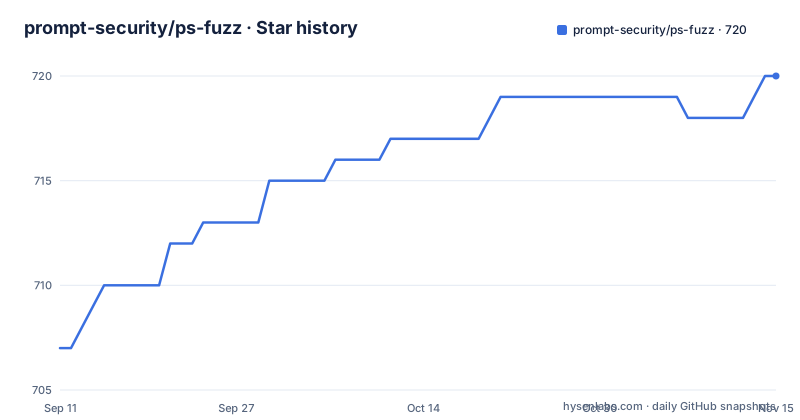
- prompt-security/ps-fuzz720 ★ · +13
| Repository | 2026-09-11 | 2026-11-15 |
|---|---|---|
| prompt-security/ps-fuzz | 707 | 720 |
13 Stars in the last 65 days, measured from the daily GitHub snapshot. Compare with other projects
Editorial analysis
The usage examples call a console command the package does not install
The packaging registers one entry point, named prompt-security-fuzzer with hyphens, pointing at the CLI main function. The launch step in the installation section uses that hyphenated name:
export OPENAI_API_KEY=sk-123XXXXXXXXXXXX

prompt-security-fuzzer
The batch example for running a single prompt file non-interactively uses it too. The interactive mode example, however, shows the same tool with underscores between the words, which is a different string and not a command that exists on your path. So the first example a reader copies fails with a command-not-found error, while the batch form works. The truncated final example shows a subset-of-attacks invocation cut off mid-path, which suggests the visible document ends in the middle of the examples section rather than at a deliberate stopping point. None of this affects the tool, but it is the difference between a working first run and a confusing one, which is why it is worth reading past.
Two build systems, and the older one falls back to version 0.0.1
The repository carries both a pyproject file and a setup.py, each with its own copy of the metadata, and they do not fully agree. The pyproject declares the version dynamic, restricts packaged code to packages matching the internal package name, and ships the attack data directory as package data. The setup.py reads the README for its long description, calls find_packages with no filter at all, repeats the same package data entry, and hardcodes the version as an environment variable read with a fallback string of 0.0.1. That fallback is the number to notice. Releases are tagged at 2.1.1, and the last push to the repository is dated 2026-08-19, but a build that does not have the expected environment variable set produces a distribution claiming version 0.0.1, which sorts below every real release and installs happily. There is a version script at the repository root, so the intended flow is that the script sets the variable first, but nothing in the packaging enforces it.
A 2015 argparse pin sits beside a 2026 openai pin
The dependency list mixes open ranges with exact pins, and the pins are where the risk sits. Eight are open, including httpx, the openai client with a floor of 2.45, tiktoken, and several LangChain packages. Seven are pinned exactly: argparse at 1.4.0, colorama at 0.4.6, prettytable at 3.10.0, pandas at 2.2.3, inquirer at 3.2.4, prompt-toolkit at 3.0.43, and fastparquet at a 2024 build. The argparse pin is the one that stands out, because argparse is also in the standard library and the pinned release is many years old; installing that name into an environment that expects a modern Python is a known source of breakage, and the tool also builds its own command line interface with argparse-style options. Pairing a decade-old pin with a client library floor set two years ahead of the Python versions the classifiers declare, 3.10 and 3.11, is a picture of a dependency set that was extended over time rather than designed at once.
The provider table lists an environment variable name containing a space
Sixteen providers are configured through environment variables, and the table is where the tool's breadth is most visible: Anthropic, Anyscale, Azure OpenAI, Baichuan, Cohere, EverlyAI, Fireworks, GigaChat, Google PaLM, Jina AI, ChatKonko, Minimax, OpenAI, PromptLayer, Baidu Qianfan and YandexGPT. Two entries in that table cannot work as written. One is spelled with a space in the middle, where an environment variable name cannot contain one, so exporting it the way the table implies is not possible. Two providers also take a pair of values rather than a single key, one for a group identifier and one for a pair of access credentials, which is easy to miss when copying a single-variable example. The table header itself is misspelled. The command line options offer a second, separate mechanism for reaching models, with base URLs for an OpenAI-compatible endpoint and for Ollama, so a provider not in the table can often be reached anyway.
The RAG attacks drag in a vector database whether or not you run them
Four attack families are documented: jailbreak, prompt injection, RAG and vector database attacks including poisoning, and system prompt extraction, with the feature list claiming sixteen individual attacks in total. The RAG family has its own configuration requirements, named on the command line: an embedding provider, restricted to either ollama or the OpenAI option, an embedding model name, and separate base URLs for the embedding APIs of each. That is a second inference stack to configure before a RAG test can run, and the embedding calls are billed wherever they land. What it costs at install time is broader. The dependency list includes a vector database, its LangChain integration, and a parquet engine with an exact pin, none of which are needed for a jailbreak or system-prompt-leak test against a plain endpoint. The optional extra is only a single test package, so there is no lean install path documented for the non-RAG case.
The batch option is written with one dash, and one option name ends with a space
The command line options are listed with their short forms, and two entries are formatted in ways that will not behave as a reader expects. The batch mode option is written with a single dash before the long name and a short form, while every other long option in the list uses two dashes, which means the parser is being asked to accept both a one-character short flag and a multi-character long flag under the same convention. One other entry, the target provider option, is printed with a trailing space inside the backticks that delimit it, so copying the name from the document yields a flag with a space in it that will never match. Neither fault is subtle once you have tried it, but both are the kind of thing that costs a first-time user an afternoon, and neither is documented anywhere as a known issue in the sections that are visible.
Docker appears in the table of contents and is marked as coming soon
The table of contents at the top of the document lists an installation section with three subsections: using pip, the package page, and a docker subsection annotated as coming soon. There is no Dockerfile among the top-level entries and no container instructions in the visible text, so the docker anchor leads nowhere today. That is stated rather than hidden, which is more than many projects manage, and it matches the repository listing, which is a plain Python project with a Bandit configuration for security linting, a pytest configuration, a tests directory, a resources directory, a system prompt examples directory, and three shell scripts for building, cleaning and version-setting the package. Those scripts matter more than they look: they are how the version environment variable gets set, which is the same variable the setup.py fallback quietly guesses at when it is missing.
Editorial conclusion
Use this if you own a system prompt and want an adversarial pass over it before an attacker does, and if you can afford to spend tokens on the attempt, which the documentation is upfront about. The design is the interesting part: the attacker is a model rather than a fixed list of strings, and the attack provider is separate from the target provider, so you can point a strong model at a weak target, or at your own local model through the Ollama base URL option. That is a better shape than a static corpus for finding wording-dependent leaks. Before you wire it into a pipeline, four checks. The interactive usage example names a console command with underscores that the package does not install, so use the hyphenated form. The RAG attack family needs an embedding provider and model configured separately, and it pulls a vector database stack into the install whether or not you use it. The attack surface is your own prompt sent to a third-party provider, so decide what you are willing to hand to that provider before pasting production prompts in. And the package ships two build systems whose version handling disagrees, so pin what you install rather than trusting a local build.
Frequently asked questions
What does prompt-security ps-fuzz actually do?
It assesses the security of a GenAI application's system prompt against dynamic LLM-based attacks, dynamically tailors its tests to your application's configuration and domain, and gives a security evaluation based on the outcome. It also includes a Playground chat interface for iterating on the prompt.
How do I install and run ps-fuzz?
With `pip install prompt-security-fuzzer`, which requires Python 3.10 or newer. Set an environment variable holding your provider key, OPENAI_API_KEY by default, then launch prompt-security-fuzzer, enter your system prompt, and start testing.
Which LLM providers does ps-fuzz support?
Sixteen, each configured through environment variables: Anthropic, Anyscale, Azure OpenAI, Baichuan, Cohere, EverlyAI, Fireworks, GigaChat, Google PaLM, Jina AI, ChatKonko, Minimax, OpenAI, PromptLayer, Baidu Qianfan and YandexGPT. Command line options also accept custom base URLs for OpenAI-compatible endpoints and for Ollama.
What kinds of attacks does ps-fuzz test?
Four documented categories: jailbreak, prompt injection, RAG and vector database attacks including poisoning, and system prompt extraction. The feature list states sixteen individual attacks in total, and the RAG family additionally needs an embedding provider and embedding model configured.
Does running ps-fuzz cost money?
The README warns that using the fuzzer leads to consumption of tokens. It runs attack prompts against your target using separate attack and target providers and models, supports multi-threaded runs, and a RAG test adds embedding calls on top.
Official sources
Add this badge to your README
If you maintain this project, the badge below links readers to this analysis and shows its maintenance status from the daily GitHub snapshot. Paste the markdown into your README; add ?metric=license or ?metric=stars to the image URL for a different field.

[](https://hysenlabs.com/projects/prompt-security-ps-fuzz)Star history chart for your README
[](https://hysenlabs.com/projects/prompt-security-ps-fuzz)Was this useful?