ShardX spoofs fingerprints inside Chromium, not with injected JavaScript
Free, open-source anti-detect browser launcher for web scraping and multi-accounting. By the ProxyShard team. Engine-level fingerprint spoofing in Chromium 148 (WebGL / WebGPU / Client Hints / fonts / TLS), 170+ device profiles bundled, stable QUIC + WebRTC over SOCKS5.
At a glance
- What is it?
- A free anti-detect browser launcher from the ProxyShard team that patches Blink, V8 and the network stack so a profile's signals agree in every frame, worker, devtools session and headless run. The documentation is careful about what it claims, and in two places the repository metadata disagrees with the README.
- Who is it for?
- ShardX makes sense if your scraping or multi-account work fails on consistency rather than on IP reputation, since the whole design points at signals disagreeing with each other. Before relying on it, confirm your proxy actually relays UDP over SOCKS5, because QUIC and WebRTC degrade without it, and treat the verification table as the project's own claim rather than an independent result.
- Can I use it commercially?
- Yes. MIT is a permissive licence: you can use, modify and sell software built on it, as long as you keep its copyright and licence notices.
- Is it still maintained?
- Yes. The repository last received commits 2 days ago.
- What is it written in?
- Mainly TypeScript, according to GitHub's language statistics.
Answers come from the project's GitHub data, last synced on November 22, 2026, and from our analysis. They are not legal advice.
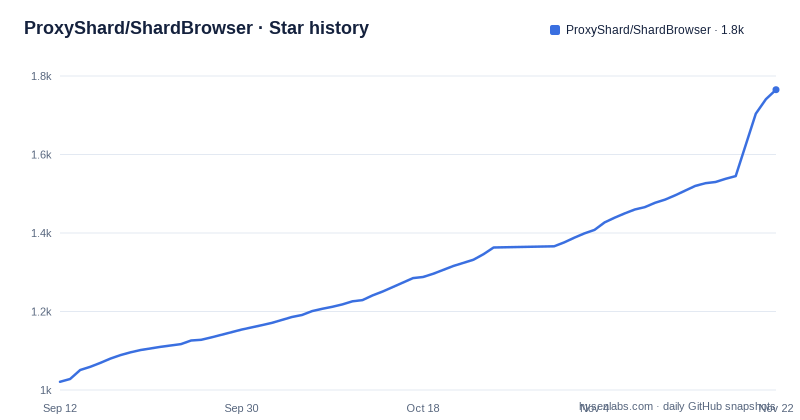
Star history
- ProxyShard/ShardBrowser1,765 ★ · +744
| Repository | 2026-09-12 | 2026-11-22 |
|---|---|---|
| ProxyShard/ShardBrowser | 1k | 1.8k |
744 Stars in the last 71 days, measured from the daily GitHub snapshot. Compare with other projects
Editorial analysis
The repository is ShardBrowser, everything inside is ShardX
Naming is the first thing to sort out, because nothing agrees. The repository is ProxyShard/ShardBrowser, while the product, the release titles, the packages and the documentation all say ShardX. The release names make it explicit: v2.0.1, v2.0.2 and v2.0.3 are each titled ShardX Launcher. The registry badges point at a Python package named shardx on PyPI, an npm package scoped @proxyshard/shardx, a Rust crate shardx on crates.io, and its documentation on docs.rs, which is four badges covering three languages. The root manifest calls the application shardx-launcher and marks it private, so the npm package you install is not this manifest.
The build is recent and the release history is dense: v2.0.1 on 2026-09-03, v2.0.2 on 2026-09-12 and v2.0.3 on 2026-09-13, with the last push to main on 2026-09-13 as well. The repository carries 1,165 stars, 131 forks and 27 open issues, with no homepage set in the metadata. Three 2.0.x releases in eleven days reads like active work on an unstable line, so pin a version rather than tracking latest.
The README says Chromium 152, the repository description says 148
Two numbers in the project's own metadata contradict the README, and both matter if you are matching behaviour to a target site. The repository description advertises engine-level fingerprint spoofing in Chromium 148 along with 170+ device profiles bundled. The README says the launcher ships a patched Chromium 152 and includes 220 ready-made device profiles. Neither the 148 nor the 170+ figure is repeated anywhere else in the documentation available, and neither is 152 nor 220 contradicted, so the README is the fresher of the two and the description is stale.
The gap is not cosmetic. A fingerprint that matches a real device class has to line up with what that device's browser version actually sends, so a spoofed profile claiming to be a recent Chrome while the engine is four major versions behind it is exactly the inconsistency this project exists to remove. The profile families are listed concretely: Mac M1 through M5, Windows desktops and laptops with NVIDIA RTX or GTX, Intel and AMD GPUs, Linux workstations, and Android phones. If you are evaluating this, check the shipped engine version against the profile you pick rather than trusting the summary line.
Four control surfaces over one local state
The same profiles are reachable four ways, and the claim that they need no extra synchronization is what makes that useful. The desktop UI is the workspace for daily work, holding profiles, proxies, cookies and the fingerprint editor. The local HTTP API uses Bearer JWT authentication on 127.0.0.1:40325, lets you create, start and stop profiles from any language, and hands back a CDP endpoint. The MCP server connects ShardX to Claude Desktop, Cursor and other MCP clients for natural-language profile orchestration, working through that same HTTP API and CDP rather than through a separate path. Standalone SDKs for Python, Node and Rust ship the browser engine and run without the desktop UI, aimed at scrapers, CI jobs and servers.
Because every surface reads the same local state, an MCP client and a shell script are not competing with each other, which is the practical difference from a design where each control surface keeps its own profiles. The repository layout backs the split: an openapi.yaml at the root describes the HTTP surface, a top-level mcp directory holds the MCP server, and sdks/ holds the three language libraries. A runtime.json sits alongside them, and the section that would set out the fingerprint override surfaces is cut off before it begins, so the override list itself is not spelled out.
Patching happens in C++, so devtools and workers agree
The central technical claim is about where the override happens. Fingerprint changes are applied inside Chromium's C++ engine, covering Blink, V8 and the network stack, and ShardX does not rely on JavaScript injection. The consequence is stated plainly: the same values are visible in frames, workers, developer tools and headless sessions. That is the difference that matters in practice. An injected override is visible to a page only if the page cooperates, and it is trivially absent from a worker context, from an inspector open in another tab, or from a headless run that skips the injecting script entirely.
The signals covered are enumerated per profile: GPU, screen and its refresh rate, fonts, audio settings, timezone, locale, WebGL and WebGPU capabilities, TLS ClientHello, UA-CH, WebRTC policy, geolocation and cookies. WebGL, WebGPU, Client Hints, fonts and TLS each get their own surface, and the README states that the signals within a profile are kept consistent with one another rather than set independently. A profile can hold hundreds of these identities side by side, and each one gets an isolated user-data-dir, persistent cookies and Widevine pre-warming. Widevine matters more than it sounds: a DRM check on a fresh profile with a cold licence cache is a signal in itself.
Timezone, locale and geolocation follow the proxy exit country
The launcher resolves timezone, locale and geolocation from the country the proxy exits in. That is the mechanism that ties the browser identity to the network identity, and it is also the assumption to check: if your proxy exits somewhere unexpected, or if the exit country is wrong, the browser will be internally consistent and still wrong. You can bind a SOCKS5 or an HTTP proxy per profile, so several identities can leave through different exits.
WebRTC follows the configured proxy policy and does not expose the host IP, which closes the leak path that most proxy setups leave open. QUIC goes over the proxy UDP relay. The ProxyShard proxies this is built around provide full SOCKS5 UDP relay support under RFC 1928 section 7, and active p0f TCP fingerprint spoofing at the proxy exit. The stated reason for the p0f work is consistency: it keeps the operating system presented by the proxy aligned with the SYN and ACK shape the website sees. Read together, the two claims describe a browser and an exit that agree about the same machine. You can bring other proxy providers, but the README is explicit that full QUIC and WebRTC operation needs SOCKS5 UDP relay support, so a plain HTTP proxy is a partial configuration.
The verification results are the project's own claim
A results table accompanies the documentation, and every number in it should be read as a claim by the project rather than as an independent finding. The README reports that browserleaks.com/quic returns QUIC True with JA4 matching real Chrome and an MTU of 1232 over the SOCKS5 UDP relay. It reports that fingerprint.com shows bot, VPN, DevTools and browser-tampering checks all Not detected, that browserscan.net scores authenticity 100%, and that pixelscan.net reports the fingerprint consistent with no proxy or automation detected. It also reports a reCAPTCHA v3 score of 0.9 from antcpt.com, and all checks passing on networktest.twilio.com across TURN UDP, TCP and TLS plus Voice with no real-IP leak, alongside a browser fingerprinting and CDP bot-detection test at deviceandbrowserinfo.com.
What the table does not supply is a method: no date, no configuration, no profile used, and no way to reproduce which device profile produced which result. For a tool whose entire pitch is that a wrong configuration fails quietly, that gap is the thing to close yourself. Pick one profile, run the same pages, and record what you get before drawing a conclusion about the launcher.
A Tauri shell with a private root manifest and four SDKs
The desktop application is a Tauri 2 project, and the root manifest is not the artifact anyone installs. It is named shardx-launcher, marked private, and carries version 2.0.3, which lines up with the newest release tag rather than drifting from it. The UI is React 19 with Tailwind 4.3.1, zustand for state, flag-icons and the Hugeicons set for assets. Vite is pinned in the 5.4 line for the dev server and build while the Tailwind Vite plugin is on 4.3.1, so the styling toolchain is a generation ahead of the bundler. A dependency on @proxyshard/shardx-ui-kit points at a local file:./ui-kit directory rather than the registry, and a prebuild script runs an npm ci plus a build:lib in that subdirectory before the TypeScript compile and Vite build, so the UI kit is compiled from source inside the workspace.
One script hints at how the project is maintained: check:i18n runs node scripts/check-i18n.mjs, which pairs with the flag-icons dependency and suggests the interface itself is localized rather than only the docs. The root also carries index.html, public/, a docs directory with the screenshot assets the badges reference, and both tsconfig.json and tsconfig.node.json. Between the Tauri shell, the openapi.yaml, the mcp directory and the three SDKs, this is a monorepo wearing a single-application manifest.
Editorial conclusion
ShardX makes sense if your scraping or multi-account work fails on consistency rather than on IP reputation, since the whole design points at signals disagreeing with each other. Before relying on it, confirm your proxy actually relays UDP over SOCKS5, because QUIC and WebRTC degrade without it, and treat the verification table as the project's own claim rather than an independent result. Read the version numbers too: the repository description and the README disagree about both the Chromium build and the profile count, so check what you actually installed.
Frequently asked questions
Is ShardX free, and what does the free version include?
The README states ShardX is free to use and open source under MIT. ProxyShard sells the proxies, and full QUIC and WebRTC operation requires a proxy that supports SOCKS5 UDP relay, which other providers can also supply.
How does ShardX differ from an anti-detect browser that injects JavaScript?
Overrides are applied inside Chromium's C++ engine across Blink, V8 and the network stack rather than through JavaScript injection, so the same values appear in frames, workers, developer tools and headless sessions.
What port does the ShardX local API listen on?
The local HTTP API uses Bearer JWT authentication on 127.0.0.1:40325. It can create, start and stop profiles from any language and then returns a CDP endpoint.
Can I control ShardX from Claude Desktop or Cursor?
Yes. ShardX ships an MCP server that connects to Claude Desktop, Cursor and other MCP clients for natural-language profile orchestration, going through the same HTTP API and CDP as the other control surfaces.
Which Chromium version does ShardX patch, and how many device profiles are bundled?
The README describes a patched Chromium 152 and 220 ready-made device profiles covering Mac M1 to M5, Windows with NVIDIA, Intel or AMD GPUs, Linux workstations and Android phones. The repository description still advertises Chromium 148 and 170+ profiles, so the two disagree.
Official sources
Add this badge to your README
If you maintain this project, the badge below links readers to this analysis and shows its maintenance status from the daily GitHub snapshot. Paste the markdown into your README; add ?metric=license or ?metric=stars to the image URL for a different field.

[](https://hysenlabs.com/projects/proxyshard-shardbrowser)Star history chart for your README
[](https://hysenlabs.com/projects/proxyshard-shardbrowser)Was this useful?