protoc-gen-doc: an image that copies a binary it never builds, and a glob ending in a dot
Documentation generator plugin for Google Protocol Buffers
At a glance
- What is it?
- A protoc plugin that turns comments in .proto files into HTML, JSON, DocBook or Markdown, installable four ways including Maven Central. The published image is built on Alpine 3.15 from 2021 and contains no Go toolchain, so it copies in a binary somebody built elsewhere, the example build mounts six volumes where the page documents two, and the last line of the example target ends its file list with a literal dot.
- Who is it for?
- Reach for this when your .proto files already carry the comments and you want reference documentation without maintaining a separate site, and the four output formats plus the Go template escape hatch cover most cases. Check two things before you build on it.
- Can I use it commercially?
- Yes. MIT is a permissive licence: you can use, modify and sell software built on it, as long as you keep its copyright and licence notices.
- Is it still maintained?
- Yes. The repository last received commits 127 days ago.
- What is it written in?
- Mainly Go, according to GitHub's language statistics.
Answers come from the project's GitHub data, last synced on November 25, 2026, and from our analysis. They are not legal advice.
Star history
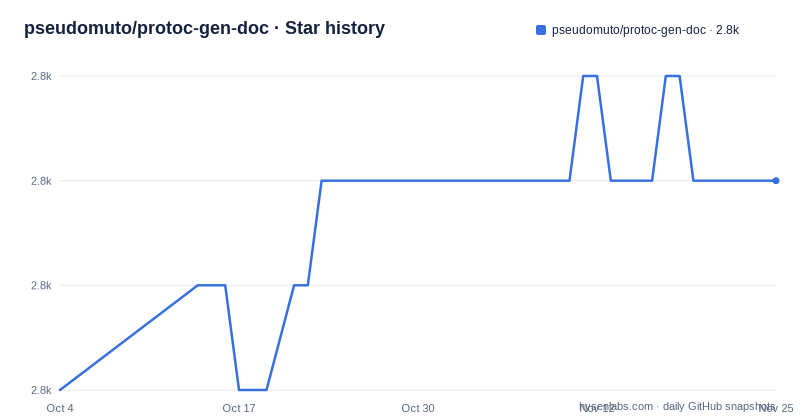
- pseudomuto/protoc-gen-doc2,845 ★ · +2
| Repository | 2026-10-04 | 2026-11-25 |
|---|---|---|
| pseudomuto/protoc-gen-doc | 2.8k | 2.8k |
2 Stars in the last 52 days, measured from the daily GitHub snapshot. Compare with other projects
Editorial analysis
Four install routes, and one of them needs a recent Go
There are four ways to get this plugin, which is unusual for a single Go binary.
The first is a Docker image, `docker pull pseudomuto/protoc-gen-doc`, described as having everything needed to generate documentation from your protos. The second is a pre-built release for your platform from the releases page.
The third is the Go toolchain, and the exact form matters:
go get --tool github.com/pseudomuto/protoc-gen-doc/cmd/protoc-gen-doc@latestThat is `go get` with the `--tool` flag rather than a plain `go get`. The flag registers the binary as a tool in the module file instead of adding an import, which is a comparatively recent addition to the Go command. The page states no minimum Go version, while the module file declares `go 1.26.4`, so the requirement is discoverable only by reading the repository.
The fourth route is the surprise: Maven Central. A Go program published as a Java dependency is why `build.gradle` and `settings.gradle` sit at the repository root next to `go.mod`, and the page points at a Gradle example directory for the details.
So a Java shop can pull this in through its normal build tool without touching Go at all, which is probably why the flag on the third route matters less than it looks.
The exclusion example blanks the output format
The option grammar is positional and colon-delimited. The format and output filename come first, exclusion patterns go after the first colon, and extra options after a second colon.
With protoc on the host all three combine cleanly. Excluding looks like this:
protoc --doc_out=./doc --doc_opt=html,index.html:google/*,third_party/* proto/*.protoand adding the one supported extra option uses a doubled colon to leave the exclusion segment empty:
protoc --doc_out=./doc --doc_opt=html,index.html::camel_case_fields=true proto/*.protoThe Docker example for the same feature is where it goes wrong:
docker run --rm \
  -v $(pwd)/examples/doc:/out \
  -v $(pwd)/examples/proto:/protos \
  pseudomuto/protoc-gen-doc --doc_opt=:google/*,somepath/*
The format segment before the colon is empty. Because passing `--doc_opt` to the container replaces the default argument baked into the image, which is `--doc_opt=html,index.html`, following the page's exclusion example through Docker replaces the format with nothing rather than keeping HTML.
The same feature is therefore expressed three ways on one page, and the Docker form behaves differently from the protoc form. That is the sharpest trap in the documentation.
The Docker route cannot take a wildcard file list
The container route has a constraint that the host route does not, and it is explained in a note rather than in the main flow:
> Due to the way wildcard expansion works with docker you cannot use a wildcard path (e.g. `protos/*.proto`) in the file list. To get around this, if no files are passed, the container will generate docs for `protos/*.proto`, which can be changed by mounting different volumes.
So through Docker the file list must be explicit filenames or omitted entirely. There is no third option, and the escape from the default is to mount different directories rather than to pass different arguments.
The three worked Docker examples on the page follow exactly that constraint. One runs with no file list at all. One sets only an output format. The third appends a single named file:
docker run --rm \
  -v $(pwd)/examples/doc:/out \
  -v $(pwd)/examples/proto:/protos \
  pseudomuto/protoc-gen-doc --doc_opt=markdown,docs.md Booking.proto [OPTIONALLY LIST MORE FILES]
That last line carries a placeholder in square brackets as though it were something to type, which it is not.
There is a second container-only rule on the same page, stated as a reminder: paths should be from within the container, not the host. Combined with the two together, a command that works when you run protoc locally can fail in a way that looks like a path bug when you run it through the image.
The image copies a binary it never builds
The Dockerfile is nine lines and does not compile anything:
FROM alpine:3.15.0
WORKDIR /

RUN apk --update add bash protoc protobuf-dev && rm -rf /var/cache/apk/*

COPY LICENSE.md README.md script/entrypoint.sh ./
COPY protoc-gen-doc /usr/bin/

VOLUME ["/out"]
VOLUME ["/protos"]

ENTRYPOINT ["./entrypoint.sh"]
CMD ["--doc_opt=html,index.html"]
There is no Go toolchain, no `go build`, and no multi-stage build. The binary arrives by `COPY` from the build context.
That means the pull route works, because the publisher compiled it before pushing, and a local `docker build` from a fresh clone does not. There is no `protoc-gen-doc` in the repository root to copy. And the project's own Makefile writes its build output to `bin/protoc-gen-doc`, one directory down, so even after running the build target the file is not where this Dockerfile looks for it.
Two other details. The base is Alpine 3.15, a release from 2021, set against a module file declaring Go 1.26.4. And the image does install `protoc` and `protobuf-dev`, so the container can compile protos itself, plus `bash` because the entrypoint is a shell script.
The two `VOLUME` lines match exactly the two volumes the page describes, which is the one part of the file and the documentation that line up cleanly.
The example build mounts six volumes where the page says two
The page states that the image has two volumes, `/out` for output and `/protos` for your proto files. The project's own example target mounts six:
- the example doc directory to `/out`, read-write - the example proto directory to `/protos`, read-only - the templates directory to `/templates`, read-only - a vendored validator library to `/usr/include/github.com/mwitkow`, read-only - a second vendored validator library to `/usr/include/github.com/envoyproxy`, read-only - a generated googleapis directory to `/usr/include/google/api`, read-only
So reproducing the documentation the repository publishes requires four more mounts than the documentation says exist. That is not a contradiction so much as an omission, since those extra mounts exist so the example protos can resolve their imports from inside the container.
The same need shows on the host side. The example command passes three include paths, `-Ithirdparty -Itmp/googleapis -Iexamples/proto`, where `thirdparty` is a vendored directory checked into the repository and `tmp/googleapis` is generated. The build target for the examples lists that generated directory as a prerequisite, so it is produced by another target rather than committed.
The practical consequence is that the quickstart and the repository's own example build are not the same operation, even though both invoke the same image.
The last example target ends its glob with a dot
The examples are generated by running the same command once per output format. Five of the invocations are well formed:
	@$(EXAMPLE_CMD) --doc_opt=docbook,example.docbook:Ignore* examples/proto/*.proto
	@$(EXAMPLE_CMD) --doc_opt=html,example.html:Ignore* examples/proto/*.proto
	@$(EXAMPLE_CMD) --doc_opt=json,example.json:Ignore* examples/proto/*.proto
	@$(EXAMPLE_CMD) --doc_opt=markdown,example.md:Ignore* examples/proto/*.proto
	@$(EXAMPLE_CMD) --doc_opt=markdown,example-camel-case-fields.md:Ignore*:camel_case_fields=true examples/proto/*.proto
The sixth is not:
@$(EXAMPLE_CMD) --doc_opt=examples/templates/asciidoc.tmpl,example.txt:Ignore* examples/proto/*.Its file list ends `examples/proto/*.` with a star and then a literal dot, where the five above it end `*.proto`. A glob of that shape matches names ending in a dot, which no proto file does, so the custom-template example has no inputs.
That sequence is also the clearest documentation of the option grammar anywhere in the repository, because each line exercises a different combination: format alone, format with an exclusion pattern, and format with both an exclusion and the extra option. The exclusion pattern used throughout is `Ignore*`, which is how the vendored validator protos are kept out of the published example output.
Four years of commits past the newest release, and a dead preview link
The release history stops. Version 1.4.1 was published 2021-01-25, 1.5.0 on 2021-08-11, and 1.5.1 on 2022-02-18. That is a steady six months between each.
Then nothing, while the last push to the master branch is dated 2026-07-21. So more than four years of commits sit past the newest tag.
That has a direct effect on the four install routes. The pre-built release, the Docker image and the Maven coordinate all give you the 2022 build. Only the Go tool install, which resolves from the branch, gives you what is actually in the repository today. The page presents the four as interchangeable, and they are not.
The link to the HTML example output points at an address on rawgit.com, a service that no longer operates, so that preview cannot resolve. The link definition itself is also cut off mid-quote at the end of the page.
One more dependency note. The module file still requires `github.com/golang/protobuf` directly, alongside `google.golang.org/protobuf`. The former is the shim module that predates the current one and is retained for the older generated API, so having both as direct requirements means code still imports from the superseded path.
Editorial conclusion
Reach for this when your .proto files already carry the comments and you want reference documentation without maintaining a separate site, and the four output formats plus the Go template escape hatch cover most cases. Check two things before you build on it. The newest release is from February 2022 while the branch has moved for four years, so pick the install route deliberately: the release, Docker and Maven coordinates all give you the old build and only the Go tool install gives you current code. And if you build the image yourself, remember it does not compile anything, so a binary has to exist in the build context first.
Frequently asked questions
How do I install protoc-gen-doc?
Four ways. Pull the Docker image with `docker pull pseudomuto/protoc-gen-doc`, run `go get --tool github.com/pseudomuto/protoc-gen-doc/cmd/protoc-gen-doc@latest`, download a pre-built release for your platform, or use the Maven Central artifact, whose Gradle setup is in the examples directory.
What output formats does protoc-gen-doc support?
HTML, JSON, DocBook and Markdown, named `docbook`, `html`, `markdown` and `json` as the first segment of `--doc_opt`. You can also pass a path to a file holding a custom Go template in place of a format name.
How do I exclude proto files from protoc-gen-doc output?
Pass a second `--doc_opt` segment after a colon holding comma-separated path patterns, as in `--doc_opt=html,index.html:google/*,third_party/*`. The Docker example on the page writes this as `--doc_opt=:google/*,somepath/*`, with an empty format before the colon.
How do I keep a comment out of protoc-gen-doc output?
Prefix it with `@exclude`. It works in both line and block comments, on a whole leading comment block or on a single trailing comment, and the page's example keeps the comment on the `id` field while excluding the ones on `name` and `value`.
What extra options does protoc-gen-doc accept?
One: `camel_case_fields=true|false`, which emits field names in lowerCamelCase and defaults to false. It goes in a third `--doc_opt` segment after a second colon, as in `--doc_opt=html,index.html::camel_case_fields=true`.
Official sources
Add this badge to your README
If you maintain this project, the badge below links readers to this analysis and shows its maintenance status from the daily GitHub snapshot. Paste the markdown into your README; add ?metric=license or ?metric=stars to the image URL for a different field.

[](https://hysenlabs.com/projects/pseudomuto-protoc-gen-doc)Star history chart for your README
[](https://hysenlabs.com/projects/pseudomuto-protoc-gen-doc)Was this useful?