OpenAI-Gemini's release tags are Gemini model names, so the proxy itself has no version
✦ Gemini ➜ OpenAI API proxy. Serverless!
At a glance
- What is it?
- A MIT-licensed JavaScript compatibility layer that exposes a Google model through the OpenAI request shape, deployable to four serverless platforms with one runtime dependency. Its releases are tagged with upstream model names rather than its own version, three of its documented logit parameters are not implemented, its manifest has no name, no version and no tests, and the readme tells you how to obtain a key from outside the supported regions.
- Who is it for?
- This proxy is worth understanding if you have tools that only speak the OpenAI request shape and a Gemini key you already pay nothing for, because the compatibility layer is the interesting part and it is documented parameter by parameter rather than claimed. Three things to settle before you deploy it.
- Can I use it commercially?
- Yes. MIT is a permissive licence: you can use, modify and sell software built on it, as long as you keep its copyright and licence notices.
- Is it still maintained?
- Activity is slowing. The repository last received commits 8 months ago.
- What is it written in?
- Mainly JavaScript, according to GitHub's language statistics.
Answers come from the project's GitHub data, last synced on November 15, 2026, and from our analysis. They are not legal advice.
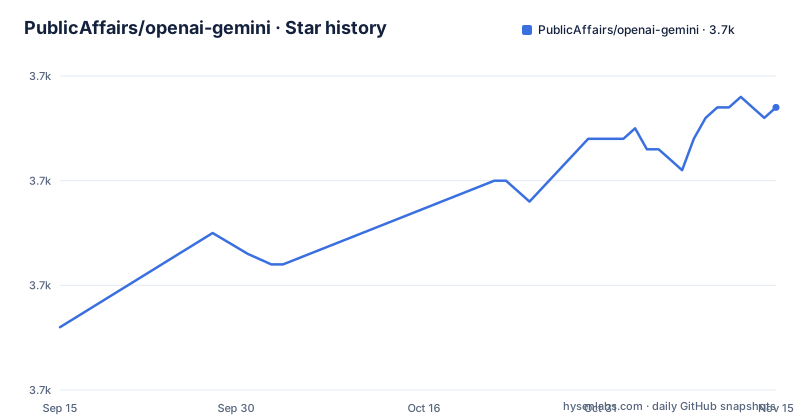
Star history
- PublicAffairs/openai-gemini3,677 ★ · +21
| Repository | 2026-09-15 | 2026-11-15 |
|---|---|---|
| PublicAffairs/openai-gemini | 3.7k | 3.7k |
21 Stars in the last 61 days, measured from the daily GitHub snapshot. Compare with other projects
Editorial analysis
The tags are model names, so there is nothing to pin
The three visible releases are named after Google models: one for a model generation, one for a flash variant, and one for an experimental thinking variant from the end of 2024. None of them is a version of this project. So a deployment has no version string, a dependency cannot name one, and the only way to record what you deployed is to record the commit. That is unusual and it has a practical consequence: when the proxy changes behaviour, there is no way to bisect it, because the tag you would bisect with is a name that upstream controls. The relationship is the reverse of normal, where your project's releases name their dependencies. Here the tags track what the service on the other end is called, and the newest of them is from December 2025 while the default branch was last pushed on 2026-03-17.
The readme's region instruction is a terms question
There is a callout placed before the deployment instructions, and it says that even if you are outside the supported regions it is still possible to acquire an API key using a VPN. That is the most consequential line in the readme and it is eight words long. The key it unlocks is a free-tier allowance, and the provider publishes both a free tier and a list of supported regions, so obtaining the key from somewhere else means using it from somewhere else. Nothing here tells you whether that is permitted, and this article will not tell you it is. What it should tell you is that the answer is in the provider's terms rather than in this repository, that a deployment built on such a key inherits the same question, and that the decision belongs to you before you order parts or bill anything. The same callout also tells you the key is personal, which is the legitimate case this project is built for.
Four platforms, four configuration files and three entry points
The deployment section covers four targets, and each one has a different shape rather than a different command. One platform's button deploy requires forking the repository, which the readme says is needed because the deploy runs continuous integration against your copy. One platform's button deploy does not; instead you can paste the contents of a single worker file into a browser-based playground, which is the lowest-friction route here and also the one that leaves you copying code by hand. One platform needs a command line tool and documents separate limits for two kinds of function, which is why it exposes two base paths, one for ordinary functions and one for edge functions. And one platform's instructions are not in the readme at all, they are in a discussion thread. The tree matches: four configuration files and three small entry files, one per JavaScript runtime, beside a shared source directory.
The parameter checklist is the real documentation
The last section is a tick list for the chat endpoint, and it is the most useful thing in the readme because it tells you exactly where the translation stops. Most of the sampling and shaping parameters are there, including both maximum-token spellings, the candidate count mapped with the note that it must be below eight and does not apply while streaming, both stop-sequence forms bounded to five, streaming options for usage, and the reasoning-effort parameter. The response format supports a JSON object, a schema in a selected subset of the schema description language, and plain text. Temperature is documented with its wider upstream range. Three logit-related parameters are unticked, and one more is unticked with a note that it is always active upstream, which means a tool that sets it is not being obeyed so much as being ignored. The legacy completions endpoint is unticked entirely.
Model selection is prefix matching with two defaults
The routing rule is short enough to hold in your head: if the requested model name starts with one of three prefixes, that model is used, and otherwise a default is chosen based on which endpoint you called. There are two defaults, one for the chat endpoint and a different one for embeddings, both pinned to a floating alias rather than a version number. That is a sensible default and it is also a silent behaviour change waiting to happen, since a floating alias can point at a different model next week without anything in the proxy changing. The one genuinely clever feature is the search tool, which you enable by appending a suffix to the model name, and the one stated gap is an annotations field on messages that is not implemented, which will surface as a missing field rather than an error in tools that read citations from it.
Opening the deployed address gives you a not-found page
The readme warns that opening your new deployment in a browser shows only a not-found message and says this is expected, because the API is not designed for direct browser access. It is the right behaviour for an endpoint and it is also the entire access story: there is no authentication in front of your proxy, and the endpoint is on a public platform at a guessable or shareable address. The readme's framing is that you put your own key in and point your own tools at it, and the examples give the base path with a version segment, which is the shape a tool expects. Nothing warns that anyone who learns the address can spend your allowance, and the not-found root page is obscurity rather than a control. If you deploy one, the deployment routes your own tools take, either in a tool's settings under an OpenAI proxy label or advanced section, or through one of two documented base-URL environment variables:
OPENAI_BASE_URL="https://my-super-proxy.vercel.app/v1"or, for tools that use the other spelling:
OPENAI_API_BASE="https://my-super-proxy.vercel.app/v1"One dependency at a minor version, and no tests at all
The manifest is unusually bare. It has two entries: one runtime dependency at an exact minor version and one development tool, plus six scripts that start or watch the service under three different JavaScript runtimes. There is no name, no version, no type marker and no private flag, and there is no test script, no linting, no type checking and no build step. Two things follow. The runtime surface is genuinely tiny, which is the honest way to build a service that runs on four platforms with four different function models, and the two version pins are both written as bare minor numbers rather than ranges, so an install resolves to whatever that minor line's latest is. What is missing is any check that the translation still matches both APIs, which for a project whose whole job is translation is the gap a test suite would have covered.
Media and thinking features ride in an extra field
Two features that have no OpenAI equivalent are documented last, under a heading for functions specific to the model on the other side. Image and audio input are supported following the OpenAI request specification, with the implementation note pointing at the provider's own inline data encoding rather than a URL scheme, which means media travels inside the request body. The other is a thinking configuration block passed in the extra field of the request body, which is the conventional escape hatch for vendor-specific options in this API shape. The readme links out for details in both cases rather than restating them, which is a sensible division: the compatibility layer is described here and the model features are documented by the provider.
Editorial conclusion
This proxy is worth understanding if you have tools that only speak the OpenAI request shape and a Gemini key you already pay nothing for, because the compatibility layer is the interesting part and it is documented parameter by parameter rather than claimed. Three things to settle before you deploy it. First, the service terms: the readme's own instruction for users outside the supported regions is to obtain a key with a VPN, which is a circumvention step, and you should decide for yourself whether that is acceptable rather than treating it as setup. Second, a deployment is a public endpoint on someone else's free-tier allowance, so anyone who finds the address spends your quota; the readme's only mitigation is that the root path returns a not-found response, which is obscurity rather than access control. Third, there is no version of this project to pin, because the tags are upstream model names, and the manifest carries no name, no version and no tests.
Frequently asked questions
Can I use OpenAI with Gemini?
This project provides that bridge: an endpoint that accepts the OpenAI request shape and forwards to Google's models, so tools that only speak the OpenAI API can use a Gemini key. It implements the chat, embedding and model endpoints, with some parameters deliberately not supported.
Is Gemini AI free to use?
The readme's argument rests on the provider's free tier having generous limits, and this proxy adds no cost on top of that allowance because you supply your own key. The price of the model service itself is set by the provider, not by this project.
How do I point a tool at the OpenAI-Gemini proxy?
Set the API base to your deployment's address with a version segment, either in the tool's settings under an OpenAI proxy label or advanced section, or through the documented base-URL environment variable. Not every tool allows overriding the endpoint.
Which OpenAI parameters does the proxy not implement?
Three logit-related parameters are unticked in the readme's checklist, one more is documented as always active on the model side rather than obeyed, and the legacy completions endpoint is unticked. The chat endpoint itself is implemented, with most shared parameters present.
How do I choose a model through the proxy?
A request's model name is used as-is when it starts with one of three prefixes, and otherwise a default is chosen: one for the chat endpoint and a different one for embeddings. Enabling the model's built-in web search is done by appending a suffix to the model name.
Official sources
Add this badge to your README
If you maintain this project, the badge below links readers to this analysis and shows its maintenance status from the daily GitHub snapshot. Paste the markdown into your README; add ?metric=license or ?metric=stars to the image URL for a different field.

[](https://hysenlabs.com/projects/publicaffairs-openai-gemini)Star history chart for your README
[](https://hysenlabs.com/projects/publicaffairs-openai-gemini)Was this useful?