Pumpkin's checklist: what a Rust Minecraft server can host today
Empowering everyone to host fast and efficient Minecraft servers.
At a glance
- What is it?
- Pumpkin is a Minecraft server written in Rust and shipped to containers as a prebuilt musl binary, with a deliberately hard shell. Its own feature checklist leaves chunk generation, redstone, combat, mob AI and plugins without a tick, and Bedrock Edition marked work in progress.
- Who is it for?
- Pumpkin suits someone who already has a world file and cares more about the runtime than the feature list, since the container drops every Linux capability, runs as an unprivileged user, and mounts the root filesystem read only. It does not suit anyone starting from an empty directory, because chunk generation, redstone, combat, entity AI, entity saving and plugins carry no tick in the checklist while Bedrock Edition is marked work in progress.
- Can I use it commercially?
- Yes, with conditions. GPL-3.0 is a copyleft licence: if you distribute software that includes it, you must release that software's source code under the same licence. Running it internally without distributing it does not trigger that obligation.
- Is it still maintained?
- Yes. The repository last received commits 2 days ago.
- What is it written in?
- Mainly Rust, according to GitHub's language statistics.
Answers come from the project's GitHub data, last synced on October 21, 2026, and from our analysis. They are not legal advice.
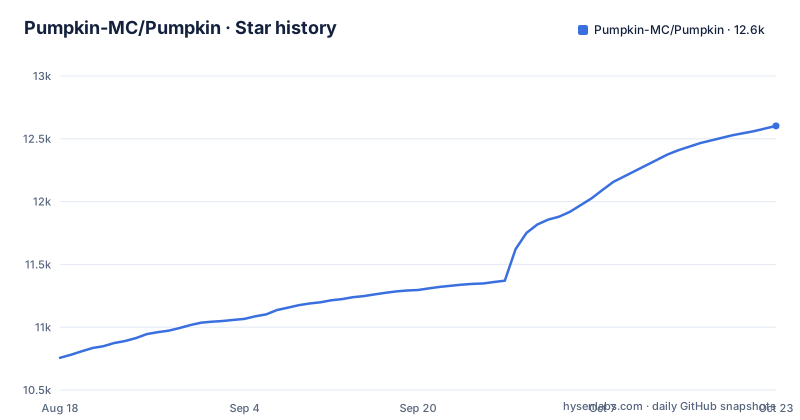
Star history
- Pumpkin-MC/Pumpkin12,561 ★ · +1,805
| Repository | 2026-08-18 | 2026-10-21 |
|---|---|---|
| Pumpkin-MC/Pumpkin | 10.8k | 12.6k |
1,805 Stars in the last 64 days, measured from the daily GitHub snapshot. Compare with other projects
Editorial analysis
The image downloads a musl binary and maps only amd64 and arm64
Pumpkin does not compile Rust inside its Docker image. The build stage pulls a finished binary from the release feed and puts it on the path:
FROM alpine:3.24

ARG TARGETARCH
ARG PUMPKIN_TAG=nightly
Alpine 3.24 is the base, and only two target architectures are wired up. The default PUMPKIN_TAG is nightly, so an image built with no extra arguments tracks the nightly channel rather than a numbered release:
RUN apk add --no-cache curl ca-certificates && \
    case "${TARGETARCH}" in \
        "amd64") BIN_ARCH="X64" ;; \
        "arm64") BIN_ARCH="ARM64" ;; \
        *) echo "Unsupported architecture: ${TARGETARCH}" && exit 1 ;; \
    esac && \
    curl -fsSL "https://github.com/Pumpkin-MC/Pumpkin/releases/download/${PUMPKIN_TAG}/pumpkin-${BIN_ARCH}-Linux-musl" \
        -o /usr/local/bin/pumpkin && \
    chmod +x /usr/local/bin/pumpkin && \
    apk del curl
amd64 maps to the X64 asset name and arm64 maps to ARM64. Any other architecture stops the build with an explicit unsupported architecture message rather than falling back to something. curl goes in for the download and is removed again in the same layer, so the running image carries no HTTP client at all. The musl suffix in the asset name is what lets a Rust binary run on Alpine without glibc. Building on a target outside that pair, 32-bit x86 for instance, needs a release asset that has to exist first.
cap_drop ALL and read_only leave every write to the ./data bind mount
Runtime posture is the strongest part of the image. The server never runs as root:
WORKDIR /pumpkin
USER pumpkin:pumpkin

ENV RUST_BACKTRACE=1
EXPOSE 25565

ENTRYPOINT [ "pumpkin" ]

HEALTHCHECK --interval=30s --timeout=3s --retries=3 \
    CMD nc -z 127.0.0.1 25565 || exit 1
RUST_BACKTRACE=1 is set unconditionally, so a panic prints a backtrace into the container log. The health check is a TCP probe against the Java Edition port every 30 seconds with a 3 second timeout, which confirms a listener and says nothing about whether a player can join. The compose file pushes the hardening further and publishes two ports:
    ports:
      - "25565:25565"
      - "19132:19132/udp"
    volumes:
      # Pumpkin runs as UID/GID 2613. On Linux hosts, make sure the data
      # directory has the correct ownership before starting the server:
      #   mkdir -p ./data
      #   sudo chown -R 2613:2613 ./data
      - ./data:/pumpkin
19132 over UDP is the port Bedrock Edition clients use, which matches the Bedrock line in the feature checklist. Then the runtime is fenced in:
    security_opt:
      - no-new-privileges:true
    restart: unless-stopped
    stdin_open: true
    tty: true
    cap_drop:
      - ALL
    read_only: true
With every capability dropped and the root filesystem read only, each write the server makes has to land in ./data. Three traps follow from that shape. The UID and GID are 2613, so on a Linux host the directory needs chowning to that pair before the first start or the process comes up unable to save anything. The compose comments warn that an existing installation must migrate ./data before switching to the named pumpkin-data volume, otherwise the server starts against a new empty world. And for anyone who wants config they cannot edit by accident, the file offers a third mount, ./pumpkin.toml at /pumpkin/pumpkin.toml:ro, since configuration is TOML.
The workspace denies todo, unimplemented and print_stdout across every crate
Architecture is a Cargo workspace of twenty three server crates plus two tools. The members list opens like this:
[workspace]
resolver = "3"
members = [
    "crates/pumpkin",
    "crates/pumpkin-core",
Past pumpkin-core come pumpkin-protocol, pumpkin-codecs, pumpkin-auth, pumpkin-world, pumpkin-config, pumpkin-command, pumpkin-inventory, pumpkin-data, pumpkin-scheduler, pumpkin-nbt, pumpkin-util, pumpkin-gametest, pumpkin-macros, pumpkin-api-macros, three versioned wasm hosts ending at pumpkin-wasm-host-v0_2, and the three plugin crates. tools/pumpkin-codegen and tools/pumpkin-fuzzer live in the same workspace, so code generation and fuzzing are part of the build rather than side projects.
The lint policy is where the project's discipline shows. Four clippy groups are denied outright:
[workspace.lints.clippy]
# Groups
all = { level = "deny", priority = -1 }
nursery = { level = "deny", priority = -1 }
pedantic = { level = "deny", priority = -1 }
cargo = { level = "deny", priority = -1 }
Below those groups sit individual denies including todo, unreachable, unimplemented, dbg_macro, print_stdout, and print_stderr. A crate cannot compile with a todo stub left in place or write to the terminal directly, which shapes how partially built game features have to be expressed. The surrounding toolchain files match that tone: rust-toolchain.toml pins the compiler, rustfmt.toml and typos.toml fix formatting and spelling, and flake.nix, shell.nix, default.nix and .envrc set up a Nix and direnv workflow. One file is unexplained, since egg-pumpkin.json sits at the root and no project document describes what consumes it.
Bedrock Edition is W.I.P and plugins carry no tick at all
The feature checklist is candid about where it stops. Under the protocol tracking item, Server Status/Ping, Encryption, Packet Compression, and Java Edition are ticked, while Bedrock Edition carries the marker W.I.P. The stated compatibility goal is to support the latest Java and Bedrock server version while adhering to Vanilla game mechanics, so the intent covers both editions while the Bedrock path is still being written. The compose file already publishes the Bedrock UDP port, which means a deployment can accept the connection before the protocol behind it is finished.
Plugins sit further back. Plugins appears on the server list as a tracking issue with no tick, next to completed items such as RCON, Query, Inventories, Particles, Chat, Commands, Permissions, and Translations. The supporting code already exists, with pumpkin-plugin-api, pumpkin-plugin-runtime, and pumpkin-plugin-utils all in the workspace, and the licence section hands plugin authors a choice the server itself never gets by dual licensing the plugin API and the plugin WIT crates under MIT or Apache-2.0. The effect for an operator is simple. The extensibility goal, a foundation for plugin development, describes a destination rather than a capability, so a server that needs a custom plugin today has nothing to load.
Worlds load and save but nothing generates, and redstone has no tick
Read the world list as ticks against unticks. World Loading, World Saving, Lighting, Entity Spawning, Bossbar, World Time, World Borders, and the tab-list are done, and chunk loading and chunk saving each ship in three modes named Vanilla, Linear, and Pump. Against that, Chunk Generation has no tick and points at its own tracking issue, and Redstone has no tick either. Liquid Physics, for contrast, is ticked.
The combination decides what a server can host. An existing world loads, saves, and lights correctly, but nothing generates new terrain, so a first run needs a world file prepared elsewhere. Without redstone, no piston, lamp, or farm mechanic works, which removes the layer most survival play is built on. Combat is unticked too, so damage rules are incomplete. Under Entities, only Entity Effects and Players are ticked: mobs, animals, bosses, villagers, and non-living entities such as minecarts and eggs all carry W.I.P, and both Entity AI and Entity Saving have no tick at all. A host can therefore serve players exploring a saved map, and cannot yet host a survival world whose mobs persist across a restart. Advancements are marked W.I.P under Player, so progression tracking is unfinished in the same way.
Configuration is TOML, and RCON and Query are the finished admin paths
Configuration is TOML, the one checklist entry marked done without a tracking issue behind it. The flexibility goal states that unnecessary features can be disabled, and the compose file enforces a slice of that at the container level with the read-only mount of /pumpkin/pumpkin.toml. pumpkin.toml is the file the server produces on first start, and its contents appear nowhere in the README, so the key names have to come from the documentation at pumpkinmc.org rather than from the project file.
For administration there are two finished remote paths, RCON and Query, alongside ticked Commands and Permissions. That is enough to drive a server from a panel without a shell on the host, which matters more than usual here because the compose file opens stdin and a tty while dropping every capability, making an in-container console the least capable route in. Which Pumpkin configuration keys hold the RCON port and password is not stated anywhere in the README, so the wiki is the reference rather than a guess at key names. Proxy support is a separate story and is complete: BungeeCord, BungeeGuard, and Velocity all carry ticks, so Pumpkin can sit behind an existing network rather than be its edge.
canary, nightly, and issue 449 as the gate on 1.0.0
Pumpkin is moving quickly. The last push to the default branch landed on 2026-10-02, and the release feed holds a canary build from that same day, a nightly build, and a numbered release, 0.2.0+26.3-26.51, dated 2026-09-20. Status is stated in an IMPORTANT block rather than left to inference: Pumpkin is under heavy development, and issue 449 tracks what needs to be done before the 1.0.0 release. That issue is the honest version of a roadmap.
Two operational consequences follow. A container built with no arguments defaults to PUMPKIN_TAG=nightly, so the image someone tests is not necessarily the image players should sit on, and pinning a tag is the only way to hold a known state. The compose file says the same thing in its own comment, which asks you to change the tag to the version you want, points at the container package versions page filtered to tagged releases, and leaves the ghcr.io image line commented out in favour of build: .
Licensing is split three ways. The server is GPL-3.0. The plugin API and plugin WIT crates are dual licensed MIT or Apache-2.0, which is what keeps plugin authors outside copyleft. Bedrock mappings, protocol conversion data, and Minecraft assets stay under their own terms, recorded in assets/NOTICE.md, and that file is the one to read before shipping anything derived from those assets.
Editorial conclusion
Pumpkin suits someone who already has a world file and cares more about the runtime than the feature list, since the container drops every Linux capability, runs as an unprivileged user, and mounts the root filesystem read only. It does not suit anyone starting from an empty directory, because chunk generation, redstone, combat, entity AI, entity saving and plugins carry no tick in the checklist while Bedrock Edition is marked work in progress. Before pointing players at it, run the Quick Start once against a world you already have and check issue 449, the list the project itself keeps of what must be done before 1.0.0.
Frequently asked questions
How do I run Pumpkin for the first time?
The README gives no run command of its own and points to the Quick Start guide at https://docs.pumpkinmc.org/#quick-start, with fuller documentation at https://pumpkinmc.org/. The repository root carries a Dockerfile, a docker-compose.yml, a flake.nix, and a .devcontainer directory, which are the routes available for a first launch.
Does Pumpkin support Bedrock Edition players?
The feature list marks Bedrock Edition as W.I.P under the protocol tracking item, while Java Edition, Encryption, Packet Compression, and Server Status/Ping are ticked. The stated goal is to support the latest Java and Bedrock server version while sticking to Vanilla mechanics, so the intent covers both editions and the Bedrock implementation is still in progress.
Can I write plugins for Pumpkin?
Plugins are still a tracking issue with no tick, though pumpkin-plugin-api, pumpkin-plugin-runtime, and pumpkin-plugin-utils already exist as workspace members. The plugin API and plugin WIT crates are dual licensed MIT or Apache-2.0, so plugin authors are not pulled into the GPL terms that cover the server.
What licence does Pumpkin use?
The Pumpkin server is licensed under GNU GPL v3. The plugin API crates are dual licensed MIT OR Apache-2.0, and third party assets and data such as Bedrock mappings, protocol conversion data, and Minecraft assets stay under their own licences, with the details recorded in assets/NOTICE.md.
Can Pumpkin sit behind BungeeCord or Velocity?
BungeeCord, BungeeGuard, and Velocity are all ticked in the proxy section of the feature list. Remote administration is also in place through ticked RCON, Query, Commands, and Permissions, though the README never states which TOML keys hold the RCON port or password.
Official sources
Add this badge to your README
If you maintain this project, the badge below links readers to this analysis and shows its maintenance status from the daily GitHub snapshot. Paste the markdown into your README; add ?metric=license or ?metric=stars to the image URL for a different field.

[](https://hysenlabs.com/projects/pumpkin-mc-pumpkin)Star history chart for your README
[](https://hysenlabs.com/projects/pumpkin-mc-pumpkin)Was this useful?