purcell/emacs.d: the two step update dance, the escape hatch files, and the Emacs 28.1 floor
An Emacs configuration bundle with batteries included
At a glance
- What is it?
- emacs.d is a full Emacs configuration you clone straight into your home directory, and almost everything interesting about it lives in the failure paths: first start downloads packages and recovers by retry, updates need a git pull and a package refresh, and customization past two local files means forking with no support.
- Who is it for?
- Adopt emacs.d if you want a working web development setup faster than you could assemble one, and you are willing to own a tree that lives in your home directory and expects a restart after pulling changes or updating packages. Read the update cycle before your first week ends, because pulling without refreshing packages is the mistake this config is least forgiving about.
- Can I use it commercially?
- Yes. BSD-2-Clause is a permissive licence: you can use, modify and sell software built on it, as long as you keep its copyright and licence notices.
- Is it still maintained?
- Yes. The repository last received commits 26 days ago.
- What is it written in?
- Mainly Emacs Lisp, according to GitHub's language statistics.
Answers come from the project's GitHub data, last synced on November 13, 2026, and from our analysis. They are not legal advice.
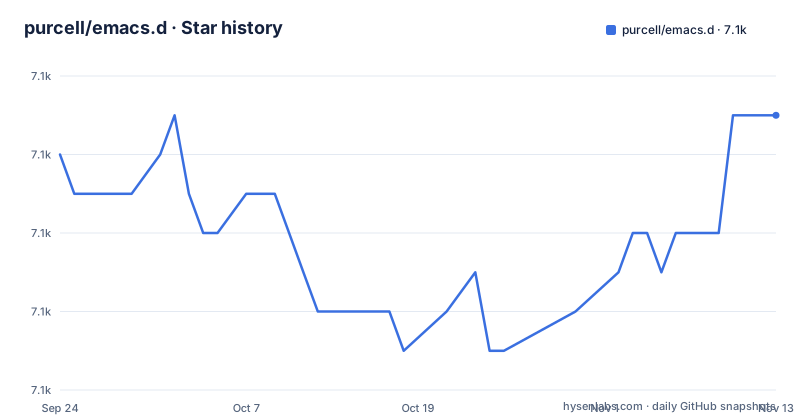
Star history
- purcell/emacs.d7,077 ★ · +1
| Repository | 2026-09-24 | 2026-11-13 |
|---|---|---|
| purcell/emacs.d | 7.1k | 7.1k |
1 Stars in the last 50 days, measured from the daily GitHub snapshot. Compare with other projects
Editorial analysis
The clone target is a directory, so ~/.emacs.d has to be yours
The install is one command, and it points at a directory rather than a file:
git clone https://github.com/purcell/emacs.d.git ~/.emacs.dThe condition to satisfy is stated exactly: the init.el contained in the repo has to end up at ~/.emacs.d/init.el. There is no alternative location here and no single file variant in the instructions, so if a dotfile manager already owns that directory, or an init.el from another source is sitting there, the clone collides with it and nothing in the guide covers merging the two. Any personal configuration you already carry also has to move into the tree, which is what the two local hook files later in this text are for.
Two paths inside the clone matter for everything that follows. init.el at the root is the entry point, and early-init.el sits beside it, which points to a two stage startup where code that runs before packages exist has to live somewhere other than where package dependent code lives. The root also carries lisp/, site-lisp/, test-startup.sh, .dir-locals.el, .agignore, and the LICENSE, so the configuration, its checks, and per project editor settings all arrive in the same checkout you pull into later.
First start installs packages itself, and the documented recovery is a retry
Nothing after the clone is installed by hand, because on the first start Emacs downloads and installs the third party packages automatically. The interesting part is the failure mode. If errors appear at that stage, the suggested response is to try restarting Emacs, and if that does not help, run M-x package-refresh-contents before doing so. The documented recovery path is therefore a retry rather than a diagnosis. There is no list of which packages were being fetched, no mention of pinning an archive, and no error text to match against.
That makes the first launch the one moment where this config depends on network access and on whatever package archives your Emacs is set up to consult, and it is also the moment a proxy or an offline machine will look like a broken checkout. Running the package list refresh by hand before the very first start is not described here, though it is the same command the recovery step uses, and knowing that in advance saves a confusing first session.
Updates are a pull and a package refresh, and the config assumes both
Updating is two operations. First git pull for the tree itself, then the third party packages, which is done through M-x package-list-packages followed by U and then x. The text is blunt about the need for both: you will probably also want or need to update the packages regularly, because that is what the author does and the config assumes it.
The rest of the cycle is restart oriented. You should usually restart Emacs after pulling changes or updating packages so they can take effect, and the config's use of the desktop and session packages is the reason your working buffers return after that restart. Those two packages are what make a forced restart tolerable here, and they are a dependency you inherit without choosing.
The mistake to plan around is doing half of it. A pull without a package refresh, or a refresh without a pull, leaves you running code the config was not written against. There is no versioned artefact to compare against either, because the repository publishes no GitHub releases, so the diff you pull is the only record of what changed.
init-local.el is the sanctioned exit, and going past it costs you support
Personal code has an official home and a defined shape. M-x customize and M-x customize-themes cover options and themes, and anything else belongs in ~/.emacs.d/lisp/init-local.el, which is expected to look like this:
... your code here ...

(provide 'init-local)
That trailing provide form is what makes the file a loadable library rather than a loose script, which matters if you later move code between it and the rest of the tree. When you need code that executes earlier in the startup process there is a second file, init-preload-local.el, so you get two ordered hooks instead of one.
The boundary is support. Anything beyond that escape hatch is a fork, and forking means merging changes back in regularly so your config stays compatible with the latest package and Emacs versions. The author says outright that customised versions cannot be supported, so a fork trades that help for control. The tree is offered as a good starting point for other Emacs users, especially web developers, geared towards OS X but known to work on Linux and Windows, under a BSD-2-Clause license.
Emacs 28.1 is the floor, and everything above it is best effort
The stated floor is Emacs 28.1, and the guidance above it is to use the latest released version, with the author on the latest stable one. The design goal is described as degrading smoothly, with the CI build named as the place that is checked, and the warning that many enhancements may be unavailable if Emacs is too old. So the config claims to start on 28.1 while reserving its better behaviour for current versions.
The language list is ordered by the author's own usage, from most to least: Haskell, PureScript, Elm and OCaml, then Ruby and Ruby on Rails, SQL, CSS with LESS, SASS and SCSS, Javascript and Typescript, HTML with HAML, Markdown, Textile and ERB, Common Lisp with Sly, Python, Rust, Clojure with Cider and nRePL, PHP, and Erlang. That ranking is a personal preference, so treat the top of the list as a description of the author's work rather than as a measure of how finished each language setup is.
flymake and eglot both report problems, and neither ships the tools it drives
Diagnostics arrive through two systems. flymake is configured to reuse backends from flycheck, and it is what highlights syntax errors immediately in Ruby, Python, Javascript, Haskell and a number of other languages. LSP support is provided separately by eglot. Between them you have a flymake path for languages that have a flycheck backend and an LSP path for anything with a language server, and nothing in the setup says which one reports a file covered by both.
This is why a separate requirements section exists. To get the most out of the language specific support you will need further programs, particularly those that flycheck or flymake invoke to do on the fly checking, and they are not vendored in this repository. A fresh clone on a clean machine gives you the editor and its configuration, not the toolchains behind them, which for the top of that language list means a Haskell toolchain, a Ruby runtime, or a Node install before a check can run at all.
corfu and vertico split the completion work, and the rest is deliberately shallow
Completion is handled by two packages doing different jobs. corfu covers in buffer autocompletion, and vertico handles minibuffer completion. After that comes the long tail of popular tools that are included and configured, with magit, docker.el, projectile and org-mode named as examples and the caveat that the focus is moderate. Read that as a config that gives working defaults across a wide set of tools without going deep on any of them, a trade that suits someone who wants to be productive quickly rather than someone who wants to tune for a month.
Scale makes the rest obvious. The tree is described as continually used and tweaked since 2000, the last push to the repository is dated 18 October 2026, and no GitHub releases exist, so there is no artefact to pin and no upgrade note beyond what your own history shows. Everything arrives by pulling main directly into your home directory.
Editorial conclusion
Adopt emacs.d if you want a working web development setup faster than you could assemble one, and you are willing to own a tree that lives in your home directory and expects a restart after pulling changes or updating packages. Read the update cycle before your first week ends, because pulling without refreshing packages is the mistake this config is least forgiving about. Do not fork it unless you accept losing support, and do not expect the language list to mean the external toolchains are installed for you.
Frequently asked questions
what is emacs d
It is the Emacs configuration directory itself, not a file. This repository is cloned straight into ~/.emacs.d so its init.el ends up at ~/.emacs.d/init.el, your own code goes into ~/.emacs.d/lisp/init-local.el, and ~/.emacs.d/lisp/init-preload-local.el holds code that must run earlier in startup.
emacs d vs .emacs
This configuration only supports the directory form. The install step is git clone https://github.com/purcell/emacs.d.git ~/.emacs.d and the requirement is that init.el ends up at ~/.emacs.d/init.el, so a dotfile setup built around one single file has no documented path into this tree.
What is Emacs used for?
In this project's scope, programming across many languages. Emacs comes with support for many of them, and the config adds improved defaults and extended support for a list led by Haskell, PureScript, Elm and OCaml, Ruby and Rails, SQL, CSS and Sass, Javascript and Typescript, plus Python, Rust, Clojure, PHP and Erlang.
Official sources
Add this badge to your README
If you maintain this project, the badge below links readers to this analysis and shows its maintenance status from the daily GitHub snapshot. Paste the markdown into your README; add ?metric=license or ?metric=stars to the image URL for a different field.

[](https://hysenlabs.com/projects/purcell-emacs-d)Star history chart for your README
[](https://hysenlabs.com/projects/purcell-emacs-d)Was this useful?